
NIMO Nimo N157L
NIMO 15.6" FHD IPS Student Laptop Computer User Manual
Model: Nimo N157L
Entwodiksyon
Thank you for choosing the NIMO 15.6" FHD IPS Student Laptop Computer. This manual provides essential information for setting up, operating, maintaining, and troubleshooting your new device. Please read this manual thoroughly to ensure optimal performance and longevity of your laptop.
Ki sa ki nan bwat la
Tanpri verifye ke tout atik ki nan lis anba a yo enkli nan pakè ou a:
- 1 x Nimo N157 Laptop
- 1 x Chargeur rapid Kalite-C 65W PD
- 1 x Manyèl Itilizatè (dokiman sa a)
- Windows 11 Home Operating System (pre-installed)
- Enfòmasyon sou garanti (2 zan garanti, 90 jou pou retounen)
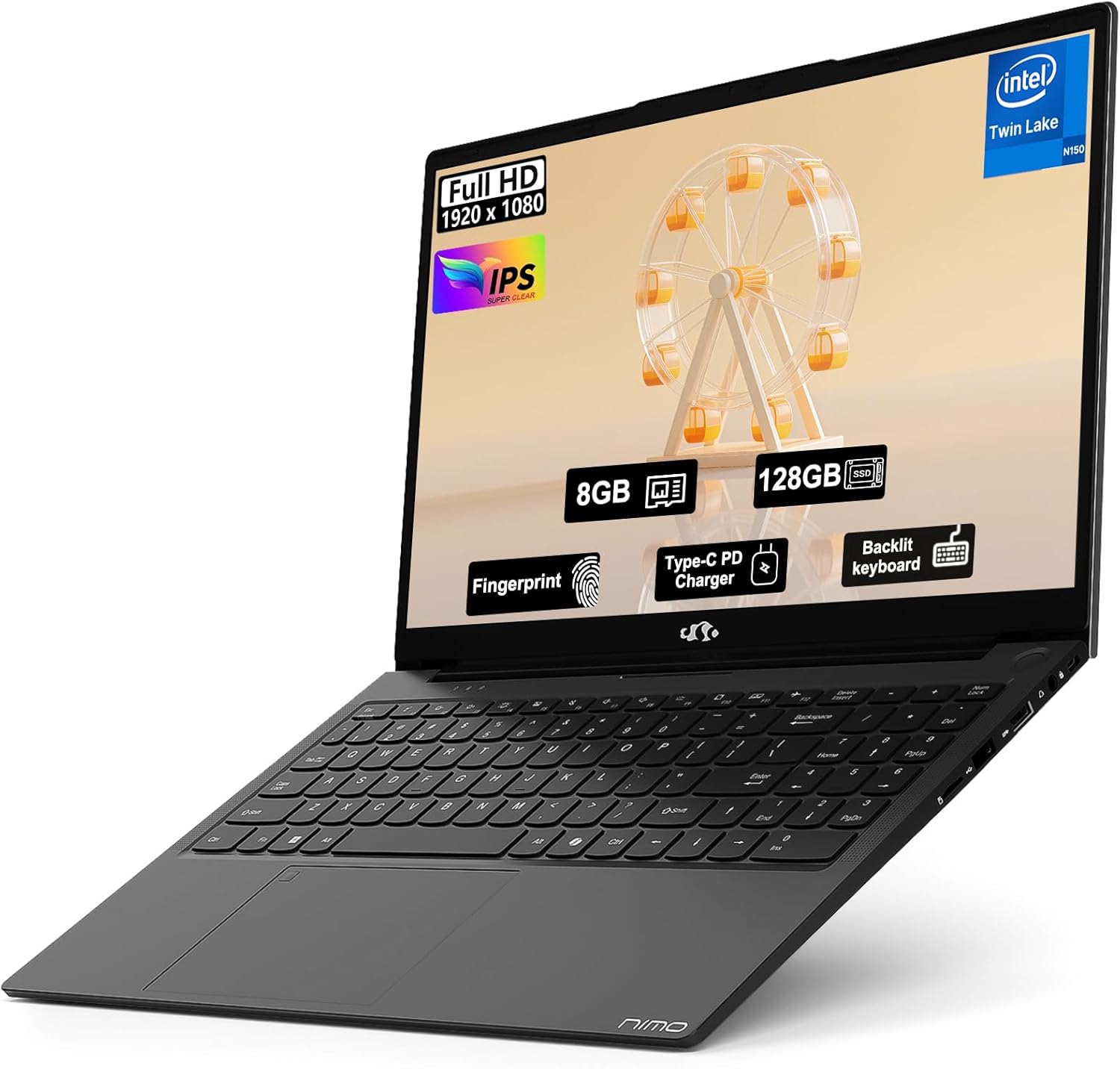
Image: The NIMO 15.6" FHD IPS Student Laptop Computer. The screen highlights key features such as Full HD 1920x1080 resolution, IPS display, 8GB RAM, 128GB SSD, Fingerprint reader, Type-C PD Charger, and Backlit keyboard. The laptop is shown in a sleek black finish.
Gid Enstalasyon
1. Premye Limen ak Chaje
Before first use, it is recommended to fully charge your NIMO laptop. Connect the included Type-C 65W PD Fast Charger to the laptop's Type-C port and a power outlet. The charging indicator light will illuminate. A 15-minute charge can provide approximately 2 hours of standby time.
2. Operating System Setup
Your NIMO laptop comes with Windows 11 Home pre-installed. Upon first boot, follow the on-screen instructions to complete the initial Windows setup, including language selection, network connection, and user account creation.
3. Fingerprint Reader Setup
For enhanced security and convenient login, set up the fingerprint reader. Navigate to Anviwònman > Kont > Opsyon koneksyon > Rekonesans anprent (Windows Hello) and follow the prompts to register your fingerprints. The fingerprint sensor is integrated into the touchpad.
4. Backlit Keyboard Adjustment
The backlit keyboard allows for comfortable typing in low-light environments. Use the dedicated function keys (usually Fn + a specific F-key, refer to keyboard legends) to turn the backlight on/off and adjust its brightness levels.
Enstriksyon Operasyon
1. Karakteristik ekspozisyon
Your laptop features a 15.6-inch Full HD (1920x1080) IPS Anti-Glare Display. This provides wide viewing angles, accurate colors, and reduces reflections for a comfortable viewing experience. The 85% screen-to-body ratio and 16:9 aspect ratio optimize screen real estate.
2. Touchpad Usage
The integrated touchpad supports multi-touch gestures for intuitive navigation. Common gestures include:
- Tape yon sèl dwèt: Left-klike sou
- Tape ak de dwèt: Dwa-klike sou
- woulo liv de dwèt: Scroll monte/desann oswa agoch/adwat
- Zoom-pou-zoom: Zoom nan / soti
3. Koneksyon
The NIMO laptop supports various connectivity options:
- Wi-Fi 6: Pou koneksyon entènèt san fil ki gen gwo vitès.
- Bluetooth 5.2: For connecting wireless peripherals such as headphones, mice, and keyboards.
- Pò USB: Includes 1 x USB 2.0 port and 3 x USB 3.0 ports for connecting external devices.
- Kalite-C Port: Itilize pou chaje ak transfè done.
4. Jesyon batri
The laptop is equipped with a Lithium Polymer battery providing an average battery life of approximately 5 hours. To maximize battery life, adjust screen brightness, close unused applications, and utilize power-saving modes in Windows settings.
Antretyen
1. RAM and SSD Upgrade
The NIMO laptop supports user-detachable RAM and SSD, allowing for future upgrades. If you plan to upgrade, ensure you use compatible components (DDR4 RAM, PCIe SSD) and follow proper electrostatic discharge (ESD) precautions. Consult a professional if you are unsure.
2. Netwaye òdinatè pòtab ou a
To maintain the appearance and functionality of your laptop:
- Sèvi ak yon twal mou ki pa gen pousyè pou netwaye ekran an ak deyò a.
- Pou tach ki difisil pou retire, yon ti kras dampRense twal la avèk dlo oswa yon solisyon pou netwaye ekran.
- Avoid using harsh chemicals, abrasive cleaners, or direct spraying of liquids onto the laptop.
- Netwaye klavye a ak touchpad la regilyèman pou retire pousyè ak debri.
Depanaj
Seksyon sa a bay solisyon pou pwoblèm komen ou ka rankontre.
| Pwoblèm | Solisyon posib |
|---|---|
| Laptop la pa limen. | Ensure the charger is properly connected and the power outlet is functional. Allow the battery to charge for at least 30 minutes before attempting to power on again. |
| Ekran an vid oswa li ap tranble. | Check display cable connections (if external monitor is used). Restart the laptop. Update graphics drivers. |
| Pwoblèm koneksyon Wi-Fi. | Asire w Wi-Fi a aktive nan paramèt Windows yo. Rekòmanse routeur/modem ou a. Mete chofè Wi-Fi yo ajou. |
| Klavye a oswa touchpad la pa reponn. | Restart the laptop. Check for driver updates. Ensure no external devices are interfering. |
If you encounter issues not covered here or require further assistance, please contact NIMO customer support.
Espesifikasyon
Detailed technical specifications for your NIMO N157L laptop:
| Karakteristik | Detay |
|---|---|
| Non modèl | Nimo N157L |
| Gwosè ekran | 15.6 pous |
| Rezolisyon ekran | 1920 x 1080 pixels (FHD IPS Anti-Glare) |
| Processeur | Intel 4 Core N150 (up to 3.6 GHz) |
| RAM | 8 GB DDR4 (3200 MHz, detachable) |
| Disk Drive | 128 GB PCIe SSD (detachable) |
| Koprosesè grafik | Grafik entegre |
| Sistèm operasyon | Windows 11 Kay |
| Kalite san fil | 802.11a/b/g/n/ac (Wi-Fi 6), Bluetooth 5.2 |
| Pò USB | XNX x USB NAN, X NAN X USB NAN |
| Lòt pò | Type-C (65W PD Fast Charging), Memory Card Slot |
| Karakteristik espesyal | Klavye retroeklere, lektè anprent, odyo HD, klavye nimerik |
| Lavi batri | Approx. 5 Hours (Lithium Polymer) |
| Pwa atik | 3.8 liv |
| Dimansyon pwodwi | 14.07 x 8.98 x 0.76 pous |
| Koulè | Nwa |
| Dèyè WebCam Rezolisyon | 2 MP |
Garanti ak sipò
NIMO Direct Inc. offers a comprehensive Garanti manifakti 2 an for your laptop. This warranty covers defects in materials and workmanship under normal use. Additionally, a 90-Day Hassle-Free Return and Exchange Service yo bay apati dat acha a.
For warranty claims, technical support, or any concerns regarding your NIMO laptop, please contact the manufacturer's dedicated support team. Refer to the contact information provided on the product packaging or the official NIMO websit.
Nòt: The laptop is partially assembled in the USA. Please retain your proof of purchase for warranty purposes.
Ask a question about this manual
Ask about setup, troubleshooting, compatibility, parts, safety, or missing instructions. Manuals+ will review the question and use this page’s manual context to help answer it.