Entwodiksyon
Thank you for choosing the Mistral 42" DC Blade Free Fan. This user manual provides essential information for the safe operation, maintenance, and troubleshooting of your new fan. Please read this manual thoroughly before use and retain it for future reference.
Enstriksyon Sekirite Enpòtan
Toujou swiv prekosyon sekirite debaz yo lè w ap itilize aparèy elektrik pou diminye risk dife, chòk elektrik, ak blesi pou moun.
- Li tout enstriksyon yo anvan w sèvi ak aparèy sa a.
- Asire ekipman pou pouvwa a voltage koresponn ak etikèt klasman ki sou aparèy la.
- Pa opere okenn fanatik ki gen yon kòd oswa ploge ki domaje.
- Do not place the fan near heat sources or in direct sunlight.
- Kenbe timoun ak bèt kay lwen vantilatè a pandan l ap fonksyone.
- Unplug the fan from the power outlet when not in use or before cleaning.
- Pa mete dwèt oswa objè etranje nan okenn ouvèti vantilatè a.
- Aparèy sa a se pou itilize nan kay la sèlman.
Kontni pake
Tanpri verifye sa ki nan pakè w la. Si gen nenpòt atik ki manke oswa ki domaje, kontakte sèvis kliyan.
- Mistral 42" DC Blade Free Fan Unit
- Kontwòl Remote
- AC adaptè
- Manyèl Itilizatè (dokiman sa a)
Enstalasyon
1. Asanble
The Mistral 42" DC Blade Free Fan requires simple assembly.
- Ak anpil atansyon retire tout eleman nan anbalaj la.
- Place the fan base on a stable, flat surface.
- Ensure the main fan body is securely seated onto the base.
- Connect the AC adapter to the power input port on the fan, then plug it into a standard electrical outlet.

Figi 1: Devan view of the Mistral 42" DC Blade Free Fan.
2. Wi-Fi Setup (Mayer Home App)
To utilize the Wi-Fi features and voice control, download the "Mayer Home App" on your smartphone.
- Download the "Mayer Home App" from your device's app store (iOS or Android).
- Register or log in to your Mayer Home account.
- Follow the in-app instructions to add your Mistral fan. This typically involves putting the fan into pairing mode (refer to the app or fan's display for specific instructions) and connecting it to your home Wi-Fi network.
Enstriksyon Operasyon
Kontwòl Panel ak Remote Control
The fan can be operated using the full touch screen control panel on the unit or the included remote control.

Figure 2: Mistral Fan with Remote Control.
Fonksyon debaz:
- Limen/Etenyen: Peze bouton pouvwa a sou panèl kontwòl la oswa aleka.
- Vitès fanatik: Adjust through 12 fan speeds using the '+' and '-' buttons.
- Mòd: Cycle through 5 modes: Fresh, Nature, Sleep, Baby, and Smart. Each mode adjusts airflow patterns for different comfort levels.
- Osilasyon: Activate left-right oscillation with options for 30, 60, or 120 degrees.
- Revèy: Set a pre-set on/off timer for up to 12 hours.
Smart Control (Wi-Fi & Voice)
Once connected to the Mayer Home App, you can control your fan remotely and integrate with voice assistants.
- Mayer Home App: Control all fan functions from your smartphone, including power, speed, modes, oscillation, and timer settings.
- Kontwòl vwa: The fan works with Google Home and Amazon Alexa. Link your Mayer Home account to your voice assistant app and use voice commands to operate the fan (e.g., "Hey Google, turn on the fan," "Alexa, set fan speed to 5").
Antretyen
Netwayaj ak antretyen regilye ap asire pèfòmans optimal ak lonjevite fanatik ou an.
Netwaye fanatik la
- Toujou debranche vantilatè a nan priz kouran anvan ou netwaye li.
- Sèvi ak yon mou, damp twal pou siye sifas ekstèn vantilatè a. Pa sèvi ak pwodui netwayaj abrazif oswa solvan.
- For the Hepa 13 filter located at the sides, gently remove it and clean according to the instructions provided with the filter or by gently vacuuming. Do not wash the filter with water.
- Asire w tout pati yo sèk nèt anvan ou branche vantilatè a ankò.
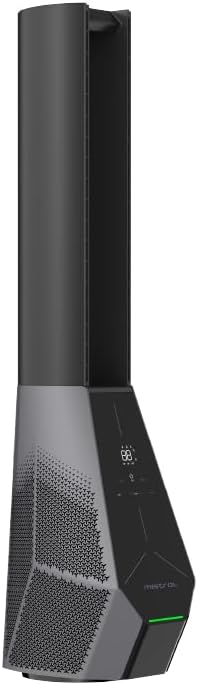
Figi 3: Side view showing the filter location.
Depanaj
Si ou rankontre pwoblèm ak vantilatè ou a, gade pwoblèm ak solisyon komen sa yo.
| Pwoblèm | Kòz posib | Solisyon |
|---|---|---|
| Vantilatè a pa limen. | Pa gen kouran; Bouton pouvwa a pa peze. | Check if the power cord is securely plugged in. Press the power button on the unit or remote. |
| Remote kontwòl pa travay. | Pil yo mouri oswa yo pa byen mete; Gen yon obstak ant kontwòl remote la ak vantilatè a. | Replace batteries. Ensure there is a clear line of sight to the fan's receiver. |
| Koneksyon Wi-Fi a echwe. | Incorrect Wi-Fi password; Fan too far from router; Router issues. | Double-check Wi-Fi password. Move fan closer to router. Restart your Wi-Fi router. Ensure you are connecting to a 2.4GHz network. |
| Vantilatè a fè yon bri dwòl. | Obstruction in air intake/outlet; Fan not on a stable surface. | Unplug and check for any foreign objects. Place the fan on a flat, stable surface. |
Espesifikasyon
| Karakteristik | Detay |
|---|---|
| Modèl | MBFAP4236DRW |
| Voltage | 100-240V ~ 50/60Hz |
| Wattage | 36W |
| Volim Air | 35 m³ / min |
| Max Air koule | 15 m / s |
| Dimansyon pwodwi (L * W * H) | 237.5 * 300 * 1067 mm |
| Pwa nèt | 5.4 KGS |
| Kalite motè | DC motè Brushless |
| Kontwòl | Full Touch Screen Control Panel, Remote, Wi-Fi (Mayer Home App), Voice Control (Google Home & Amazon Alexa) |
| Kalite filtre | Hepa 13 Filter |
| Osilasyon | 30/60/120 Degree Left-Right |
| Revèy | 12 Hours Pre-set On/Off |
Enfòmasyon sou Garanti
The Mistral 42" DC Blade Free Fan (Model: MBFAP4236DRW) comes with a comprehensive warranty:
- 1 ane general warranty on the appliance.
- Yon lòt 3 Ane warranty specifically for the motor only.
Please retain your proof of purchase for warranty claims. The warranty covers manufacturing defects and malfunctions under normal use. It does not cover damage caused by misuse, accidents, unauthorized repairs, or normal wear and tear.
Sipò pou Kliyan
For any inquiries, technical assistance, or warranty claims, please contact Mistral customer support.
Websit: www.mistral.com.sg
Imèl: support@mistral.com.sg
When contacting support, please have your product model number (MBFAP4236DRW) and proof of purchase ready.


