
1. Pwodwi souview
This manual provides essential information for setting up, operating, maintaining, and troubleshooting your HP OMEN 16L Gaming Desktop. This high-performance desktop is equipped with an Intel Core i7-14700F processor, NVIDIA GeForce RTX 4060 graphics, 64GB DDR5 RAM, and a 2TB PCIe NVMe M.2 Solid State Drive, running on Windows 11 Pro.
The HP OMEN 16L is designed for demanding gaming and computing tasks, offering robust performance and efficient cooling. It comes bundled with a Thunderobot KG3089R Gaming Keyboard to enhance your experience.

Imaj 1.1: Devan view of the HP OMEN 16L Gaming Desktop.
2. Gid Enstalasyon
2.1 Debale ak Plasman Inisyal
- Carefully remove the desktop and all accessories from the packaging. Retain packaging for future transport or service.
- Place the desktop on a stable, flat surface with adequate ventilation around all sides. Ensure no vents are obstructed.
2.2 Konekte periferik
Connect your monitor, keyboard, mouse, and other peripherals to the appropriate ports on the desktop. Refer to the 'Ports' section for a detailed diagram.
- Siveye: Connect your monitor using a DisplayPort or HDMI cable to the dedicated graphics card ports.
- Klavye ak sourit: Connect the Thunderobot KG3089R Gaming Keyboard and your mouse to any available USB Type-A ports.
- Pouvwa: Connect the power cable to the desktop's power supply port and then to a grounded electrical outlet.
- Rezo: For wired internet, connect an Ethernet cable to the RJ-45 port. For wireless, ensure Wi-Fi 6 is enabled after initial setup.

Imaj 2.1: Egzanpample of a complete desktop setup with peripherals connected.
2.3 First Boot and Windows 11 Pro Setup
- Peze bouton pouvwa a ki sou devan òdinatè biwo a.
- Swiv enstriksyon ki sou ekran an pou w konplete konfigirasyon inisyal Windows 11 Pro a, ki gen ladan lang, rejyon, koneksyon rezo, ak kreyasyon kont itilizatè.
- Ensure all drivers are up-to-date after Windows setup for optimal performance.
3. Operasyon Enstriksyon
3.1 Power On/Off
- Pouvwa sou: Peze bouton pouvwa a ki sitiye sou devan òdinatè biwo a.
- Pouvwa Off: Click the Start button in Windows, then select Power > Shut down. Avoid direct power-offs unless necessary to prevent data loss.
3.2 Koneksyon Rezo
- Filaire (Etènèt): Connect an Ethernet cable to the RJ-45 port on the rear of the desktop. The connection should be automatically detected.
- San fil (Wi-Fi 6): In Windows, click the network icon in the taskbar, select your Wi-Fi network, enter the password, and connect.
3.3 Using Ports and Connections
The desktop offers a variety of ports for connecting external devices:
- Pò devan: 3 x Superspeed USB Type-A (5Gbps signaling rate), 1 x Superspeed USB Type-C (10Gbps signaling rate), 1 x Headphone/Microphone combo.
- Pò dèyè: 4 x USB Type-A 2.0, 1 x RJ-45 (Ethernet), 1 x HDMI, 3 x DisplayPort, 2 x Audio Port.

Image 3.1: Front panel ports for easy access.
3.4 Jwèt ak Pèfòmans
The HP OMEN 16L is optimized for gaming. Utilize the pre-installed OMEN Gaming Hub software to monitor system performance, customize RGB lighting, and optimize game settings. Ensure your graphics drivers are regularly updated for the best gaming experience.

Image 3.2: The HP OMEN 16L desktop in a gaming environment.
4. Antretyen
4.1 Netwayaj
- Eksteryè: Sèvi ak yon mou, damp cloth to clean the exterior surfaces. Avoid harsh chemicals.
- Vantilasyon: Periodically use compressed air to clear dust from the intake and exhaust vents to maintain optimal airflow and cooling. Ensure the system is powered off before cleaning vents.
4.2 Mizajou lojisyèl
- Regularly check for and install Windows updates through the Windows Settings.
- Update graphics drivers (NVIDIA GeForce RTX 4060) directly from the NVIDIA website or through the GeForce Experience application.
- Update HP-specific drivers and firmware using the HP Support Assistant or OMEN Gaming Hub.
4.3 Sovgad Done
Fè kopi done enpòtan ou yo regilyèman sou yon disk ekstèn oswa yon depo nwaj pou evite pèt done si sistèm nan ta gen yon pann.
NAN. Depanaj
Seksyon sa a adrese pwoblèm komen ou ka rankontre.
5.1 Pa gen pouvwa
- Asire w ke kab kouran an byen konekte ak tou de biwo a ak priz elektrik la.
- Verifye si priz elektrik la fonksyone byen lè w branche yon lòt aparèy.
5.2 Pa gen ekspozisyon
- Check that the monitor is powered on and the video cable (DisplayPort/HDMI) is securely connected to both the desktop's graphics card and the monitor.
- Asire w ou chwazi bon sous opinyon an sou monitè w la.
- If using multiple monitors, test with a single monitor.
5.3 Ralentissement oswa Blokaj Sistèm
- Fèmen aplikasyon ki pa nesesè k ap fonksyone nan background nan.
- Tcheke Manadjè Tâch la (Ctrl+Shift+Esc) pou pwosesis ki konsome anpil resous CPU, RAM, oswa disk.
- Ensure the system has adequate ventilation and is not overheating. Clean vents if necessary.
- Run a full system scan for malware or viruses.
5.4 Pwoblèm koneksyon rezo
- Branche: Check the Ethernet cable connection and router status.
- San fil: Restart your router/modem. Ensure Wi-Fi is enabled in Windows and try reconnecting to the network.
6. Espesifikasyon
Detailed technical specifications for the HP OMEN 16L Gaming Desktop (Model TG03).
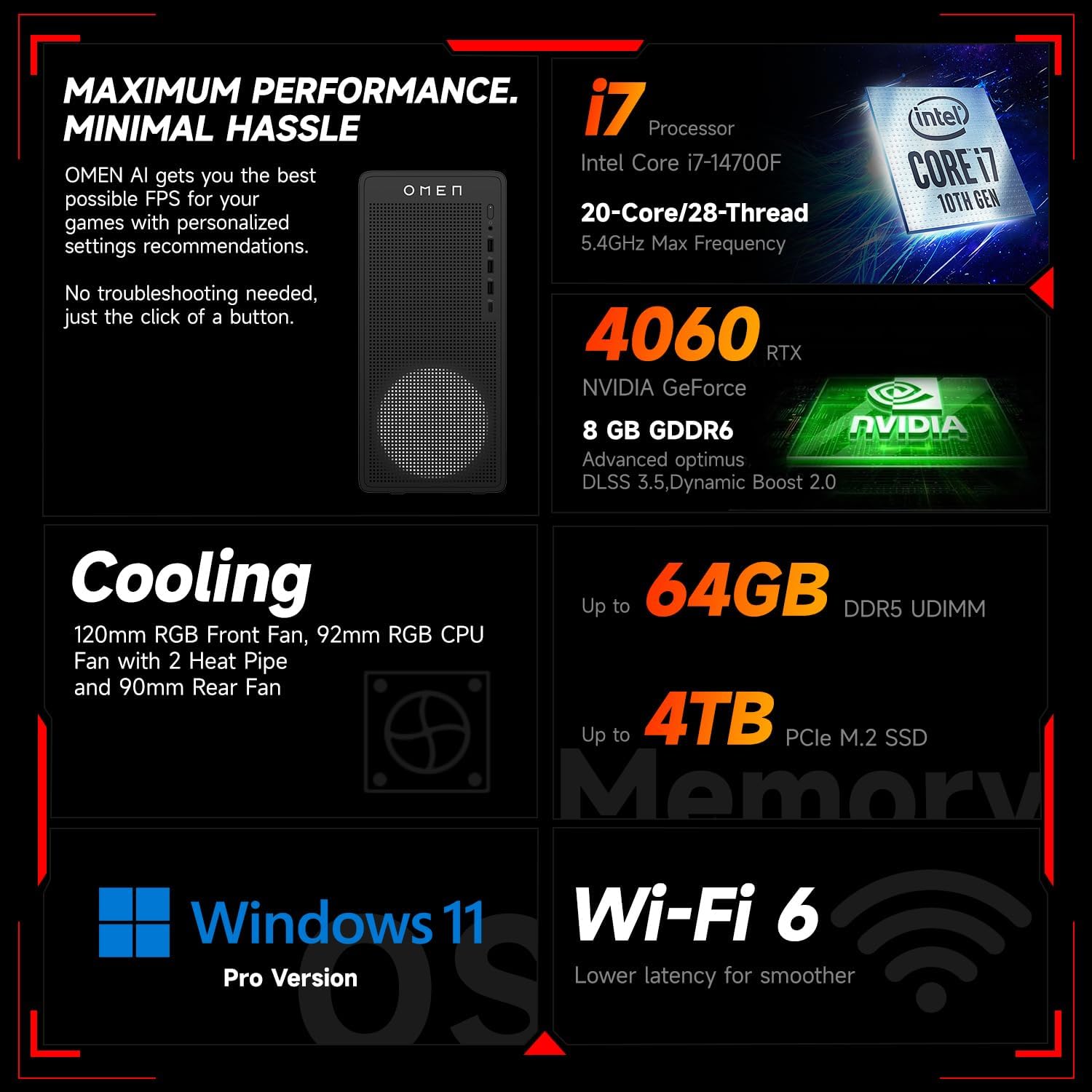
Imaj 6.1: Plis paseview of key performance and cooling specifications.
| Eleman | Spesifikasyon |
|---|---|
| Mak | HP |
| Nimewo Modèl | TG03 |
| Sistèm operasyon | Windows 11 Pro |
| Modèl CPU | Intel Core i7-14700F (20 Cores, 28 Threads, up to 5.4 GHz) |
| Koprosesè grafik | NVIDIA GeForce RTX 4060 (8GB GDDR6) |
| Gwosè memwa RAM enstale | 64 GB DDR5 RAM |
| Kapasite Depo memwa | 2 TB PCIe NVMe M.2 Solid State Drive |
| Koneksyon san fil | Wi-Fi 6, Bluetooth |
| Pò devan | 3x USB Type-A (5Gbps), 1x USB Type-C (10Gbps), Headphone/Mic Combo |
| Pò dèyè | 4x USB Type-A 2.0, 1x RJ-45, 1x HDMI, 3x DisplayPort, 2x Audio Port |
| Dimansyon (L x W x H) | 13.26 x 6.1 x 12.12 pous |
| Pwa atik | 13.14 liv |
| Koulè | Nwa |
| Bundled Accessory | Thunderobot KG3089R Gaming Keyboard |

Image 6.2: Details of the Intel Core i7-14700F processor.

Image 6.3: Information on the NVIDIA GeForce RTX 4060 graphics card.
7. Enfòmasyon sou Garanti
Your HP OMEN 16L Gaming Desktop comes with a standard manufacturer's warranty. The specific terms and duration of the warranty are provided with your purchase documentation and are subject to HP's official warranty policy.
Nòt enpòtan: Modifications to the system, such as upgrading components (e.g., RAM) with non-HP certified parts or by unauthorized personnel, may void the manufacturer's warranty. Always consult HP's official support or authorized service providers before making any internal hardware changes.
The Thunderobot KG3089R Gaming Keyboard bundled with this desktop may have a separate warranty provided by its manufacturer. Please refer to the documentation included with the keyboard for its specific warranty terms.
8. Sipò
For further assistance, technical support, or warranty claims, please contact HP Customer Support through the following channels:
- Sipò HP Websit: Vizite www.hp.com/support for drivers, manuals, and troubleshooting guides.
- Asistan Sipò HP: Use the pre-installed HP Support Assistant software on your desktop for diagnostics, updates, and direct access to support.
- Sipò nan telefòn: Refer to your product documentation or the HP support websit pou nimewo kontak rejyonal yo.