
KOFIRE UG-09
KOFIRE UG-09 Wireless Gaming Headset
Manyèl itilizatè
Entwodiksyon
This manual provides detailed instructions for the setup, operation, maintenance, and troubleshooting of your KOFIRE UG-09 Wireless Gaming Headset. Please read this manual thoroughly before using the product to ensure optimal performance and longevity.

Image: The KOFIRE UG-09 Wireless Gaming Headset displayed with its charging cable, detachable microphone, and USB/Type-C 2-in-1 transmitter.
Kontni pake
Verifye ke tout atik yo prezan nan pakè ou a:
- 1 x KOFIRE Wireless Gaming Headset (Model: UG-09)
- 1 x USB & Type-C 2-in-1 Transmitter
- 1 x tip-C chaje kab
- 1 x Detachable mikwofòn
- 1 x 3.5mm Audio Kab
- 1 x Manyèl Itilizatè (dokiman sa a)
Pwodwi souview
Familiarize yourself with the components and controls of your headset.
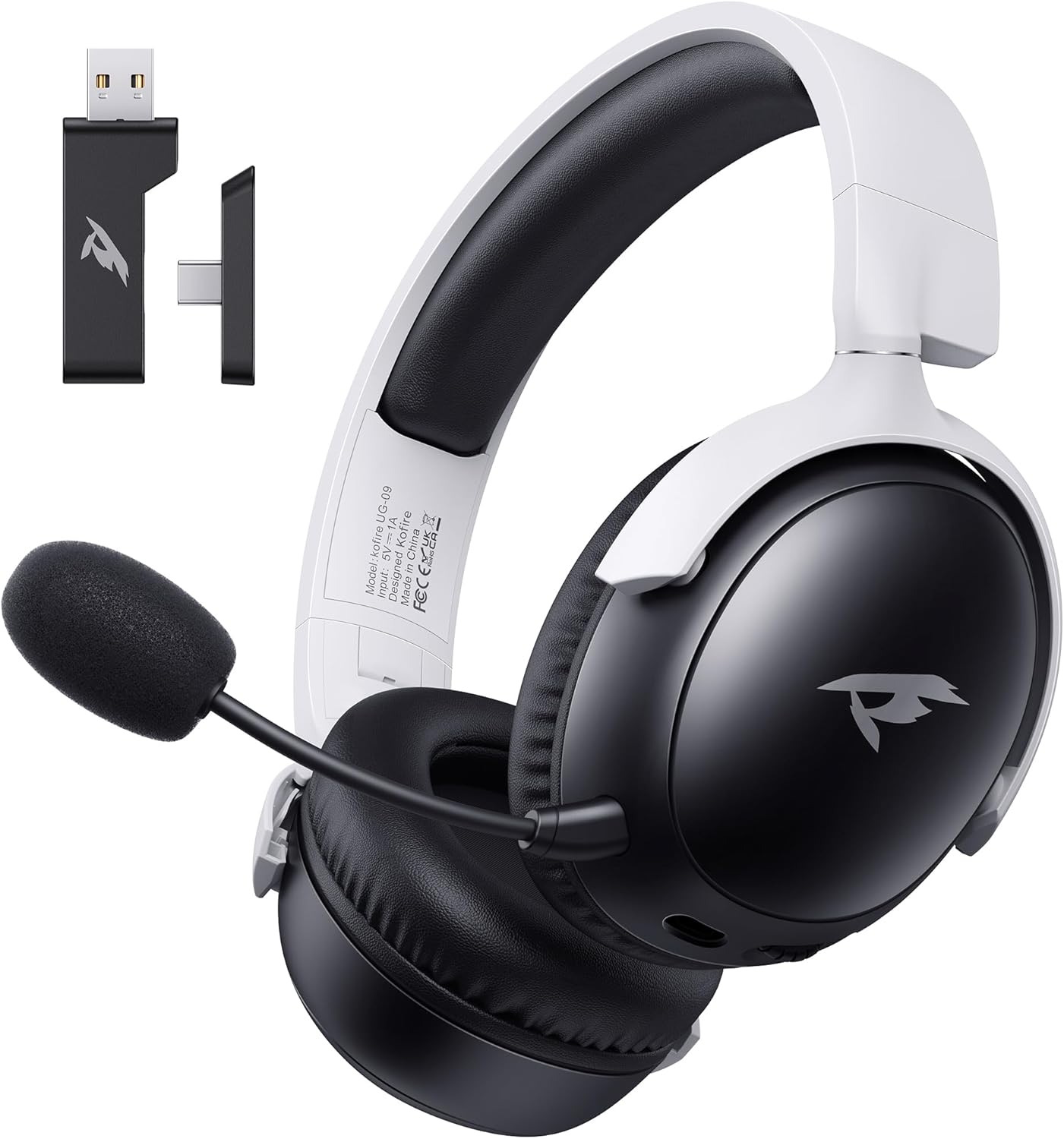
Imaj: Devan view of the KOFIRE UG-09 Wireless Gaming Headset in black and white, showing the detachable microphone and the USB/Type-C 2-in-1 transmitter.
Karakteristik kle:
- Koneksyon plizyè mòd: 2.4GHz Wireless, Bluetooth 5.4, and 3.5mm Wired options.
- Long lavi batri: Jiska 65 èdtan nan rekreyasyon.
- 53mm chofè dinamik: For immersive 3D stereo sound.
- ENC Noise-Canceling Microphone: Detachable and omnidirectional for clear communication.
- Konsepsyon ergonomique: Lightweight with rotatable ear cups, adjustable headband, and soft memory foam cushions for comfort.
Enstriksyon Enstalasyon
1. Chaje Headset la
Before first use, fully charge the headset. Connect the supplied Type-C charging cable to the headset's charging port and the other end to a USB power source (e.g., computer USB port, USB wall adapter). The LED indicator will show charging status. A full charge takes approximately 2-2.5 hours. The headset supports simultaneous charging and use.
2. Konekte atravè yon rezo san fil 2.4GHz (USB Dongle)
This mode offers ultra-low latency (≤20ms) for gaming on compatible devices like PC, Mac, PS4, PS5, and Nintendo Switch (audio only).
- Insert the USB & Type-C 2-in-1 transmitter into an available USB-A or USB-C port on your device.
- Pouvwa sou headset la.
- Press and hold the microphone button on the headset to switch to 2.4G mode. You will hear an audio prompt "dongle mode."
- On your connected device, navigate to sound settings and select "Kofire UG-09" as the audio output/input device to complete pairing.

Image: Illustration of the 2.4GHz wireless connection, showing the USB dongle plugged into a gaming handheld device, emphasizing stable and low-latency performance.
3. Konekte atravè Bluetooth 5.4
Use Bluetooth for mobile devices such as phones, tablets, and Nintendo Switch (audio only).
- Pouvwa sou headset la.
- Press and hold the microphone button for 3 seconds to switch to Bluetooth mode. You will hear an audio prompt "Bluetooth mode." The LED indicator will flash, indicating pairing mode.
- On your mobile device, go to Bluetooth settings and search for "Kofire UG-09." Select it to complete the pairing process.

Image: Depicts the versatility of the headset, showing one user connected via Bluetooth to a phone and another connected wirelessly to a PC, highlighting dual connectivity options.
4. Konekte atravè yon kab 3.5mm
For universal compatibility or when the battery is depleted, use the 3.5mm audio cable.
- Konekte yon bout kab odyo 3.5mm lan nan priz 3.5mm kas ekoutè a.
- Connect the other end to the 3.5mm audio port on your gaming device or console.
- Kas ekoutè a ap chanje otomatikman nan mòd filaire.
Nòt: The microphone function is not supported on Nintendo Switch when using any wireless mode. For Xbox, only wired mode is supported.
Enstriksyon Operasyon
Power On/Off
- Pouvwa sou: Peze epi kenbe bouton Power la jiskaske endikatè LED la limen.
- Pouvwa Off: Peze epi kenbe bouton Power la jiskaske endikatè LED la etenn.
Kontwòl Volim
- Ogmante Volim: Rotate the volume wheel upwards.
- Diminye Volim: Rotate the volume wheel downwards.
Itilizasyon Mikwofòn
The headset features a detachable ENC (Environmental Noise Canceling) omnidirectional microphone.
- Attach/Detach: Insert the microphone into the dedicated port on the left earcup or remove it when not needed.
- Bèlèt/Retire bouche: Press the dedicated microphone mute button for one-touch muting. The LED indicator on the microphone will show its status.

Imaj: Detaye view of the ENC noise reduction microphone, highlighting its internal components and detachable design for clear voice transmission.
Chanje mòd
To switch between 2.4GHz wireless and Bluetooth modes, press and hold the microphone button for approximately 3 seconds until you hear the corresponding audio prompt ("dongle mode" or "Bluetooth mode").
Lavi batri ak alèt
The headset provides up to 65 hours of playtime in Bluetooth mode (microphone off) and 50 hours in 2.4GHz dongle mode (microphone on). A low battery alert will notify you when recharging is needed.
Antretyen
Netwayaj
- Siye headset la ak yon twal mou, sèk.
- Pa sèvi ak pwodui chimik piman bouk, solvang netwayaj, oswa detèjan fò.
- Ensure no moisture enters the earcups or control buttons.
Depo
- Sere kas ekoutè a nan yon kote ki fre epi sèk, lwen limyè solèy dirèk ak tanperati ekstrèm.
- When storing for extended periods, ensure the headset is partially charged (around 50%) to preserve battery health.
- The rotatable and foldable ear cups allow for compact storage.

Image: Illustrates the ergonomic design elements of the headset, including rotatable earcups, soft sponge cushioning, adjustable angle, and a retractable headband for comfortable wear and storage.
Swen batri
- Evite dechaje batri a nèt souvan.
- Pa ekspoze batri a nan tanperati ki wo.
- Sèvi sèlman ak kab chaje ki vini ak li a oswa yon kab ekivalan sètifye.
Depanaj
| Pwoblèm | Kòz posib | Solisyon |
|---|---|---|
| Pa gen son nan kask. |
|
|
| Mikwofòn pa mache. |
|
|
| Pa ka konekte san fil. |
|
|
| Kas ekoutè a pa chaje. |
|
|

Image: Illustrates the universal compatibility of the headset with a range of gaming and mobile devices, including PlayStation consoles, PC, Mac, Nintendo Switch, and smartphones.
Espesifikasyon
| Karakteristik | Detay |
|---|---|
| Non modèl | UG-09 |
| Koneksyon Teknoloji | 2.4GHz san fil, Bluetooth 5.4, 3.5mm filaire |
| Teknoloji kominikasyon san fil | 2.4GHz USB-A & Type-C 2-in-1 Dongle, Bluetooth 5.4 |
| Kalite chofè odyo | 53mm chofè dinamik |
| Repons Frekans | 20 KHz (Max) |
| Enpedans | 32 Ohm |
| Gamme Bluetooth | 10 mèt |
| Audio Latency (2.4GHz) | ≤20 Milliseconds |
| Lavi batri | Up to 65 hours (Bluetooth, mic off); 50 hours (2.4GHz, mic on) |
| Tan pou chaje | 2-2.5 èdtan |
| Mikwofòn | Detachable ENC Noise-Canceling Omnidirectional |
| Pwa | 14.4 ons (0.41 kilogram) |
| Materyèl | ABS, Faux Leather, PC, Soft Memory Sponge Cushions |
| Aparèy konpatib | PC, Mac, Laptop, Desktop, Phone, Pad, Tablet, PlayStation 5/4/Pro/Slim, Gaming Consoles, Switch (audio only), Xbox (wired only) |
Garanti ak sipò
KOFIRE is committed to providing professional service and expert support for your wireless gaming headset. If you encounter any issues or have questions regarding your product, please do not hesitate to contact us.
- Sèvis Kliyan: Our team of experienced engineers and support staff are available to assist you.
- Tan repons: We aim to respond to all inquiries within 0-24 hours.
- Enfòmasyon pou kontakte: Please refer to the contact details provided on the product packaging or the official KOFIRE websit pou asistans.
Ask a question about this manual
Ask about setup, troubleshooting, compatibility, parts, safety, or missing instructions. Manuals+ will review the question and use this page’s manual context to help answer it.