
1. Entwodiksyon
This manual provides essential information for the safe and efficient operation of your FASTWD Android 15 Tablet 11-inch. Please read this manual thoroughly before using the device and retain it for future reference. This tablet features an 11-inch 2K display, Android 15 operating system, Octa-Core processor, 36GB RAM, 256GB ROM (expandable up to 1TB), 4G LTE, and 5G WiFi connectivity.
2. Enfòmasyon sou Sekirite
- Do not expose the tablet to extreme temperatures, direct sunlight, or high humidity.
- Avoid dropping or subjecting the tablet to strong impacts.
- Sèvi ak sèlman chajè ak akseswa ki apwouve pou evite domaj epi asire sekirite.
- Keep the tablet away from water and other liquids.
- Do not attempt to disassemble or repair the tablet yourself. Contact customer support for assistance.
- Jete batri a ak aparèy la dapre règleman lokal yo.
3. Pake kontni
Upon opening your FASTWD Android 15 Tablet package, please verify that all the following items are included:
- FASTWD Tablet
- Bluetooth klavye
- Sourit
- Ka Pwoteksyon
- Stylus Pen
- Kalite-C Kab
- Charger
- Manyèl itilizatè

Image: The FASTWD Android 15 Tablet displayed with its full set of accessories, including the keyboard, mouse, protective case, stylus, and charging components.
4. Aparèy souview
The FASTWD Android 15 Tablet features a sleek metal body with an 11-inch 2K INCell display. It is designed for both productivity and entertainment.
4.1 Karakteristik Fizik
- Ekspozisyon: 11-inch 2K UHD INCell display with 120Hz refresh rate.
- Kamera: 8MP front camera, 13MP rear camera with LED flash.
- Pò: Pò USB Kalite-C pou chaje ak transfè done.
- Plas kat: Dual SIM card slot, also supports MicroSD card expansion up to 1TB.
- Oratè: Kat amplitude speakers for enhanced audio.

Image: A visual representation of the FASTWD tablet's slim design, 11-inch screen, and Type-C charging port.
5. Enstalasyon
5.1 Premye pouvwa sou
- Press and hold the Power button located on the side of the tablet until the FASTWD logo appears.
- Swiv enstriksyon yo sou ekran an pou chwazi lang ou, rejyon ou, epi konekte ak yon rezo Wi-Fi.
- Konekte avèk kont Google ou a oubyen kreye yon nouvo pou jwenn aksè nan Google Play Store ak lòt sèvis yo.
5.2 Enstalasyon Kat SIM ak Kat MicroSD
Your tablet supports dual SIM cards for 4G LTE connectivity and a MicroSD card for expanded storage.
- Jwenn plato kat SIM/MicroSD a sou bò tablèt la.
- Sèvi ak zouti ejèksyon SIM lan pou pouse dousman nan ti twou ki akote plato a jiskaske li soti.
- Place your Nano-SIM card(s) and/or MicroSD card into the designated slots on the tray. Ensure they are correctly oriented.
- Remete plato a avèk prekosyon nan tablèt la jiskaske li fè yon klik pou l anfòm nan plas li.

Imaj: Yon imaj detaye view of the tablet's SIM card tray, showing slots for two SIM cards and one MicroSD card.
6. Operasyon Enstriksyon
The FASTWD tablet runs on Android 15, offering an intuitive and customizable user experience.
6.1 Navigasyon debaz
- Glise moute: Jwenn aksè nan tiwa aplikasyon an.
- Glise desann: Louvri panèl notifikasyon an ak paramèt rapid yo.
- Tape: Chwazi atik oswa louvri aplikasyon yo.
- Long Press: Jwenn aksè nan meni kontèks yo oubyen deplase ikòn yo.
- Zoom-pou-Zoom: Adjust zoom level in apps like browser or gallery.
6.2 Karakteristik Android 15
Android 15 introduces several enhancements for privacy, security, and user experience:
- Improved Privacy Controls: Granular permissions for apps, allowing you to authorize access more precisely.
- Optimizasyon IA: Intelligent AI features for improved performance and battery life.
- Navigasyon jès: New touch control gestures for a more fluid interaction.
- Global Dark Mode: System-wide dark theme for reduced eye strain and power consumption.
- Face Recognition Unlock: Debloke tablèt ou an sekirite avèk rekonesans vizaj.
- Kontwòl paran yo: Manage screen time and app access for children.
- Fann ekran: Use two applications simultaneously side-by-side.
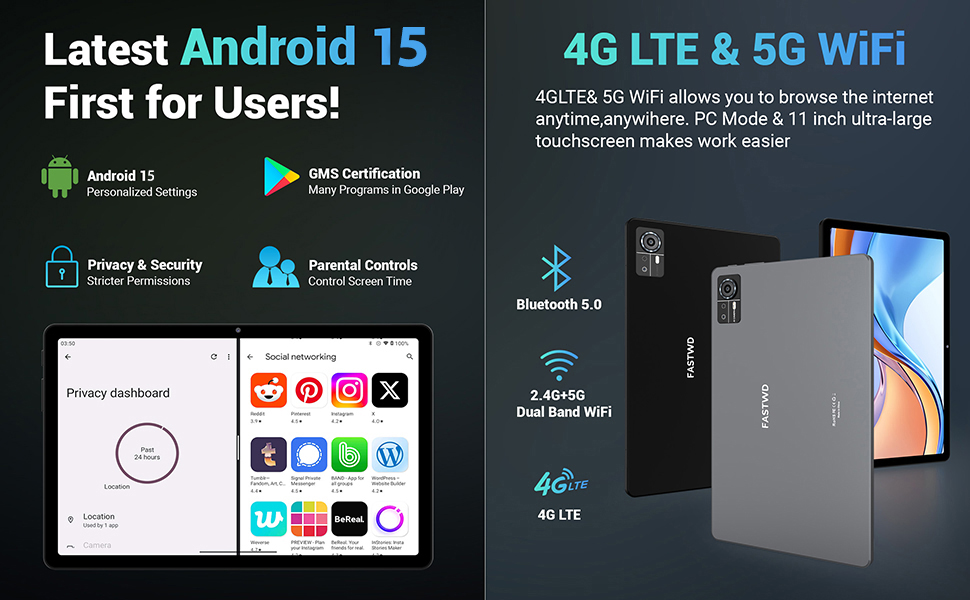
Image: A visual guide to key Android 15 features such as easy app pairing, storage management, quick Bluetooth connection, face recognition unlock, double-tap to wake, and parental control settings.
7. Koneksyon
Your FASTWD tablet offers versatile connectivity options for internet access and peripheral devices.
7.1 Koneksyon Wi-Fi
- Ale nan Anviwònman > Rezo ak entènèt > Wi-Fi.
- Aktive Wi-Fi a On.
- Chwazi rezo ou vle a nan lis la epi antre modpas la si yo mande w.
- The tablet supports dual-band 2.4G/5G Wi-Fi for stable and fast connections.
7.2 4G LTE Mobile Data
With a compatible SIM card installed, you can access 4G LTE mobile data.
- Ensure your SIM card is correctly installed (refer to Section 5.2).
- Ale nan Anviwònman > Rezo ak entènèt > Rezo mobil.
- Pèmèt Done mobil and configure APN settings if required by your carrier.
7.3 Bluetooth Pairing
Connect Bluetooth accessories like the included keyboard and mouse.
- Ale nan Anviwònman > Aparèy ki konekte > Bluetooth.
- Aktive Bluetooth On.
- Mete akseswa Bluetooth ou a nan mòd koneksyon.
- Select the accessory from the list of available devices and follow any on-screen prompts to complete pairing.
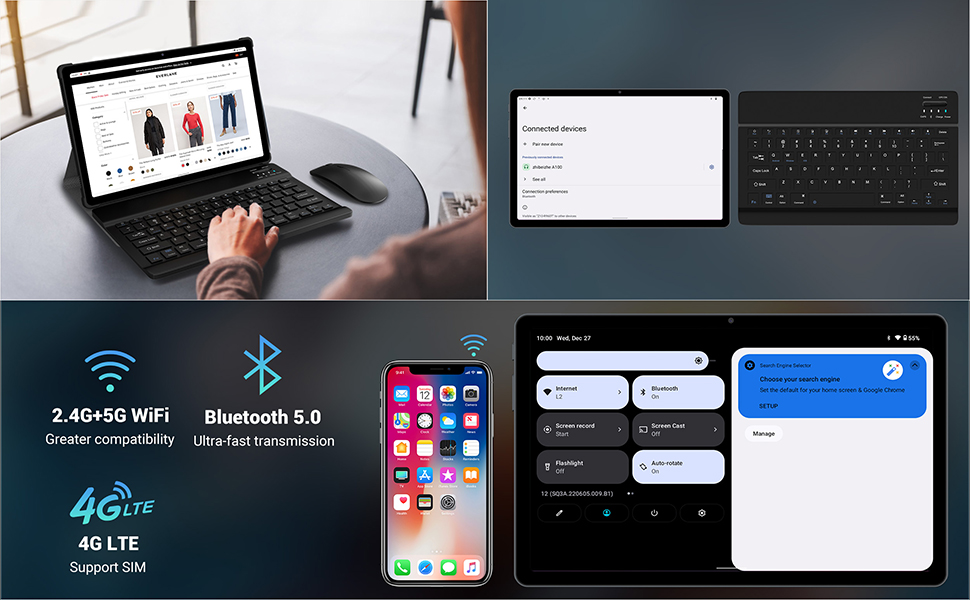
Image: The FASTWD tablet connected to its keyboard and mouse, illustrating its 2.4G+5G WiFi, Bluetooth 5.0, and 4G LTE SIM support for comprehensive connectivity.
8. Kamera
The tablet is equipped with an 8MP front camera and a 13MP rear camera for photos and video calls.
- Louvri a Kamera aplikasyon.
- Tape bouton deklanchè a pou pran yon foto.
- Chanje ant kamera devan ak dèyè a lè w sèvi ak ikòn aktive/dezaktive kamera a.
- AI post-processing technology enhances photo quality, making images more realistic.

Imaj: Yon imaj detaye view of the tablet's rear camera, highlighting its 13MP sensor and AI Camera branding.
9. Jesyon batri
The tablet features a 9580mAh battery for extended usage and supports 12W fast charging.
9.1 Chaje tablèt la
- Connect the Type-C cable to the tablet's charging port.
- Plug the other end of the cable into the provided charger, and then into a power outlet.
- Ikòn batri a sou ekran an ap endike estati chaj.
9.2 Optimizasyon Batri
- Ajiste klète ekran an nan yon nivo konfòtab.
- Fèmen aplikasyon ou pa itilize k ap fonksyone nan background nan.
- Aktive mòd ekonomize batri a nan Anviwònman > Batri.
- Dezaktive Wi-Fi, Bluetooth, oubyen GPS lè w pa ap itilize yo.

Image: The FASTWD tablet connected to a Type-C charger, illustrating its 9580 mAh battery and 12W fast charging capability.
10. Depo
The tablet comes with 256GB of internal storage (ROM) and supports expansion up to 1TB via a MicroSD card.
10.1 Jesyon Depo
- Pou tcheke itilizasyon depo a, ale nan Anviwònman > Depo.
- You can free up space by uninstalling unused apps, deleting old files, or moving media to a MicroSD card.
10.2 RAM Management
The tablet features 36GB RAM (12GB LPDDR4 + 24GB expandable virtual memory) for smooth multitasking.
- The system automatically manages RAM for optimal performance.
- You can activate additional virtual RAM in the settings if needed for demanding applications.
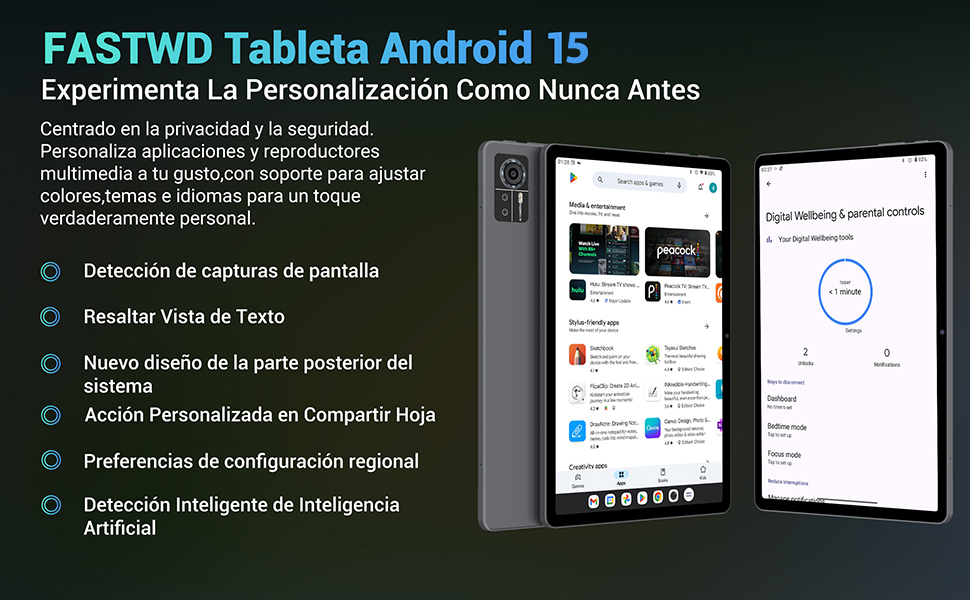
Image: An illustration highlighting the tablet's 36GB RAM (12+24GB), 256GB ROM, and 1TB MicroSD expansion capabilities, alongside its Octa-core processor.
11. Antretyen
11.1 Netwayaj
- Sèvi ak yon twal mou ki pa gen pousyè pou netwaye ekran an ak kò tablèt la.
- Pa sèvi ak pwodwi chimik piman bouk oswa materyèl abrazif.
11.2 Mizajou lojisyèl
- Tcheke regilyèman pou mizajou sistèm nan Anviwònman > Sistèm > Aktyalizasyon sistèm lan pou asire pèfòmans ak sekirite optimal.
NAN. Depanaj
Si w rankontre pwoblèm ak tablèt ou a, gade solisyon komen sa yo:
| Pwoblèm | Solisyon |
|---|---|
| Tablèt la pa limen | Asire w batri a chaje. Konekte plato a epi tann kèk minit anvan ou eseye limen l ankò. Si aparèy la pa reponn, fòse l rekòmanse lè w kenbe bouton Pouvwa a pandan 10-15 segonn. |
| Applications crash or freeze | Close background applications. Clear the cache of the problematic app (Settings > Apps > [App Name] > Storage & cache > Clear cache). Restart the tablet. |
| Pòv Wi-Fi koneksyon | Ensure you are within range of the Wi-Fi router. Restart your router and the tablet. Forget the network and reconnect. |
| Kat SIM pa detekte | Ensure the SIM card is correctly inserted into the tray. Restart the tablet. Verify the SIM card is active with your mobile carrier. |
| Batri vide byen vit | Reduce screen brightness. Disable unused connectivity features (Wi-Fi, Bluetooth, GPS). Close background apps. Check for apps consuming excessive battery in Settings > Battery. |
13. Espesifikasyon
Detailed technical specifications for the FASTWD Android 15 Tablet 11-inch (Model M986):
| Karakteristik | Spesifikasyon |
|---|---|
| Mak | FASTWD |
| Non modèl | FASTWD Android 15 Tablet 11 Pulgadas |
| Sistèm operasyon | Android 15 |
| Vitès processeur | Oktòb-nwayo 2 GHz |
| RAM | 36 GB (12GB LPDDR4 + 24GB expandable) |
| Depo Entèn (ROM) | 256 GB |
| Depo dilatabl | Jiska 1 TB atravè kat MicroSD |
| Gwosè ekran | 11 Pulgadas (Inches) |
| Rezolisyon ekran | 2560 x 1440 pixels (2K UHD INCell) |
| Rafrechisman pousantaj | 120 Hz |
| Kamera dèyè | 13 MP |
| Kamera devan | 8 MP |
| Kapasite batri | 9580 mAh |
| Battery Life (average) | 8 èdtan (lèktur videyo) |
| Chaje | 12W Fast Charging, Type-C Interface |
| Koneksyon | 4G LTE (Cellular), 5G Wi-Fi (802.11ac), Bluetooth 5.0 |
| Dimansyon | 29.7 x 19.6 x 4 cm |
| Pwa | 1.36 kg |
| Karakteristik espesyal | Gaming Tablet, Face Recognition, Parental Control, GPS (Beidou, Galileo, Glonass, GPS) |
14. Garanti ak sipò
FASTWD offers two years of premium after-sales service and long-term technical support for your tablet.
- Peryòd garanti: 2 zan apati dat acha a.
- Sipò teknik: For any issues or inquiries, please contact the FASTWD after-sales team through your Amazon purchase platform.
- Our support team aims to respond within 24 hours.