
1. Entwodiksyon
Welcome to the user manual for your new FASTWD Android 15 Tablet 11-inch. This guide provides essential information for setting up, operating, and maintaining your device. Please read this manual thoroughly to ensure optimal performance and longevity of your tablet.
The FASTWD Android 15 Tablet features an 11-inch 2K QHD display, an Octa-Core T615 processor, 36GB RAM, 256GB ROM, and an 8000mAh battery. It supports 5G WiFi, 4G LTE, and includes AI-enhanced cameras, Gemini AI, and Widevine L1 for high-quality streaming.
2. Pake kontni
Upon unboxing, please verify that all items listed below are present in your package:
- FASTWD Android 15 Tablet (11-inch)
- Sourit
- Klavye
- Klike sou Pen
- Ka kwi
- Charger
- Kab Done (USB Kalite-C)
- Manyèl itilizatè tablèt

Figi 2.1: Included accessories with the FASTWD Android 15 Tablet.
3. Aparèy souview
The FASTWD Android 15 Tablet features a sleek, lightweight metal body with a slim profile and straight edges. The display bezel measures 7.8mm, contributing to an immersive vieweksperyans nan.
Karakteristik Fizik
- Ekspozisyon: 11-inch 2K QHD (2560x1440) In-cell Display with 90Hz refresh rate and Wide Viewing Angle.
- Kò: Metal construction, weighing approximately 568g.
- Pò: USB Type-C for charging and data transfer, SIM/MicroSD card slot.
- Kamera: Rear 13MP + 3MP with autofocus and Low Light LED Flash; Front 8MP with autofocus.
- Odyo: Kat Amplitude Speakers with Artificial Intelligence Noise Cancellation technology.

Figi 3.1: Plis paseview of the tablet's design and key features.

Figi 3.2: Detail of the tablet's connectivity ports and speaker placement.
4. Enstalasyon
4.1 Premye chaj
Before first use, fully charge your tablet using the provided USB Type-C cable and charger. Connect the cable to the tablet's USB-C port and the charger to a power outlet. The battery indicator on the screen will show charging progress.
4.2 Limen/Etenyen
- Pou limen: Press and hold the Power button until the FASTWD logo appears on the screen.
- Pou etenn: Peze epi kenbe bouton Pouvwa a, answit chwazi 'Etenn' nan opsyon ki parèt sou ekran an.
- Pou rekòmanse: Peze epi kenbe bouton Pouvwa a, answit chwazi 'Rekòmanse' nan opsyon yo.
4.3 Asistan Enstalasyon Inisyal
Upon first power-on, the tablet will guide you through an initial setup process. This includes selecting your language, connecting to a Wi-Fi network, setting up your Google account, and configuring basic security settings.
4.4 Enstalasyon Kat SIM ak MicroSD
Locate the SIM/MicroSD card tray on the side of the tablet. Use the provided SIM ejector tool to open the tray. Insert your Nano-SIM card (for 4G LTE connectivity) and/or a MicroSD card (for expanded storage) into the designated slots, ensuring correct orientation. Gently push the tray back into the tablet.
4.5 Koneksyon Aparèy Bluetooth
To connect Bluetooth accessories like the included keyboard or mouse:
- Ale nan Anviwònman > Aparèy ki konekte > Bluetooth.
- Aktive Bluetooth On.
- Asire w aparèy Bluetooth ou a nan mòd koneksyon.
- Select 'Pair new device' and choose your device from the list.
- Swiv nenpòt envit ki sou ekran pou konplete koupi.

Figi 4.1: Bluetooth device connection interface.
4.6 Face Recognition Unlock
For convenient and secure unlocking, you can set up Face Recognition:
- Ale nan Anviwònman > Sekirite ak vi prive > Aparèy debloke > Déblotché figi.
- Follow the on-screen instructions to register your face. Ensure you are in a well-lit environment.
Figi 4.2: Face Recognition Unlock setup.
5. Operasyon Enstriksyon
5.1 Navigasyon debaz
The tablet uses standard Android touch gestures:
- Tape: Chwazi yon atik oubyen louvri yon aplikasyon.
- Glise: Defile nan paj yo oubyen lis yo.
- Zoom-pou-zoom: Agrandi oswa diminye imaj yo epi web paj.
- Long peze: Jwenn aksè nan meni kontèks yo oubyen deplase ikòn aplikasyon yo.
5.2 Wi-Fi and 4G LTE Connectivity
- Wi-Fi: Ale nan Anviwònman > Rezo ak entènèt > Entènèt. Select your desired Wi-Fi network and enter the password if required. The tablet supports 2.4G/5G dual-band Wi-Fi.
- 4G LTE: Si yon kat SIM enstale, ale nan Anviwònman > Rezo ak entènèt > SIM yo to manage mobile data settings. The tablet supports 4G LTE TDD+FDD and VoLTE.

Figi 5.1: Connectivity features of the tablet.
5.3 Jesyon Aplikasyon
To manage your applications:
- Enstale Aplikasyon: Sèvi ak Google Play Store la pou telechaje epi enstale nouvo aplikasyon yo.
- Dezenstale aplikasyon yo: Long-press an app icon on the home screen or app drawer, then drag it to 'Uninstall' or select 'App info' and choose 'Uninstall'.
- Free Up Storage Space: Ale nan Anviwònman > Aplikasyon yo > Gade tout aplikasyon yo. Select an app, then choose 'Storage & cache' to clear cache or data, or 'Force stop' to temporarily halt its operation.
Figi 5.2: App management options.
5.4 Kontwòl paran yo
Manage and monitor tablet usage for children using parental controls:
- Ale nan Anviwònman > Byennèt dijital ak kontwòl paran yo.
- Set up screen time limits, app restrictions, and content filters.
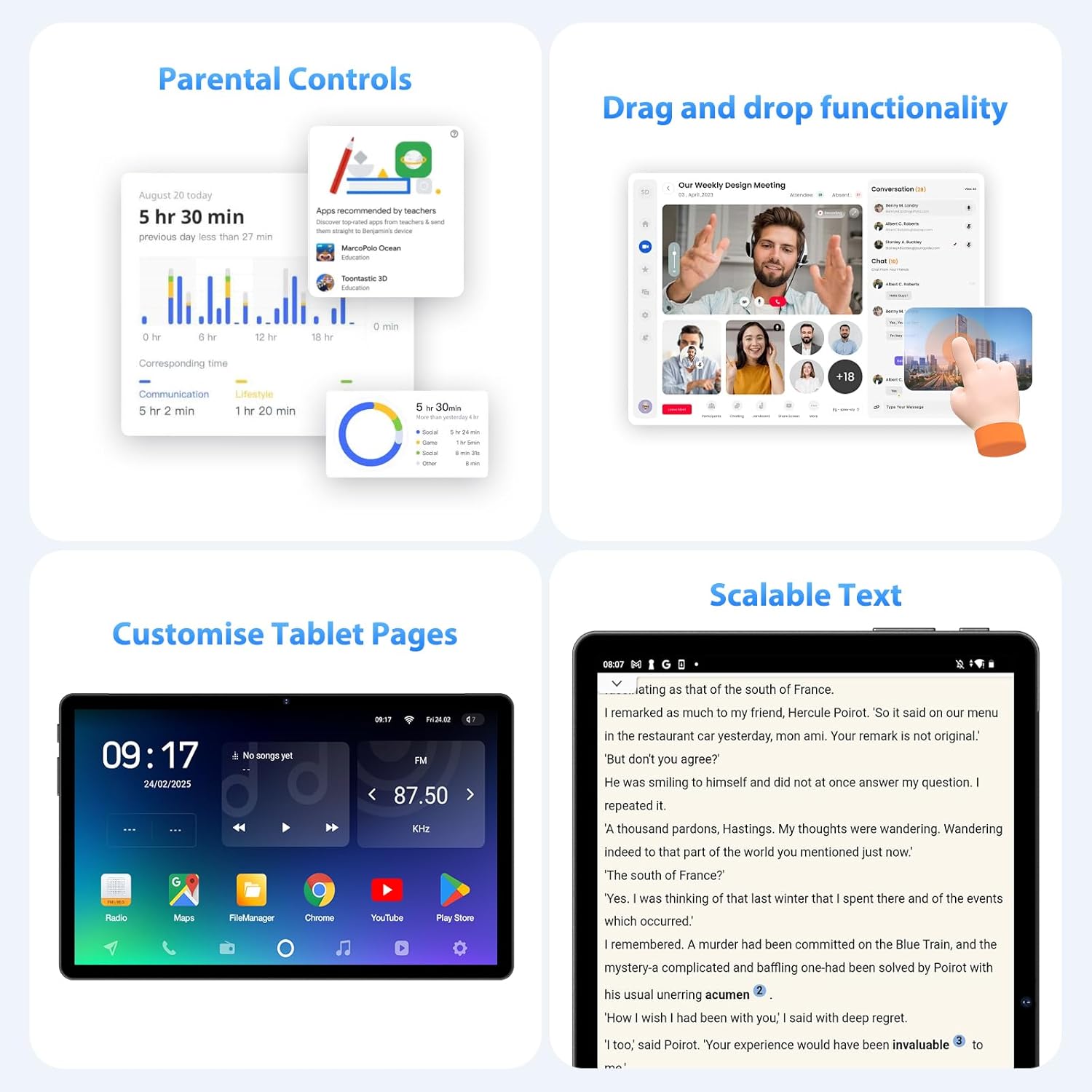
Figi 5.3: Parental control settings.
5.5 Double-tap to Wake
To quickly wake the screen without pressing the power button, simply double-tap the display. This feature can usually be enabled or disabled in Anviwònman > Ekspozisyon > Lock screen display.
Figi 5.4: Double-tap to wake functionality.
5.6 Customizing Tablet Pages
Personalize your tablet's home screens by long-pressing on an empty area to access wallpaper, widgets, and home screen settings. You can also rearrange app icons and create folders.
Figi 5.5: Example of a customized tablet page.
6. Karakteristik avanse
6.1 Display and Multimedia
- 2K QHD 90Hz Display: Enjoy smooth visuals and vibrant colors on the 11-inch 2560x1440 resolution display. The 90Hz refresh rate enhances scrolling and gaming experiences.
- Widevine L1 DRM: Supports Widevine L1 Digital Rights Management, enabling high-definition (1080P) streaming from services like Netflix.
- DP HD Screen Throwing: Allows for high-definition screen mirroring or extension to compatible external displays.
- Scalable Text: Adjust text size for improved readability via display settings.
Figi 6.1: Scalable text feature for enhanced readability.
6.2 Performance and AI
- Octa-Core T615 Processor: Equipped with a powerful 12nm Octa-Core T615 processor (4x A73 + 4x A53) and Mali-G72 GPU for efficient multitasking and smooth application performance.
- Gemini AI Integration: Leverages Gemini AI for enhanced smart features and optimized user experience.
- AI Smart Detection: The tablet incorporates AI for various smart detection functionalities, improving user interaction and device efficiency.
Figi 6.2: Octa-core processor specifications.
6.3 Karakteristik Kamera
The tablet is equipped with AI-enhanced cameras:
- Kamera dèyè: 13MP + 3MP with HD Video Call support, autofocus, and Low Light LED Flash.
- Kamera devan: 8MP with autofocus.
- Capture Unlock Face: Utilize the front camera for face recognition to unlock the device.
6.4 Sistèm Audio
Experience clear audio with the tablet's advanced sound system:
- Kat Amplitude Speakers: Delivers rich and immersive sound.
- Anilasyon Bri pa IA: Artificial Intelligence Noise Cancellation technology automatically filters out ambient noise for clearer audio output.
7. Antretyen ak Swen
7.1 Netwaye Tablèt la
Use a soft, lint-free cloth to gently wipe the screen and body of the tablet. For stubborn smudges, slightly dampRense twal la avèk dlo oswa yon solisyon pou netwaye ekran. Evite itilize pwodui chimik ki agresif oswa materyèl abrazif.
7.2 Swen Batri
The tablet is equipped with an 8000mAh battery, providing approximately 8 hours of usage. To prolong battery life:
- Evite tanperati ekstrèm.
- Pa kite batri a dechaje nèt souvan.
- Sèvi ak plato ki vini ak li a pou yon chajman optimal.
- Reduce screen brightness and disable unnecessary features (Wi-Fi, Bluetooth, GPS) when not in use.
7.3 Mizajou lojisyèl
Tcheke epi enstale mizajou lojisyèl regilyèman pou asire tablèt ou a gen dènye karakteristik yo, patch sekirite yo ak amelyorasyon pèfòmans yo. Ale nan Anviwònman > Sistèm > Aktyalizasyon sistèm lan pou tcheke si gen mizajou ki disponib.
7.4 Jesyon Depo
The tablet comes with 256GB of internal storage, expandable up to 1TB via MicroSD card. To manage storage:
- Efase regilyèman sa ki pa nesesè files ak apps.
- Deplase an gwo files (photos, videos) to the MicroSD card or cloud storage.
- Clear app cache periodically via Anviwònman > Depo.
NAN. Depanaj
Seksyon sa a adrese pwoblèm komen ou ka rankontre ak tablèt ou a.
Tablèt 8.1 la pa limen
- Asire w batri a chaje. Konekte tablèt la nan plato a pou omwen 30 minit.
- Peze epi kenbe bouton Pouvwa a pandan 10-15 segonn pou fòse rekòmanse.
8.2 Pwoblèm Koneksyon Wi-Fi
- Rekòmanse routeur Wi-Fi ou a ak tablèt la.
- Asire w ou nan zòn siyal Wi-Fi a.
- Verifye ke modpas Wi-Fi a kòrèk.
- Bliye rezo a nan paramèt Wi-Fi yo epi rekonekte li.
8.3 Pèfòmans Ralanti
- Fèmen aplikasyon ou pa itilize k ap fonksyone nan background nan.
- Clear app caches and free up storage space.
- Rekòmanse tablèt la detanzantan.
- Consider performing a factory reset if performance issues persist (Nòt: This will erase all data on the tablet. Back up important data first).
8.4 Ekran an pa reponn
- Perform a forced restart by holding the Power button.
- Asire w ekran an pwòp epi li pa gen imidite oswa debri.
9. Espesifikasyon
| Karakteristik | Spesifikasyon |
|---|---|
| Mak | FASTWD |
| Non modèl | FASTWD Android 15 Tablet 11-inch |
| Sistèm operasyon | Android 15 |
| Processeur | Octa-Core T615 (4x A73, 4x A53, 12nm) |
| GPU | Mali-G72 |
| RAM | 36GB (12GB + 24GB vityèl) |
| Depo Entèn | 256GB |
| Depo dilatabl | Up to 1TB MicroSD |
| Gwosè ekspozisyon | 11 pous |
| Rezolisyon ekspozisyon | 2560x1440 (2K QHD) |
| Rafrechisman pousantaj | 90Hz |
| Kapasite batri | 8000 mAh |
| Lavi batri | Apeprè 8 èdtan |
| Kamera dèyè | 13MP + 3MP with Autofocus and LED Flash |
| Kamera devan | 8MP ak otofokus |
| Wi-Fi | 802.11ac (2.4G/5G Dual-band) |
| Koneksyon selilè | 4G LTE (TDD+FDD), VoLTE |
| Bluetooth | Wi |
| Pò | USB Kalite-C |
| Dimansyon (pwodwi) | 26L x 16W x 0.8H cm |
| Pwa | Apeprè 568 g |
| Sipò DRM | Widevine L1 |
| Lòt Karakteristik | Gemini AI, GPS, TÜV Certified (implied from product title) |
10. Garanti ak sipò
For detailed warranty information, please refer to the warranty card included in your product packaging or contact your point of purchase. Warranty terms and conditions may vary by region and retailer.
If you encounter issues not covered in this manual or require further assistance, please contact FASTWD customer support through the contact information provided with your product or on the official FASTWD websit.