
Entwodiksyon
Welcome to your Machenike KG98 Tri-Mode Mechanical Keyboard. This manual provides detailed instructions for setting up, operating, and customizing your keyboard to enhance your gaming and typing experience. The KG98 features hot-swappable switches, RGB backlighting, and versatile tri-mode connectivity for seamless use across multiple devices.
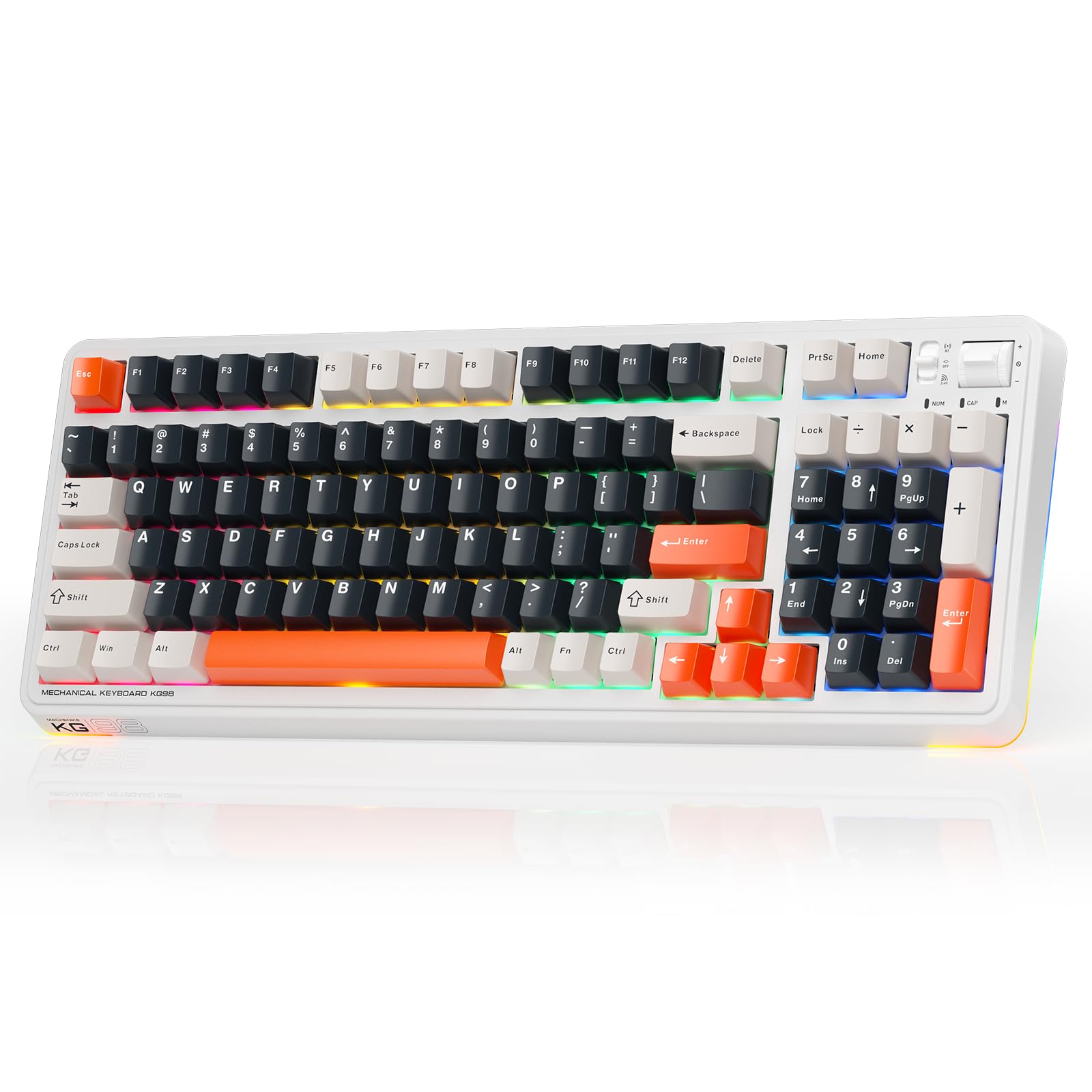
Image: The Machenike KG98 Tri-Mode Mechanical Keyboard in its White&Black&Orange color scheme, showcasing its compact 98-key layout and RGB sidelit design.
Ki sa ki nan bwat la
- Machenike KG98 Mechanical Keyboard
- 2 switch lineyè gri pre-lubrifye anplis
- Keycap Puller
- Kab USB (Tip-A a Kalite-C)
- Manyèl itilizatè
Enstalasyon ak Koneksyon
The Machenike KG98 keyboard offers three connectivity modes: wired USB, 2.4GHz wireless, and Bluetooth. A multi-functional switch located on the top-right of the keyboard allows for easy switching between these modes.
Koneksyon branche
Connect the provided USB Type-C cable to the keyboard's port and the USB Type-A end to your computer. Ensure the tri-mode switch is set to the wired (USB) position.
2.4GHz Wireless Koneksyon
Locate the 2.4GHz USB dongle, typically stored magnetically on the underside of the keyboard. Plug the dongle into an available USB port on your device. Set the tri-mode switch on the keyboard to the 2.4GHz wireless position. The keyboard should automatically connect.
Bluetooth Koneksyon
Set the tri-mode switch to the Bluetooth position. On your device (computer, tablet, smartphone), search for Bluetooth devices and select "Machenike KG98" to pair. The keyboard supports multiple Bluetooth profiles, allowing connection to several devices simultaneously.
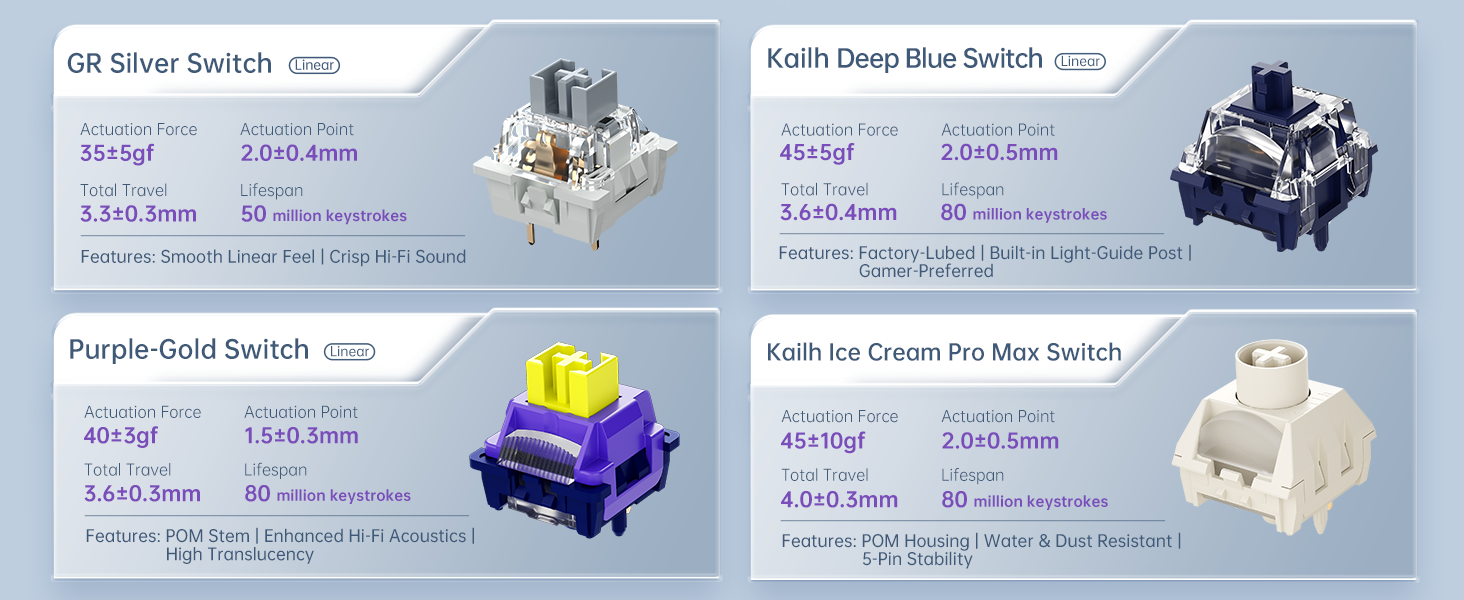
Image: Diagram illustrating the three connectivity modes: Type-C wired, 2.4G wireless, and Bluetooth, along with key features like 3rd-Gen Tuned Stabilizers and Full Hot-Swap capability.
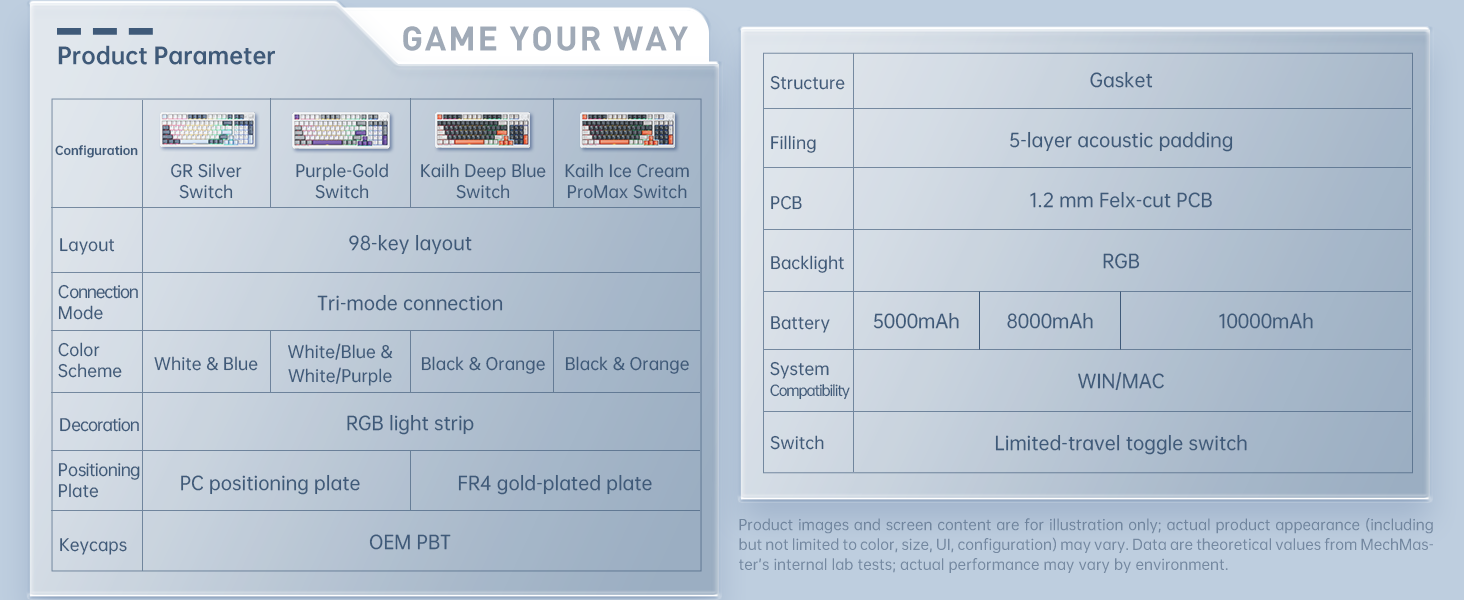
Image: The Machenike KG98 keyboard shown in a desk setup, highlighting its Type-C, 2.4G Wireless, and Bluetooth connectivity options.
Itilizasyon klavye ou a
Rgb ekleraj
The KG98 features vibrant RGB backlighting with multiple effects and adjustable brightness. Use the Function (Fn) key in combination with other keys to control lighting:
- Fn + Shift: Chanje atravè divès efè ekleraj.
- Fn + Enter: Change solid backlight colors (red, green, blue, yellow, purple, cyan, white).
- Fn + Flèch Anwo/Anba: Ajiste klète limyè dèyè a (4 nivo).
- Fn + Flèch agoch/adwat: Adjust backlight flow speed.

Image: The Machenike KG98 keyboard showcasing its 16.8 million RGB backlighting with various adjustable lighting effects.
Multi-functional Toggle Switch
The dedicated multi-functional toggle switch on the top-right of the keyboard allows for quick adjustments:
- Glise monte/desann: Ajiste volim.
- Peze Anndan: Aktive/dezaktive odyo a.
- Vire: Chanje nan mòd ekleraj RGB yo.

Imaj: Yon gwo plan view of the multifunction toggle switch on the Machenike KG98 keyboard, used for adjusting volume, muting, and cycling through RGB lighting modes.

Imaj: Yon imaj detaye view of the multifunction toggle switch, emphasizing its ease of use for volume control and RGB lighting adjustments.
Jesyon batri
The KG98 is equipped with an 8000mAh high-capacity battery for extended wireless use. Connect the USB-C cable to charge the keyboard. The keyboard features an automatic sleep mode to conserve battery life during periods of inactivity. This can be configured via the software.
Pèsonalizasyon ak antretyen
The Machenike KG98 is designed for extensive customization and easy maintenance, allowing you to personalize your typing and gaming experience.
Cho-Swappable switch
The keyboard features hot-swappable switch sockets, meaning you can easily remove and replace switches without soldering. Use the included keycap puller and switch puller to change switches. The keyboard supports both 3-pin and 5-pin switches.
Imaj: Yon imaj detaye view of the keyboard's internal structure, highlighting the Per-Key Flex-Cut design and a close-up of a pre-lubed linear switch.
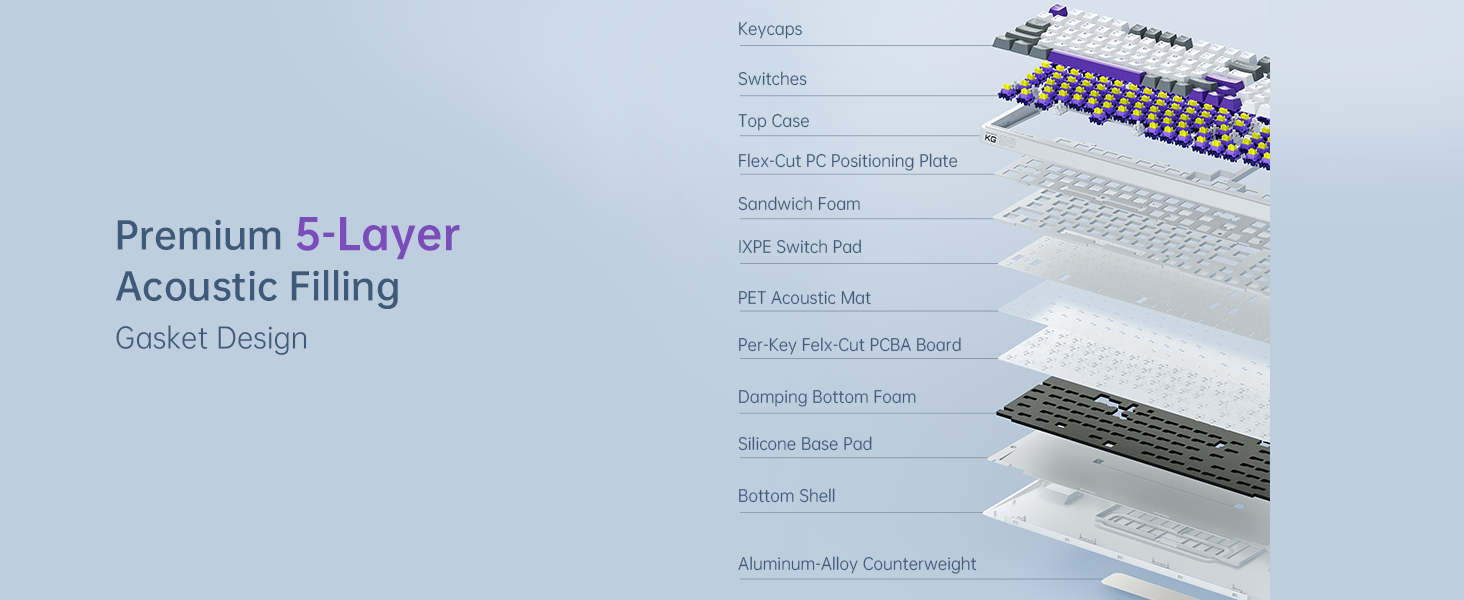
Image: A comparison of different linear switch types compatible with the Machenike KG98, including GR Silver, Kailh Deep Blue, Purple-Gold, and Kailh Ice Cream Pro Max switches, detailing their actuation force, actuation point, lifespan, and features.

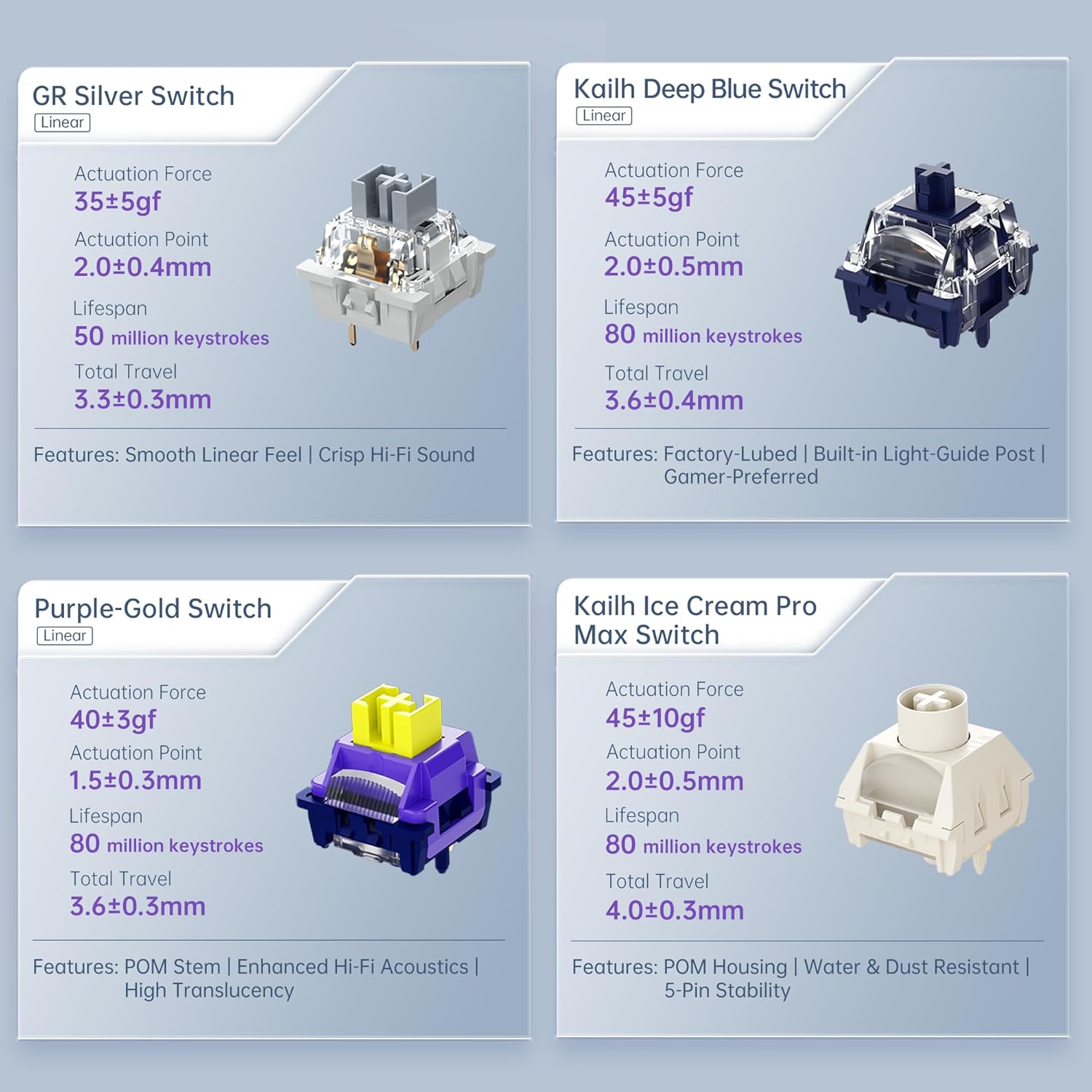
Image: Close-up images of four different linear switch types: GR Silver, Kailh Deep Blue, Purple-Gold, and Kailh Ice Cream Pro Max, with their specifications.
Ranplasman Keycap
The keyboard comes with durable PBT keycaps. You can replace them with any compatible keycaps of your choice using the provided keycap puller. The south-facing RGB LEDs ensure that custom shine-through keycaps will be well-illuminated.
Personnalisation lojisyèl
For advanced customization, including key remapping, macro creation, and detailed RGB lighting effects, download the official Machenike software from the manufacturer's website. The software allows you to create multiple profiles for different uses (gaming, work, etc.).
Acoustic Design and Ergonomics
The KG98 incorporates a premium 5-layer acoustic filling and GASKET structure design to enhance typing feel and reduce noise, providing a more comfortable and precise keystroke experience.
- GASKET and PCB Single-Key Slotting Design: Improves keyboard elasticity and stability for precise and comfortable keystrokes.
- Ergonomik konsepsyon estriktirèl: Optimized for comfort during extended use.
- Twa-Stage Height-Adjustable Feet: Allows users to set their preferred typing angle.
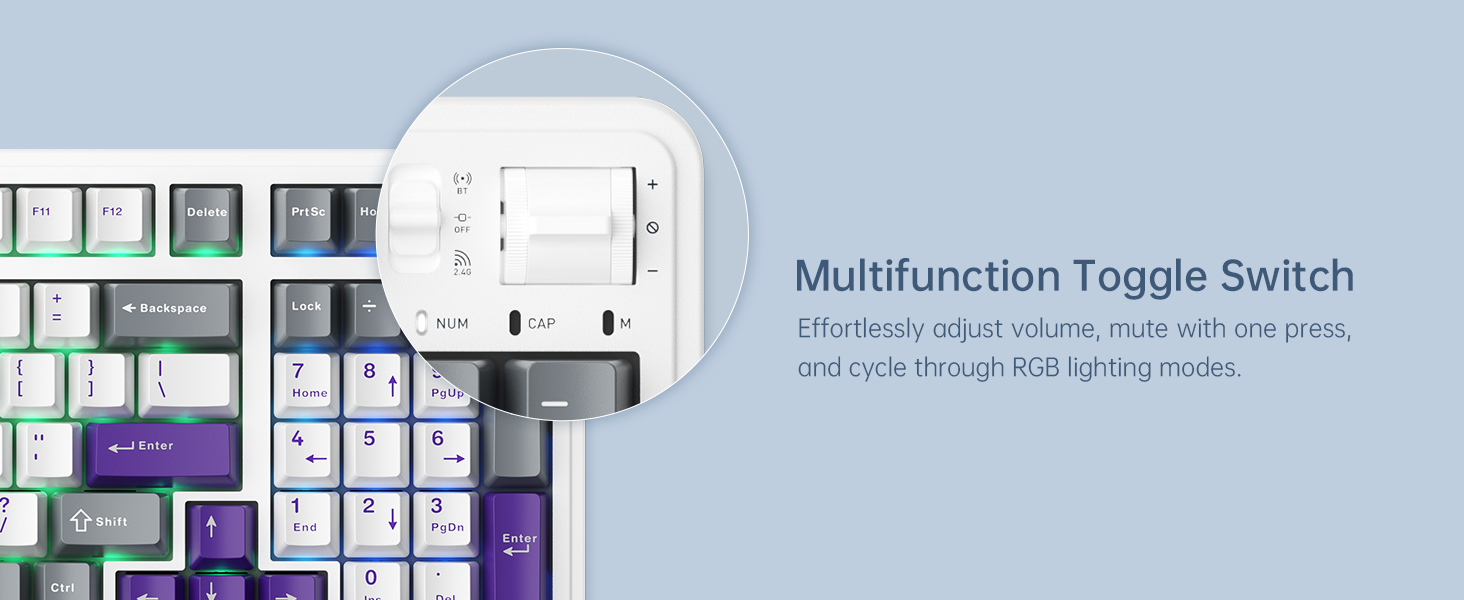
Image: An exploded diagram showing the premium 5-layer acoustic filling of the Machenike KG98, including keycaps, switches, top case, Flex-Cut PC Positioning Plate, Sandwich Foam, IXPE Switch Pad, PET Acoustic Mat, Per-Key Felx-Cut PCBA Board, Damping Bottom Foam, Silicone Base Pad, Bottom Shell, and Aluminum-Alloy Counterweight.

Image: A visual representation of the keyboard's internal structure, emphasizing the Premium 5-Layer Acoustic Filling and Gasket Design for improved typing feel and sound.

Imaj: Gwo plan views of the PC positioning plate and FR4 gold-plated plate, illustrating the Per-Key Flex-Cut design for enhanced acoustic performance and tactile feedback.

Image: The Machenike KG98 keyboard highlighting its dual-sided RGB light strips, custom engraved metal nameplate, and three-stage height-adjustable feet for ergonomic comfort.
Espesifikasyon
| Karakteristik | Detay |
|---|---|
| Modèl | KG98 |
| Koneksyon Teknoloji | BT5.0, 2.4G Wireless, USB Type-C Wired |
| Deskripsyon klavye | Joint san fil mekanik klavye |
| Layout kle | 98 Keys Compact Layout |
| Chanjman | Pre-lubed Linear Switches (Hot-Swappable) |
| Ekleraj | RGB Backlit, Dual-Sided RGB Light Strips |
| Kapasite batri | 8000mAh |
| Dimansyon pwodwi | 16.61 x 7.48 x 2.16 pous |
| Pwa atik | 3.52 liv |
| Aparèy konpatib | Gaming Console, Laptop, PC, Smartphone, Tablet (Windows/Mac) |

Image: A table detailing various product parameters and configurations for the Machenike KG98 keyboard, including layout, connection mode, color scheme, positioning plate, keycaps, structure, filling, PCB, backlight, battery capacity, and system compatibility.
Depanaj
- Pwoblèm Koneksyon: Ensure the tri-mode switch is in the correct position for your desired connection type (wired, 2.4GHz, or Bluetooth). For wireless modes, ensure the dongle is properly inserted or Bluetooth is paired.
- Klavye a pa reponn: Try connecting via USB cable to ensure it's not a battery issue. Check if the keyboard is in sleep mode and wake it up by pressing any key.
- Limyè RGB pa travay: Verify that the brightness is not set to the lowest level. Cycle through lighting effects using Fn + Shift.
- Defo kle: If a specific key is not working, try replacing its switch with one of the spare switches provided, or another working switch from the keyboard, to determine if the switch or the keycap is faulty.
- Pwoblèm lojisyèl: Ensure you have the latest version of the Machenike software installed. If issues persist, try reinstalling the software.
For further assistance, please refer to the detailed user manual included in the box or visit the official Machenike support websit.
Garanti ak sipò
The Machenike KG98 Mechanical Keyboard comes with a manufacturer's warranty. For detailed information regarding warranty coverage, terms, and conditions, please refer to the warranty card included in your product packaging or visit the official Machenike website. For technical support, product registration, or service inquiries, please contact Machenike customer service through their official channels.
Videyo pwodwi ofisyèl la
Video: An official product video from Machenike US STORE showcasing the features and functionality of the Machenike KG98 Mechanical Keyboard, including unboxing, connectivity options, RGB lighting, and hot-swappable switches.