
1. Entwodiksyon
This manual provides essential instructions for setting up, operating, maintaining, and troubleshooting your HONOR 400 5G smartphone. Please read this guide thoroughly to ensure proper use and to maximize the performance of your device.
The HONOR 400 is a powerful 5G smartphone featuring a 6.55-inch AMOLED display, a Qualcomm Snapdragon 7 Gen 3 processor, 12GB of RAM, and 512GB of internal storage. It operates on Android 15 and is equipped with a 5300mAh battery, a 200MP main camera, and dual-SIM capabilities.
2. Ki sa ki nan bwat la
Upon unboxing your HONOR 400 smartphone, verify that all items are present:
- HONOR 400 5G Smartphone
- USB kab
- (Other accessories such as a charger, SIM ejector tool, or protective case may vary by region and package contents.)
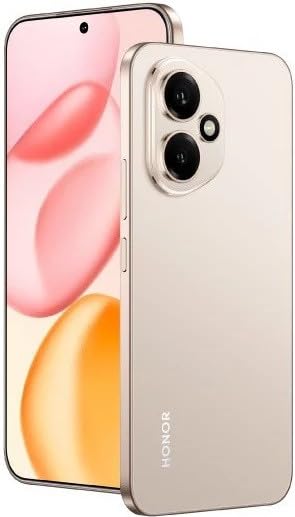
Figi 2.1: The HONOR 400 5G Smartphone. This image displays the device's sleek design and the main screen.
3. Aparèy souview
Familiarize yourself with the physical components of your HONOR 400 smartphone.
3.1 Devan View
- Ekspozisyon: 6.55-inch AMOLED screen with 1264 x 2736 pixels resolution.
- Kamera devan: 50 MP, f/2.0 (lajè) pou selfie ak apèl videyo.
- Ekouteur: Located at the top edge of the display.
An illustration of the front view would typically show the display, front camera, and earpiece.
3.2 Dèyè View
- Sistèm Kamera Prensipal:
- 200 MP, f/1.9 (wide), 1/1.4", PDAF, OIS
- 12 MP, f/2.2, 112° (ultrawide), AF
- Flash: Flash LED pou fotografi nan fènwa.
- HONOR Logo: Idantifikasyon mak.
An illustration of the rear view would typically highlight the camera module and brand logo.
3.3 Bò Views ak pò
- Bouton pouvwa: Typically on the right side, used to power on/off and wake/sleep the device.
- Bouton Volim: Typically on the right side, above the power button, for adjusting volume.
- USB Kalite-C Port: Sitiye anba a, yo itilize li pou chaje ak transfere done.
- Plato SIM kat: Location varies, typically on the side or bottom, for inserting Nano-SIM cards.
- Microphones & Speakers: Strategically placed for calls and audio output.
Illustrations of the device's sides would show the placement of buttons, ports, and the SIM tray.
4. Enstalasyon
4.1 Mete Kat SIM yo
- Jwenn plato kat SIM sou aparèy ou an.
- Mete zouti pou retire kat SIM lan (si w genyen l) nan ti twou ki akote plato a epi pouse dousman jiskaske plato a soti.
- Place your Nano-SIM card(s) into the designated slots on the tray. The HONOR 400 supports Dual-SIM (Nano-SIM + ESIM OR Nano-SIM + Nano-SIM). Ensure the gold contacts face downwards.
- Remete plato a nan telefòn nan avèk prekosyon.
An image demonstrating SIM card insertion would be helpful here.
Enpòtan: Anvan achaasing, verify network compatibility with your service provider. This device supports GSM networks (2G, 3G, 4G LTE, and 5G SA/NSA) but does not support CDMA networks.
4.2 Premye Limen ak Sòsye Enstalasyon
- Press and hold the Power button until the HONOR logo appears.
- Follow the on-screen instructions to complete the initial setup, which includes selecting your language, connecting to Wi-Fi, setting up your Google account, and configuring security features.
5. Opere aparèy ou an
5.1 Sistèm operasyon Android 15
Your HONOR 400 runs on Android 15, offering a user-friendly interface and access to a vast ecosystem of applications via the Google Play Store. Navigate using gestures or on-screen buttons, customize your home screen, and manage notifications.
5.2 Fonksyon debaz
- Fè apèl: Tape ikòn Telefòn nan, antre nimewo a, epi tape bouton apèl la.
- Voye Mesaj: Use the Messaging app to send SMS/MMS.
- Navigasyon Entènèt: Louvri a web browser (e.g., Chrome) to access the internet via Wi-Fi or mobile data.
- Jesyon aplikasyon: Download, install, and uninstall apps from the Google Play Store.
5.3 Itilizasyon Kamera
The HONOR 400 features a versatile camera system:
- Kamera dèyè: Utilize the 200 MP main sensor for high-resolution photos and the 12 MP ultrawide lens for expansive shots. Features include PDAF and Optical Image Stabilization (OIS).
- Kamera devan: The 50 MP wide-angle front camera is ideal for selfies and video conferencing.
- Anrejistreman videyo: Capture videos in up to 4K resolution at various frame rates (30, 60, 120 fps).
A diagram of the camera interface or tips for photography modes could be included here.
5.4 Koneksyon
Your device supports multiple connectivity options:
- 5G/4G LTE: Koneksyon done mobil gwo vitès.
- Wi-Fi: Konekte sou rezo san fil pou jwenn aksè a entènèt.
- Bluetooth: Konekte ak kas ekoutè san fil, oratè ak lòt aparèy.
- USB Kalite-C: For charging and connecting to a computer for data transfer.
6. Antretyen
6.1 Swen Batri
- The HONOR 400 is equipped with a 5300mAh non-removable battery.
- Pou pwolonje lavi batri a, evite tanperati ekstrèm epi dechaje batri a nèt souvan.
- Use the provided USB cable and a compatible charger for optimal charging.
6.2 Mizajou lojisyèl
Regularly check for and install software updates to ensure your device has the latest features, security patches, and performance improvements. You can usually find this option in your phone's Settings menu under "System & updates" or "About phone."
6.3 Netwaye aparèy ou an
Sèvi ak yon twal mou ki pa gen pousyè pou netwaye ekran ak kò telefòn ou an. Evite itilize pwodui chimik ki agresif oswa materyèl abrazif.
NAN. Depanaj
This section addresses common issues you might encounter with your HONOR 400 smartphone.
7.1 Aparèy la pa limen
- Asire w batri a chaje. Konekte telefòn nan nan yon plato pou omwen 15 minit anvan ou eseye limen l ankò.
- Try a forced restart by holding the Power button for an extended period (e.g., 10-15 seconds).
7.2 Pwoblèm koneksyon rezo
- Tcheke si kat SIM ou a byen mete.
- Verifye ke done mobil yo aktive nan paramèt telefòn ou an.
- Rekòmanse aparèy ou an.
- Confirm with your service provider that your plan is active and there are no network outages nan zòn ou an.
- Ensure your device is compatible with your network's frequencies (GSM only, no CDMA).
7.3 Aplikasyon ki kraze oswa bloke
- Fèmen epi relouvri aplikasyon an.
- Efase kach ak done aplikasyon an nan Anviwònman > Aplikasyon.
- Asire w ke aplikasyon an mete ajou nan dènye vèsyon li.
- Rekòmanse telefòn ou.
7.4 Pèfòmans Ralanti
- Fèmen aplikasyon ki pa nesesè yo an background.
- Klè kachèt ak tanporè files.
- Ensure you have sufficient free storage space (512GB internal storage).
- Rekòmanse aparèy ou regilyèman.
8. Espesifikasyon
| Karakteristik | Detay |
|---|---|
| Non modèl | Onè 400 |
| Sistèm operasyon | Android 15.0 |
| Processeur | Qualcomm SM7550-AB Snapdragon 7 Gen 3 (4 nm), Octa-core (1x2.63 GHz Cortex-A715 & 3x2.4 GHz Cortex-A715 & 4x1.8 GHz Cortex-A510) |
| RAM | 12 GB |
| Depo Entèn | 512 GB (ki pa ka elaji) |
| Ekspozisyon | 6.55 Inches AMOLED, 1B colors, 1264 x 2736 pixels |
| Kamera dèyè | 200 MP (wide, OIS) + 12 MP (ultrawide) |
| Kamera devan | 50 MP (laj) |
| Rezolisyon Capture Videyo | 4K (30, 60, 120 fps) |
| Kapasite batri | 5300 Miliamp Hours (non-removable) |
| Kat SIM | Dual-SIM (Nano-SIM + ESIM OR Nano-SIM + Nano-SIM) |
| Koneksyon | 5G, GSM, LTE, Wi-Fi, Bluetooth, USB Type-C |
| Dimansyon | 156.5 x 74.6 x 7.3 mm (6.16 x 2.94 x 0.29 pous) |
| Pwa | 202 Gram (6.49 ons) |
| Koulè | Desert Gold (as per product listing, actual color may vary by variant) |
9. Garanti ak sipò
9.1 Garanti manifakti a
The HONOR 400 smartphone comes with a 1 Ane Manifakti GarantiGaranti sa a kouvri domaj nan materyèl ak nan fabrikasyon anba itilizasyon nòmal. Tanpri konsève prèv acha ou pou reklamasyon garanti.
For specific terms and conditions of the warranty, please refer to the warranty card included with your product or visit the official HONOR support websit.
9.2 Sipò pou Kliyan
For further assistance, technical support, or service inquiries, please contact HONOR customer support through their official websit la oswa enfòmasyon kontak ki nan anbalaj pwodwi ou a.
You can typically find support resources, FAQs, and contact details on the official HONOR websit: www.hihonor.com