
Entwodiksyon
This manual provides essential information for setting up, operating, maintaining, and troubleshooting your NIMO 15.6-inch FHD Gaming Laptop, model Nimo N153. Please read this manual thoroughly before using your device to ensure proper function and longevity.

Image: The NIMO 15.6-inch FHD Gaming Laptop, showcasing konsepsyon elegant li yo.
Ki sa ki nan bwat la
Upon unboxing, verify that all items listed below are present:
- 1 x Nimo N153 Laptop
- 1 x Chargeur rapid Kalite-C 100W PD
- 1 x Manyèl Itilizatè (dokiman sa a)
- Windows 11 Home (pre-enstale)
- Garanti ak Retounen Enfòmasyon
Enstalasyon
1. Premye Limen ak Chaje
Before first use, connect the laptop to the power adapter and a wall outlet. The Type-C 100W PD Fast Charger is designed for efficient charging. Allow the battery to charge sufficiently before disconnecting.

Image: The compact Type-C 100W PD Fast Charger included with the laptop.
2. Operating System Setup (Windows 11)
Upon first boot, follow the on-screen instructions to complete the Windows 11 Home setup. This includes selecting your region, language, connecting to a Wi-Fi network, and creating a user account.
3. Fingerprint Reader Setup
For enhanced security, set up the integrated fingerprint reader. Navigate to Windows Settings > Accounts > Sign-in options and follow the prompts to register your fingerprint.

Image: Close-up of the laptop's keyboard, highlighting the fingerprint reader and backlit keys.
4. Konekte periferik
Laptop la gen plizyè pò pou konekte aparèy ekstèn:
- Pò USB: Connect USB devices such as mice, keyboards, and external storage.
- HDMI Port: Konekte ak yon monitè ekstèn oswa yon televizyon pou yon ekspozisyon pwolonje.
- Type-C Ports: For data transfer, charging, and connecting compatible Type-C accessories.
- Mikwo SD kat plas: Insert Micro SD cards for additional storage or data transfer.
- Kas ekoutè Jack: Konekte kas ekoutè oswa oratè ekstèn.
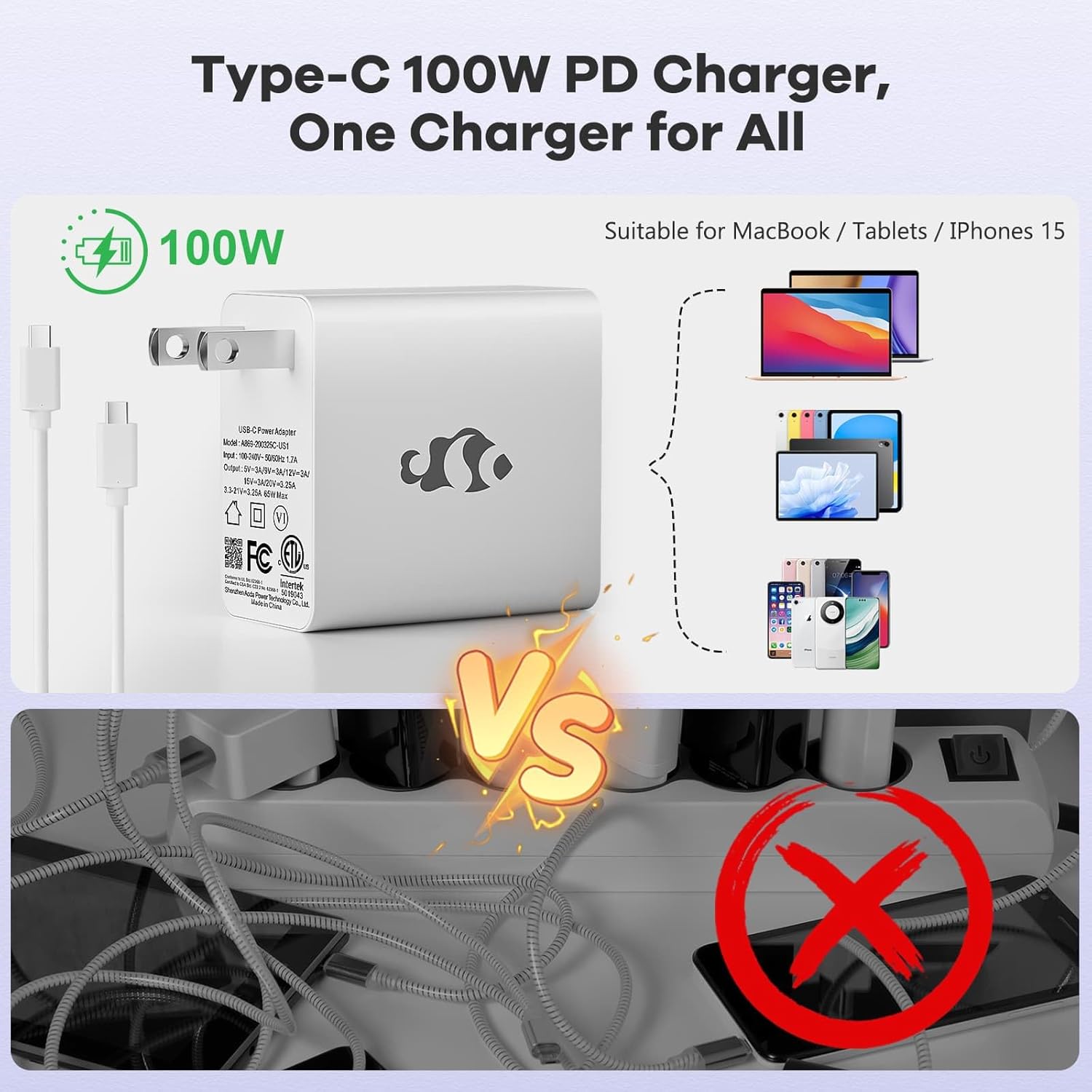
Image: Diagram illustrating the various ports available on the NIMO laptop, including USB, HDMI, Type-C, Micro SD, and headphone jack.
Enstriksyon Operasyon
1. Limen/Etenn ak Mòd Dòmi
- Pouvwa sou: Peze bouton pouvwa a ki sitiye sou klavye a.
- Pouvwa Off: Klike sou bouton Start la nan Windows, answit chwazi Power > Shut down.
- Mòd dòmi: Close the laptop lid or click the Start button, then select Power > Sleep.
2. Keyboard and Touchpad Functions
- Klavye retroeklere: The keyboard features backlighting for use in low-light conditions. Use the dedicated function key (Fn + F key combination, typically) to adjust brightness or toggle it on/off.
- Klavye nimerik: The full-size keyboard includes a numeric keypad for convenient data entry.
- Pavé tactile milti-touche: Supports various gestures for navigation and control within Windows. Refer to Windows settings for touchpad gesture customization.
3. Wireless Koneksyon
- Wi-Fi: Pou konekte ak yon rezo san fil, klike sou ikòn Wi-Fi ki nan ba travay la, chwazi rezo ou vle a, epi antre modpas la si sa nesesè.
- Bluetooth: Pou konekte aparèy Bluetooth yo, ale nan Anviwònman Windows > Bluetooth ak aparèy, epi swiv enstriksyon yo pou ajoute yon nouvo aparèy.
4. Webcam Shield
The laptop is equipped with a physical webcam shield for privacy. Slide the shield to cover or uncover the webCam jan sa nesesè.
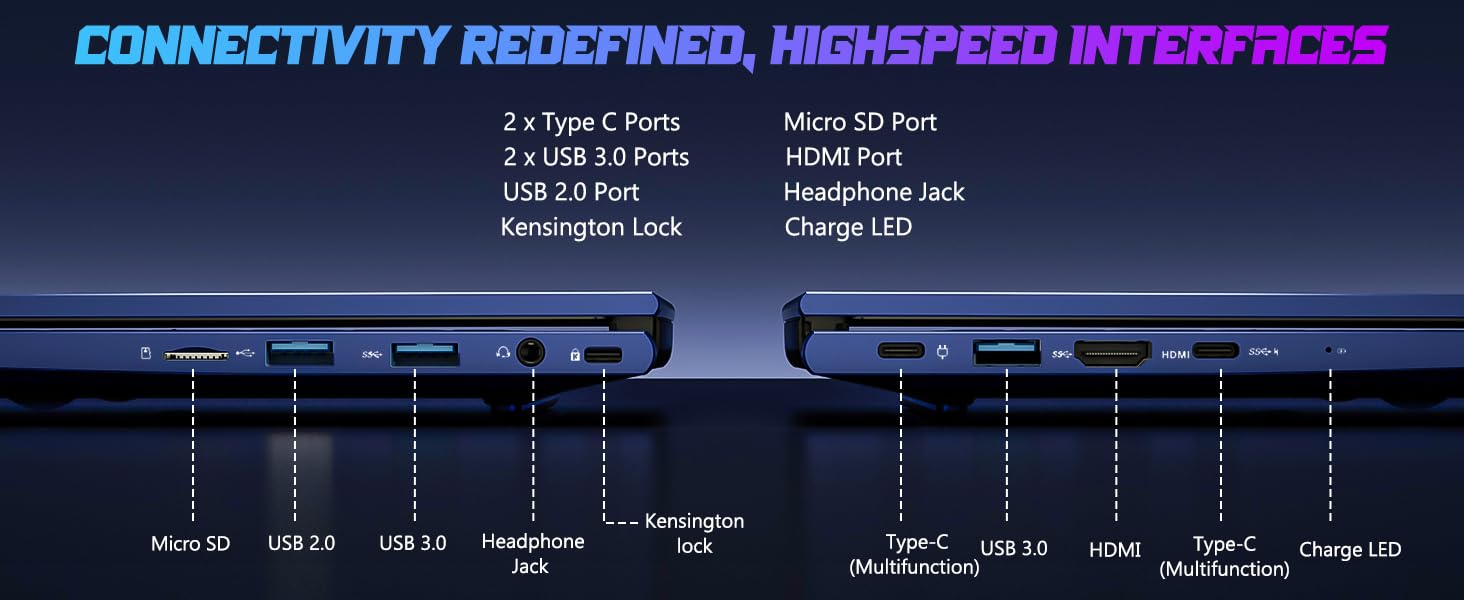
Image: Illustration of the laptop's webcam with a privacy shield feature.
5. Karakteristik ekspozisyon
The 15.6-inch FHD IPS anti-glare display (1920x1080 resolution) provides clear visuals. Adjust display settings such as brightness and resolution through Windows Display Settings.

Image: The NIMO laptop displaying a vibrant image on its 15.6-inch FHD IPS screen.
Antretyen
1. Netwaye òdinatè pòtab la
- Ekran: Sèvi ak yon moso twal mou, ki san pèl dampLave avèk dlo oswa yon pwodui netwayaj ekran. Pa flite likid dirèkteman sou ekran an.
- Klavye ak chasi: Sèvi ak yon twal mou epi sèk. Pou pousyè tè ki difisil pou retire, yon ti kras mouye.amp Ou ka itilize twal, pou asire pa gen likid ki antre nan ouvèti yo.
- Pò: Kenbe pò yo pwòp san pousyè ak debri. Sèvi ak lè konprese si sa nesesè, pandan w ap kenbe bwat la dwat.
2. Mizajou lojisyèl
Regularly check for and install Windows updates to ensure system stability, security, and optimal performance. Go to Windows Settings > Windows Update.
3. Upgradability
The Nimo N153 laptop supports upgradable dual-channel memory and detachable RAM/SSD. If you plan to upgrade components, it is recommended to consult a qualified technician or refer to NIMO's official support resources to avoid voiding your warranty or damaging the device.
Depanaj
If you encounter issues with your NIMO laptop, try the following basic troubleshooting steps:
- Pa gen pouvwa: Ensure the charger is securely connected to both the laptop and a working power outlet. Check the charge LED indicator.
- Pwoblèm ekspozisyon: If the screen is blank, try connecting an external monitor via HDMI to check if the issue is with the laptop's internal display. Ensure display drivers are up to date.
- Pwoblèm koneksyon (Wi-Fi/Bluetooth): Restart the laptop and your router/Bluetooth device. Check Windows network settings to ensure Wi-Fi and Bluetooth are enabled.
- Pèfòmans Ralanti: Close unnecessary applications, check for malware, and ensure sufficient free storage space on the SSD.
- Sistèm bloke: Peze epi kenbe bouton pouvwa a pandan 10-15 segonn pou fòse yon etennman, apresa rekòmanse laptop la.
For more complex issues or if the problem persists, please contact NIMO customer support.
Espesifikasyon
| Karakteristik | Detay |
|---|---|
| Mak | NIMO |
| Non modèl | Nimo N153 |
| Gwosè ekran | 15.6 pous |
| Rezolisyon | 1920x1080 Pixels (FHD IPS Anti-glare) |
| Modèl CPU | AMD Ryzen 5 6600H (6 Nwayo, 12 Fil, jiska 4.5 GHz) |
| Koprosesè grafik | AMD Radeon 660M (Integrated GPU) |
| Gwosè memwa RAM enstale | 16 GB DDR5 (4800 MHz) |
| Gwosè Disk Difisil | 1 TB SSD (PCIe 4.0) |
| Sistèm operasyon | Windows 11 Kay |
| Karakteristik espesyal | Backlit Keyboard, Fingerprint Reader, HD Audio, Numeric Keypad, Webcam Shield |
| Koneksyon Teknoloji | Wi-Fi (802.11a/b/g/n/ac), Bluetooth |
| Pò | 2x Type-C, 2x USB 3.0, 1x USB 2.0, 1x HDMI, 1x Micro SD, 1x Headphone Jack, Kensington Lock |
| Lavi batri | Up to 5 Hours (Usage), Up to 7 Hours (Standby) |
| Kapasite batri | 53.58 Watt èdtan |
| Charger | 100W GaN Type-C PD Fast Charger |
| Pwa atik | 3.8 liv |
| Dimansyon (L x W x P) | 14.07" x 8.98" x 0.76" |
Remak: Espesifikasyon yo sijè a chanje san avètisman davans.
Garanti ak sipò
1. Garanti manifakti a
Your NIMO N153 laptop is covered by a Garanti manifakti 2 zan from Nimo Direct Inc. This warranty covers defects in materials and workmanship under normal use. Please retain your proof of purchase for warranty claims.
2. Règleman retounen
NIMO offers a Règleman pou retounen pwodwi a san pwoblèm nan 90 jou. If you are not satisfied with your purchase, you may return the product within 90 days of purchase. Refer to your purchase documentation for specific return procedures.
3. Sipò pou Kliyan
Pou asistans teknik, reklamasyon garanti, oswa nenpòt kesyon ki gen rapò ak pwodwi, tanpri kontakte sèvis kliyan NIMO:
- Imèl: service@nimopc.com
- Sou entènèt: Vizite NIMO ofisyèl la websit pou resous sipò ak opsyon pou kontakte yo.
Our dedicated support team is available to assist you.

Image: NIMO customer service representatives ready to assist.