
Entwodiksyon
Welcome to your new NIMO 15.6" FHD Laptop N151. This manual provides essential information to help you get started, operate, maintain, and troubleshoot your device. Please read through these instructions carefully to ensure optimal performance and longevity of your laptop.
Enstalasyon
1. Unboxing ak Inisyal Enspeksyon
Retire tout bagay yo nan anbalaj la avèk prekosyon. Asire w ke konpozan sa yo prezan:
- 1 x Nimo N151 Laptop
- 1 x Chargeur rapid Kalite-C 65W PD
- 1 x Manyèl Itilizatè (dokiman sa a)
- Windows 11 Home (pre-enstale)
Inspect the laptop for any physical damage. If any components are missing or damaged, contact customer support immediately.
2. Chaje òdinatè pòtab la
Before first use, fully charge your laptop. Connect the provided Type-C 65W PD Fast Charger to the Type-C charging port on your laptop and then to a power outlet. The charge LED indicator will illuminate.

Image: The NIMO laptop connected to its Type-C PD fast charger, illustrating the charging process.
3. Limen ak Premye Konfigirasyon
Press the power button located on the keyboard. The laptop will boot up and guide you through the initial Windows 11 Home setup process. Follow the on-screen instructions to configure your language, region, network, and user account.
Itilizasyon Laptop ou a
Ekspozisyon
Your NIMO laptop features a 15.6-inch Full HD (1920x1080) Anti-Glare IPS display. This display offers clear visuals and reduced eye strain, suitable for various tasks from work to entertainment.

Image: The NIMO laptop's 15.6-inch FHD IPS display, highlighting its narrow bezels and vibrant visual capabilities.
Keyboard and Fingerprint Sensor
The laptop is equipped with a backlit keyboard for comfortable typing in various lighting conditions and a numeric keypad for efficient data entry. A fingerprint sensor is integrated for secure and quick login.

Image: Close-up of the NIMO laptop's backlit keyboard, showcasing the fingerprint sensor and numeric keypad.
Webkam
A 2MP webcam is integrated for video calls and online meetings.
Pò ak Koneksyon
The NIMO N151 offers a variety of ports for versatile connectivity:
- Pò USB 3.0: Pou transfè done gwo vitès.
- USB 2.0 pò: Pou konekte periferik yo.
- HDMI Port: Pou konekte ak ekran ekstèn.
- Type-C Ports: One for charging (PD Fast Charger) and one for multifunction use.
- Mikwo SD kat plas: Pou elaji depo oswa transfè files.
- Headphone Combo Jack: Pou antre/soti odyo.
- Fant Kensington Lock: Pou sekirite fizik.
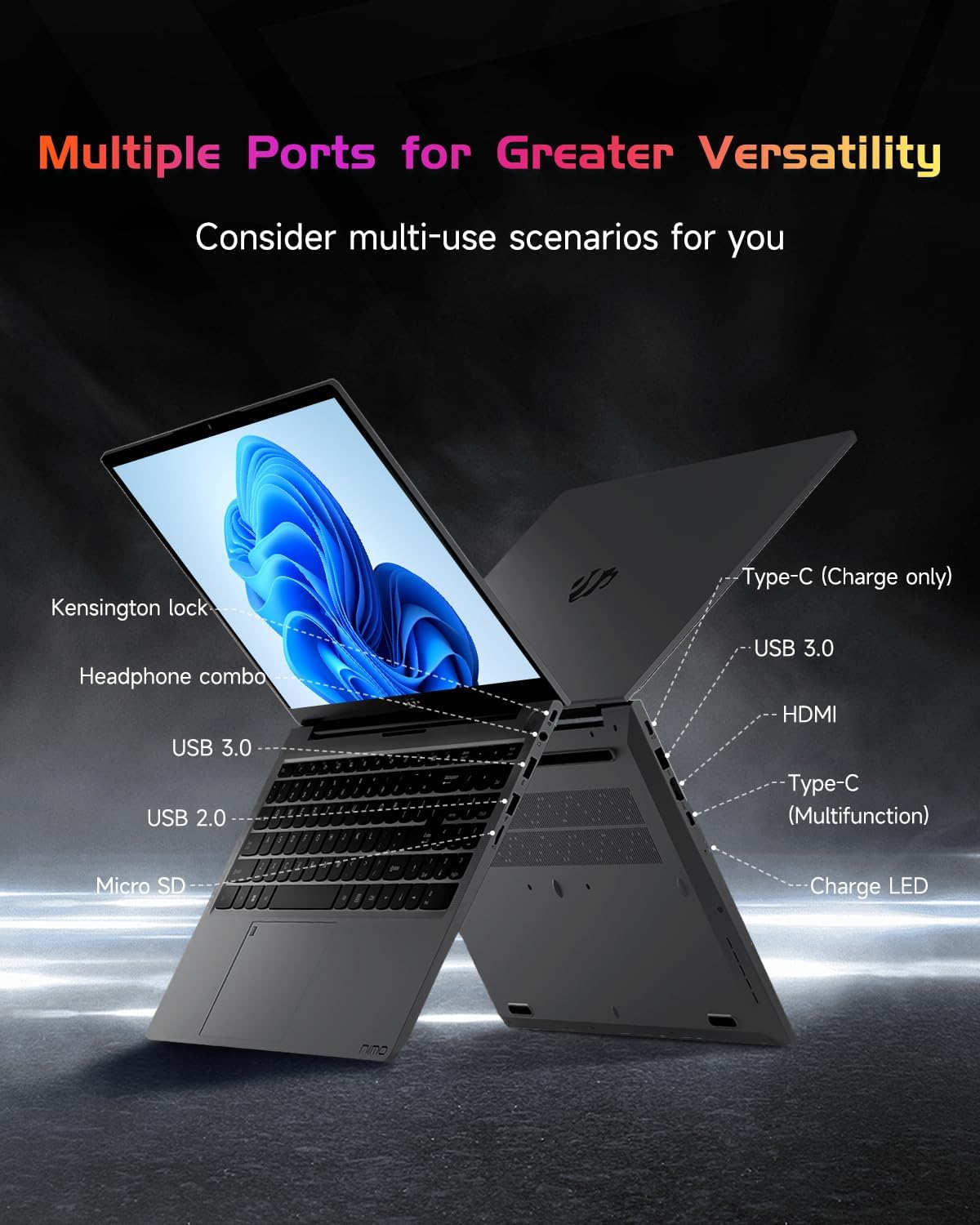
Image: The side profile of the NIMO laptop, displaying its array of ports for diverse connectivity needs.
Stay connected with integrated Wi-Fi 6 for fast wireless internet and Bluetooth 5.2 for connecting wireless accessories.
Processeur ak pèfòmans
Powered by the Intel Alder Lake-N100 12th Gen processor, the NIMO N151 delivers reliable performance for multitasking, streaming, and everyday computing tasks. It comes with 16GB DDR4 RAM and a 256GB PCIe SSD for fast startups and seamless operation.

Image: A visual representation of the Intel Alder Lake-N100 12th Gen processor, highlighting its role in the laptop's performance.
Sistèm operasyon
The laptop comes pre-installed with Windows 11 Home, offering a modern and intuitive user experience.
Antretyen
Swen Jeneral
- Keep the laptop in a clean, dry environment away from extreme temperatures.
- Avoid spilling liquids on the keyboard or screen.
- Sèvi ak yon twal mou ki pa gen pousyè pou netwaye ekran an ak deyò a. Pa sèvi ak pwodui chimik ki agresif.
- Asire bon vantilasyon pa bloke vantilasyon yo.
Swen batri
To prolong battery life, avoid fully discharging the battery frequently. It is recommended to keep the battery charge between 20% and 80% when possible.
Depanaj
Pwoblèm komen ak solisyon yo
- Laptop la pa limen: Ensure the charger is properly connected and the battery has sufficient charge. Try holding the power button for 10-15 seconds to perform a hard reset.
- Ekran an vid: Connect an external monitor to check if the display is the issue. Restart the laptop.
- Pwoblèm koneksyon Wi-Fi: Tcheke si Wi-Fi a aktive nan paramèt Windows yo. Rekòmanse routeur ou a ak laptop la.
- Pèfòmans ralanti: Close unnecessary applications, check for malware, and ensure Windows is up to date.
For persistent issues, refer to the online support resources or contact NIMO customer service.
Espesifikasyon
| Karakteristik | Detay |
|---|---|
| Mak | NIMO |
| Non modèl | Nimo N151 |
| Gwosè ekran | 15.6 pous |
| Rezolisyon ekran | 1920 x 1080 piksèl (FHD) |
| Processeur | Intel Pentium Quad Core N100 (up to 3.4 GHz) |
| RAM | 16 GB DDR4 |
| Vitès memwa | 3200 MHz |
| Disk Drive | 256 GB SSD (PCIe) |
| Koprosesè grafik | Grafik entegre |
| Sistèm operasyon | Windows 11 Kay |
| Kalite san fil | 802.11a/b/g/n/ac (Wi-Fi 6) |
| Bluetooth | Bluetooth 5.2 |
| Pò USB 2.0 | 1 |
| Pò USB 3.0 | 3 |
| Mwayèn lavi batri | 5 èdtan |
| Pwa atik | 3.8 liv |
| Dimansyon pwodwi | 14.07 x 8.98 x 0.76 pous |
| Karakteristik espesyal | Backlit Keyboard, Fingerprint Reader, HD Audio, Memory Card Slot, Numeric Keypad |
Garanti ak sipò
Your NIMO laptop is covered by a 2-ane garanti manifakti a, ensuring peace of mind for your purchase. Additionally, NIMO offers a Règleman pou retounen san pwoblèm nan 90 jou.
For technical assistance, warranty claims, or returns, please contact NIMO customer support through their official channels. Refer to the contact information provided with your product or on the NIMO websit.
Videyo pwodwi
Gade videyo ofisyèl sa yo pou yon vizyon konplèview and demonstration of your NIMO laptop's features.
NIMO 15.6 Laptop Entwodiksyon konplè
Video: A detailed introduction to the NIMO 15.6" FHD Laptop, showcasing konsepsyon li yo ak fonksyonalite prensipal li yo.
NIMO Laptop: Perfect for Work and Study, Anytime, Anywhere
Video: This video highlights the NIMO laptop's versatility for both work and study environments, emphasizing its portability.
NIMO 15.6 FHD Laptop for Students Home Work
Video: A demonstration of the NIMO 15.6" FHD Laptop's suitability for students and home-based work tasks.
Efficiency Meets Convenience: Nimo Laptop
Video: This video showcases the NIMO laptop's efficiency and convenient features for daily use.
NIMO Laptop UGC
Video: User-generated content featuring the NIMO laptop, demonstrating real-world usage scenarios.
NIMO 15.6 FHD Laptop Promotion Video
Video: A promotional video for the NIMO 15.6" FHD Laptop, showcasing karakteristik ak benefis li yo.