
1. Entwodiksyon
This manual provides detailed instructions for the installation, operation, and maintenance of your BOTSLAB W510 4K Wireless Outdoor Security Camera System. Please read this manual thoroughly before using the product to ensure proper functionality and safety.
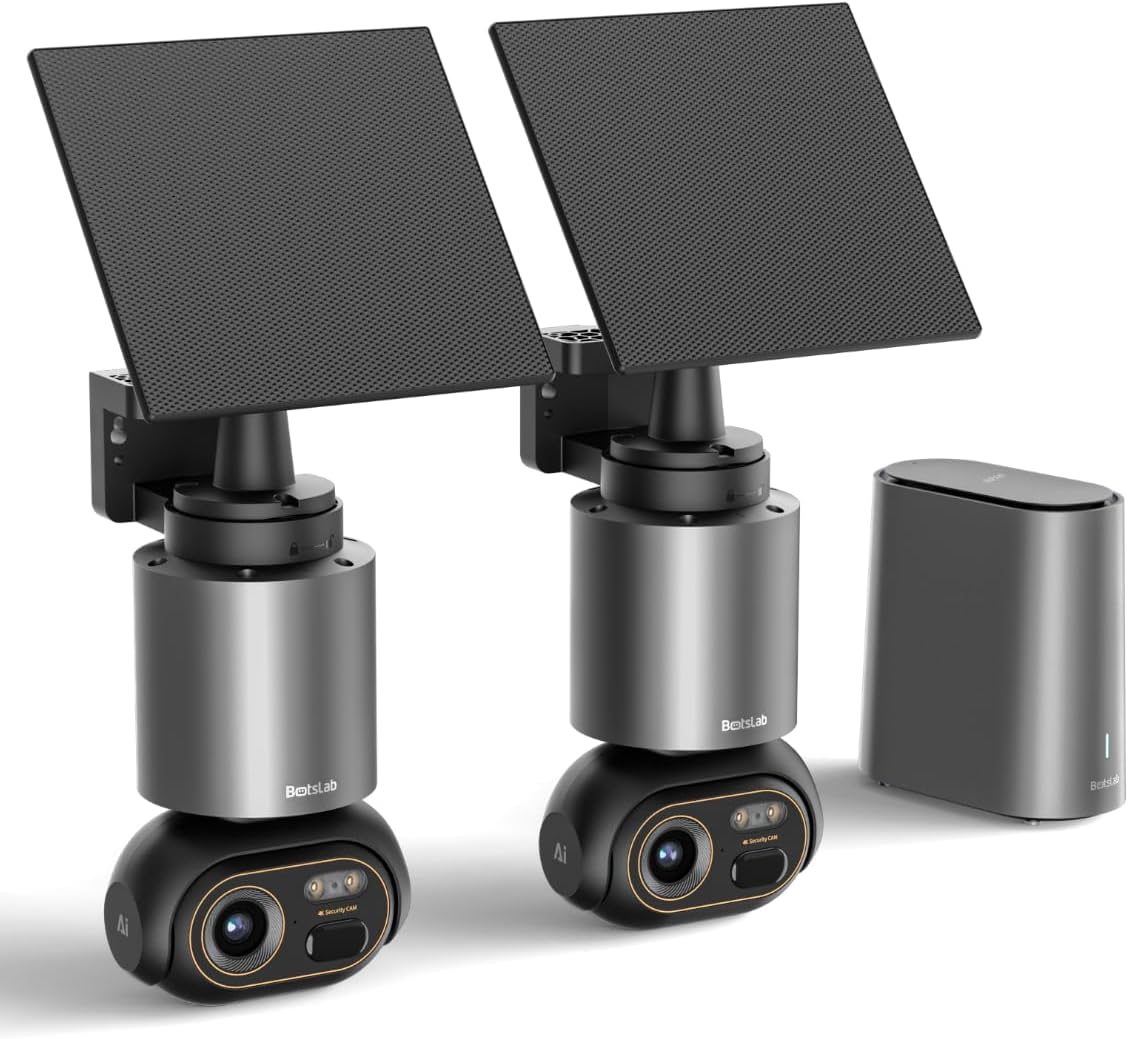
Image 1.1: The BOTSLAB W510 4K Wireless Outdoor Security Camera System, including two cameras with solar panels and the HomeBase unit.
2. Ki sa ki nan bwat la
Verifye ke tout konpozan yo prezan nan pake ou a:
- W510 Camera body *2
- Mounting Support * 2
- Panèl solè * 2
- H200 HomeBase *1
- Camera Mounting Brackets / Wall Stickers *2
- Wall Mounting Screws Package *2
- Solar Panel Mounting Bracket / Wall Stickers *2
- Solar Panel Installation Screws (for mounting) *2
- Kalite-C chaje kab * 2
- User Manual (Quick Guide + Certification) *1
- Otokolan Avètisman *2
- Base Station Adapter *1
- Hard Drive Mounting Screws *1
- Ethernet kab * 1
- User Guide Card *1

Image 2.1: All included components of the BOTSLAB W510 2-Cam Kit.
3. Pwodwi souview
The BOTSLAB W510 system offers advanced security features for outdoor surveillance.
3.1 Karakteristik kle
- 4K Ultra HD Rezolisyon: Kaptire videyo klè ak detaye footage.
- Vizyon lannwit koulè: Bay imaj byen vivan ak tout koulè menm nan kondisyon ki pa twò klere.
- Solè Powered: Equipped with a 5W external solar panel and a 10,000mAh built-in battery for continuous operation.
- Panoramik ak Enklinasyon 360°: Offers a comprehensive panoramic view ki pa gen okenn tach avèg.
- BOTSLAB IQ (AI-Powered): Features intelligent notifications, customized warnings, quick search, and auto-tracking for people, vehicles, and pets.
- Pa gen frè mansyèl: Utilizes local storage via the H200 HomeBase (32GB internal, expandable up to 16TB with HDD).
- IP66 Rezistan a move tan: Ki fèt pou reziste divès kondisyon metewolojik deyò.
- Koneksyon Wi-Fi 2.4G: Ensures stable and long-distance wireless communication.

Image 3.1: Demonstrates the clarity of 4K Ultra HD resolution.

Image 3.2: Illustrates the effectiveness of Color Night Vision.
4. Gid Enstalasyon
4.1 Enstalasyon Kamera a ak Panèl Solè a
The camera and solar panel can be mounted together or separately, offering flexibility for optimal solar exposure and camera placement.
- Chwazi yon bon kote pou kamera a, epi asire w ke li gen yon bon kote pou wè. view of the area you wish to monitor and is within Wi-Fi range of the HomeBase.
- Use the provided mounting bracket and screws to securely attach the camera to a wall or ceiling.
- If mounting the solar panel separately, select a location that receives ample direct sunlight throughout the day. The solar panel can be adjusted 360° horizontally and 180° vertically.
- Connect the solar panel's USB-C cable to the camera's charging port. Ensure the port cover is securely closed after connection to maintain weather resistance.

Image 4.1: Various mounting options for the camera and solar panel.
4.2 Connecting to HomeBase
The H200 HomeBase acts as the central hub for your security system, providing local storage and managing camera connections.
- Place the HomeBase in a central location within your home, ensuring it is connected to your router via the provided Ethernet cable and powered on.
- The HomeBase will automatically connect to your cameras once they are powered on and within range.
4.3 Enstalasyon ak koneksyon aplikasyon an
Manage your cameras and access features through the Botslab app.
- Download the 'Botslab' app from your smartphone's app store (available on Google Play and Apple App Store).
- Kreye yon kont oswa konekte si ou deja gen youn.
- Follow the in-app instructions to add your HomeBase and cameras. This typically involves scanning a QR code on the device or manually selecting the model.
- Ensure your smartphone is connected to a 2.4GHz Wi-Fi network during the initial setup process.

Image 4.2: The Botslab mobile application for device management.
5. Operasyon Enstriksyon
5.1 Viv View ak Kontwòl
Access real-time video feed and control camera movement via the Botslab app.
- Open the Botslab app and select the desired camera to view emisyon an dirèk li an.
- Use the on-screen controls to pan (horizontal movement) and tilt (vertical movement) the camera for a 360° view.
- Digital zoom allows you to magnify specific areas of the live feed or recorded video.

Image 5.1: Illustrates the 360° pan and tilt capabilities and PIR detection range.
5.2 Deteksyon Mouvman ak Notifikasyon
The system uses advanced AI to provide intelligent alerts.
- Notifikasyon Entelijan: Receive detailed, descriptive notifications on your smartphone, identifying visitors or events without needing to open the app.
- Customized Warnings: The camera analyzes the scene and can send tailored warnings to suspicious individuals based on the perceived threat level.
- Adjust detection sensitivity and set activity zones within the app to minimize false alarms.

Imaj 5.2: Egzanpample of intelligent notifications from the Botslab app.
5.3 Anrejistreman ak Depo
Tout footage is stored locally without monthly fees.
- The H200 HomeBase includes 32GB of internal local storage, automatically looping and saving footage for up to two months.
- Storage can be expanded up to 16TB by adding a hard disk drive (not included).
- Aksè anrejistre footage through the app's timeline or use the Intelligent Search feature.

Image 5.3: HomeBase H200 with local and expandable storage options.
5.4 Odyo De-fason
Communicate with individuals near your camera using the two-way audio feature.
- Soti nan ap viv la view in the app, tap the microphone icon to speak through the camera's speaker.
- The camera's built-in microphone allows you to hear audio from the camera's location.
5.5 Karakteristik IA
Leverage BOTSLAB IQ for enhanced surveillance capabilities:
- Human Recognition: Identifies human figures and filters videos.
- Deteksyon machin: Recognizes vehicles in the camera's view.
- Deteksyon bèt kay: Identifies pets (cats and dogs supported).
- Suivi oto: The camera automatically tracks the movement of detected subjects (people, vehicles, pets) within its 360° field of view.
- Rechèch Entelijan: Quickly find specific events, people, vehicles, or objects in historical footage.

Image 5.4: Intelligent Search feature in the Botslab app.
6. Antretyen
6.1 Batri Chaje
The camera is designed for minimal power intervention.
- The 5W solar panel continuously charges the built-in 10,000mAh battery. Approximately 30 minutes of direct sunlight can power the camera for a full day.
- In periods of low sunlight, the large battery capacity ensures stable operation for extended durations.
- If manual charging is required, detach the camera from its mount and use the provided Type-C charging cable.
6.2 Netwayaj
To maintain optimal performance, periodically clean the camera lens and solar panel.
- Sèvi ak yon mou, damp cloth to gently wipe the lens and solar panel.
- Avoid using harsh chemicals or abrasive materials that could scratch the surfaces.
6.3 Firmware Updates (OTA)
The system supports Over-The-Air (OTA) firmware updates to improve performance and add new features.
- Ensure your camera and HomeBase are connected to the internet.
- The Botslab app will notify you when a new firmware update is available. Follow the in-app instructions to initiate the update.
NAN. Depanaj
If you encounter issues with your BOTSLAB W510 system, refer to the following common solutions:
- Pa gen Live View/Offline Device: Check the HomeBase's internet connection (Ethernet cable, router status). Ensure the camera is powered on and within range of the HomeBase. Restart the HomeBase and camera if necessary.
- Kalite videyo pòv: Verify your Wi-Fi signal strength. Ensure the camera lens is clean and free from obstructions. Adjust the camera's position if there are strong light sources directly facing the lens.
- Batri Vide byen vit: Ensure the solar panel is positioned to receive maximum direct sunlight. Reduce motion detection sensitivity or frequency of recordings if not critical.
- Fo Alam: Adjust the motion detection sensitivity in the app. Define specific activity zones to monitor only relevant areas.
- Pwoblèm koneksyon aplikasyon an: Ensure your smartphone has a stable internet connection. Restart the Botslab app.
8. Espesifikasyon
| Karakteristik | Detay |
|---|---|
| Itilizasyon Andedan kay la / Deyò | Deyò |
| Aparèy konpatib | Smartphone (Android) |
| Sous pouvwa | Solè Powered |
| Pwotokòl Koneksyon | Wi-Fi (2.4G) |
| Kalite aliye | Mi mòn |
| Rezolisyon Capture Videyo | 4K |
| Kantite Atik | 2 (2-Cam Kit) |
| Viewing Ang | 360 Degre (Pan ak Enklinasyon) |
| Dimansyon atik L x W x H | 4.72 x 3.8 x 7.54 pous |
| Flash memwa enstale gwosè | 32 GB (HomeBase) |
| Flash memwa sipòte gwosè maksimòm | 16 TB (with external HDD) |
| Batri obligatwa? | Yes (1 12V battery included) |
| Kalite Konsantre | Konsantre oto |
| Teknoloji limyè ki ba | Koulè lannwit |
| Kalite Zoom | Zoom dijital (8x) |
| Fòma Capture Videyo | AVI |
| Itilizasyon espesifik pou pwodwi | Kouvèti 360 Degre, Siveyans |
| Metòd kontwòl | App |
| Pwa atik | 9.13 liv |
| Non modèl | W510 |
| Karakteristik espesyal | 10000mAh Battery, 4K/8MP, No Monthly Fee, 32G Local Storage, Intelligent Notification, Intelligent Alarm, Intelligent Search, Cross-camera Tracking, Facial Detection, Human Detection, Vehicle Detection, Night Vision |
9. Garanti ak sipò
BOTSLAB is committed to providing reliable products and customer satisfaction.
- 12-Mwa Garanti: Your BOTSLAB W510 system is covered by a 12-month warranty from the date of purchase.
- Sipò teknik 24/7: For any questions or technical assistance, please contact BOTSLAB customer support.
- Enfòmasyon pou kontakte: You can reach support via Amazon Messages or through the contact details provided in the Botslab app.