
Dyurwa Smart Watch T60 User Manual
Modèl: T60
1. Entwodiksyon
Thank you for choosing the Dyurwa Smart Watch T60. This manual provides essential information for setting up, operating, and maintaining your new smartwatch. Please read it thoroughly to ensure proper use and to maximize your device's potential.
2. Ki sa ki nan bwat la
Upon opening your Dyurwa Smart Watch T60 package, you should find the following items:
- Dyurwa Smart Watch T60
- Chaje kab
- Manyèl Itilizatè (dokiman sa a)

Image: Package contents showing the Dyurwa Smart Watch T60, an extra strap, a charging cable, and the user manual.
3. Enstalasyon
3.1 Enstalasyon App
- Scan the QR code provided in the quick start guide or search for the "GloryFit" app in your smartphone's app store (Apple App Store for iOS, Google Play Store for Android).
- Download and install the "GloryFit" app.
- Open the app and follow the on-screen instructions to create an account and set up your personal profile.
3.2 Device Pairing (Bluetooth Connection)
To connect your Dyurwa Smart Watch T60 to your smartphone:
- Ensure your smartphone's Bluetooth is turned on.
- Open the "GloryFit" app.
- In the app, navigate to the device section and select "Add Device" or "Chèche pou Device."
- The app will search for available devices. Select "T60" from the list to initiate pairing.
- Konfime demann koneksyon an sou tou de smartphone ou ak smartwatch la si yo mande w la.
For iOS 13.0 and above, and Android 5.0 and above, a single connection through the GloryFit app is usually sufficient for all functions. For older iOS versions (13.0 and below), an additional Bluetooth connection for audio functions (answer/make calls) may be required:
- After successful binding in the GloryFit app, go to your phone's Bluetooth settings.
- Find "T60" in the list of available devices and tap to connect.
- Once connected, you can use the watch to answer and make calls.

Image: Visual guide for connecting the smartwatch to your phone, showing app download, Bluetooth activation, device search, and binding confirmation.
4. Operasyon Enstriksyon
4.1 Display and Dials
The Dyurwa Smart Watch T60 features a 1.91-inch HD full touch screen. You can customize your watch face:
- Chanje mont lan: Access over 200 designs through the "GloryFit" app.
- Kadran pèsonalize: Upload your favorite picture via the app to set it as your watch face.
- Ajisteman klète: Manually adjust the screen brightness through the watch settings (4 levels available) for optimal visibility in various lighting conditions.

Image: The smartwatch showcasing its large 1.91-inch HD display and several customizable watch face options, including data like steps, heart rate, and weather.

Image: A user customizing their watch face with a personal photo through the companion app, demonstrating the DIY dial feature.
4.2 Calling and Messaging
With Bluetooth 5.3, the watch offers stable connectivity for communication features:
- Apèl Bluetooth: Make and receive calls directly from your watch using the built-in microphone and Hi-Fi speaker.
- Notifikasyon mesaj: Receive alerts for text messages and notifications from social media applications (e.g., Facebook, WhatsApp, Twitter) directly on your watch.

Image: The smartwatch displaying its Bluetooth call features, including a dial pad, contact list, incoming call screen, and call history.

Image: The smartwatch displaying notifications from various social media platforms and other apps, indicating its smart notification capabilities.
4.3 Siveyans Sante
The Dyurwa Smart Watch T60 provides comprehensive health tracking features:
- Monitè batman kè: Continuously monitors your heart rate 24/7. Data is for reference only and not for medical diagnosis.
- Tracker dòmi: Automatically measures your sleep patterns, including awake, light, and deep sleep stages, to help you understand and improve your sleep habits.
- Siveyans oksijèn nan san: Mezire nivo oksijèn nan san ou.
- Suivi Sante Fi: Manage and track menstrual cycles and predict fertile periods through the app.
- Egzèsis pou respire: Guided breathing sessions to help with relaxation.

Image: A split image showing the smartwatch's sleep monitoring function with sleep duration, and heart rate and blood oxygen monitoring displays.

Image: A woman exercising while wearing the smartwatch, with a close-up of the watch displaying heart rate data and a corresponding app screen.

Image: Demonstrates breathing exercises and blood oxygen monitoring features of the smartwatch, showing users engaging with these functions.
4.4 Espò mòd
The watch supports over 110 built-in sports modes. During exercise, it records data such as steps, calories burned, distance, and heart rate.

Image: A cyclist wearing the smartwatch, with an overlay showing various sports icons and the watch displaying real-time exercise data like calories, steps, distance, and heart rate.

Image: A collage of people participating in various sports like running, cycling, yoga, and tennis, illustrating the wide range of supported sport modes.
4.5 Lòt Fonksyon
The Dyurwa Smart Watch T60 includes several practical features:
- Asistan vwa: Access your phone's voice assistant directly from the watch.
- Kontwòl Mizik: Kontwole lèktur mizik sou smartphone ou.
- Kontwòl kamera: Deklanche obturateur kamera smartphone ou a adistans.
- Pwedi metewolojik: View kondisyon metewolojik aktyèl yo ak previzyon yo.
- Revèy ak revèy: Mete alam epi sèvi ak fonksyon revèy la.
- Kronomètr: Pou aktivite ki gen rapò ak tan.
- Jwenn telefòn ou: Jwenn telefòn ou ki pèdi a lè w fè l sonnen.
- Kalkilatris: Fonksyon kalkil debaz yo.
- Flach: Uses the screen as a light source.

Image: A comprehensive display of the smartwatch's various utility features, including calendar, stopwatch, camera remote, weather, alarm, timer, flashlight, calculator, breathing exercises, phone finder, voice assistant, and music control.
5. Batri ak Chaje
The Dyurwa Smart Watch T60 is equipped with a large capacity battery, offering extended usage times:
- Tan pou chaje: Apeprè 2 èdtan pou yon chaj konplè.
- Itilizasyon regilye: Up to 7-10 days.
- Tan sibstiti: Jiska 30 jou.
Use the provided magnetic charging cable to charge your device. Connect the magnetic end to the charging points on the back of the watch and the USB end to a standard USB power adapter (not included).
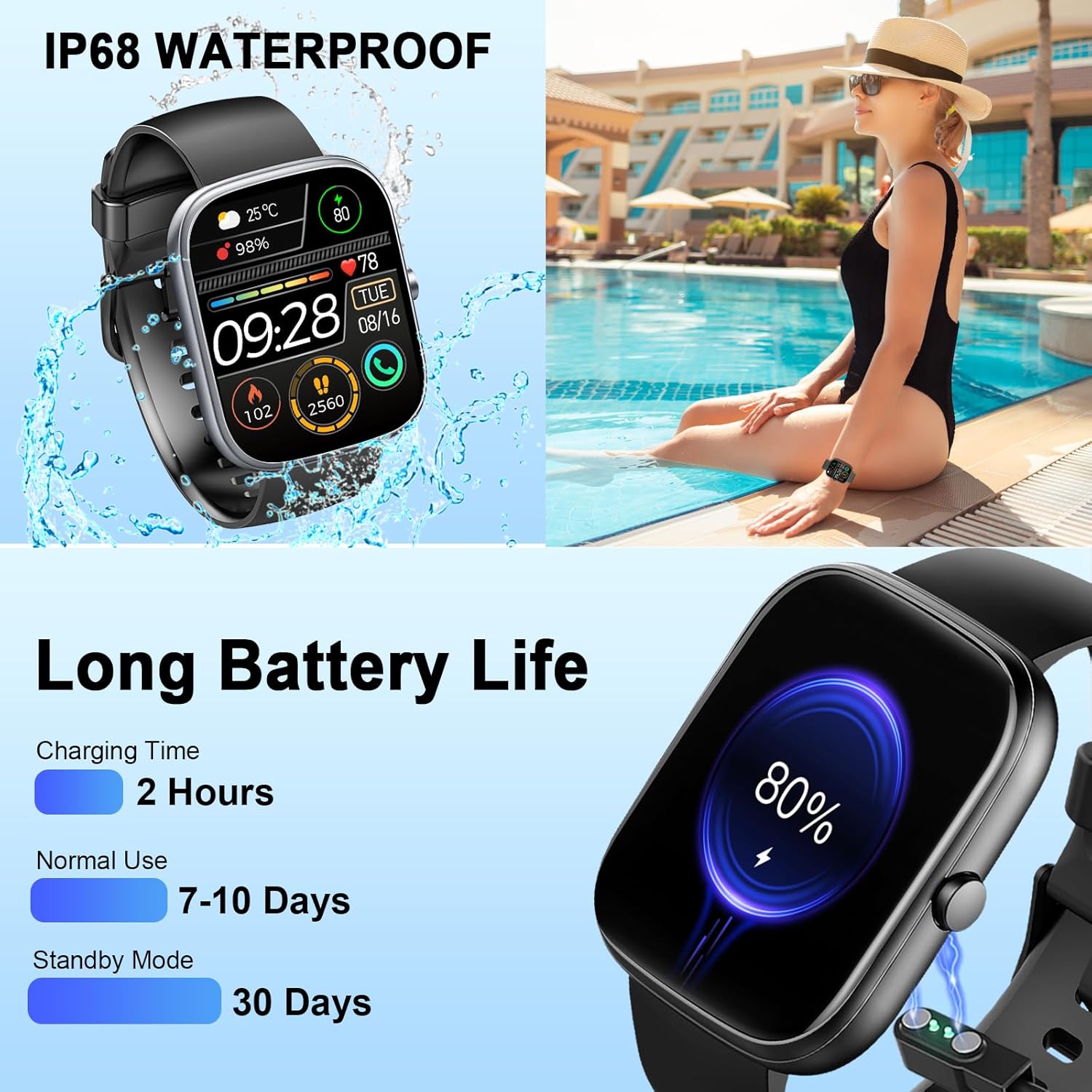
Image: The smartwatch connected to its magnetic charging cable, illustrating the charging process and highlighting its long battery life specifications.

Image: The smartwatch on its magnetic charger, with text indicating a daily use time of 7 days and a standby time of 30 days.
6. Waterproof Information
The Dyurwa Smart Watch T60 is IP68 waterproof. This means it is resistant to dust and can withstand immersion in water up to 1.5 meters for up to 30 minutes. It is suitable for daily use, such as hand washing, bathing, and swimming.
Nòt:
- Not suitable for hot water, saunas, or diving.
- Avoid exposure to high humidity or corrosive liquids.
- Water resistance may decrease over time with normal wear and tear.

Image: The smartwatch being splashed with water, accompanied by icons indicating its IP68 waterproof rating for activities like bathing and swimming.
7. Antretyen
- Netwayaj: Wipe the watch and strap regularly with a soft, dry cloth. If necessary, use a slightly damp twal epi sèk byen.
- Evite pwodwi chimik yo: Pa sèvi ak pwodui chimik ki fò, solvan netwayaj, oswa detèjan fò, paske sa yo ka domaje fini ak sele mont lan.
- Kontak chaje: Kenbe kontak chaje yo ki dèyè mont lan pwòp epi san debri pou asire yon chajman kòrèk.
- Depo: Sere mont lan nan yon kote ki fre epi sèk lè w pa ap itilize li.
NAN. Depanaj
| Pwoblèm | Solisyon posib |
|---|---|
| Gade pa limen | Asire w ke mont lan chaje nèt. Konekte l nan plato a pou omwen 10 minit. |
| Pa ka konekte ak smartphone la | 1. Asire w ke Bluetooth aktive sou telefòn ou an. 2. Asire w ke mont lan nan zòn telefòn ou an. 3. Rekòmanse mont lan ak telefòn ou an. 4. Try unpairing and re-pairing the device through the GloryFit app and phone's Bluetooth settings. |
| Inaccurate heart rate/sleep data | Ensure the watch is worn snugly on your wrist, not too tight or too loose. Clean the sensor on the back of the watch. Note that data is for reference and not medical use. |
| Notifikasyon pa resevwa | 1. Check app permissions for GloryFit on your phone (notifications, background activity). 2. Ensure Bluetooth connection is stable. 3. Verify notification settings within the GloryFit app. |
| Kout lavi batri | Reduce screen brightness, limit continuous heart rate monitoring, and disable unnecessary notifications. Ensure proper charging. |
9. Espesifikasyon
| Karakteristik | Spesifikasyon |
|---|---|
| Modèl | T60 |
| Gwosè ekran | 1.91 inches (4.85 cm) HD Full Touch Screen |
| Koneksyon | Bluetooth 5.3 |
| Sistèm operasyon | Android Wear 1.0 (compatible with iOS 9.0+ and Android 4.0+) |
| Evalyasyon ki enpèmeyab | IP68 |
| Kalite batri | Lithium Ion (1 A battery included) |
| Tan pou chaje | Apeprè. 2 èdtan |
| Tan Itilizasyon Tipik | 7-10 jou |
| Tan sibstiti | Jiska 30 jou |
| Pwa atik | 3.2 ons |
| GPS | Pa gen GPS |
10. Garanti ak sipò
For warranty information and customer support, please refer to the documentation included with your purchase or contact Dyurwa customer service directly. Details for contacting support are typically available on the product packaging or the official Dyurwa websit.