
1. Entwodiksyon
This manual provides detailed instructions for the installation, operation, and maintenance of your GAMEMAX N90 BG ATX PC Case. The N90 BG features a modular dual-chamber design, a 512-LED matrix display, and panoramic curved glass. It is designed for BTF motherboards, offering a cable-free interior, efficient 270° cooling, and includes six ARGB PWM fans. Please read this manual thoroughly before beginning assembly to ensure proper setup and optimal performance.

Figi 1: Devan view of the GAMEMAX N90 BG ATX PC Case, showcasing its panoramic curved glass, internal components, and the integrated LED display.
2. Pake kontni
Verify that all components are present before proceeding with the installation:
- GAMEMAX N90 BG ATX PC Case
- Bwat akseswa (vis, distansè, lyen kab)
- Six pre-installed ARGB PWM fans
- Manyèl Itilizatè (dokiman sa a)
3. Enstalasyon ak Enstalasyon
Follow these steps for proper assembly of your PC components within the GAMEMAX N90 BG case.
3.1. Prepare Ka a
- Debake: Retire bwat la nan anbalaj li avèk prekosyon.
- Retire panèl: The panoramic curved glass and side panels can be removed for easier access. Refer to Figure 2 for an interior view.

Figi 2: Enteryè view of the GAMEMAX N90 BG case, highlighting the spacious motherboard tray and fan mounting locations.

Figi 3: Side view of the case with the panel removed, providing access to the internal structure for component installation.
3.2. Enstalasyon mèr
The N90 BG supports ATX motherboards, including BTF (Back-To-the-Future) motherboards for a cable-free aesthetic. Install the necessary standoffs for your motherboard size, then carefully place the motherboard and secure it with screws.

Figi 4: Entèn view demonstrating potential component placement and cable routing paths.
3.3. Enstalasyon ekipman pou pouvwa
The case features a bottom mount for the power supply. Install your power supply unit (PSU) into the designated compartment at the bottom of the case and secure it with screws from the rear.

Figi 5: Dèyè view of the case, illustrating the power supply mounting area and expansion slots.
3.4. Enstalasyon Disk Depo
Utilize the available drive bays for 2.5-inch SSDs or 3.5-inch HDDs. Refer to the accessory box for specific mounting hardware.
3.5. Enstalasyon Vantilatè ak Radyatè
The case comes with six pre-installed ARGB PWM fans for efficient 270° cooling. Additional fans or radiators can be mounted in various positions (top, side, rear) as needed. Ensure proper airflow direction for optimal cooling.

Figure 6: Top-down interior view, showing available mounting points for additional fans or liquid cooling radiators.
3.6. Jesyon kab
The dual-chamber design and BTF motherboard compatibility facilitate excellent cable management, allowing for a clean, cable-free interior. Route all cables through the designated cutouts and secure them using the provided cable ties in the rear chamber.
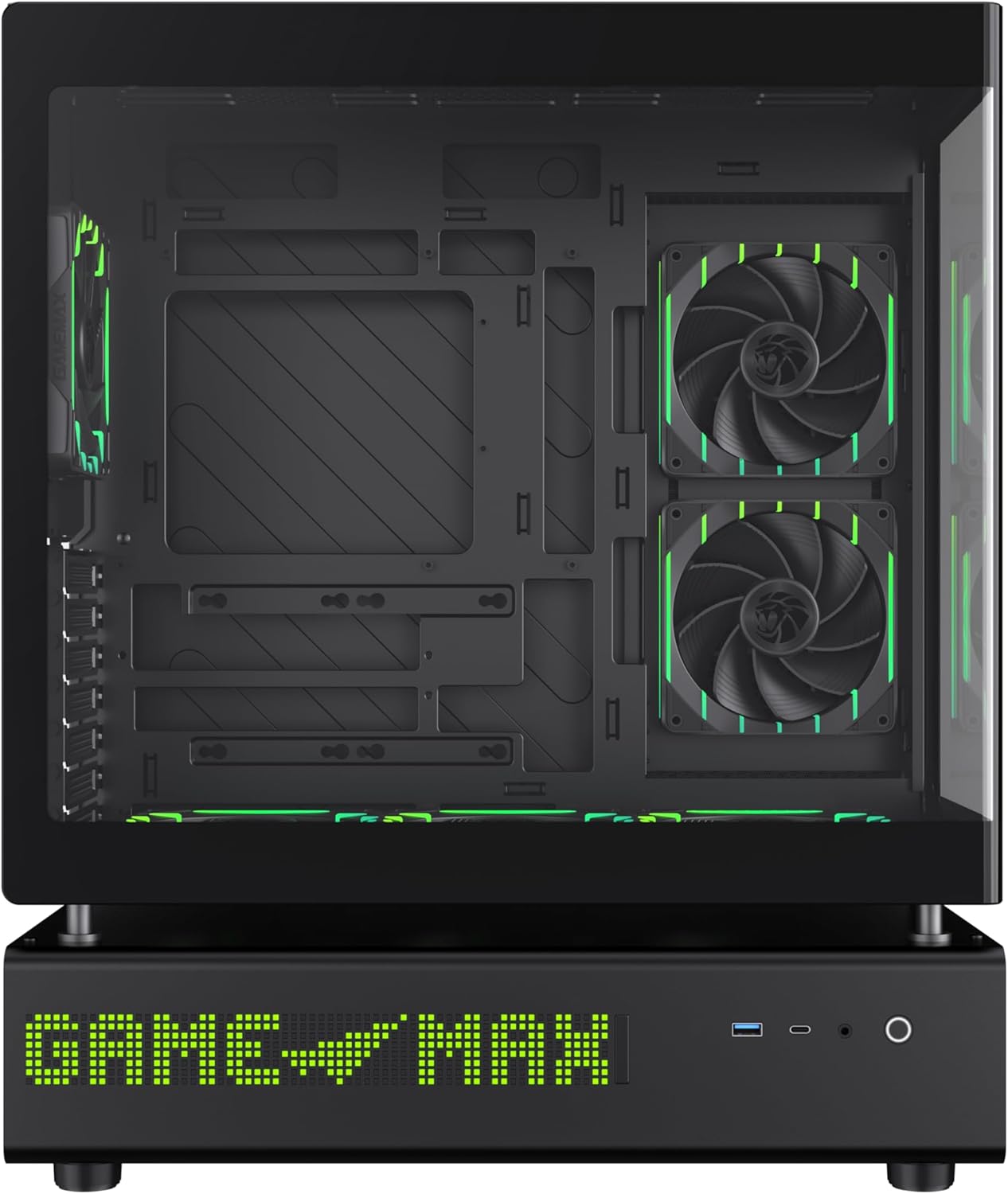
Figi 7: Side view of the case, illustrating the solid panel that conceals the cable management area.
4. Operasyon Enstriksyon
4.1. Limen
After all components are installed and cables are connected, close all panels. Connect the power cable to your PSU and press the power button located on the front panel of the case.
4.2. 512-LED Matrix Display
The integrated 512-LED matrix display on the front panel can be customized to show various information or patterns. Refer to your motherboard's software or the GAMEMAX utility (if applicable) for configuration options.
4.3. ARGB PWM Fans
The six pre-installed ARGB PWM fans are connected to a controller or directly to your motherboard. Fan speed and RGB lighting can typically be controlled via motherboard software (e.g., ASUS Aura Sync, MSI Mystic Light, Gigabyte RGB Fusion) or a dedicated fan controller.
5. Antretyen
Antretyen regilye asire lonjevite ak pèfòmans optimal bwat PC ou a.
- Filtè Pousyè: Periodically clean the dust filters located on the intake areas of the case. Gently remove them and clean with compressed air or water (ensure they are completely dry before reinstallation).
- Netwayaj eksteryè: Wipe the exterior surfaces, including the panoramic curved glass, with a soft, damp twal. Evite pwodui netwayaj abrazif.
- Netwayaj enteryè: Sèvi ak lè konprese pou retire pousyè nan konpozan entèn yo ak fanatik yo. Asire w ke sistèm nan etenn epi debranche anvan ou netwaye li.
NAN. Depanaj
Si ou rankontre pwoblèm, gade etap depanaj komen sa yo:
- Pa gen pouvwa:
- Asire w ke PSU a limen epi li byen konekte nan priz miray la.
- Verify all power cables (24-pin ATX, CPU, GPU) are securely connected to the motherboard and components.
- Tcheke koneksyon switch pouvwa a sou panèl devan an ak kat manman an.
- Fans Not Spinning / LEDs Not Lighting Up:
- Confirm fan and ARGB cables are correctly connected to the motherboard headers or fan controller.
- Check motherboard BIOS/UEFI settings or software for fan and RGB control.
- Pwoblèm ekspozisyon:
- Ensure your monitor is connected to the graphics card, not the motherboard's integrated graphics (unless using integrated graphics).
- Verifye kat grafik la byen chita nan plas PCIe li epi li gen ase pouvwa.
For further assistance, consult your motherboard manual or the GAMEMAX support resources.
7. Espesifikasyon
| Karakteristik | Spesifikasyon |
|---|---|
| Mak | GAMEMAX |
| Non modèl | GAMEMAX N90 BG |
| Nimewo Modèl Atik | N90 BG |
| Mèr konpatibilite | ATX |
| Kalite Ka | Mid Tower |
| Koulè | Nwa |
| Materyèl | Vè, Plastik ABS |
| Dimansyon pwodwi (LxWxH) | 17.28 x 9.65 x 20.87 pous |
| Pwa atik | 28.5 liv (12.95 kilogram) |
| Kantite USB 3.0 pò | 1 |
| Kalite montaj ekipman pouvwa | Anba mòn |
| Metòd refwadisman | Air (with 6 pre-installed ARGB PWM fans) |
| Itilizasyon Rekòmande | Gaming |
8. Garanti ak sipò
GAMEMAX stands behind the quality of its products. While specific warranty details may vary by region, GAMEMAX products are designed for reliability and performance.
For technical support, warranty claims, or further inquiries, please visit the official GAMEMAX store or contact their customer service. You can find more information and support resources at the GAMEMAX Store on Amazon.