
1. Entwodiksyon
This manual provides essential instructions for setting up, operating, maintaining, and troubleshooting your FUNYET 2-in-1 Laptop, Model FUN01-05. This device features a 14.1-inch Full HD touchscreen, an Intel Core i7-1265U processor, 16GB RAM, and a 512GB SSD, running Windows 11 Pro. Its 360-degree reversible screen allows for versatile usage modes.
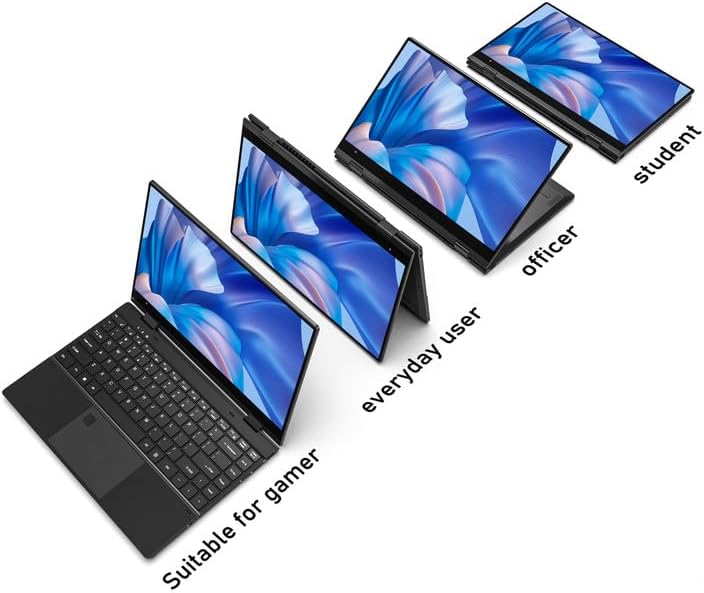
Figure 1: FUNYET 2-in-1 Laptop showcasing its versatile modes.
2. Pake kontni
Verifye ke tout atik yo prezan nan pakè a:
- FUNYET 2-in-1 Touch Screen Laptop
- AC adaptè
- Kat Garanti
- Enstriksyon (manyèl sa a)
3. Enstalasyon
3.1 Premye Chaje ak Limen
- Connect the AC adapter to the DC-IN port on the laptop and plug it into a power outlet.
- Allow the laptop to charge for at least 30 minutes before initial use.
- Press and hold the Power Button (located on the side) until the screen illuminates.
3.2 Enstalasyon Windows 11 Pro
Follow the on-screen prompts to complete the Windows 11 Pro initial setup. This includes selecting your region, language, connecting to a Wi-Fi network, and creating a user account.
3.3 Enstalasyon Lektè Anprent Dwèt
For enhanced security and quick access, set up the fingerprint reader:
- Navigate to Windows Settings > Accounts > Sign-in options.
- Under "Windows Hello Fingerprint," click "Set up" and follow the instructions to register your fingerprint.

Figure 2: Backlit keyboard and integrated fingerprint reader.
4. Operasyon Enstriksyon
4.1 Jesyon pouvwa
- Pouvwa sou: Peze bouton pouvwa a.
- Mòd dòmi: Briefly press the Power Button or close the lid.
- Fèmen: Go to Start Menu > Power > Shut down.
- Rekòmanse: Go to Start Menu > Power > Restart.
4.2 2-in-1 Modes
The laptop's 360-degree hinge allows for four primary modes:
- Notebook Mode: Konfigirasyon estanda laptop pou tape ak pwodiktivite.
- Mòd Kanpe: Fold the keyboard back to prop up the screen for viewkontni.
- Mòd Tant: Position the laptop in an inverted 'V' shape, ideal for touch interaction or presentations in confined spaces.
- Mòd tablèt: Fold the screen completely back against the base for a tablet experience.

Figure 3: Different operational modes of the 2-in-1 laptop.
4.3 Touchscreen and Keyboard
- Ekran tactile: Use gestures similar to a smartphone or tablet for navigation and interaction.
- Klavye retroeklere: The keyboard features a backlight for use in low-light conditions. The backlight can typically be toggled or adjusted using function keys (e.g., Fn + F5).
4.4 Koneksyon
Your laptop supports various connectivity options:
- Wi-Fi 6: For high-speed wireless internet access. Connect via Windows Settings > Network & Internet > Wi-Fi.
- Bluetooth 5.2: For connecting wireless peripherals like headphones, mice, or keyboards. Pair devices via Windows Settings > Bluetooth & devices.
- Pò: The laptop includes various ports for external devices.

Figure 4: Laptop ports and their functions.
Pò ki disponib:
- DC-IN (Entre pouvwa)
- USB 3.1 Type-C (Video Output, Data Transfer, Charging)
- Audio Port (Headphones/Microphone)
- Bouton pouvwa
- TF Card Slot (for storage expansion up to 1TB)
- USB 3.1 Kalite-A
5. Antretyen
5.1 Netwayaj
- Sèvi ak yon twal mou ki pa gen pousyè pou netwaye ekran an ak deyò a.
- For stubborn smudges, dampen the cloth slightly with water or a screen-safe cleaner.
- Avoid harsh chemicals, abrasives, or excessive moisture.
5.2 Swen Batri
- Pou maksimize dire lavi batri a, evite dechaje batri a nèt souvan.
- Sere laptop la nan yon kote ki fre epi sèk lè w pa itilize li pou yon bon bout tan.
- The laptop features a 38 Watt-hour Lithium-Ion battery, providing up to 8 hours of usage.
5.3 Jesyon tèmik
The laptop is designed with an improved thermal system to maintain optimal operating temperatures. Ensure proper airflow by not blocking the ventilation openings, especially during intensive tasks.

Figure 5: Laptop thermal design for efficient cooling.
NAN. Depanaj
Si ou rankontre pwoblèm, eseye etap debaz sa yo pou depanaj:
- Pa gen pouvwa: Asire w adaptè AC a byen konekte ak laptop la ak yon priz kouran ki fonksyone. Eseye yon lòt priz.
- Ekran an pa parèt: Connect an external monitor to check if the issue is with the laptop's display. Restart the laptop.
- Pèfòmans Ralanti: Close unnecessary applications. Check for Windows updates. Ensure sufficient free storage space.
- Pwoblèm Wi-Fi/Bluetooth: Toggle Wi-Fi/Bluetooth off and on in Windows Settings. Restart the laptop. Check router/device connections.
- Ekspozisyon glitches: Ensure your Windows operating system and graphics drivers are up to date. This can often resolve display anomalies.
- Ekran tactile ki pa reponn: Restart the laptop. Ensure the screen is clean and free of debris.
For persistent issues, refer to the support section or contact customer service.
7. Espesifikasyon
| Karakteristik | Detay |
|---|---|
| Mak | FUNYET |
| Non modèl | Magbook |
| Nimewo Modèl | FUN01-05 |
| Gwosè ekran | 14.1 pous |
| Rezolisyon ekspozisyon | 1920 x 1080 piksèl (FHD) |
| Kalite ekspozisyon | LCD, Touchscreen, Glossy Finish |
| Processeur | Intel Core i7-1265U (jiska 4.8 GHz, 8 Nwayo, 12 Fil) |
| RAM | 16 GB DDR4 (3733 MHz) |
| Depo | 512 GB SSD (PCIE x 4), expandable up to 1TB with TF card |
| Sistèm operasyon | Windows 11 Pro |
| Grafik | Entegre Intel Iris Xe Graphics |
| Koneksyon san fil | Wi-Fi 6, Bluetooth 5.2 |
| Pò | USB 3.1 Type-A, USB 3.1 Type-C, DC-IN, Audio Jack, TF Card Slot |
| Kamera | Front 2 MP |
| Sekirite | Rekonesans anprent |
| Batri | 38 Watt Hours Lithium Ion (up to 8 hours) |
| Pwa | 3 liv |
| Dimansyon (L x W x P) | 12.7" x 8.6" x 0.6" |
8. Garanti ak sipò
8.1 Enfòmasyon sou Garanti
Your FUNYET 2-in-1 Laptop comes with a 2-ane garanti limite. This warranty covers manufacturing defects and hardware malfunctions under normal use. Please retain your proof of purchase for warranty claims.
Anplis de sa, a 180 jou politik retounen gratis yo ofri apati dat acha a.
8.2 Sipò pou Kliyan
For technical assistance, warranty claims, or any product-related inquiries, please contact FUNYET customer support:
- Sipò telefòn: +1 800-986-9631 (English phone support available)
- Sipò sou entènèt: 24/7 instant online support is available. Please visit the official FUNYET websit pou detay kontak.