
Ledwood PLAYKARAOKE
Ledwood PLAYKARAOKE Portable Karaoke Speaker
Manyèl Enstriksyon
Entwodiksyon
Mèsi pou acha aasing the Ledwood PLAYKARAOKE Portable Karaoke Speaker. This manual provides essential information for the safe and efficient operation of your device. Please read it thoroughly before use and retain it for future reference.
Enfòmasyon enpòtan sou sekirite
- Pa ekspoze aparèy la nan dlo oswa imidite twòp.
- Evite tanperati ekstrèm.
- Pa eseye demonte oswa repare aparèy la tèt ou. Konfye tout antretyen bay pèsonèl kalifye.
- Kenbe soti nan atenn timoun yo.
- Sèvi sèlman ak kab chaje ak adaptè ki vini ak aparèy la.
- Asire w ke sistèm nan byen vantile pandan w ap itilize l epi pandan w ap chaje l.
Kontni pake
Tanpri verifye ke tout atik yo prezan:
- Ledwood PLAYKARAOKE Portable Karaoke Speaker
- 2 Mikwofòn Wireless
- Kab chaje (USB-C)
- Manyèl itilizatè
- 32GB USB Key
Pwodwi souview
The Ledwood PLAYKARAOKE is a compact and powerful portable karaoke speaker designed for entertainment. It features a 120W output, dynamic RGB LED lighting, and multiple connectivity options.
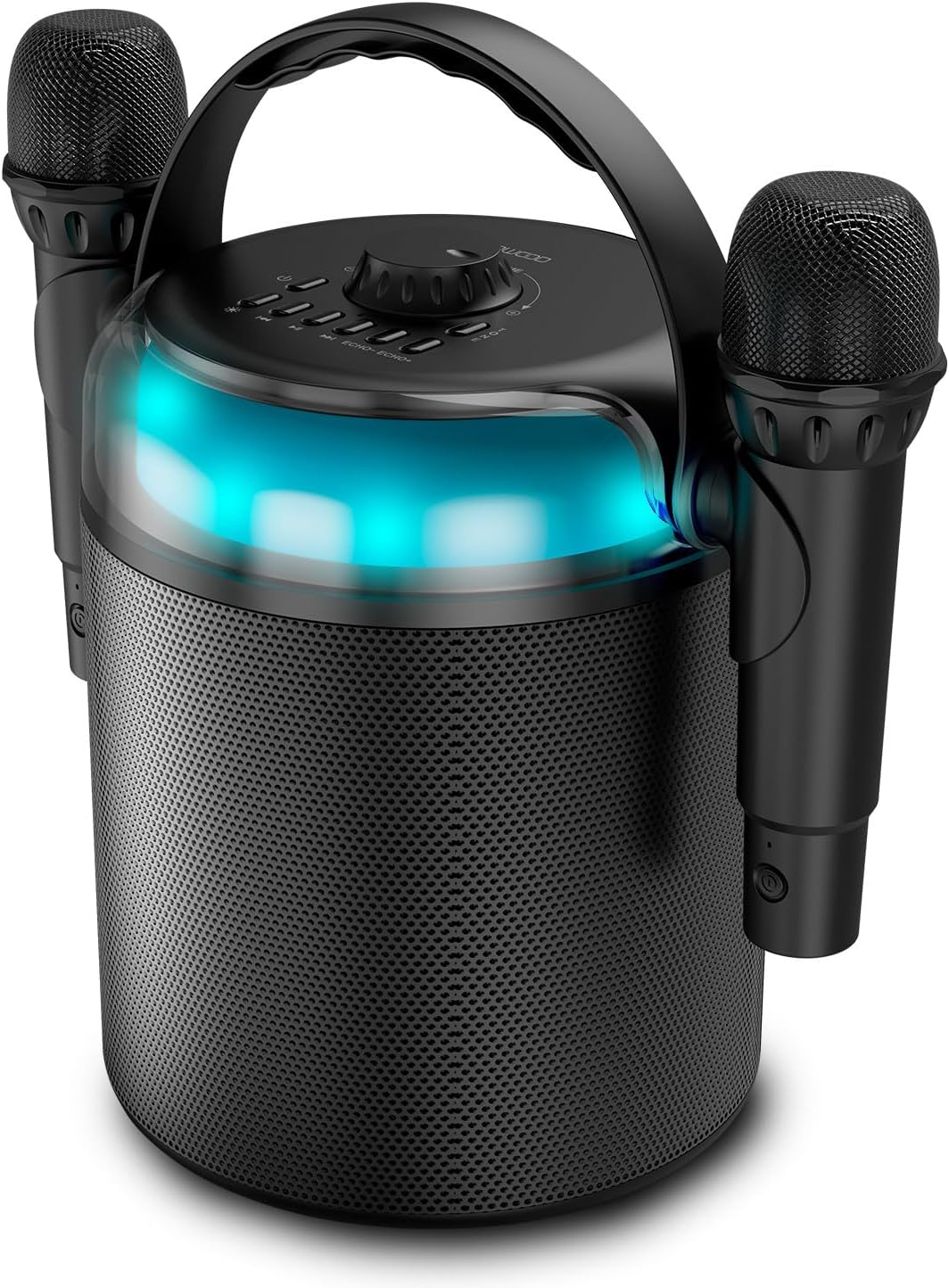
Figure 1: Ledwood PLAYKARAOKE Speaker with Microphones
This image shows the main unit of the Ledwood PLAYKARAOKE speaker, a cylindrical black device with a handle on top. Two wireless microphones are securely attached to the sides of the speaker. A blue LED light band is visible around the top section of the speaker.
Kontwòl Panel

Figi 2: Top Kontwòl Panel
Imaj sa a bay yon imaj anwo-anba view of the speaker's control panel. It features a large central volume knob, a power button, buttons for LED light control, playback controls (play/pause, skip), and echo adjustment for the microphones.
Familiarize yourself with the buttons and ports on the device:
- Volim bouton: Adjusts the overall sound output.
- Bouton pouvwa: Limen oswa etenn oratè a.
- Ki ap dirije bouton limyè: Cycles through LED light effects or turns them off.
- Kontwòl Lekti: Jwe/Pòz, Tras anvan, Tras apre.
- Echo Controls (Echo-, Echo+): Adjusts the echo effect on the microphones.
- bouton mòd: Switches between input sources (Bluetooth, USB, MicroSD, AUX, COAX).
- Vocal Effects Button: Cycles through different vocal effects (Man, Woman, Monster, Child, Reverb).
- Pò USB: Pou lekti sou kle USB.
- MicroSD Kat plas: Pou lekti kat microSD.
- Antre AUX: Antre odyo 3.5mm pou aparèy ekstèn.
- COAX Input: Coaxial audio input.
- Pò chaje: Pò USB-C pou chaje oratè a.
Enstalasyon
1. Chaje Oratè a
- Connect the provided USB-C charging cable to the charging port on the speaker.
- Connect the other end of the cable to a suitable USB power adapter (not included) or a powered USB port.
- Limyè endikatè chaj la ap limen. Yon chaj konplè pran apeprè 4 èdtan.
- Yon fwa konplètman chaje, dekonekte kab la chaje.
2. Powering On / Off
- Pou pouvwa sou, peze epi kenbe la Bouton pouvwa until the LED lights illuminate and you hear an audible prompt.
- Pou koupe pouvwa a, peze epi kenbe Bouton pouvwa again until the LED lights turn off.
3. Pairing Wireless Microphones
The two wireless microphones are typically pre-paired with the speaker. If they do not connect automatically:
- Asire w ke oratè a limen.
- Insert batteries into the microphones (if not already installed).
- Power on each microphone. They should automatically connect to the speaker.
- If connection issues persist, refer to the Troubleshooting section.
Enstriksyon Operasyon
1. Bluetooth Koneksyon
- Power on the speaker. It will automatically enter Bluetooth pairing mode (indicated by a flashing LED).
- Sou telefòn entelijan ou, tablèt ou, oswa lòt aparèy ki gen Bluetooth, aktive Bluetooth epi chèche aparèy ki disponib yo.
- Select "Ledwood PLAYKARAOKE" from the list.
- Once connected, the speaker will emit an audible confirmation, and the LED will stop flashing.
- Kounye a ou kapab jwe odyo soti nan aparèy konekte ou a atravè oratè a.
2. Lekti USB/MicroSD
- Insert a USB drive or microSD card (with audio files) into the corresponding port/slot on the speaker.
- The speaker should automatically switch to USB/MicroSD mode and begin playing audio. If not, press the Bouton Mode to select the correct input.
- Sèvi ak la Kontwòl Lektur (Play/Pause, Previous Track, Next Track) to manage your music.
3. AUX/COAX Input
- Connect an external audio device (e.g., TV, PC) to the speaker using a 3.5mm AUX cable or a coaxial cable (not included).
- Peze a Bouton Mode repeatedly until the speaker switches to AUX or COAX input mode.
- Play audio from your external device. The speaker will output the sound.
4. Ajiste Volim
Vire gwo a Volim bouton on the top panel clockwise to increase volume and counter-clockwise to decrease volume.
5. Using Vocal Effects
While using the microphones:
- Peze a Vocal Effects Button to cycle through the available vocal effects: Man, Woman, Monster, Child, and Reverb.
- Sèvi ak la eko- epi Eko+ buttons to adjust the intensity of the echo effect on your voice.
6. Efè Limyè LED
Peze a Dirije limyè bouton to cycle through different dynamic RGB LED light patterns or to turn the lights off.
Antretyen
- Netwayaj: Siye oratè a avèk yon twal mou epi sèk. Pa sèvi ak pwodui netwayaj abrazif oswa solvan.
- Depo: Sere aparèy la nan yon kote ki fre epi sèk, lwen limyè solèy dirèk ak tanperati ekstrèm.
- Swen batri: For optimal battery life, charge the speaker fully before long periods of storage and recharge it every few months.
Depanaj
| Pwoblèm | Solisyon posib |
|---|---|
| Oratè a pa limen. | Asire w batri a chaje. Konekte kab chaje a epi eseye ankò. |
| Pa gen son ki soti nan oratè a. |
|
| Mikwofòn yo pa fonksyone. |
|
| Koneksyon Bluetooth la pa estab. |
|
Espesifikasyon
- Modèl: Ledwood PLAYKARAOKE
- Sòti pouvwa: 120W
- Chofè Oratè: 4" (10 cm) Woofer, 1.25" Tweeter
- Bluetooth vèsyon: 5.1
- Lavi batri: Jiska 3 èdtan (nan 70% volim)
- Tan pou chaje: Apeprè 4 èdtan
- Pò Antre: USB, MicroSD, AUX (3.5mm), COAX
- Mikwofòn: 2 Mikwofòn Wireless
- Efè Vokal: Man, Woman, Monster, Child, Reverb (5 effects)
- Limyè ki ap dirije: RGB dinamik
- Dimansyon oratè (H x W x P): 215 x 168 x 168 mm
- Microphone Dimensions (H x Dia): 175 x 50 mm
- Pwodwi pou Telefòn enkli: 32GB USB Key
Garanti ak sipò
Pou enfòmasyon sou garanti a ak sipò teknik, tanpri gade kat garanti ki vini ak pwodwi w la oswa vizite sit ofisyèl Ledwood la. websit la. Kenbe prèv acha ou a pou nenpòt reklamasyon garanti.
Ask a question about this manual
Ask about setup, troubleshooting, compatibility, parts, safety, or missing instructions. Manuals+ will review the question and use this page’s manual context to help answer it.