
1. Entwodiksyon
Thank you for choosing the Devoko Electric Height-Adjustable Standing Desk. This manual provides detailed instructions for the assembly, operation, and maintenance of your new desk. Please read this manual thoroughly before use to ensure proper function and safety. Keep this manual for future reference.
2. Avètisman Sekirite
- Limit pwa: Do not overload the desk. The maximum load capacity is 70 kg. Exceeding this limit may cause damage to the desk or personal injury.
- Sekirite elektrik: Use the integrated USB-A charging port with caution to avoid electrical hazards. Ensure cables are properly managed to prevent tripping or damage.
- Timoun ak bèt kay: Kenbe timoun ak bèt kay lwen biwo a pandan w ap opere pou evite aksidan.
- Clearance: Asire w pa gen okenn obstak anwo oswa anba biwo a lè w ap ajiste wotè li.
- Sous pouvwa: Connect the desk only to a grounded power outlet.
- Antretyen: Pa eseye demonte oswa repare motè a oswa sistèm kontwòl la tèt ou. Kontakte sèvis kliyan pou asistans.
3. Pake kontni
Please verify that all components are present before beginning assembly. If any parts are missing or damaged, contact Devoko customer support.
- Desktop sections (4 parts, 15mm high-quality particle board)
- Desk frame (2 steel beams, 2 T-shaped legs)
- Control panel with LED display and USB-A port
- Motor and power supply
- Fabric drawer (35x22x10.5 cm)
- Kwòk kas ekoutè
- Plato jesyon kab
- Kab grommet
- Materyèl ak zouti asanblaj
- Manyèl itilizatè
4. Enstalasyon ak Asanble
The desktop is divided into 4 sections of 15mm high-quality particle board, which simplifies the assembly process. Follow the included graphical instructions for a smooth setup.
- Depake konpozan: Retire tout pyès yo nan anbalaj la avèk prekosyon epi mete yo sou yon sifas pwòp e mou pou evite reyur.
- Rasanble ankadreman an: Attach the two T-shaped legs to the steel beams. Ensure all screws are tightened securely. The frame features a robust double-beam construction (65x45 mm cold-rolled steel alloy) for enhanced stability.
- Tache seksyon Desktop yo: Connect the four desktop sections together and then secure them to the assembled frame using the provided hardware.
- Enstale Panèl Kontwòl la: Mount the control panel to the underside of the desk in an easily accessible location.
- Konekte motè a ak pouvwa a: Connect the motor to the control panel and then plug the power supply into the control panel.
- Enstale Pwodwi pou Telefòn: Attach the fabric drawer, headphone hook, cable management tray, and cable grommet as desired.


5. Operasyon Enstriksyon
5.1 Kontwòl Panel Overview
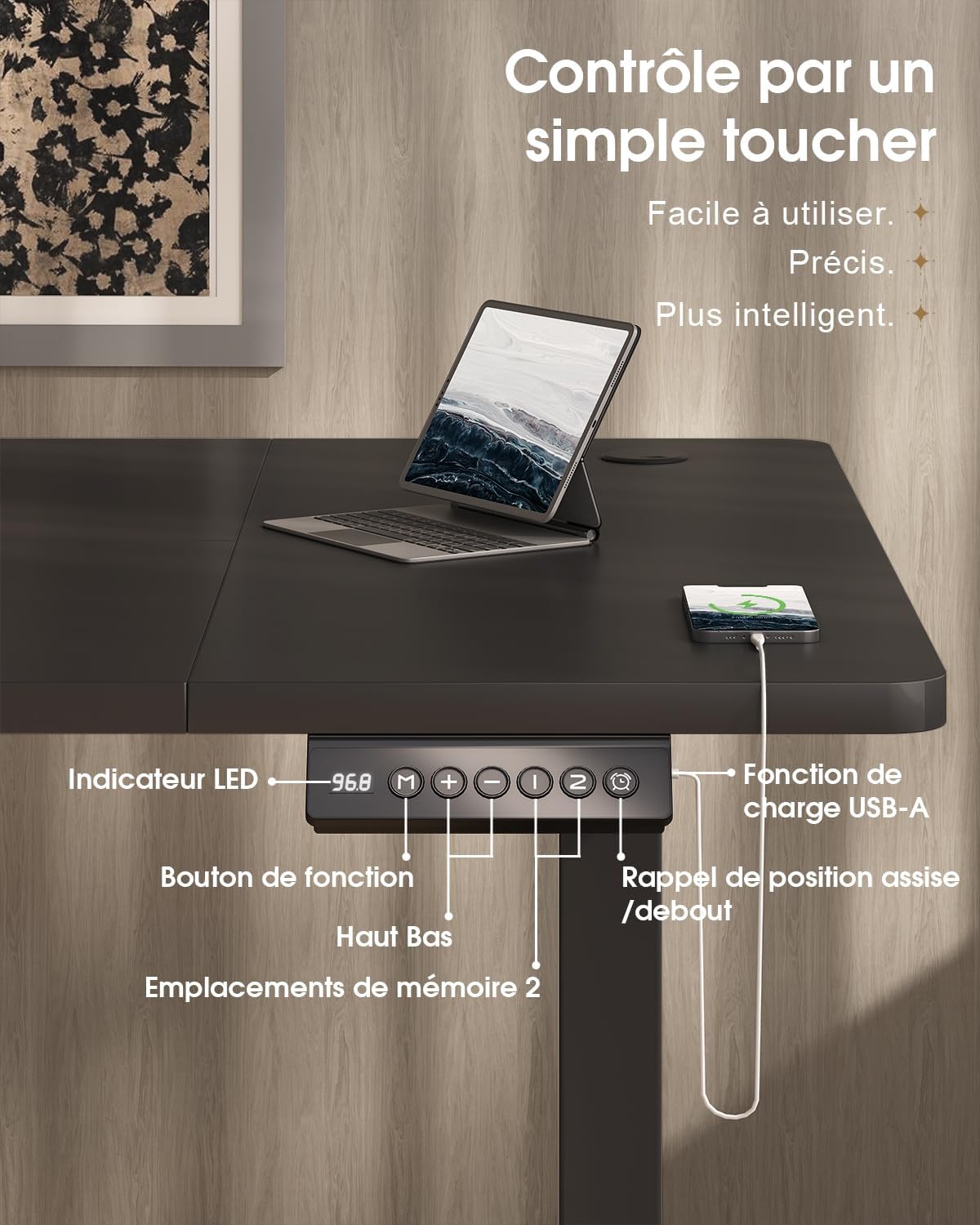
The desk features an intuitive control panel with an LED display for easy height adjustment and memory functions.

5.2 Ajisteman Wotè
- Bouton monte / desann: Press and hold the 'Up' or 'Down' arrow buttons on the control panel to raise or lower the desk to your desired height. The LED display will show the current height.
- Ranje wotè: The desk can be adjusted smoothly and quietly between 73 cm (sitting height) and 118 cm (standing height).
5.3 Prereglaj Memwa
The control panel allows you to save two preferred height settings for quick adjustments.
- Fikse yon pozisyon memwa: Adjust the desk to your desired height using the 'Up' or 'Down' buttons.
- Press the 'M' (Memory) button. The LED display will flash.
- Within 3 seconds, press either '1' or '2' to save the current height to that memory position. The LED display will confirm the setting.
- Sonje yon pozisyon memwa: Simply press the '1' or '2' button to automatically move the desk to the saved height.
5.4 USB-A chaje pò
A convenient USB-A charging port is integrated into the control panel. Connect your compatible devices, such as smartphones or tablets, for charging. Ensure your device's charging cable is compatible with a USB-A port.
6. Karakteristik
The Devoko Electric Height-Adjustable Standing Desk is designed with several ergonomic and functional features to enhance your workspace.
- Ajisteman Wotè elektrik: Smooth and quiet (less than 50 dB) motor allows for effortless transitions between sitting and standing positions.
- Konstriksyon solid: Features a double-beam frame made of 65x45 mm cold-rolled steel alloy, providing exceptional stability and a load capacity of up to 70 kg. All metal parts are powder-coated for durability.
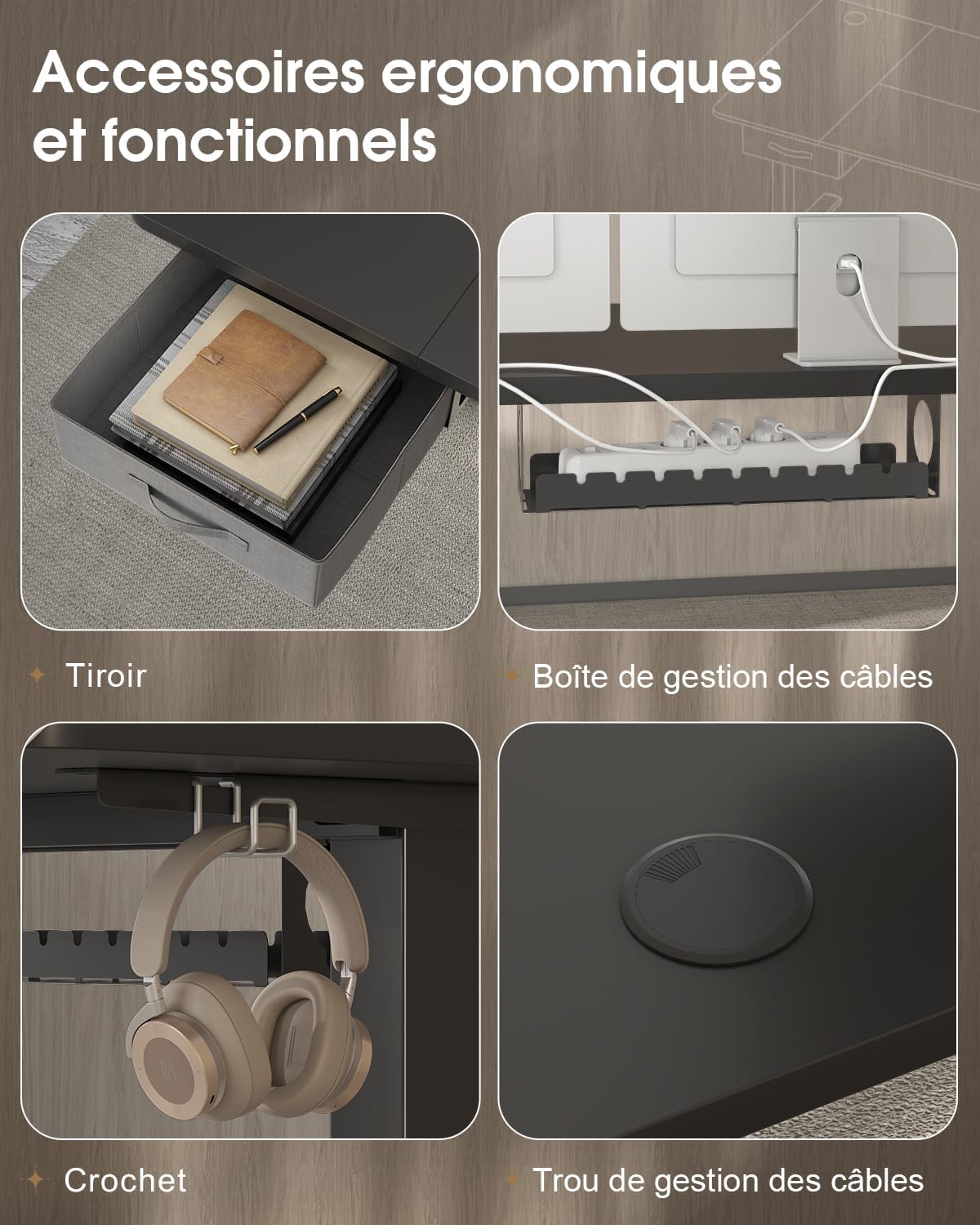
- Tiwa entegre: A fabric drawer (35x22x10.5 cm) is included for convenient storage of office supplies, helping to keep your desktop clutter-free.
- Kwòk pou ekoutè: A side-mounted hook provides a dedicated spot for your headphones, keeping them within reach and off the desk surface.
- Sistèm jesyon kab: Includes a cable management tray and a cable grommet to organize and conceal power cords and other cables, maintaining a tidy and safe workspace.
- USB-A chaje pò: Built-in port on the control panel for easy charging of your electronic devices.

7. Antretyen
Regular maintenance will help prolong the life and performance of your Devoko standing desk.
- Netwayaj: Siye sifas biwo a ak ankadreman an avèk yon twal mou.amp twal. Evite itilize pwodui chimik ki agresif oswa pwodui netwayaj abrazif ki ka domaje fini an.
- Tcheke Koneksyon: Tcheke tout vis ak boulon yo detanzantan pou asire yo byen sere. Sere boulon yo ankò si sa nesesè.
- Jesyon kab: Ensure cables are neatly organized and not pinched or strained, especially during height adjustments.
- Swen motè: Avoid spilling liquids on the motor or control panel. If the desk is not used for an extended period, unplug it from the power outlet.
NAN. Depanaj
If you encounter any issues with your desk, refer to the following common problems and solutions. If the problem persists, contact customer support.
| Pwoblèm | Kòz posib | Solisyon |
|---|---|---|
| Biwo a pa deplase oswa li pa reyaji ak kontwòl yo. | Kab kouran dekonekte; kab motè dekonekte; surcharge. | Check if the power cable is securely plugged into the wall outlet and the desk. Ensure the motor cable is connected. Reduce the load on the desk if it exceeds 70 kg. |
| Biwo a ap deplase yon fason inegal oswa li fè bri dwòl. | Loose connections; uneven weight distribution. | Check and tighten all assembly screws. Redistribute weight evenly on the desktop. |
| LED display shows an error code. | System malfunction; sensor error. | Unplug the desk from the power outlet for 10 minutes, then plug it back in to reset the system. If the error persists, contact customer support. |
| USB-A charging port not working. | Cable issue; device incompatibility. | Try a different USB cable or device. Ensure the desk is powered on. |
9. Espesifikasyon
| Karakteristik | Spesifikasyon |
|---|---|
| Mak | Devoko |
| Nimewo Modèl | 0790 |
| Koulè | Nwa |
| Materyèl Desktop | Tablo patikil |
| Materyèl ankadreman | Steel alloy (65x45 mm cold-rolled steel) |
| Dimansyon pwodwi (L x W x H) | 180 santimèt x 80 santimèt x (73-118 santimèt) |
| Ranje Ajisteman Wotè | 73 cm a 118 cm |
| Kapasite chaj | 70 kg |
| Nivo bri | Mwens pase 50 dB |
| Karakteristik espesyal | Electric height adjustment, Integrated USB-A port, Cable management, Ergonomic design, 2 Memory presets, Drawer, Headphone hook |
| Pwa atik | 30.8 kg |
| Peyi orijin | Lachin |
10. Garanti ak sipò
For warranty information or technical support, please refer to the purchase documentation or contact Devoko customer service. Keep your proof of purchase for any warranty claims.
You can visit the official Devoko store for more information: Devoko Store