
1. Entwodiksyon
Thank you for choosing the Pro Breeze 40L Smart Dehumidifier. This manual provides important information regarding the safe operation, installation, use, and maintenance of your appliance. Please read this manual thoroughly before use and retain it for future reference.
This dehumidifier is designed to efficiently remove excess moisture from the air, helping to prevent mold, mildew, and condensation in spaces up to 50 m².
2. Enstriksyon Sekirite Enpòtan
Toujou swiv prekosyon sekirite debaz yo lè w ap itilize aparèy elektrik pou diminye risk dife, chòk elektrik, ak blesi.
- Li tout enstriksyon yo ak anpil atansyon anvan ou opere aparèy la.
- Asire voltagvolim ki endike sou etikèt klasman an koresponn ak vòltaj prensipal ou atage.
- Pa plonje aparèy la, kòd kouran an, oswa ploge a nan dlo oswa lòt likid.
- Pa sèvi ak aparèy la si kòd la oswa ploge a domaje, oubyen apre li pa fonksyone byen oswa apre li fin tonbe atè oswa li domaje nan nenpòt fason.
- Kenbe aparèy la lwen timoun ak bèt kay.
- Always unplug the appliance when not in use, before cleaning, or before moving.
- Asire w mete aparèy la sou yon sifas ki estab, ki plat.
- Pa bloke antre oswa sòti lè yo. Kenbe omwen 20 cm espas otou aparèy la.
- Aparèy sa a se pou itilize andedan kay la sèlman.
- Do not use in bathrooms or other excessively humid environments where water may splash onto the unit.
3. Pwodwi souview
3.1 Eleman
The Pro Breeze 40L Smart Dehumidifier features a compact design with integrated controls and a water tank. It includes a continuous drainage option and mobility wheels for easy placement.
Imaj: Devan view of the Pro Breeze 40L Smart Dehumidifier, highlighting its dimensions (52cm height, 28cm depth, 35.5cm width) and key features like smart app control, laundry mode, 5.5L tank, and low energy consumption.
3.2 Kontwòl Panel ak Display
The dehumidifier is equipped with an intuitive touch control panel and an LED display for easy operation and monitoring of humidity levels.

Image: A hand interacting with the touch control panel of the dehumidifier, showing the digital display and various function buttons.
4. Enstalasyon
4.1 Debake
- Retire dezumidifikatè a nan anbalaj li avèk prekosyon.
- Remove all packaging materials, including any protective films or tapes.
- Inspect the appliance for any signs of damage. If damaged, do not operate and contact customer support.
4.2 Plasman
Place the dehumidifier on a firm, level surface in the desired room. Ensure there is at least 20 cm of clear space around all sides of the unit to allow for proper airflow.

Image: A person easily moving the dehumidifier across a wooden floor in a living room, demonstrating its portability with four swivel wheels.
4.3 Koneksyon pouvwa
Plug the power cord into a grounded electrical outlet. Ensure the outlet meets the power requirements specified in the 'Specifications' section.
4.4 Drenaj kontinyèl (opsyonèl)
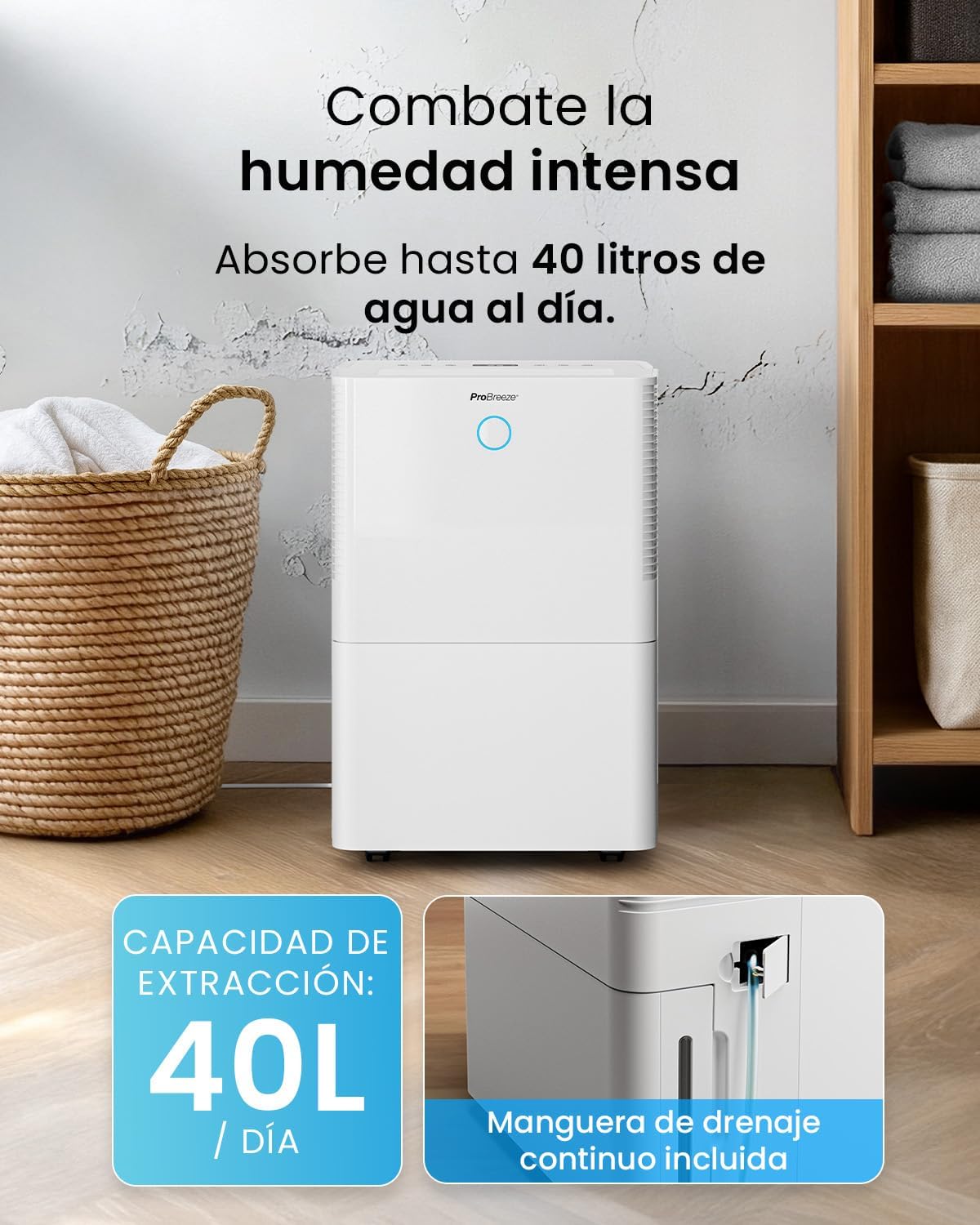
For continuous operation without needing to empty the water tank, attach the included drainage hose. Connect one end to the drainage port on the back of the unit and the other end to a suitable drain or container that is lower than the drainage port.

Imaj: Gwo plan view of the dehumidifier's side, showing the continuous drainage hose connected and leading to a floor drain.
5. Operasyon Enstriksyon
5.1 Power On/Off
Peze a Pouvwa bouton ki sou panèl kontwòl la pou limen oswa etenn aparèy la.
5.2 Ajisteman Imidite Dezire a
The dehumidifier features an automatic sensor that continuously measures room humidity. Use the Imidite bouton yo pou mete nivo imidite ou vle a ant 30% ak 80%.

Image: A family relaxing in a living room with the dehumidifier operating. An overlay illustrates the humidity indicator lights: Blue for >50% (Low), Green for 50-70% (Medium), and Red for <70% (High).
5.3 Mòd Fonksyònman
- Mòd otomatik: The unit will automatically adjust its operation to maintain the set humidity level.
- Mòd kontinyèl: The dehumidifier will operate continuously regardless of the humidity level, ideal for very damp kondisyon yo.
- Mòd lesiv: This mode is designed to accelerate the drying of clothes indoors by running at maximum fan speed and continuous dehumidification.
- Mòd dòmi: Reduces fan speed and dims the display for quiet operation during the night.

Image: A woman smiling while placing clothes on a drying rack next to the dehumidifier, illustrating the accelerated laundry drying feature.

Image: A family watching television in a dimly lit living room, with the dehumidifier operating quietly in the foreground, indicating its silent operation and night mode features.
5.4 Fonksyon revèy
Sèvi ak la Revèy button to set a 24-hour timer for automatic power on or off. This allows you to schedule operation according to your needs.

Image: A close-up of a smartphone screen displaying the Pro Breeze app's 24-hour timer function, allowing users to schedule the dehumidifier's operation.
6. Konektivite Wi-Fi ak Kontwòl Aplikasyon
The Pro Breeze 40L Smart Dehumidifier can be controlled remotely via the free Pro Breeze app, compatible with both Alexa and Google Home.
6.1 Enstalasyon ak koneksyon aplikasyon an
- Download the Pro Breeze app from your smartphone's app store.
- Follow the in-app instructions to create an account and pair your dehumidifier.
- Ensure your dehumidifier is powered on and your smartphone is connected to a 2.4GHz Wi-Fi network during the pairing process.
6.2 Karakteristik Kontwòl Remote
Atravè aplikasyon an, ou kapab:
- Turn the dehumidifier on/off.
- Adjust humidity settings.
- Select operating modes (Auto, Continuous, Laundry, Sleep).
- Set and manage the 24-hour timer.
- Monitor current room humidity.

Image: A woman using a smartphone to control the dehumidifier, with icons for Amazon Alexa and Google Home indicating voice control compatibility.
7. Antretyen
Antretyen regilye asire pèfòmans optimal ak lonjevite dezumidifikatè ou a.
7.1 Netwaye filtè lè a
Ou ta dwe netwaye filtè lè a chak de semèn oswa pi souvan selon itilizasyon an ak kalite lè a.
- Etenn epi deploge dezimidifikatè a.
- Retire filtè lè a nan dèyè aparèy la.
- Lave filtè a avèk dlo tyèd savon. Rense l byen epi kite l seche nèt nan lè a anvan ou mete l tounen.
- Do not operate the dehumidifier without the filter installed.
7.2 Vide epi Netwaye Tank Dlo a
When the water tank is full, the unit will automatically shut off and an indicator light will illuminate. Empty the tank and clean it regularly to prevent mold and bacteria growth.
- Rale tank dlo a avèk prekosyon soti nan devan aparèy la.
- Vide dlo a kolekte.
- Clean the tank with mild detergent and water. Rinse thoroughly.
- Reinsert the dry tank firmly into the dehumidifier.

Image: The dehumidifier in operation, with an overlay indicating its 40L/day extraction capacity and the continuous drainage hose option.
7.3 Netwayaj ekstèn
Siye eksteryè dezimidifikatè a ak yon mou, damp twal. Pa sèvi ak pwodui netwayaj abrazif oswa solvang.
NAN. Depanaj
If you encounter issues with your dehumidifier, refer to the following table before contacting customer support.
| Pwoblèm | Kòz posib | Solisyon |
|---|---|---|
| Dezumidifikatè a pa limen. | No power; Power cord not plugged in; Water tank full or not correctly inserted. | Check power supply; Plug in power cord; Empty and reinsert water tank correctly. |
| Pa gen dlo ki te ranmase. | Room humidity too low; Temperature too low; Air filter blocked; Continuous drainage hose connected. | Increase desired humidity setting; Ensure room temperature is above 5°C; Clean air filter; Disconnect continuous drainage hose if collecting water in tank. |
| Inite a fè bwi. | Unit not on a level surface; Air filter blocked; Fan obstruction. | Place on a flat, stable surface; Clean air filter; Check for obstructions in fan area. |
| Pwoblèm koneksyon Wi-Fi. | Incorrect Wi-Fi password; Not connected to 2.4GHz network; Router too far. | Verify password; Connect to 2.4GHz Wi-Fi; Move unit closer to router or use a Wi-Fi extender. |
9. Espesifikasyon
- Mak: Pro Breeze
- Non modèl: PB-D-32W-W
- Moisture Extraction: Jiska 40 lit/jou
- Kapasite tank dlo: 5.3 lit
- Gwosè chanm rekòmande: Jiska 50 m² (538 pye kare)
- Dimansyon (L x W x H): 27.5 x 35.5 x 52.2 cm
- Pwa: 16.36 kg
- Kantite vitès: 3
- Karakteristik espesyal: Smart App Control, Automatic Humidity Sensor, Automatic Shut-off, 24-hour Timer, Laundry Mode, Sleep Mode, Continuous Drainage
- Nivo bri: <49dB
10. Garanti ak sipò
For warranty information and customer support, please refer to the documentation included with your purchase or visit the official Pro Breeze website. Ensure you have your model number (PB-D-32W-W) and proof of purchase available when contacting support.
Manifakti: Yon gwoup Yo Vann an Detay