
1. Entwodiksyon
Thank you for choosing the Sudio F4 Bluetooth Wireless Speaker. This manual provides essential information for setting up, operating, and maintaining your speaker. Please read it thoroughly before use to ensure optimal performance and longevity of your device.
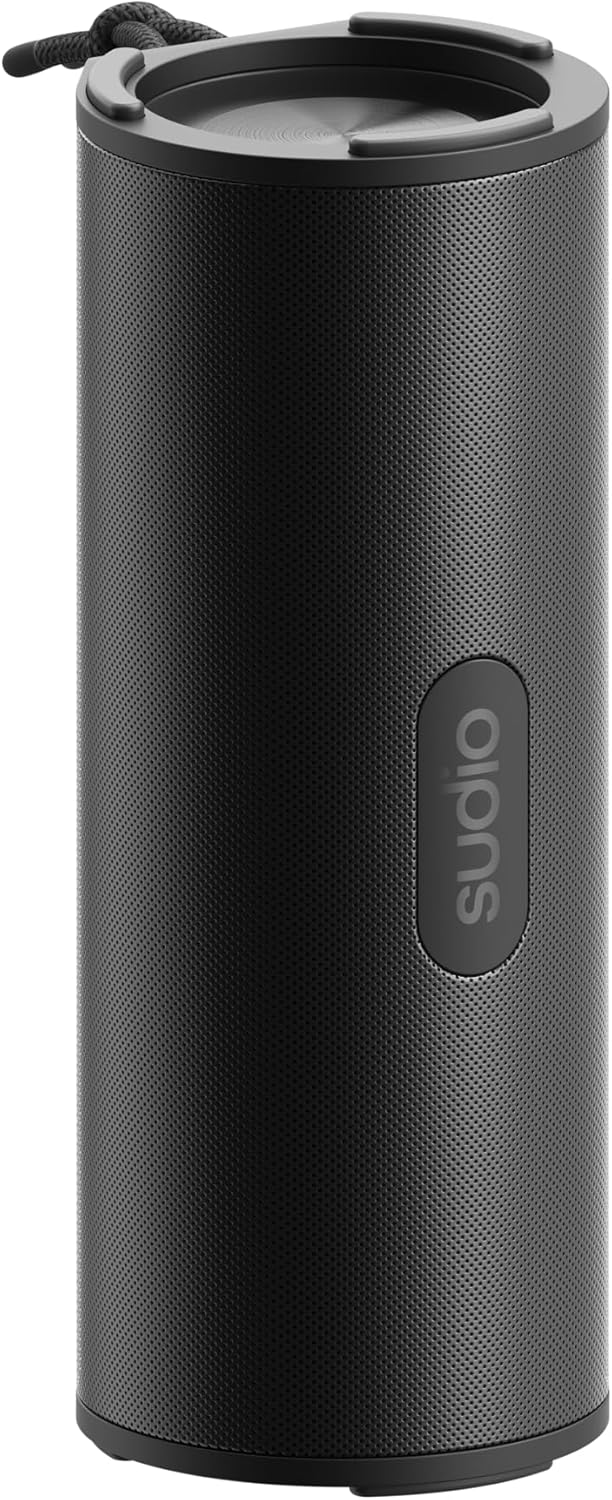
Figure 1: Sudio F4 Bluetooth Wireless Speaker
2. Enfòmasyon sou Sekirite
- Pa ekspoze oratè a nan tanperati ekstrèm, limyè solèy dirèk, oswa flanm dife.
- Evite jete oswa soumèt oratè a nan gwo enpak.
- Pa eseye demonte, repare, oswa modifye oratè a. Sa ap anile garanti a.
- Keep the speaker away from water and liquids, except for splashes as per its IPX4 rating. Do not submerge.
- Use only the provided or a certified USB-C charging cable.
- Jete pwodwi a ak batri li yon fason responsab dapre règleman lokal yo.
3. Pake kontni
Asire w tout atik yo prezan nan pakè a:
- Sudio F4 Bluetooth Wireless Speaker
- USB-C Chaje Kab
- Manyèl itilizatè
4. Pwodwi souview
Familiarize yourself with the Sudio F4 speaker's components and controls.

Figi 2: Side view with control buttons and USB-C port
- Bouton pouvwa: Press and hold to power on/off. Short press for battery status.
- Bouton Diminye Volim / Chante Anvan: Peze yon ti kras pou diminye volim nan. Peze lontan pou ale nan mizik anvan an.
- Play / Pause / Call Button: Peze yon ti kras pou jwe/poz mizik. Peze yon ti kras pou reponn/fini apèl. Peze lontan pou rejte apèl.
- Bouton pou ogmante volim / pwochen mizik la: Peze yon ti kras pou ogmante volim nan. Peze lontan pou ale nan pwochen mizik la.
- Bouton appariement Bluetooth: Kout laprès pou antre nan mòd appariement Bluetooth.
- USB-C chaje pò: Pou chaje oratè a.
- Mikwofòn: Pou apèl men-gratis.
- Tachman kòd: Pou portabilite.

Figi 3: Top view with speaker grille and lanyard
5. Enstalasyon
5.1 Chaje Oratè a
- Konekte kab chaje USB-C a nan pò USB-C oratè a.
- Konekte lòt bout kab la nan yon adaptè kouran USB (pa enkli) oubyen nan yon pò USB òdinatè.
- Limyè endikatè chaj la ap limen pandan chaj la epi li ap etenn lè li fin chaje nèt.
- Yon chaj konplè bay jiska 25 èdtan lekti.
5.2 Power On/Off
- Pou limen: Press and hold the Power button for approximately 2 seconds until you hear an audible prompt.
- Pou etenn: Press and hold the Power button for approximately 2 seconds until you hear an audible prompt.
5.3 Bluetooth Pairing
- Asire w ke oratè a limen epi li nan yon distans 1 mèt de aparèy Bluetooth ou a.
- The speaker will automatically enter Bluetooth pairing mode when powered on for the first time, indicated by a flashing LED light. If already paired, short press the Bluetooth pairing button to enter pairing mode.
- Aktive Bluetooth sou telefòn entelijan ou, tablèt ou, oswa lòt aparèy odyo ou.
- In your device's Bluetooth settings, select "Sudio F4" from the list of available devices.
- Once successfully paired, the speaker will provide an audible confirmation, and the LED light will stop flashing.
6. Operasyon Enstriksyon
6.1 Lekti Odyo
- Jwe/Poz: Short press the Play/Pause/Call button.
- Pwochen Track: Peze bouton Volim Monte a pandan lontan.
- Track Previous: Peze bouton Diminye Volim nan pandan lontan.
6.2 Kontwòl Volim
- Ogmante Volim: Peze bouton Volim Monte a yon ti tan.
- Diminye Volim: Peze bouton Diminye Volim nan yon ti tan.
6.3 Jesyon Apèl
The Sudio F4 includes a built-in microphone for hands-free calling.
- Reponn/Fen Apèl: Short press the Play/Pause/Call button.
- Rejte apèl: Long press the Play/Pause/Call button.
6.4 Rezistans dlo IPX4
The Sudio F4 speaker is rated IPX4, meaning it is resistant to splashing water from any direction. This makes it suitable for outdoor use where it might encounter light rain or splashes. It is pa fèt pou plonje nan dlo.
7. Antretyen
- Netwayaj: Wipe the speaker with a soft, dry, lint-free cloth. Do not use abrasive cleaners, alcohol, or chemical solvents.
- Depo: Sere oratè a nan yon kote ki fre epi sèk, lwen limyè solèy dirèk ak tanperati ekstrèm lè w pa itilize li pou yon bon bout tan.
- Swen batri: To preserve battery life, charge the speaker fully at least once every three months if not used regularly.
NAN. Depanaj
| Pwoblèm | Solisyon posib |
|---|---|
| Oratè a pa limen. | Asire w ke oratè a chaje. Konekte l nan yon sous kouran avèk kab USB-C a. |
| Pa ka asosye ak aparèy Bluetooth. |
|
| Pa gen son oswa volim nan ba. |
|
| Bon kalite son pòv yo. |
|
9. Espesifikasyon
| Modèl | Sudio F4 |
| Bluetooth vèsyon | 5.4 |
| Lektur Tan | Jiska 25 èdtan |
| Port chaje | USB-C |
| Rezistans dlo | IPX4 (Rezistan a dlo) |
| Sòti Oratè | 15W |
| Dimansyon (L x W x H) | 8.9 x 8.7 x 20.6 cm |
| Pwa | 300 g |
| Mikwofòn | Wi |
10. Garanti ak sipò
For warranty information, technical support, or any inquiries regarding your Sudio F4 speaker, please visit the official Sudio websit la oubyen kontakte sèvis kliyan yo dirèkteman. Kenbe prèv acha ou pou reklamasyon garanti.
Official Sudio Websit: www.sudio.com