
Entwodiksyon
This manual provides detailed instructions for the VINABTY Voice Remote Control, designed as a direct replacement for various OK. QLED TV models. This remote control features voice search capabilities, an ergonomic design, and durable construction for reliable performance. Please read this manual carefully to ensure proper setup and operation.
Enstalasyon
1. Enstalasyon batri
Telekòmand lan bezwen de pil AAA (pa enkli). Swiv etap sa yo pou enstale yo:
- Louvri kouvèti konpatiman pil la ki sitiye sou dèyè kontwòl remote la.
- Mete de pil AAA ladan l, asire w ke tèminal pozitif (+) ak negatif (-) yo koresponn ak dyagram ki anndan konpatiman an.
- Fèmen kouvèti lòj batri a byen.

Imaj: Dèyè view of the remote control with the battery cover removed, illustrating the correct placement for two AAA batteries.
2. Konekte ak televizyon ou an
This remote control is designed for easy use and typically requires no programming. However, for voice search functionality, it must be paired with your TV. Refer to your TV's user manual for specific pairing instructions for a new remote control. Generally, this involves:
- Asire w ke televizyon ou an limen.
- Navigate to the TV's settings menu, usually under 'Remotes & Accessories' or 'Bluetooth Settings'.
- Select 'Add new device' or 'Pair remote control'.
- Follow the on-screen prompts to complete the pairing process. This may involve holding down specific buttons on the remote.

Image: The VINABTY remote control positioned beside a television, highlighting its ready-to-use nature and material quality.
Enstriksyon Operasyon
The VINABTY Voice Remote Control offers intuitive control over your OK. QLED TV. Below are the primary functions:
- Bouton pouvwa (⏻): Limen oswa etenn televizyon an.
- Bouton nimewo (0-9): Chwazi chanèl televizyon yo dirèkteman.
- Pavé navigasyon (Anwo, Anba, Agoch, Adwat, OK): Navige nan meni yo epi konfime seleksyon yo.
- Volim monte/desann (+/-): Ajiste volim televizyon an.
- Channel Up/Down (P^/P˅): Chanje chanèl televizyon yo.
- Bouton bèbè (🔇): Aktive oubyen dezaktive son odyo televizyon an.
- Bouton tounen (←): Retounen nan ekran oswa meni anvan an.
- Bouton Kay (🏠): Access the TV's home screen or smart hub.
- Bouton Kontwòl Vwa (🎤): Press and hold to activate voice search or commands (requires successful pairing).
- Bouton Aksè Rapid: Dedicated buttons for popular streaming services like Netflix, YouTube, Prime Video, and Google Play for direct access. A USB button is also included for media playback.
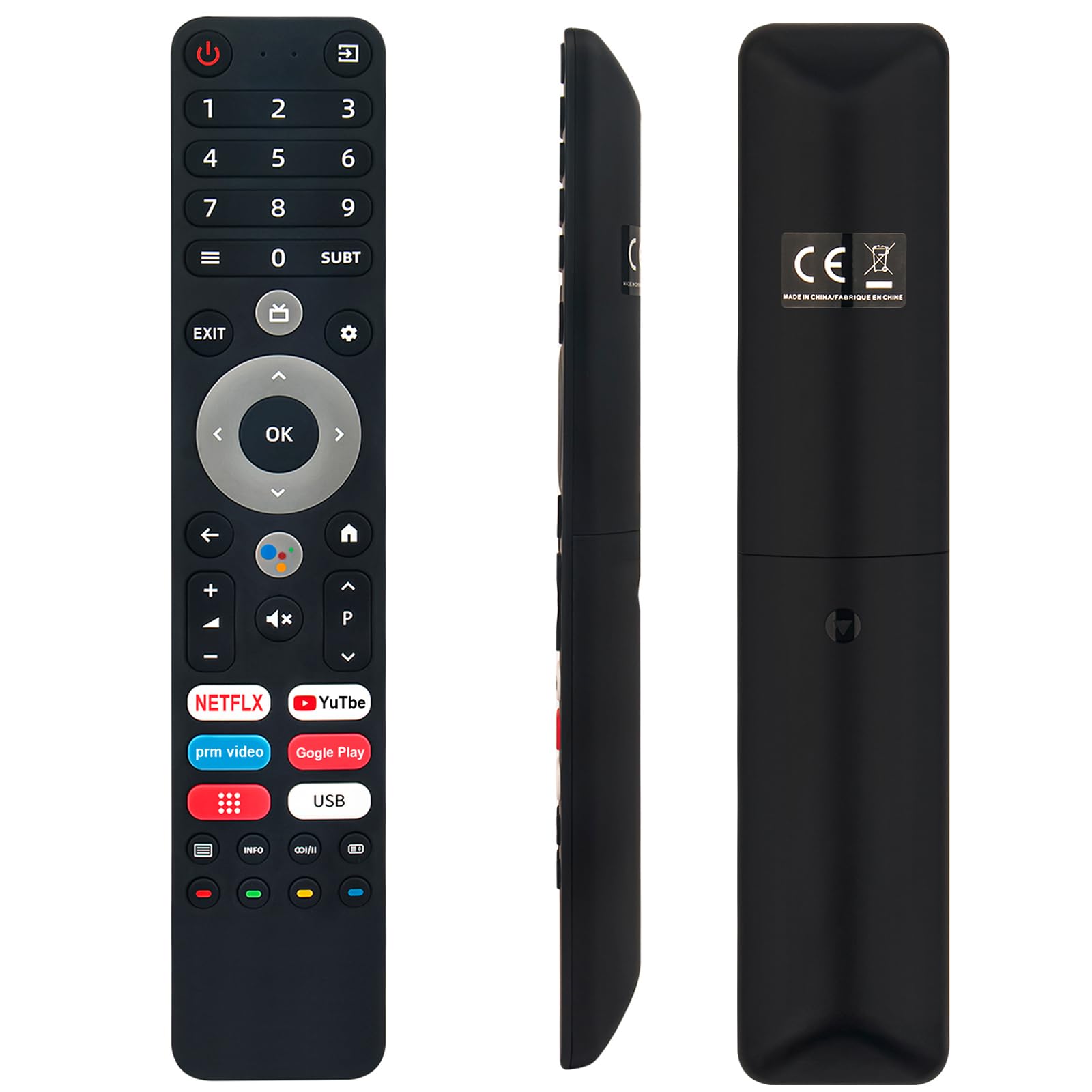
Image: The remote control with a visual emphasis on the voice command button, indicating its functionality.
Antretyen
To ensure the longevity and optimal performance of your VINABTY Voice Remote Control, follow these maintenance guidelines:
- Netwayaj: Use a soft, dry cloth to clean the remote control. Avoid using liquid cleaners, aerosols, or harsh chemicals, as these can damage the surface or internal components.
- Ranplasman batri: Ranplase pil yo lè repons telekòmand lan vin ralanti oswa li sispann fonksyone. Toujou ranplase tou de pil yo an menm tan ak nouvo ki gen menm kalite (AAA).
- Depo: Sere kontwòl remote la nan yon kote ki fre epi sèk, lwen limyè solèy dirèk, tanperati ekstrèm, ak imidite ki wo. Si ou pa pral itilize kontwòl remote la pou yon peryòd tan pwolonje, retire pil yo pou anpeche flit.
- Manyen: Evite lage kontwòl remote la oswa sibi gwo enpak, paske sa ka domaje sikui entèn yo.
Depanaj
If you encounter issues with your VINABTY Voice Remote Control, try the following solutions:
- Remote pa reponn:
- Tcheke si pil yo byen enstale epi yo pa fin itilize. Ranplase yo si sa nesesè.
- Asire w pa gen okenn obstak ant kontwòl remote la ak reseptè enfrawouj televizyon an.
- Asire w ke telekòmand lan ap pwente dirèkteman nan direksyon televizyon an.
- Kontwòl Vwa a pa fonksyone:
- Verify that the remote control is successfully paired with your TV. Refer to the 'Pairing with Your TV' section or your TV's manual.
- Ensure your TV's internet connection is stable, as voice commands often rely on online services.
- Bouton pa travay:
- Clean the remote control, especially around the buttons, to remove any dirt or debris that might be causing sticking.
Si etap sa yo pa rezoud pwoblèm nan, tanpri kontakte sèvis kliyan pou plis asistans.
Espesifikasyon
| Karakteristik | Detay |
|---|---|
| Mak | VINABTY |
| Modèl konpatib | OK. QLED TV OTV 55AU-5023C, OTV43AU-5023C, OTV50AU-5023C, OTV 43AU-5023C, OTV 50AU-5023C |
| Koneksyon Teknoloji | Enfrawouj |
| Maksimòm Range | 10 mèt |
| Kalite batri | 2 x AAA (pa enkli) |
| Materyèl | ABS (body), Soft Rubber (buttons) |
| Koulè | Nwa |
| Dimansyon (L x W x H) | 18 cm x 3 cm x 1.5 cm (apeprè 7.09 x 1.18 x 0.59 pous) |
| Pwa | 60 gram |
| Karakteristik espesyal | Voice Control, No Programming Required, Ergonomic Design |

Image: The remote control displayed with its precise length and width measurements.
Sipò
For any questions regarding the VINABTY Voice Remote Control, or if you are unsure about its compatibility with your specific TV model, please contact our customer support team. We are committed to providing assistance and ensuring your satisfaction.
If you received a remote control that does not function as expected, or if you require further technical support, please reach out to us via email. We will respond promptly to address your concerns.