
1. Plis paseview
The Roku Select Series HD TV provides a streamlined entertainment experience. This 32-inch 720p HD television integrates the Roku operating system for easy access to streaming content, live TV, and various applications. It features a voice remote for convenient control and includes technologies like Bluetooth Headphone Mode and Dolby Audio for enhanced sound.
Karakteristik kle
- Difizyon san pwoblèm: Fast Wi-Fi and quick app launches for immediate entertainment access.
- Extensive Content: Access to thousands of streaming apps, free movies, shows, and live TV channels.
- Ekran Akèy Personnalisable: Organize apps and content for personalized viewing.
- Mizajou lojisyèl otomatik: Ensures access to the latest features and applications.
- Entegrasyon kay entelijan: Compatible with Roku Voice, Siri, Alexa, and Google Assistant for voice control. Supports Apple AirPlay for content sharing.
- Clear HD Picture: 720p HD resolution with Roku Smart Picture technology for optimized visuals.
- Vwa Remote: Search, play, and control streaming with voice commands.
- Odyo amelyore: Designed for clear speech and louder sound with Dolby Audio technology.
- Bluetooth Headphone Mode: Private listening with wireless headphones.

Image: Roku 32-inch Select Series HD Smart TV with included remote control.
2. Ki sa ki nan bwat la
Verifye ke tout konpozan yo prezan anvan ou kontinye ak konfigirasyon an.
- Roku Select Series 32" HD TV
- Stands and screws
- Roku Voice Remote with batteries (2 AAA)
- Pouvwa kab
- Manyèl Itilizatè (dokiman sa a)

Image: Contents of the Roku Select Series TV packaging.
3. Enstalasyon
3.1 Debake
Carefully remove the TV and all accessories from the packaging. Retain the packaging for future transport or service needs.
3.2 Tache kanpe la
- Mete ekran televizyon an anba sou yon sifas ki mou epi pwòp pou evite li reyur.
- Aliman kanpe televizyon yo ak twou vis yo sou anba a nan televizyon an.
- Fikse sipò yo avèk vis yo bay yo. Asire w ke yo byen sere.
3.3 Konekte periferik
Konekte aparèy ou yo nan pò ki apwopriye yo sou dèyè televizyon an.
- HDMI: Connect up to three HDMI devices (e.g., cable box, gaming console, Blu-ray player) to the HDMI ports.
- USB: Use the USB port for media playback or connecting compatible accessories.
- Optik (S/PDIF): Pou konekte ak yon sistèm odyo ekstèn.
- Kab pouvwa: Konekte kab kouran an nan televizyon an epi answit nan yon priz miray.
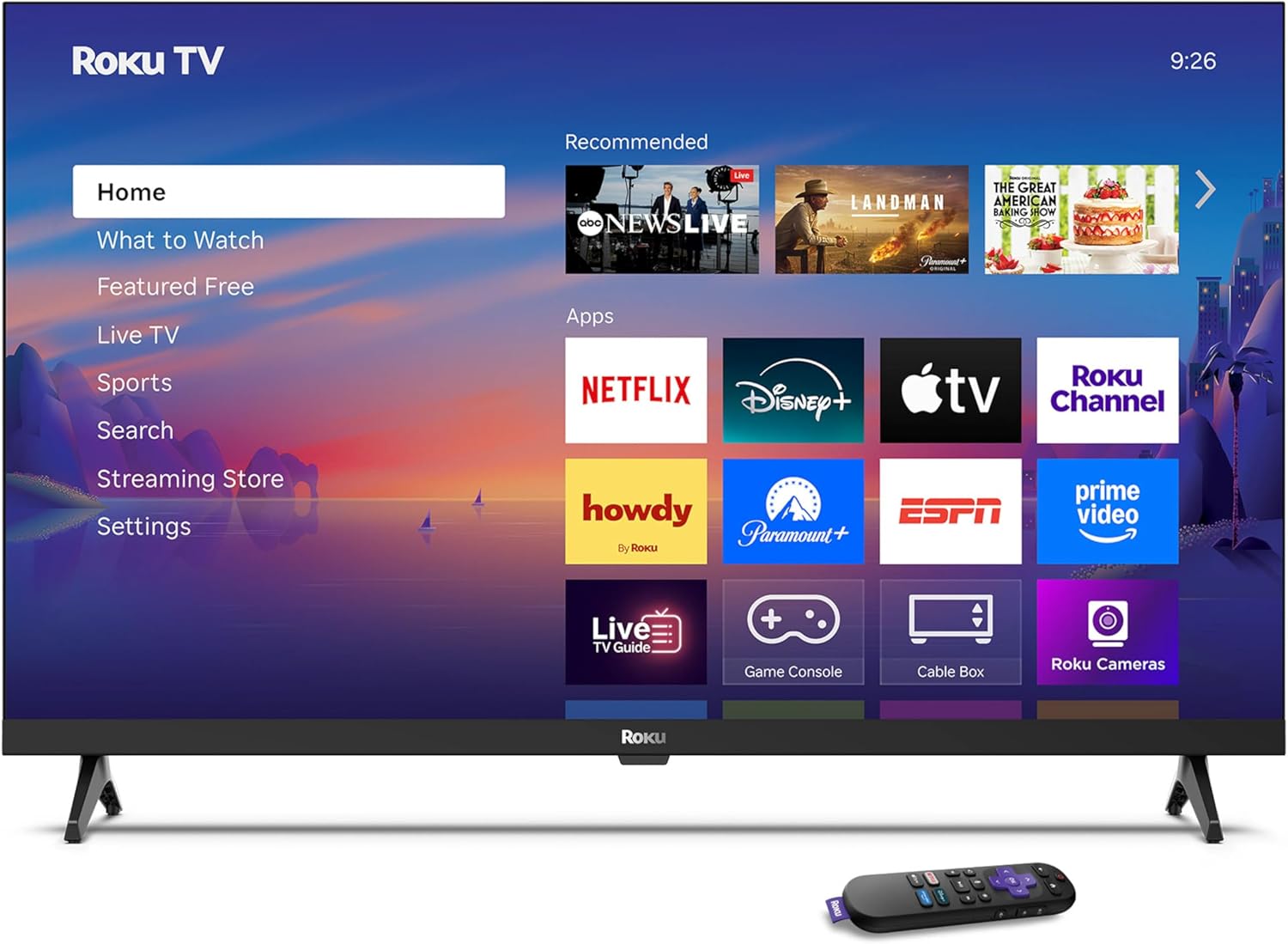
Image: Rear panel connections including HDMI, USB, and optical ports.
3.4 Premye Limen ak Koneksyon Rezo a
- Plug in the TV and press the power button on the remote or TV.
- Follow the on-screen instructions to select your language and connect to your Wi-Fi network.
- Activate your Roku account or create a new one.
Videyo: Yon finiview of the Roku TV operating system, demonstrating its user interface and features. This video is provided by Roku, Inc.
4. Operasyon Enstriksyon
4.1 Using the Voice Remote
The Roku Voice Remote allows for intuitive control of your TV and streaming content.
- Rechèch vwa: Press and hold the voice button and speak your command to search for content, launch apps, or control playback.
- Navigasyon: Use the directional pad to move through menus and select items.
- Rakoursi aplikasyon: Dedicated buttons provide quick access to popular streaming services.

Image: Features of the Roku Voice Remote, highlighting voice control and shortcut buttons.
4.2 Navige sou ekran lakay la
The Roku Home Screen provides access to all your installed apps, inputs, and settings.
- Kay: Returns you to the main home screen.
- Ki sa ki yo gade: Discover recommended content.
- Televizyon an dirèk: Access free live television channels.
- Streaming Store: Browse and add new streaming channels.
- Anviwònman: Adjust TV and system preferences.

Image: The Roku TV home screen interface.
4.3 Ajiste Paramèt Imaj ak Son
Customize ou vieweksperyans mizik ak koute atravè meni paramèt yo.
- Mòd Foto: Select from predefined modes like Standard, Vivid, Sports, or Movie. Roku Smart Picture automatically optimizes settings.
- Son Mode: Chwazi son profiles or enable features like Night Mode for reduced volume fluctuations.
- Bluetooth Headphone Mode: Pair your wireless headphones for private audio.

Image: Picture mode settings on the Roku TV.

Image: Bluetooth Headphone Mode in use.

Image: Dolby Audio technology for clear sound.
5. Antretyen
5.1 Netwaye ekran an
Pou netwaye ekran televizyon an, siye l dousman avèk yon twal mou, sèk, ki pa gen pousyè. Pou mak ki difisil pou retire, siye l dousman.ampSiye twal la avèk dlo oswa yon solisyon netwayaj ki an sekirite pou ekran. Evite itilize pwodui chimik ki agresif oswa materyèl abrazif.
5.2 Mizajou lojisyèl
Televizyon Roku ou a resevwa mizajou lojisyèl otomatikman lè li konekte ak entènèt la. Mizajou sa yo bay nouvo fonksyonalite, amelyorasyon pèfòmans ak koreksyon pinèz. Asire w ke televizyon ou a rete konekte ak entènèt la pou yon pèfòmans optimal.
NAN. Depanaj
If you encounter issues with your Roku TV, refer to the following common solutions:
- Pa gen pouvwa: Asire w kab kouran an byen branche nan televizyon an ak nan yon priz elektrik ki fonksyone. Eseye yon lòt priz.
- Pa gen imaj/son: Verify that the correct input source is selected. Check all cable connections (HDMI, audio). Restart the TV by unplugging it for 30 seconds and plugging it back in.
- Remote pa travay: Replace the AAA batteries in the remote. Ensure there are no obstructions between the remote and the TV. For voice remote issues, re-pair the remote if necessary (refer to Roku support for specific steps).
- Pwoblèm Koneksyon Rezo: Restart your Wi-Fi router and modem. Go to the TV's settings menu, then Network, and try reconnecting to your Wi-Fi network.
- Aplikasyon an pa chaje/li fè aksidan: Try restarting the app. If the issue persists, remove the app from the home screen, restart the TV, and then re-add the app from the Streaming Store.
7. Espesifikasyon
| Karakteristik | Detay |
|---|---|
| Gwosè ekran | 32 pous |
| Teknoloji ekspozisyon | dirije |
| Rezolisyon | 720p |
| Rafrechisman pousantaj | 60 Hz |
| Karakteristik espesyal | Bluetooth Headphone Mode, Dolby Audio, Voice Remote |
| Koneksyon Teknoloji | Bluetooth, fil |
| Total pò HDMI | 3 |
| Total pò USB | 1 |
| Antre odyo | HDMI |
| Sistèm operasyon | Roku OS |
| Kalite aliye | Mòn sou tab, Mòn sou miray |
| Estanda Mòn VESA | 200 x 200 mm |
| Dimansyon pwodwi (D x W x H) | 7"D x 28.3"W x 18.3"H |
| Pwa atik | 7.5 liv |
| Nimewo Modèl | 32R2D5 |
| UPC | 829610008974 |
8. Enfòmasyon sou Garanti
8.1 Garanti limite
Roku warrants the hardware against defects in materials and workmanship under normal use for a period of one (1) year from the date of purchase ("Warranty Period"). If Roku determines that the device’s hardware is defective during the Warranty Period, Roku’s sole obligation, and your exclusive remedy, will be to either repair or replace the unit with either a new or rebuilt device, at its option. This warranty applies if the product is used in accordance with the provided documentation.
8.2 Règleman pou Retounen Atik
You may return a device for any reason:
- Within thirty (30) days from the date of purchase from Roku.
- Within the applicable return period if purchased from an authorized reseller or distributor.
Additional details regarding product returns can be found on the Roku support site.
9. Sipò
For further assistance, troubleshooting guides, and frequently asked questions, please visit the official Roku support websit: