
1. Entwodiksyon
The siaviala D1-23.8inch Portable Monitor is designed to enhance your productivity and entertainment experience. Featuring a 23.8-inch 1080P Full HD IPS display with a 100Hz refresh rate, it offers crisp visuals and smooth performance. This monitor is compatible with a wide range of devices including laptops, desktops, MacBooks, tablets, and gaming consoles. Its versatile design includes a built-in kickstand and VESA compatibility for flexible placement options.

Image 1.1: The siaviala D1-23.8inch Portable Monitor with its integrated kickstand.
2. Pake kontni
Tanpri verifye ke tout atik yo prezan nan pakè ou a:

Image 2.1: Visual representation of the monitor and included accessories.
- siaviala D1-23.8inch Portable Monitor x 1
- Manyèl itilizatè x 1
- USB-C a USB-C kab x 1
- USB-C to USB-C Cable (Power Only) x 1
- HDMI to Mini HDMI Cable x 1
- USB-A USB-C kab x 1
- USB-A Male to USB-A Female Adapter x 2
- Power Adapter (30W) x 1
3. Enstalasyon
3.1 Enstalasyon fizik
The monitor offers flexible setup options:
- Using the Built-in Kickstand: The monitor features an integrated kickstand for easy tabletop placement. Simply expand the stand from the back of the monitor. The stand allows for vertical and horizontal orientation, and adjustable height.
- VESA Mount konpatibilite: For more permanent installations, the monitor is VESA compatible (75x75mm). This allows attachment to monitor arms or wall mounts (sold separately).
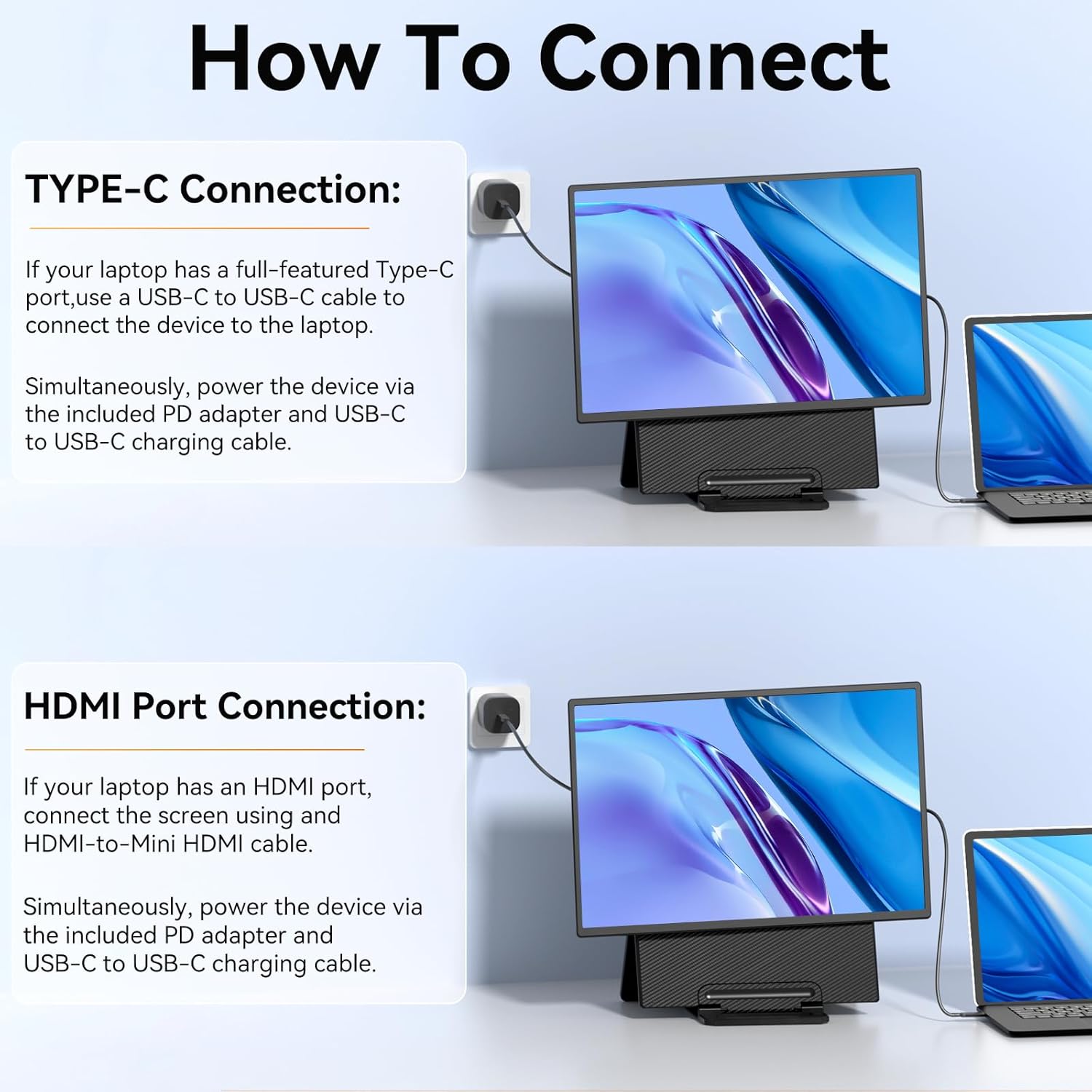
Image 3.1: Step-by-step guide for adjusting the kickstand and rotating the monitor.

Image 3.2: The monitor connected to a VESA mount, demonstrating its compatibility.
3.2 Konekte ak Aparèy
The monitor supports both USB-C and HDMI connections for video and power.

Image 3.3: Diagrams illustrating USB-C and HDMI connection methods.
- Koneksyon USB-C: If your device (laptop, phone, tablet) has a full-featured USB-C port that supports video output and power delivery, use the included USB-C to USB-C cable. Connect one end to the monitor's USB-C port and the other to your device. The monitor will draw power and receive video signal through this single cable. If your device's USB-C port does not provide sufficient power, connect the included power adapter to the monitor's dedicated power input.
- Koneksyon HDMI: For devices with an HDMI output (laptops, desktops, gaming consoles like PS4/PS5, Xbox, Switch), use the included HDMI to Mini HDMI cable. Connect the Mini HDMI end to the monitor and the HDMI end to your device. When using HDMI, external power is required. Connect the included power adapter to the monitor's power input using the USB-C to USB-C (Power Only) cable.
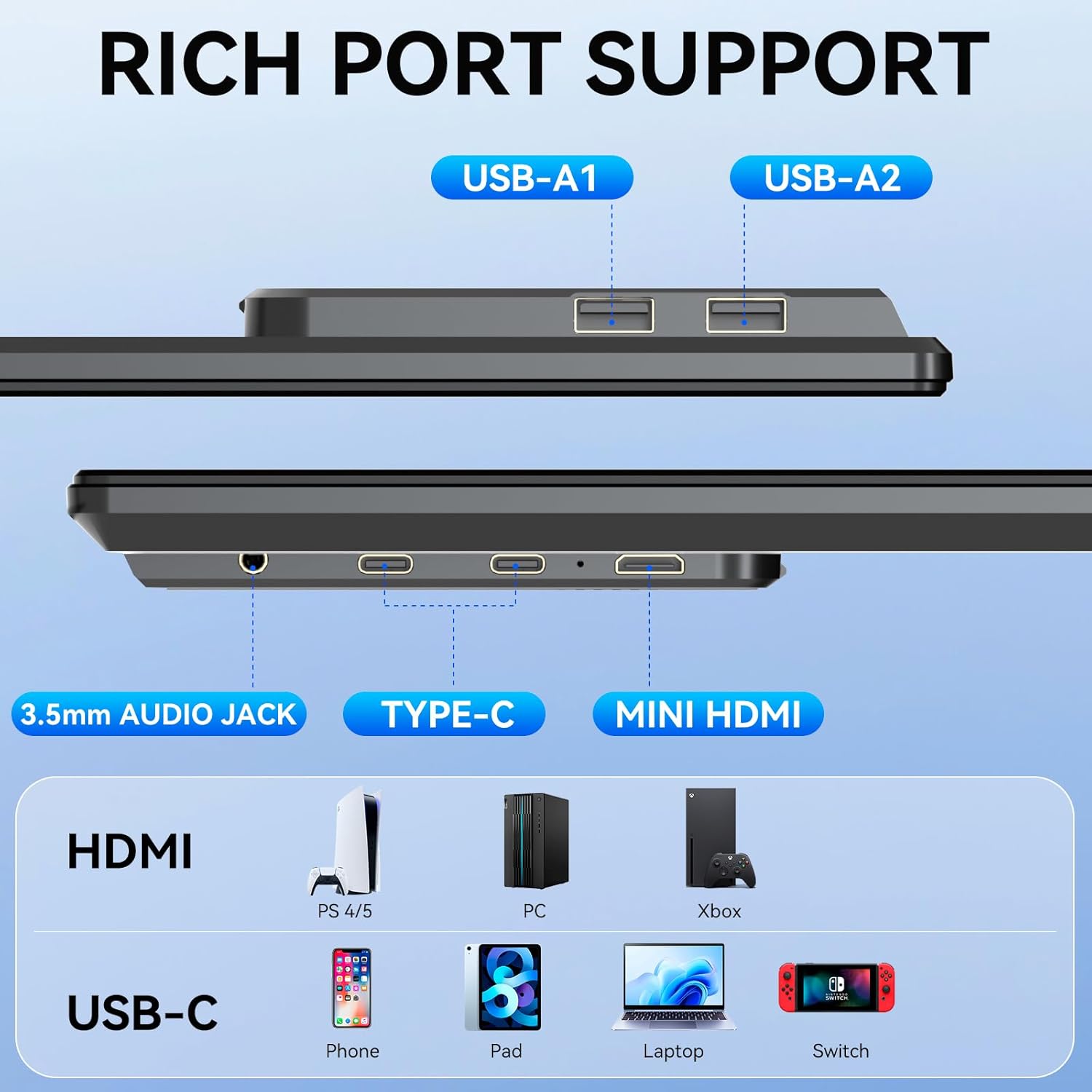
Imaj 3.4: Plis paseview of the monitor's ports, including USB-A, Type-C, 3.5mm Audio Jack, and Mini HDMI.
4. Operasyon Enstriksyon
4.1 Power On/Off
To power on the monitor, ensure it is connected to a power source (either via a full-featured USB-C cable or the dedicated power adapter). Press the power button located on the side or back of the monitor. To power off, press and hold the power button until the screen turns off.
4.2 Meni OSD (On-Screen Display).
The monitor features an OSD menu for adjusting various settings. Typically, buttons on the side or back of the monitor allow you to navigate and select options within the OSD. Common adjustable settings include:
- Klate/Kontrast: Ajiste nivo luminans ak kontras ekran an.
- Anviwònman koulè: Modifye tanperati koulè, ton, ak saturation.
- Sous Antre: Manually select the video input (USB-C or HDMI).
- Rapò aspè: Change the display aspect ratio (e.g., 16:9, 4:3).
- Volim: Control the audio output volume if using the monitor's speakers or 3.5mm audio jack.
4.3 Wotasyon ekran
The monitor supports both landscape and portrait orientations. You can physically rotate the monitor on its kickstand or VESA mount. Your connected device's operating system may automatically detect the rotation or require manual adjustment in display settings.

Image 4.1: Demonstrating the monitor's ability to adjust height and rotate 90 degrees.
5. Antretyen
5.1 Netwaye monitè a
Pou netwaye ekran an, siye l dousman avèk yon twal mou ki pa gen pousyè. Pou mak ki difisil pou retire, siye l dousman.ampen the cloth with water or a non-abrasive screen cleaner. Avoid using alcohol-based cleaners, ammonia, or abrasive materials, as these can damage the screen surface.
5.2 Depo
When not in use, store the monitor in a cool, dry place away from direct sunlight and extreme temperatures. If transporting, ensure the monitor is securely packed to prevent damage. The integrated handle on the kickstand facilitates easy carrying.
NAN. Depanaj
If you encounter issues with your siaviala D1-23.8inch Portable Monitor, please refer to the following common solutions:
- Pa gen ekspozisyon/ekran nwa:
- Ensure all cables (video and power) are securely connected.
- Verify the monitor is powered on.
- Check if your device's display output is enabled or extended.
- If using USB-C, confirm your device's USB-C port supports video output (DisplayPort Alternate Mode) and sufficient power delivery. Try connecting the external power adapter.
- Try a different video cable or port on your device.
- Ekran k ap flache:
- Ensure the video cable is not loose or damaged.
- Reduce the refresh rate in your device's display settings if it's set too high for the cable or device capabilities.
- Ensure adequate power supply to the monitor.
- Pa gen son:
- Tcheke paramèt volim monitè a nan meni OSD la.
- Verify your device's audio output is directed to the monitor.
- Ensure external speakers or headphones are properly connected to the 3.5mm audio jack.
- Image Not Centered/Incorrect Resolution:
- Adjust the resolution and scaling settings on your connected device.
- Use the auto-adjust function in the monitor's OSD menu if available.
7. Espesifikasyon
| Karakteristik | Spesifikasyon |
|---|---|
| Nimewo Modèl | D1 |
| Gwosè ekran | 23.8 Inches (24 Inches stated in title) |
| Rezolisyon | 1920 x 1080 piksèl (FHD 1080p) |
| Rafrechisman pousantaj | 100Hz |
| Kalite Panel | IPS |
| Aspè rapò | 16:9 |
| Imaj klète | 300 cd/m² |
| Deskripsyon Sifas Ekran an | Briyan |
| Koneksyon | USB-C, Mini HDMI, 3.5mm Audio Jack, USB-A (x2) |
| Dimansyon pwodwi | 26.38 x 16.14 x 3.62 pous |
| Pwa atik | 10.08 liv |
| VESA konpatibilite | Wi (75x75mm) |
8. Garanti ak sipò
The siaviala D1-23.8inch Portable Monitor comes with a one-year warranty from the date of purchase. For any product-related inquiries, technical assistance, or warranty claims, please contact our dedicated 24/7/365 after-sales support team. Contact information can typically be found on the product packaging or the official siaviala websit.