
Entwodiksyon
This manual provides detailed instructions for the assembly, operation, and maintenance of your HOOOWOOO Vanity Desk with Mirror and Lights, Model 01. Please read this manual thoroughly before assembly and use to ensure proper function and safety. Keep this manual for future reference.
Enfòmasyon enpòtan sou sekirite: This product includes an anti-tip safety device. It is crucial to install this device to secure the vanity to the wall, preventing accidental tipping, especially in households with children. Failure to install the anti-tip device may result in injury.

Figi 1: Plis paseview of the HOOOWOOO Vanity Desk with Mirror and Lights. This image displays the complete vanity desk setup, including the lighted mirror, storage shelves, drawers, and the accompanying stool.
Enstalasyon ak Asanble
Before beginning assembly, ensure all components are present and undamaged. It is recommended to assemble the vanity on a soft, clean surface to prevent scratches.
Kontni pake:
- Vanity Desk components (panels, hardware)
- LED Lighted Mirror unit
- Matching Stool
- Anti-tip safety device
- Assembly instructions (refer to included paper manual for detailed steps)
Etap Asanblaj (Jeneral Plisview):
- Unpack all parts and identify them using the parts list in the included paper manual.
- Asanble ankadreman prensipal biwo a dapre dyagram yo.
- Attach the storage cabinets and shelves.
- Install the sliding drawer mechanisms and drawers.
- Mount the LED lighted mirror unit securely.
- Rasanble tabourè ki akonpaye a.
- Install the Anti-Tip Safety Device: Securely attach the anti-tip strap to the back of the vanity and to a wall stud using appropriate hardware. This step is critical for safety.
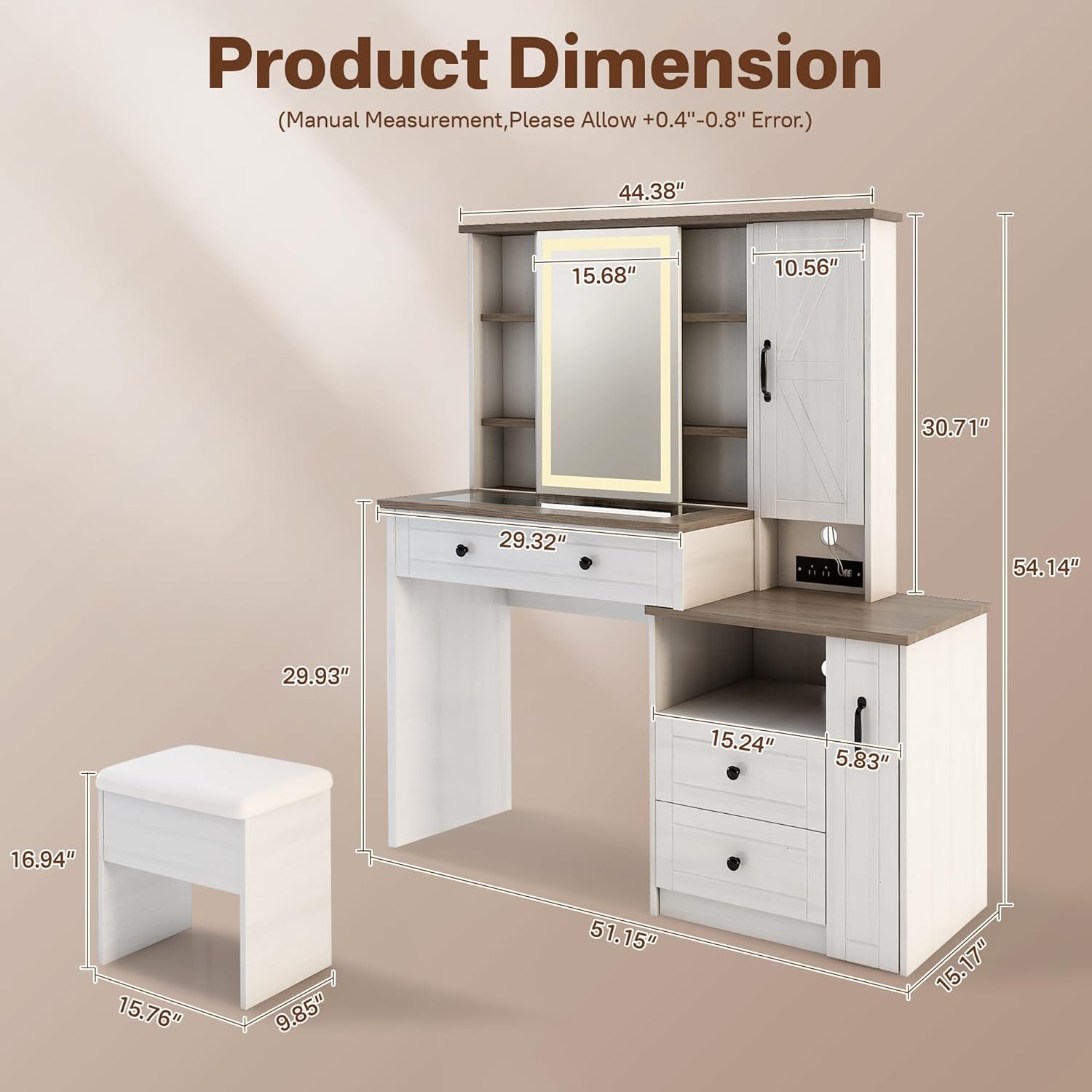
Figure 2: Product Dimensions. This diagram illustrates the overall measurements of the vanity desk and the accompanying stool, providing key height, width, and depth specifications.

Figure 3: Cosmetic Storage Features. This image highlights the various storage options available on the vanity desk, such as the top storage area, mirrored storage cabinet, jewelry storage cabinet, sliding drawers, and a side cabinet with shelving.
Enstriksyon Operasyon
Ki ap dirije glas limen:
The central mirror features built-in LED lighting. To operate, locate the touch control sensor on the mirror surface. Tap the sensor to turn the lights on or off. Press and hold the sensor to adjust the brightness or switch between light color temperatures (if applicable to your model).
Lòj Depo:
- Sliding Drawer: Pull the drawer handle to open. The drawer is designed for smooth operation.
- Kabinèt bò kote: Open the cabinet door to access internal shelving.
- Louvri etajè: Utilize the open shelves for frequently used items or decorative displays.
- Visible Glass Tabletop: The glass section of the tabletop allows for easy viewing and organization of cosmetics and accessories stored beneath.

Figure 4: Glass Tabletop Feature. This close-up image demonstrates the visible glass tabletop, which allows users to easily locate and access cosmetics and accessories stored in the compartments below.
Estasyon chaje pratik:
The vanity desk includes a built-in charging station. Connect your electronic devices to the available power outlets or USB ports. Ensure the vanity is plugged into a functional wall outlet for the charging station to operate.

Figure 5: Charging Station. This image shows the integrated charging station with power outlets and USB ports, demonstrating a smartphone being charged.
Antretyen ak Swen
Cleaning the Vanity Desk:
- Siye sifas yo ak yon mou, damp twal. Evite pwodui netwayaj abrazif oswa pwodui chimik ki agresif, ki ka domaje fini an.
- For the mirror, use a glass cleaner and a lint-free cloth. Do not spray cleaner directly onto the mirror; apply it to the cloth first.
- Siye pousyè sou tout sifas yo regilyèman pou anpeche akimilasyon.
Swen poupou:
- Spot clean the upholstered stool with a mild fabric cleaner as needed.
- Evite ekspozisyon pwolonje nan limyè solèy dirèk pou anpeche defòmasyon.
Swen Jeneral:
- Evite mete bagay cho dirèkteman sou sifas la. Sèvi ak sous-vè oswa kousen pwoteksyon.
- Do not overload drawers or shelves beyond their capacity.
- Tcheke tout vis ak eleman fiksasyon yo detanzantan pou asire yo rete sere.
Depanaj
If you encounter issues with your vanity desk, refer to the following common problems and solutions:
- LED Mirror Lights Not Working:
- Ensure the vanity is properly plugged into a functional power outlet.
- Check the power connection to the mirror unit.
- Verify the touch sensor is clean and unobstructed.
- Tiwa yo kole oswa yo pa glise fasilman:
- Check for any obstructions within the drawer slides.
- Ensure the drawer slides are properly aligned and securely fastened.
- Pa twò chaje tiwa yo.
- Vanite santi l enstab:
- Konfime tout vis asanblaj yo sere byen sere.
- Ensure the anti-tip safety device is correctly installed and secured to a wall stud.
- Place the vanity on a level surface.
- Estasyon chaje a pa fonksyone:
- Verify the main power cord for the vanity is securely plugged into a live outlet.
- Teste estasyon chaje a avèk diferan aparèy ak kab pou elimine pwoblèm espesifik nan aparèy la.
Pou pwoblèm ki pa kouvri isit la, tanpri kontakte sèvis kliyan.
Espesifikasyon
| Karakteristik | Detay |
|---|---|
| Mak | HOOOOOOO |
| Nimewo Modèl | 01 |
| Dimansyon pwodwi (D x W x H) | 15.17" x 51.15" x 54.14" |
| Pwa atik | 137 liv |
| Koulè | Blan |
| Mèb fini | Ivwa |
| Materyèl ankadreman | Metal |
| UPC | 725086356987 |
Garanti ak sipò
For warranty information, please refer to the documentation included with your purchase or contact HOOOWOOO customer support directly. HOOOWOOO is committed to providing quality products and support.
Sipò Kliyan: If you have any questions, require assistance with assembly, or need to report a missing or damaged part, please contact HOOOWOOO customer service. You can often find contact information on the manufacturer's websit entènèt la oubyen atravè revandè w la.
Visit the official HOOOWOOO Store for more products and information: HOOOWOOO Store