
InMotion True Wireless Earbuds
InMotion True Wireless Earbuds User Manual
Model: True Wireless Earbuds
Entwodiksyon
Thank you for choosing the InMotion True Wireless Earbuds. These earbuds are designed to provide a seamless audio experience with true wireless freedom, comfortable fit, and intuitive controls. Please read this manual carefully before using your earbuds to ensure proper operation and to maximize their lifespan.
Ki sa ki nan bwat la
- Ekoutè san fil vre (gòch ak dwat)
- Charging Carry Case
- USB-C Chaje Kab
- Small, Medium, and Large Ear Pads (Suction Tips)
- Manyèl itilizatè
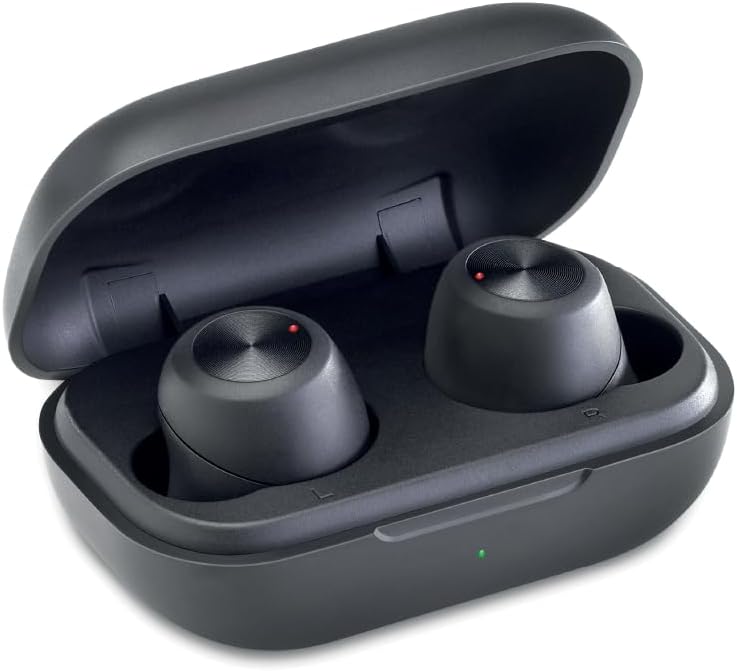
Image: The InMotion True Wireless Earbuds resting inside their open charging case, showing the compact design and charging indicators.
Enstalasyon
1. Chaje ekoutè yo ak bwat la
Before first use, fully charge the earbuds and the charging case. Place the earbuds into the charging case. Connect the USB-C charging cable to the charging port on the case and the other end to a USB power source. The charging indicator on the case will show charging status. A full charge takes approximately 2 hours for the case and earbuds.
2. One-Step Pairing
- Asire ke ekoutè yo chaje.
- Louvri bwat chaje a. Ekoutè yo ap antre otomatikman nan mòd koneksyon.
- Sou aparèy ou an (telefòn entelijan, tablèt, òdinatè pòtab), ale nan paramèt Bluetooth epi aktive Bluetooth.
- Look for "InMotion Earbuds" or "True Wireless Earbuds" in the list of available devices and select it to connect.
- Yon fwa konekte, w ap tande yon son konfimasyon, epi ekoutè yo ap pare pou itilize.
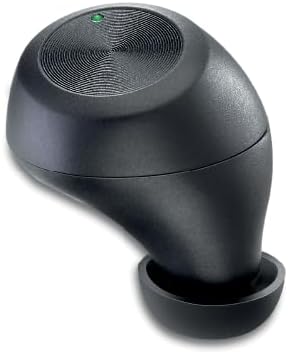
Image: A single InMotion True Wireless Earbud, showcasing its ergonomic design and the touch control surface.
3. Chwazi bon bouchon zòrèy yo
The earbuds come with small, medium, and large suction tips. For optimal sound quality and comfort, choose the ear tips that provide the best seal in your ear canal. A good seal helps with noise isolation and bass response.
Enstriksyon Operasyon
Fonksyon debaz yo
- Limen/Etenyen: Earbuds power on automatically when removed from the case and power off when placed back into the case.
- Jwe/Poz: Tap the touch control surface on either earbud once.
- Pwochen Track: Double-tap the touch control surface on the right earbud.
- Track Previous: Double-tap the touch control surface on the left earbud.
- Reponn/Fen Apèl: Tap the touch control surface on either earbud once during an incoming call.
- Rejte apèl: Press and hold the touch control surface on either earbud for 2 seconds during an incoming call.
- Asistan vwa: Triple-tap the touch control surface on either earbud to activate your device's voice assistant (Siri, Google Assistant, etc.).
The earbuds provide up to 4 hours of continuous use on a single charge, with additional charges available from the portable charging case.
Antretyen
- Netwayaj: Netwaye ekoutè yo ak bwat chaje a regilyèman avèk yon twal mou, sèk, ki pa gen pousyè. Pa sèvi ak pwodui chimik ki agresif oswa materyèl abrazif.
- Konsèy zòrèy: Retire epi netwaye bout zòrèy yo detanzantan avèk savon dou ak dlo. Asire w ke yo byen sèk anvan ou mete yo ankò nan ekoutè yo.
- Depo: Lè w pa ap itilize yo, sere ekoutè yo nan bwat chaj yo pou pwoteje yo epi kenbe yo chaje. Sere yo nan yon kote ki fre epi sèk, lwen tanperati ekstrèm.
- Evite dlo: These earbuds are not waterproof. Avoid exposure to water, rain, or excessive moisture.
Depanaj
| Pwoblèm | Solisyon posib |
|---|---|
| Ekoutè pa asosye |
|
| Pa gen son nan yon sèl ekoutè |
|
| Ekoutè pa chaje |
|
| Move son kalite |
|
Espesifikasyon
| Karakteristik | Detay |
|---|---|
| Non modèl | Vrè ekoutè san fil |
| Koneksyon Teknoloji | San fil (Bluetooth) |
| Bluetooth vèsyon | 5.2 |
| Wireless Range | Jiska 10m |
| Kapasite batri ekouteur | 45mAh |
| Chaje Ka Batri Kapasite | 400mAh |
| Jwe Tan | Jiska 4 èdtan pou chak chaj |
| Tan chaj | Apeprè. 2 èdtan |
| Plasman Zòrèy | Nan Zòrèy |
| Faktè fòm | Nan Zòrèy |
| Enpedans | 16 Ohm |
| Koulè | Nwa |
| Pwa atik | 2.89 ons |
| Manifakti | InMotion |
Garanti ak sipò
InMotion products are designed for reliability and performance. For warranty information or technical support, please refer to the contact details provided with your product packaging or visit the official InMotion website. You can also reach out to the seller, InMotion Accessories, through the Amazon platform for assistance.
Pou plis enfòmasyon, vizite a InMotion Store on Amazon.
Ask a question about this manual
Ask about setup, troubleshooting, compatibility, parts, safety, or missing instructions. Manuals+ will review the question and use this page’s manual context to help answer it.