
1. Entwodiksyon
The BWT Aquameter HF 3/8" is a digital water meter designed for high-flow water systems, including main water lines, commercial kitchens, and multi-machine setups. It accurately tracks water consumption, displaying remaining filter capacity on an integrated LCD screen to facilitate timely filter replacements. This battery-powered unit (CR2032) offers flexible installation without the need for external wiring. It is compatible with BWT Bestmax and Besttaste filters, ensuring consistent water quality and equipment protection.
2. Enfòmasyon sou Sekirite
- Li tout enstriksyon yo ak anpil atansyon anvan enstalasyon ak operasyon.
- Ensure all connections are secure and leak-free to prevent water damage.
- Do not expose the Aquameter to extreme temperatures or direct sunlight.
- Only use the specified CR2032 battery for power.
- Se pèsonèl kalifye ki ta dwe fè enstalasyon an si ou pa sèten.
- Observe the flow direction arrow on the sensor during installation.
3. Pake kontni
Verifye ke tout konpozan yo prezan nan pake a:
- BWT Aquameter HF display unit
- Flow sensor (3/8" connections)
- Konekte kab
- CR2032 battery (may be pre-installed or separate)
- Fermeture rondelles

Image 3.1: BWT Aquameter HF components.
4. Pwodwi souview
The BWT Aquameter HF consists of two main parts: the display unit and the flow sensor.
4.1 Display Unit
The display unit features an LCD screen for showing remaining capacity and two control buttons:
- Bouton PROG: Used for entering programming mode and adjusting settings.
- Bouton RESET: Used to reset the meter after a filter change or to confirm settings. A long press (min 3 sec) is typically required for reset.
4.2 Capteur koule
The flow sensor measures the water passing through it. It has 3/8" connections and an arrow indicating the correct direction of water flow. The sensor connects to the display unit via a cable.
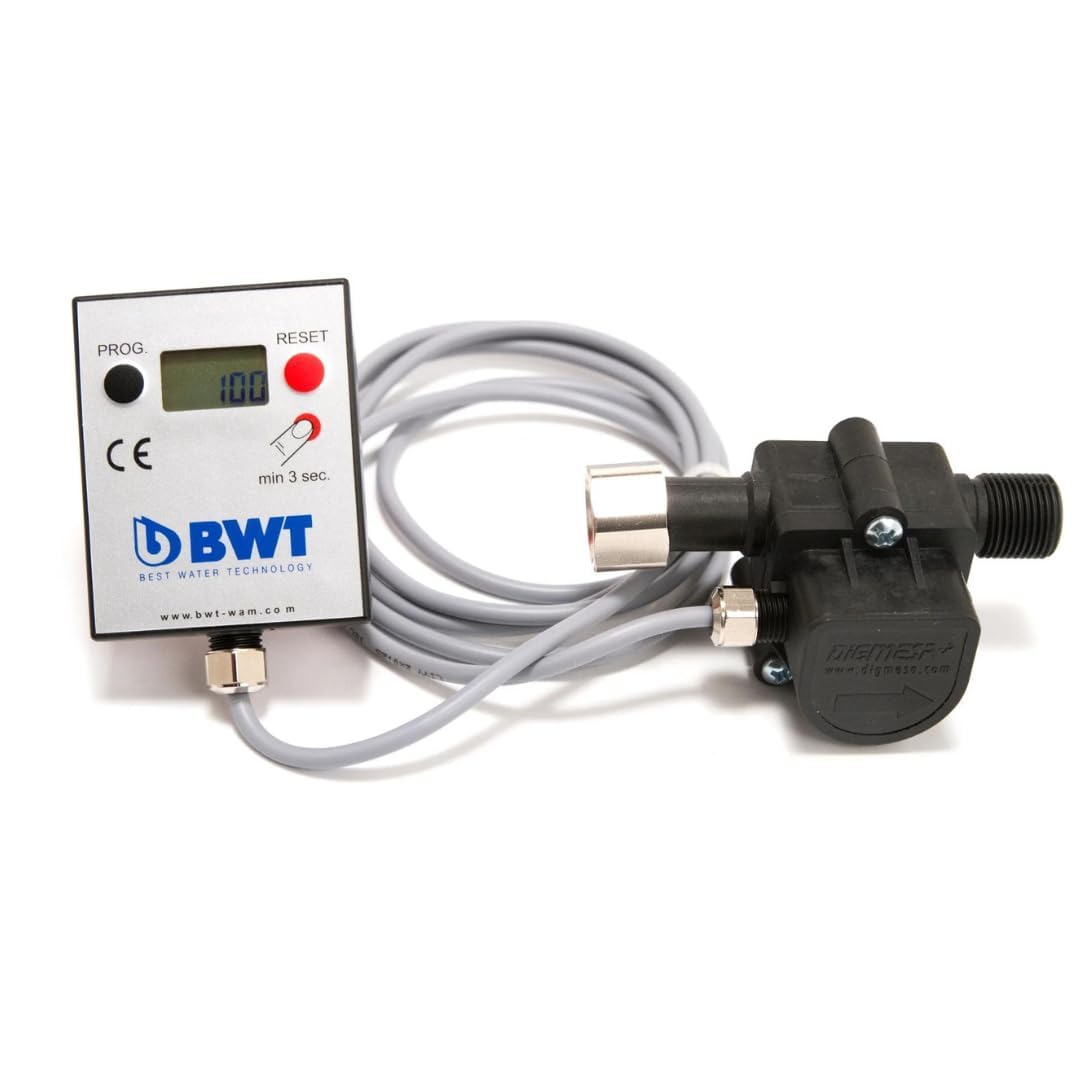
Image 4.1: BWT Aquameter HF display unit and flow sensor.
5. Enstalasyon
5.1 Enstalasyon batri
- Locate the battery compartment on the back of the display unit.
- Louvri kouvèti lòj la.
- Mete yon pil CR2032, asire w polarite a kòrèk (+/-).
- Fèmen kouvèti lòj batri a byen.
5.2 Flow Sensor Installation
- Identify the water line where the Aquameter will be installed. Ensure the water supply is turned off before proceeding.
- Cut the water line and prepare the 3/8" connections.
- Insert the sealing washers into the sensor connections.
- Connect the flow sensor into the water line, ensuring the arrow on the sensor points in the direction of water flow. Tighten connections securely to prevent leaks.
- Connect the cable from the flow sensor to the designated port on the display unit.
5.3 Monte Inite Ekspozisyon an
The display unit can be mounted on a wall or cabinet using appropriate fasteners (not included). Choose a location that is easily accessible for viewing and programming.

Imaj 5.1: Egzanpample installation of the Aquameter display unit.

Image 5.2: Aquameter and filter installed in an under-sink setup.
5.4 Pwogramasyon Inisyal
After installation, program the Aquameter according to your specific filter and water hardness settings. Refer to your filter's documentation for its rated capacity.
- Peze epi kenbe la PWOG button until the display enters programming mode.
- Sèvi ak la PWOG button to cycle through settings (e.g., total filter capacity in liters).
- Sèvi ak la RESET button to adjust the value for the selected setting.
- Repeat for all necessary settings, such as water hardness if your filter requires this input.
- Once all settings are configured, press and hold the PWOG button again to save and exit programming mode.
6. Opere
6.1 Li Ekran an
The LCD display shows the remaining capacity of your water filter in liters. As water flows through the sensor, this value will decrease. When the capacity reaches a low level or zero, it indicates that a filter change is due.
6.2 Resetting the Meter
After replacing your water filter, the Aquameter must be reset to its full capacity. To do this:
- Ensure the new filter is installed correctly.
- Peze epi kenbe la RESET bouton pou omwen 3 segonn.
- The display will show the full programmed capacity, indicating a successful reset.
7. Antretyen
7.1 Ranplasman Filtè
Replace your water filter cartridge when the Aquameter indicates that the remaining capacity is low or depleted. Follow the specific instructions provided with your BWT filter cartridge for replacement procedures.
7.2 Ranplasman batri
When the display becomes dim or stops functioning, it is time to replace the CR2032 battery. Follow the battery installation steps in Section 5.1.
7.3 Netwayaj
Wipe the exterior of the display unit with a soft, damp twal. Pa sèvi ak pwodui netwayaj abrazif oswa solvang.
NAN. Depanaj
- Ekspozisyon an vid: Check or replace the CR2032 battery. Ensure the battery is inserted with correct polarity.
- No flow reading: Verify that the flow sensor is installed correctly with the arrow pointing in the direction of water flow. Check for any blockages in the water line or sensor. Ensure the sensor cable is securely connected to the display unit.
- Lekti ki pa kòrèk: Re-check the programming settings (filter capacity, water hardness) as described in Section 5.4. Ensure the correct filter type is being used for the programmed settings.
- Leaks at connections: Turn off water supply immediately. Check all connections for proper tightening and ensure sealing washers are correctly seated and not damaged.
9. Espesifikasyon
| Karakteristik | Spesifikasyon |
|---|---|
| Nimewo Modèl | 812495 |
| Materyèl | Akrilonitrile butadien stirèn (ABS) |
| Product Dimensions (Display Unit) | 2.4"D x 4.8"W x 4.1"H |
| Pwa atik | 7.2 ons |
| Sètifikasyon Tès Ekstèn | NSF |
| Pousantaj koule | 100–700 liters/hour (l/h) |
| Gwosè Koneksyon | 3/8" |
| Kalite batri | CR2032 |
10. Garanti
For specific warranty details regarding your BWT Aquameter HF, please refer to the warranty information provided with your purchase documentation or contact your authorized BWT dealer. Keep your proof of purchase for warranty claims.
11. Sipò
Should you require technical assistance, have questions about installation, or need further information about BWT products, please visit the official BWT website or contact your local BWT distributor. You can find more information at www.bwt.com.