
InMotion ANC True Wireless Earbuds
InMotion ANC True Wireless Earbuds User Manual
Model: ANC True Wireless Earbuds
Mak: InMotion
1. Entwodiksyon
Thank you for choosing the InMotion ANC True Wireless Earbuds. This manual provides essential information for setting up, operating, and maintaining your earbuds to ensure optimal performance and longevity. Please read this manual thoroughly before use.
These earbuds feature Active Noise Cancelling (ANC) for an immersive audio experience, true wireless connectivity for freedom of movement, and intuitive touch controls. They are designed for comfort with suction tips and offer up to 6 hours of use on a single charge.
Enfòmasyon sou Sekirite
- Pa ekspoze ekoutè yo oswa bwat chaje a nan tanperati, imidite, oswa likid ekstrèm.
- Evite jete oswa sibi aparèy la nan gwo enpak.
- Do not attempt to disassemble or modify the earbuds or charging case.
- Kenbe soti nan atenn timoun yo.
- Sèvi sèlman ak kab chaje ki vini ak li a oswa yon kab ekivalan sètifye.
2. Ki sa ki nan bwat la
Verifye ke tout atik yo prezan nan pakè ou a:
- InMotion ANC True Wireless Earbuds (Left and Right)
- Charging Carry Case
- USB-C Chaje Kab
- Manyèl Itilizatè (dokiman sa a)

Image: The InMotion ANC True Wireless Earbuds resting inside their open charging case, showcasing the sleek design and charging indicators.
3. Enstalasyon
3.1 Chaje ekoutè yo ak bwat la
Anvan premye itilizasyon an, chaje ekoutè yo ak bwat chaje a nèt.
- Mete ekoutè yo nan bwat chaje a, epi asire w yo byen chita.
- Konekte kab chaje USB-C a nan pò chaje ki sou bwat la epi lòt bout la nan yon sous kouran USB (pa egzanp, adaptè miray, pò USB òdinatè).
- Limyè endikatè yo sou bwat la ap montre eta chaj la. Yon fwa chaj la fin chaje, limyè yo ap endike ke li fini oswa yo ap etenn.
A full charge provides up to 6 hours of earbud use. The charging case provides multiple additional charges.
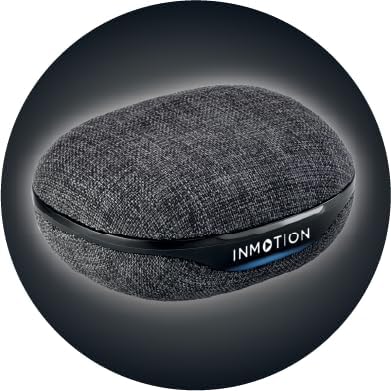
Imaj: Devan view of the InMotion ANC True Wireless Earbuds charging case, highlighting the charging port and indicator lights.
3.2 Konekte ak Aparèy ou a (Konekte an yon sèl etap)
The InMotion ANC True Wireless Earbuds feature one-step pairing for quick and easy connection.
- Asire w ke ekoutè yo chaje epi yo anndan bwat chaje a.
- Louvri kouvèti bwat chaje a. Ekoutè yo ap antre otomatikman nan mòd koneksyon.
- Sou aparèy ou an (telefòn entelijan, tablèt, òdinatè pòtab), ale nan paramèt Bluetooth epi aktive Bluetooth la.
- Chèche pou "InMotion ANC Earbuds" (or similar name) in the list of available devices.
- Select the earbuds to connect. Once connected, you will hear an audible confirmation, and the indicator lights on the earbuds may change.
Ekoutè yo ap konekte otomatikman ak dènye aparèy ki te konekte a lè yo retire yo nan bwat la, si Bluetooth aktive sou aparèy la.
4. Operasyon Enstriksyon
4.1 Kontwòl manyen
The earbuds are equipped with intuitive touch controls on each earbud. Specific functions may vary slightly by device, but common controls include:
- Jwe/Poz: Tape yon sèl sou chak ekoutè.
- Pwochen Track: Tape de fwa sou ekoutè dwat la.
- Track Previous: Tape de fwa sou ekoutè gòch la.
- Reponn/Fen Apèl: Tape yon sèl fwa sou nenpòt ekoutè pandan yon apèl k ap antre.
- Rejte apèl: Peze epi kenbe sou nenpòt ekoutè pandan yon apèl k ap antre.
- Aktive Asistan Vwa: Tape twa fwa sou nenpòt ekoutè.
- Chanje mòd ANC/Transparans: Press and hold on either earbud (duration may vary, refer to specific product details if available).

Imaj: Bò kote view of a single InMotion ANC True Wireless Earbud, illustrating its ergonomic design and the touch-sensitive area.
4.2 Anilasyon Bri Aktif (ANC)
The Active Noise Cancelling feature reduces ambient noise, allowing for a more immersive listening experience. To activate or deactivate ANC, use the designated touch control gesture (typically a press and hold). Some models may also feature a Transparency Mode, which allows you to hear your surroundings while still enjoying your audio.
5. Antretyen
Proper maintenance ensures the longevity and performance of your InMotion ANC True Wireless Earbuds.
5.1 Netwayaj
- Siye ekoutè yo ak bwat chaje a dousman avèk yon twal mou, sèk, epi ki pa gen pousyè.
- Pa sèvi ak pwodui netwayaj abrazif, alkòl, oswa solvan chimik.
- Carefully remove any earwax or debris from the ear tips and speaker mesh using a small, soft brush or cotton swab.
5.2 Depo
When not in use, store the earbuds in their charging case to protect them from dust, dirt, and damage. Store the case in a cool, dry place away from direct sunlight and extreme temperatures.

Imaj: Dèyè view of the InMotion ANC True Wireless Earbuds charging case, showing its compact and portable design.
NAN. Depanaj
Si ou rankontre pwoblèm ak ekoutè ou yo, eseye solisyon sa yo:
| Pwoblèm | Solisyon |
|---|---|
| Ekoutè yo pa konekte/pa konekte. |
|
| Pa gen son ki soti nan youn oubyen toulede ekoutè yo. |
|
| Bwat chaje a pa chaje. |
|
| ANC a pa fonksyone byen. |
|
7. Espesifikasyon
| Karakteristik | Detay |
|---|---|
| Non modèl | ANC Vrè ekouteur san fil |
| Kontwòl bri | Adaptive Anile Bri |
| Koneksyon Teknoloji | San fil (Bluetooth) |
| Konpozan ki enkli | Chaje pote ka |
| Aparèy konpatib | Odinatè pòtab, Telefòn entelijan, Tablèt |
| Metòd kontwòl | Manyen |
| Kalite chofè odyo | Chofè dinamik |
| Karakteristik espesyal | Reponn Rele |
| Manifakti | InMotion |
| Pwa atik | 3.2 ons |
| Koulè | Nwa |
| Plasman Zòrèy | Nan Zòrèy |
| Faktè fòm | Nan Zòrèy |
| Enpedans | 16 Ohm |
| Dire batri (ekoutè) | Jiska 6 èdtan |
| Tan pou chaje | Approx. 1.5 hours (for earbuds and case) |
8. Garanti ak sipò
InMotion products are manufactured with high-quality standards. For warranty information and customer support, please refer to the warranty card included with your product or visit the official InMotion website. You can also contact InMotion customer service through their Amazon store page:
Visit the InMotion Store on Amazon
InMotion is committed to providing excellent customer service and support for their products.
Ask a question about this manual
Ask about setup, troubleshooting, compatibility, parts, safety, or missing instructions. Manuals+ will review the question and use this page’s manual context to help answer it.