
1. Entwodiksyon
This manual provides essential information for the proper setup, operation, and maintenance of your FUNYET FUNPAD 10-inch Android Tablet. Please read this guide thoroughly before using your device to ensure optimal performance and longevity.
2. Ki sa ki nan bwat la
Verifye ke tout atik yo prezan nan pakè a:
- FUNYET FUNPAD 10-inch Android Tablet
- Adaptè pouvwa
3. Pwodwi souview
The FUNYET FUNPAD is a 10-inch Android tablet featuring an Octa-Core processor, 8GB RAM, 128GB storage, and a metal shell design. It is equipped with dual cameras, Wi-Fi 5, and Bluetooth 5.0 for versatile use.
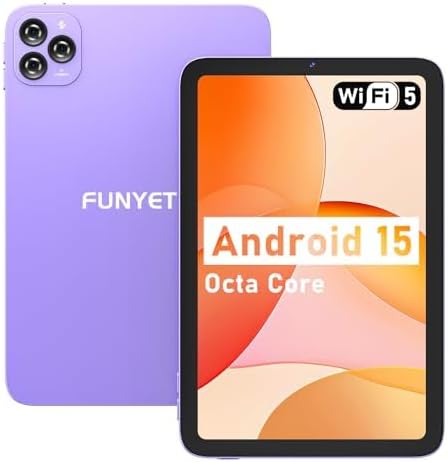
Imaj: Devan ak dèyè view of the FUNYET FUNPAD 10-inch Android Tablet, showcasing its purple metal shell and camera module.
3.1 Device Layout and Components

Image: Diagram illustrating the various ports and buttons on the FUNYET FUNPAD tablet. This includes the Micro SD Slot, Power On/Off button, Volume buttons, Type-C (Full Function) port, Auto Focus 8MP Rear Camera, Fixed Focus 2MP Front Camera, Flashlight, and Dual Speakers.
- Bouton pouvwa: Located on the side, used to power the device on/off or put it to sleep.
- Bouton Volim: Ajiste nivo pwodiksyon odyo a.
- Kalite-C Port: Pou chaje ak transfè done.
- Mikwo SD plas: Insert a Micro SD card for expandable storage.
- Kamera devan: 2MP camera for video calls and selfies.
- Kamera dèyè: 8MP autofocus camera with flashlight for capturing photos and videos.
- Doub Oratè: Bay pwodiksyon odyo.
4. Enstalasyon
4.1 Premye chaj
Before first use, fully charge the tablet using the provided power adapter and Type-C cable. The battery indicator on the screen will show charging status.
4.2 Limen/Etenyen
- Pou limen: Press and hold the Power button until the FUNYET logo appears.
- Pou etenn: Peze epi kenbe bouton Power la, answit chwazi "Power off" nan opsyon ki sou ekran an.
- Pou rekòmanse: Peze epi kenbe bouton Pouvwa a, answit chwazi "Rekòmanse" nan opsyon yo.
4.3 Asistan Enstalasyon Inisyal
Lè w limen tablèt la pou premye fwa, li pral gide w nan yon pwosesis konfigirasyon inisyal. Swiv enstriksyon ki parèt sou ekran an pou:
- Chwazi lang ou.
- Konekte nan yon rezo Wi-Fi.
- Kreye kont Google ou a (opsyonèl, men rekòmande pou telechaje aplikasyon).
- Konfigire dat ak lè.
5. Operasyon Enstriksyon
5.1 Navigasyon debaz
The FUNYET FUNPAD features an In-cell multi-touch display. Use standard Android gestures:
- Tape: Chwazi yon atik oubyen louvri yon aplikasyon.
- Glise: Defile nan ekran yo oswa lis yo.
- Zongle: Agrandi oswa diminye imaj yo epi web paj.
- Long Press: Jwenn aksè nan meni kontèks yo oubyen deplase ikòn yo.
5.2 Koneksyon Wi-Fi
Pou konekte ak yon rezo Wi-Fi:
- Ale nan Anviwònman > Rezo ak entènèt > Wi-Fi.
- Aktive Wi-Fi a On.
- Chwazi rezo ou vle a nan lis la.
- Antre modpas la si yo mande w, epi tape Konekte.
5.3 Bluetooth Pairing
Pou konekte ak yon aparèy Bluetooth (pa egzanp, kas ekoutè, oratè):
- Ale nan Anviwònman > Aparèy ki konekte > Bluetooth.
- Aktive Bluetooth On.
- Asire w aparèy Bluetooth ou a nan mòd koneksyon.
- Chwazi aparèy ou an nan lis aparèy ki disponib yo epi swiv nenpòt enstriksyon ki parèt sou ekran an pou konplete koneksyon an.
5.4 Itilizasyon Kamera
The tablet features an 8MP autofocus rear camera and a 2MP fixed-focus front camera.

Image: Visual representation of the FUNYET FUNPAD tablet's camera capabilities, highlighting the 8MP rear camera with autofocus and flashlight, and the 2MP front camera. Example photos are displayed.
- Louvri a Kamera app.
- Tape ikòn kamera a pou chanje ant kamera devan ak dèyè.
- Tape bouton deklanchè a pou pran yon foto oswa pou kòmanse/sispann anrejistreman videyo.
5.5 Jesyon Depo
The tablet comes with 128GB of internal storage. You can expand this by inserting a Micro SD card (up to 1TB capacity).

Image: The FUNYET FUNPAD tablet screen showing icons for 128GB ROM, 8GB RAM, and 1TB Micro SD expansion, indicating ample storage and expandability.
Pou jere depo:
- Ale nan Anviwònman > Depo.
- View internal storage usage and manage files.
- Insert a Micro SD card into the designated slot to expand storage.
5.6 Jesyon batri
The tablet is equipped with a 6000mAh battery for extended usage.

Image: The FUNYET FUNPAD tablet being used for various activities like watching videos and video calls, illustrating its long-lasting 6000mAh battery.
- To check battery status, go to Anviwònman > Batri.
- For optimal battery life, avoid extreme temperatures and use the provided charger.
5.7 Navigasyon GPS
The tablet supports GPS, GLONASS, and BDS for accurate location services. Ensure location services are enabled in Anviwònman > Kote for navigation apps to function correctly.
6. Antretyen
6.1 Netwaye Aparèy la
- Sèvi ak yon twal mou ki pa gen pousyè pou netwaye ekran an ak kò a.
- Evite itilize pwodwi chimik piman bouk oswa materyèl abrazif.
- Pa flite pwodui netwayaj yo dirèkteman sou ekran an.
6.2 Mizajou lojisyèl
Regularly check for and install software updates to ensure your tablet has the latest features and security enhancements. Go to Anviwònman > Sistèm > Aktyalizasyon sistèm lan.
6.3 Swen Batri
- Evite dechaje batri a nèt souvan.
- Do not expose the tablet to extreme heat or cold.
- Si w pa pral itilize tablèt la pou yon peryòd tan pwolonje, chaje l a apeprè 50% anvan ou sere l.
NAN. Depanaj
If you encounter issues with your FUNYET FUNPAD, refer to the following common solutions:
| Pwoblèm | Solisyon posib |
|---|---|
| Tablèt la pa limen | Ensure the battery is charged. Connect the tablet to the charger for at least 30 minutes, then try powering on again. |
| Pwoblèm koneksyon Wi-Fi | Restart the tablet and your Wi-Fi router. Forget the network in Wi-Fi settings and reconnect. Ensure you are within range. |
| Pèfòmans ralanti oswa konjelasyon | Close unnecessary background apps. Clear cache for problematic apps. Restart the tablet. Check for available storage space. |
| Ekran pa reponn | Perform a forced restart by holding the Power button for approximately 10-15 seconds. If the issue persists, consider a factory reset (data will be lost). |
| Device reboots unexpectedly | Ensure the device is updated to the latest software. Check for conflicting apps. If the issue persists, a factory reset may be necessary. |
7.1 Reset faktori
A factory reset will erase all data from your tablet and restore it to its original factory settings. This should be considered a last resort for persistent software issues.
- Fè yon kopi de tout done enpòtan yo.
- Ale nan Anviwònman > Sistèm > Reyajiste opsyon > Efase tout done (reset faktori).
- Konfime chwa ou epi swiv enstriksyon ki sou ekran an.
8. Espesifikasyon
Key technical specifications for the FUNYET FUNPAD 10-inch Android Tablet:
| Karakteristik | Spesifikasyon |
|---|---|
| Gwosè ekran an | 10 pous |
| Rezolisyon ekran | 800x1280 piksèl |
| Processeur | 1.6 GHz Octa-Core (Spreadtrum T606) |
| Koprosesè grafik | Mali-G57 |
| RAM | 8 GB |
| Depo Entèn | 128 GB |
| Depo dilatabl | Mikwo SD (jiska 1TB) |
| Sistèm operasyon | Android |
| Kalite san fil | 802.11ac (Wi-Fi 5) |
| Bluetooth | Bluetooth 5.0 |
| Kamera dèyè | 8MP Auto Konsantre |
| Kamera devan | 2MP Konsantre fiks |
| Batri | 6000mAh |
| Pwa atik | 1.74 liv |
| Dimansyon pwodwi | 9.48 x 6.28 x 0.3 pous |
9. Garanti ak sipò
FUNYET is dedicated to providing quality electronic products. We offer a 30-day free exchange policy and a 1-year free repair service for all our products.
If you have any questions or require assistance with your FUNYET FUNPAD tablet, please contact FUNYET support. We aim to reply to all inquiries within 24 hours.
For further information or to explore other products, visit the official FUNYET store: FUNYET Store on Amazon