
Enfòmasyon enpòtan sou sekirite
Please read all safety instructions before using this product to ensure proper and safe operation.
- Do not expose the earbuds or charging case to extreme temperatures.
- Evite jete oswa aplike twòp fòs sou aparèy la.
- Kenbe lwen timoun ak bèt kay.
- Use only a 5V adapter to charge the charging case to prevent battery damage.
- Do not use the earbuds in the bath or while swimming.
Kontni pake
Verifye ke tout atik yo prezan nan pakè ou a:
- ZIUTY A1 Wireless Earbuds (x1 pair)
- Portable Charging Case (x1)
- USB-C chaje kab (x1)
- Eartips (pre-installed size M, plus 2 extra pairs in sizes S & L)
- Manyèl Itilizatè (dokiman sa a)
Pwodwi souview
Familiarize yourself with the components of your ZIUTY A1 Wireless Earbuds.
Ekoutè ak ka chaje
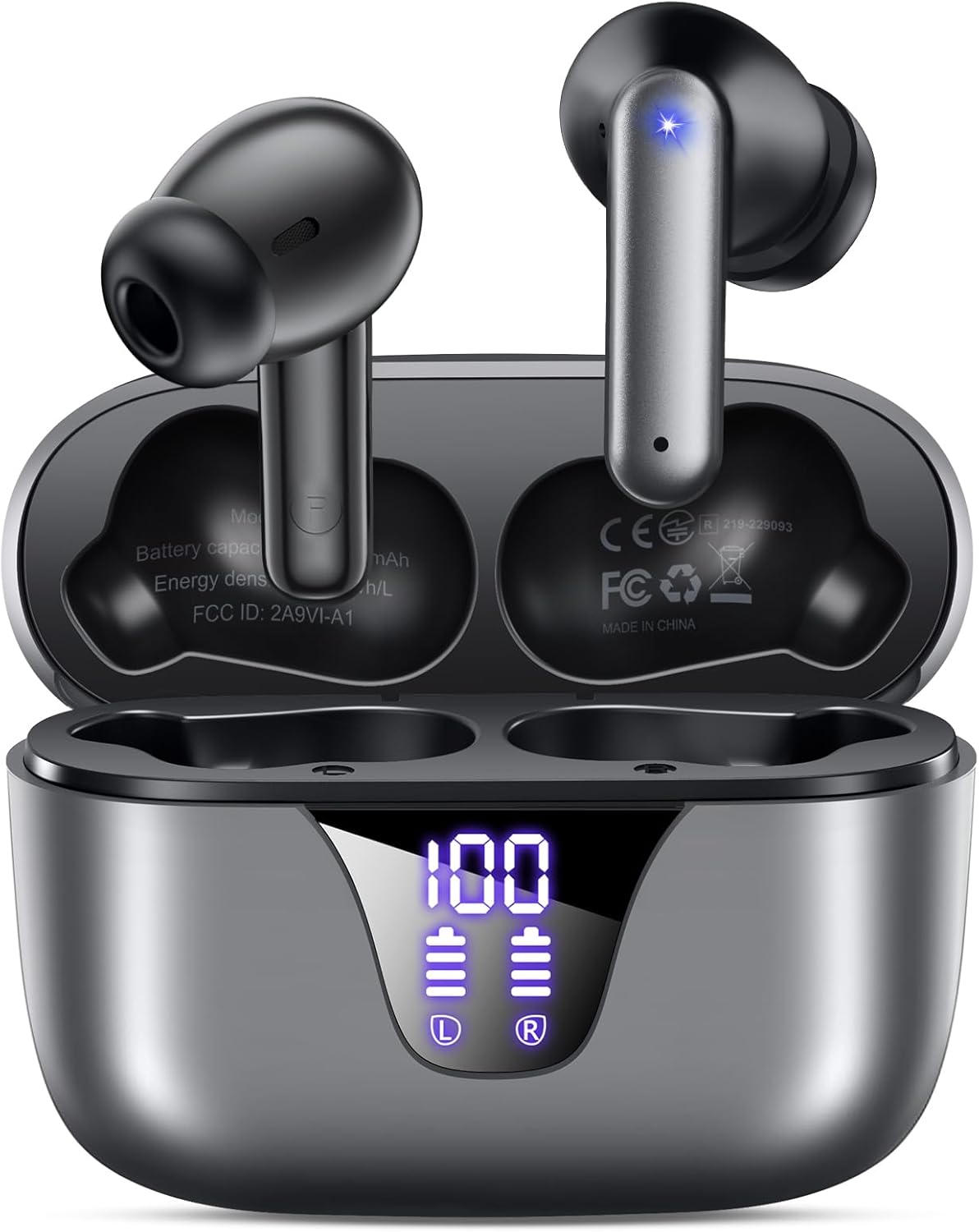
Image: ZIUTY A1 Wireless Earbuds shown inside their open charging case. The case features an LED digital display indicating battery levels for both the case and individual earbuds.
Dirije ekspozisyon pouvwa

Image: Close-up of the ZIUTY A1 charging case's LED display, showing '100' for the case battery and individual battery icons for the left (L) and right (R) earbuds.
The charging case features an LED digital display that shows the exact remaining power percentage (0-100%) for the case and individual battery levels for each earbud.
Enstalasyon
1. Chaje ekoutè yo ak bwat la
Anvan premye itilizasyon an, chaje ekoutè yo ak bwat chaje a nèt.
- Mete ekoutè yo nan bwat chaje a. Asire w ke yo byen chita nan plas respektif yo (L pou goch, R pou dwat).
- Connect the USB-C charging cable to the charging port on the case and the other end to a 5V USB power adapter (not included).
- The LED display on the case will show the charging status. A full charge typically takes approximately 2 hours.

Image: ZIUTY A1 earbuds resting in their charging case, with the LED display showing battery levels.

Image: Diagram illustrating how to connect the USB-C cable to the charging case and a 5V power adapter for charging.
2. Mete ekoutè yo
Pou yon bon jan kalite son ak yon konfò optimal, chwazi gwosè bon bout zòrèy la epi asire w ke yo byen anfòm.
- Choose the ear tips (S, M, L) that provide the best seal and comfort for your ears.
- Insert the earbuds into your ears, gently twisting them to find a snug and stable position.
- The ergonomic semi-in-ear design is intended for a comfortable fit during various activities.

Image: Diagram showing the ergonomic design of the earbuds and the three available ear tip sizes (S, M, L) for a customized fit.

Image: Step-by-step visual guide on how to correctly insert and adjust the earbuds for a secure fit.
3. Pairing ak yon Aparèy Bluetooth
Ekoutè yo ap antre otomatikman nan mòd koneksyon lè yo retire yo nan bwat chaje a.
- Louvri bwat chaje a epi retire tou de ekoutè yo. Y ap limen otomatikman epi y ap eseye konekte youn ak lòt.
- Sou aparèy ou an (telefòn entelijan, tablèt, òdinatè pòtab), aktive Bluetooth epi chèche aparèy ki disponib yo.
- Select "A1" from the list of found devices.
- Yon fwa konekte, w ap tande yon konfimasyon sonab, epi ekoutè yo ap pare pou itilize.
- Ekoutè yo ap konekte otomatikman ak dènye aparèy ki te konekte a lè yo retire yo nan bwat la.

Image: Illustration showing the ZIUTY A1 earbuds connecting via Bluetooth 5.3 to a smartphone, indicating a stable and fast connection.

Image: Diagram demonstrating the one-step auto-pairing process when the earbuds are removed from the charging case.
Enstriksyon Operasyon
Kontwòl manyen
The ZIUTY A1 earbuds feature intuitive touch controls for managing audio playback and calls.

Image: Diagram illustrating the touch control area on the earbuds and various functions like Play/Pause, Voice Assistant, Answer/Hang up, Previous/Next Track, and Volume adjustment.

Image: A more detailed visual guide to the touch controls, showing specific tap and hold gestures for different commands.
| Aksyon | Fonksyon |
|---|---|
| Yon sèl tape (G/D) | Jwe/Pòz Mizik, Reponn/Fen Apèl |
| Tape Doub (L) | Previous Track |
| Tape Doub (R) | Next Track |
| Twa Tape (G/D) | Aktive Asistan Vwa (Siri, Asistan Google) |
| Press and Hold (L) | Volim desann |
| Press and Hold (R) | Volim leve |
| Press and Hold (L/R) during incoming call | Rejte apèl |
Fè ak Resevwa Apèl
Use the touch controls to manage your phone calls:
- Reponn/Fen Apèl: Tape youn apre lòt sou nenpòt ekoutè.
- Rejte apèl: Press and hold either earbud during an incoming call.

Image: Illustration showing a user interacting with a voice assistant (Siri) via the earbuds for clear call support.
Asistan vwa
Activate your device's voice assistant by triple-tapping either earbud. This allows you to issue commands such as making calls or checking information hands-free.
Antretyen
Netwayaj
Netwayaj regilye ede kenbe pèfòmans ak ijyèn optimal.
- Clean the charging contacts on both the earbuds and inside the charging case with a dry cotton swab or alcohol pad.
- Gently clean the mesh of the ear tips to remove any dust or earwax that might affect sound volume.
- Wipe the exterior of the earbuds and case with a soft, dry cloth.

Image: Visual guide demonstrating how to clean the earbud charging contacts and ear tip mesh to resolve potential volume or charging issues.
Depo
Lè w pa ap itilize ekoutè yo, sere yo nan bwat chaje yo pou pwoteje yo epi asire yo rete chaje.
Depanaj
If you encounter issues with your ZIUTY A1 earbuds, refer to the following common solutions:
- Ekoutè yo pa konekte youn ak lòt: Place both earbuds back into the charging case, close the lid, wait a few seconds, then open the lid and remove them again. They should automatically pair.
- Ekoutè yo pa konekte ak aparèy la: Ensure Bluetooth is enabled on your device and the earbuds are in pairing mode. Forget the device from your Bluetooth list and attempt to re-pair.
- Pa gen son oswa volim ki ba: Check the volume levels on both your device and the earbuds. Ensure the ear tips are clean and properly seated in your ears. Refer to the cleaning instructions in the Maintenance section.
- Pwoblèm chaj: Ensure the charging cable is securely connected and the power adapter is 5V. Clean the charging contacts on both the earbuds and the case.
- Accidental touch control activation: When adjusting the earbuds in your ear, grasp them by the sides to avoid touching the control area.
Espesifikasyon
Key technical specifications for the ZIUTY A1 Wireless Earbuds:
| Karakteristik | Spesifikasyon |
|---|---|
| Non modèl | A1 |
| Koneksyon Teknoloji | San fil (Bluetooth 5.3) |
| Gamme Bluetooth | Jiska 15 mèt (49 pye) |
| Lavi batri ekoutè | Jiska 8 èdtan |
| Tan total pou jwe (ak bwat) | Jiska 50 èdtan |
| Chaje Ka Batri Kapasite | 500 mAh |
| Tan pou chaje | Apeprè 2 èdtan |
| Gwosè Chofè Audio | 14.5 mm chofè dinamik |
| Gamme frekans | 20 Hz - 20,000 Hz |
| Nivo rezistans dlo | IPX7 (rezistan dlo) |
| Kalite kontwòl | Kontwòl manyen |
| Earbud Pwa | Approximately 0.14 oz (3.9g) per earbud |
| Konpozan ki enkli | Earbuds, Charging Case, USB-C Cable, Eartips, User Manual |
Garanti ak sipò
Enfòmasyon sou Garanti
ZIUTY provides an 18-month battery promise for this product. This warranty covers defects in materials and workmanship under normal use.
Sipò pou Kliyan
For any questions, technical assistance, or warranty claims, please contact ZIUTY customer service. Refer to the product packaging or the official ZIUTY websit la pou jwenn enfòmasyon kontak aktyèl yo.