
1. Entwodiksyon
The OTTOCAST Nano AI Box is a compact device designed to upgrade your in-car entertainment system. It converts your vehicle's existing wired CarPlay or Android Auto into a wireless experience, integrating an Android 13.0 operating system and advanced AI voice control. This manual provides essential information for setting up, operating, maintaining, and troubleshooting your Nano AI Box.

Image: The OTTOCAST Nano AI Box, showcasing its core features including AI voice operation, wireless CarPlay and Android Auto, and compatibility with various streaming services.
2. Enfòmasyon sou Sekirite
- Always prioritize safe driving. Do not operate the device in a way that distracts you from the road.
- Asire w ke aparèy la byen monte epi li pa bloke w. view oswa entèfere ak kontwòl machin yo.
- Evite ekspoze aparèy la nan tanperati ekstrèm, limyè solèy dirèk pou peryòd pwolonje, oswa imidite.
- Do not attempt to disassemble or modify the device. This may void the warranty and pose safety risks.
- Use only the provided cables and accessories to prevent damage to the device or vehicle.
3. Pake kontni
Verifye ke tout atik yo prezan nan pakè a:
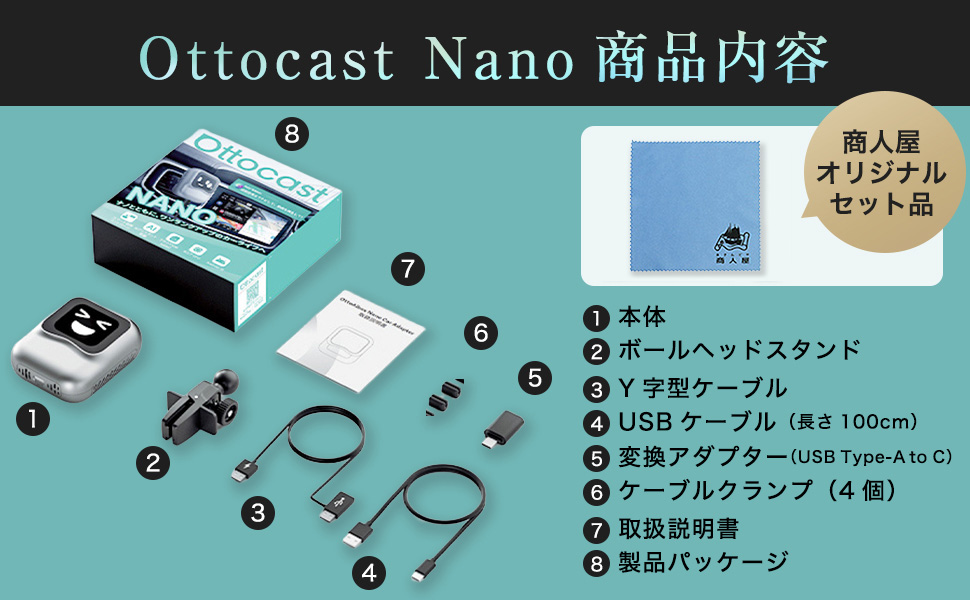
Imaj: Detaye view of the OTTOCAST Nano AI Box package contents.
- OTTOCAST Nano Main Unit
- Ball Head Stand
- Y-Type Cable
- USB kab (100cm)
- USB Type-A to C Conversion Adapter
- Kab Clamps (4 moso)
- Manyèl Enstriksyon
- Anbalaj pwodwi
4. Enstriksyon Enstalasyon
4.1 Egzijans konpatibilite
The OTTOCAST Nano AI Box is designed exclusively for vehicles equipped with a genuine wired CarPlay system. Operation is not guaranteed for all vehicle models or display audio systems. Compatibility may vary depending on the specific car model and navigation specifications.

Image: The OTTOCAST Nano AI Box supports a wide range of CarPlay-compatible car models and popular applications.
4.2 Koneksyon Inisyal
Follow these two steps for initial setup:

Image: Step-by-step guide for connecting the OTTOCAST Nano AI Box to your vehicle and the internet.
- Konekte ak machin: Insert the Nano AI Box into your vehicle's USB port. Press the power button to start the device. The connection is complete when the device powers on.
- Koneksyon Entènèt: For video streaming and online features, connect to the internet via Wi-Fi, your smartphone's tethering function, or a nano SIM card.
4.3 Monte Aparèy la
The Nano AI Box can be easily mounted to various air vents using the included ball head stand. Ensure it is securely attached for stability and optimal heat dissipation.

Image: Connecting the Nano AI Box to the vehicle's USB port while mounted on an air vent.
5. Operasyon Enstriksyon
5.1 Kontwòl Vwa IA
The Nano AI Box features next-generation AI voice control, allowing for hands-free operation of basic functions such as navigation and music playback. This reduces the operational burden while driving, enhancing safety and comfort.

Image: Safe and comfortable driving with AI voice control, allowing hands-free operation.
- Aktive: Say "Hey Nano" to activate the voice assistant.
- Navigasyon: Command "Start navigation to [destination]" to begin route guidance.
- Mizik: Say "Play music" or "Play [song/artist]" to control audio playback.
- Apèl: Use commands like "Answer call" or "Call [contact name]" for hands-free communication.
5.2 CarPlay san fil ak Android Auto
The device converts your vehicle's wired CarPlay and Android Auto into wireless functionality. This allows you to use compatible applications (navigation, music, calls, etc.) directly on your car's display without a physical cable connection after the initial setup.
5.3 Karakteristik Android 13.0
Equipped with Android 13.0 OS, the Nano AI Box allows you to install and use various applications. Please note that some applications may not function or may have limited functionality due to compatibility or system restrictions.
5.4 Customizable Home Screen (OttoDrive 2.5)
The UI2.5 smart adaptation system automatically supports 99% of major in-car displays in Japan. You can customize your in-car screen by setting photos of your family or pets as the background.

Image: Customizable home screen and screen split function of the OTTOCAST Nano AI Box.
5.5 Screen Split Function
The device supports a screen split function with three adjustable ratios: 5:5, 3:7, and 7:3. This allows you to view multiple applications simultaneously on your car's display.
6. Antretyen
6.1 Mizajou Lojisyèl (OTA)
The OTTOCAST Nano AI Box supports Over-The-Air (OTA) updates, allowing you to update the firmware online. This ensures you always have the latest system with new features and improvements without needing to visit a car electronics specialist.

Image: Continuous software updates via OTA to keep your device optimized.
6.2 Netwayaj
Wipe the device with a soft, dry cloth. Do not use liquid cleaners or abrasive materials, as they may damage the surface or internal components.
NAN. Depanaj
If you encounter issues with your OTTOCAST Nano AI Box, refer to the following common solutions:
- No Display/Connection Issues:
- Ensure your vehicle has a genuine wired CarPlay system.
- Verify the USB cable is securely connected to both the device and the vehicle's USB port.
- Restart the vehicle's infotainment system and the Nano AI Box.
- For initial connection, a wired connection may be required.
- Koneksyon Entènèt Enstab:
- Communication stability can be affected by the usage environment, area, and vehicle compatibility.
- It is recommended to use smartphone tethering for a more stable internet connection.
- Ensure your Wi-Fi or SIM card has sufficient signal strength.
- AI Voice Control Issues:
- Asire w ke mikwofòn nan pa bloke.
- Pale byen klè ak nan yon volim modere.
- Background noise can affect voice recognition accuracy.
- App Not Working/Restricted:
- Some applications may not be fully compatible with the Android 13.0 system on the device or may have regional restrictions.
- Check for available software updates for the Nano AI Box.
Si pwoblèm yo pèsiste apre ou fin eseye solisyon sa yo, tanpri kontakte sèvis kliyan.
8. Espesifikasyon
| Karakteristik | Spesifikasyon |
|---|---|
| Mak | OTTOCAST |
| Modèl | Nano |
| Sistèm operasyon | Android 13.0 |
| Koneksyon | Wireless CarPlay, Wireless Android Auto, Wi-Fi, Cloud SIM |
| Karakteristik espesyal | AI Voice Control, Customizable Home Screen (OttoDrive 2.5), Screen Split Function |
| Pwa | 100 gram |
| Pwodwi pou Telefòn enkli | USB Cable, USB Type-A to C Adapter, Ball Head Stand, Cable Clamps |
| Orijin | Lachin |
| GTIN (UPC) | 611624748379 |
9. Garanti ak sipò
The OTTOCAST Nano AI Box comes with a 1-ane garanti from the date of purchase. As a domestic authorized dealer, we offer comprehensive support for our products.

Image: OTTOCAST provides reliable support and a 1-year warranty through its domestic authorized dealer.
If you experience any initial defects, believe the product differs from expectations, or find it incompatible with your vehicle, please contact us within one year of receiving the product for return, refund, or exchange. Our Japanese-speaking staff are available to provide prompt assistance.
For any inquiries or concerns, please do not hesitate to contact our customer support team.