
Entwodiksyon
Welcome to your Angrox Universal Replacement Remote Control. This manual provides detailed instructions for setting up and operating your new remote, designed for seamless compatibility with various Philips Smart 4K UHD Android TVs. Please read this manual thoroughly to ensure optimal performance and longevity of your remote control.
1. Enstalasyon
1.1 Enstalasyon batri
The remote control requires two AAA alkaline batteries (not included).
- Jwenn kouvèti lòj batri a sou do kontwòl remote la.
- Press down on the tab and slide the cover downwards to open.
- Mete de pil AAA ladan l, asire w ke tèminal pozitif (+) ak negatif (-) yo byen aliyen ak mak ki anndan konpatiman an.
- Glise kouvèti batri a tounen nan plas li jiskaske li klike byen.
1.2 Koneksyon Inisyal
This Angrox replacement remote control is designed for immediate use with compatible Philips Smart TVs. No programming or pairing is required. Simply insert the batteries, and the remote is ready to operate your television.
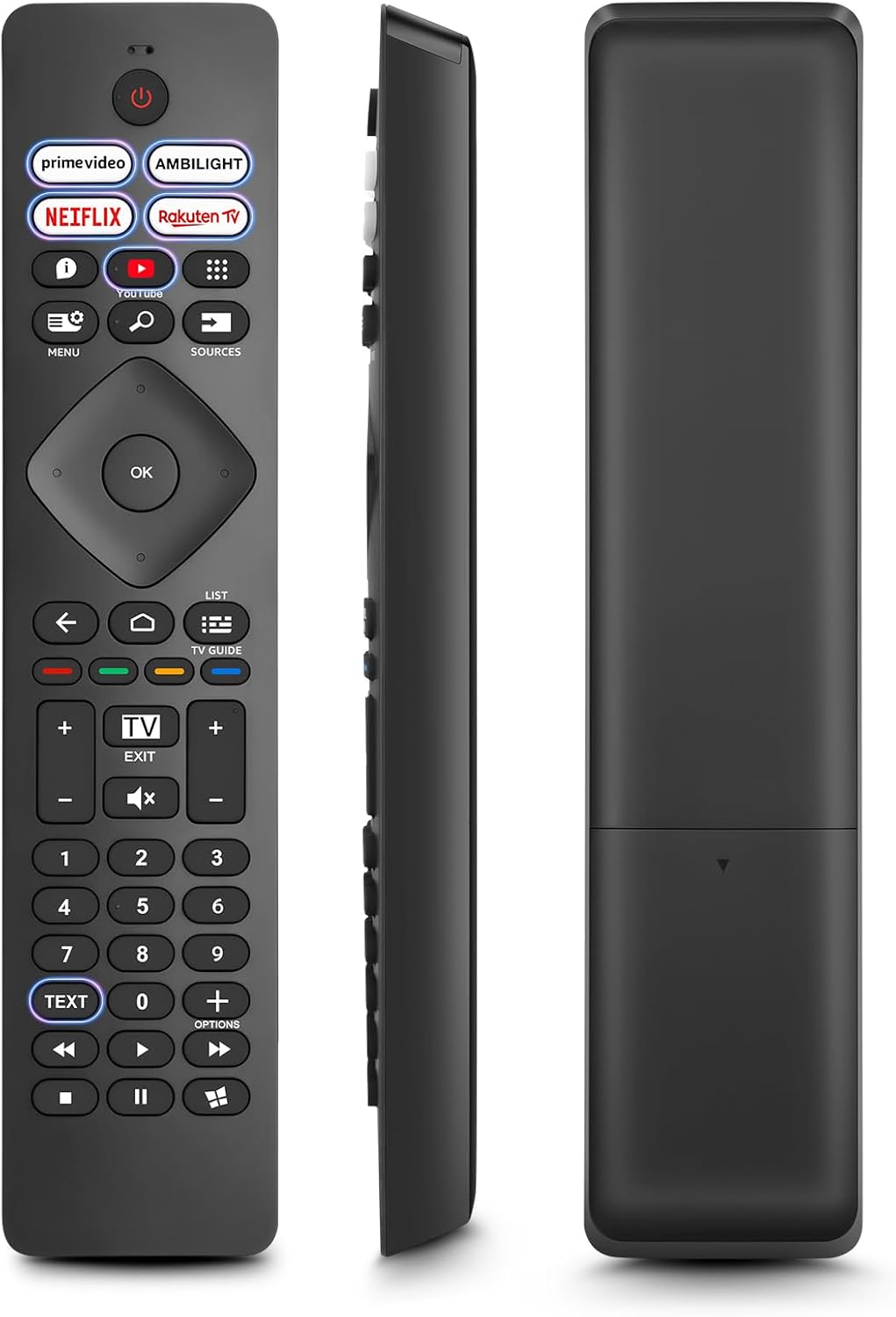
Image: Front, side, and back views of the Angrox Universal Replacement Remote Control. This image illustrates the physical design and battery compartment location.
2. Operasyon Enstriksyon
2.1 Fonksyon bouton yoview
Familiarize yourself with the remote control's buttons and their primary functions.
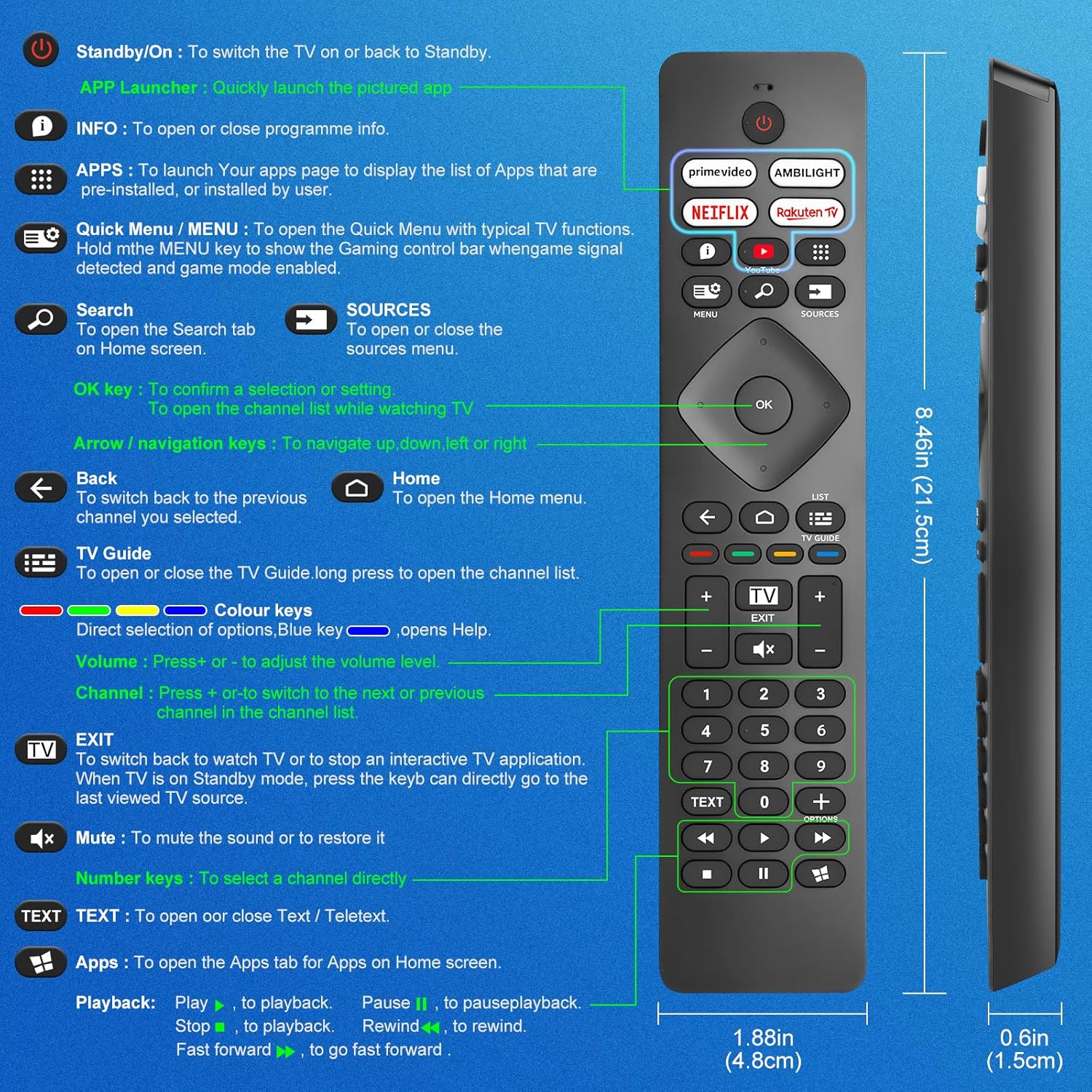
Image: A detailed diagram illustrating each button on the Angrox remote control and its corresponding function.
Detailed Button Descriptions:
- Standby/On (Power Button): Pou chanje televizyon an limen oswa tounen nan Standby.
- APP Launcher: Quickly launch the pictured app.
- ENFO: To open or close programme info.
- APLIKASYON: To launch your apps page to display the list of apps that are pre-installed or installed by the user.
- Quick Menu / MENU: To open the Quick Menu with typical TV functions. Hold the MENU key to show the Gaming control bar when game signal detected and game mode enabled.
- Rechèch: To open the Search tab on Home screen.
- SOUS: To open or close the sources menu.
- OK kle: To confirm a selection or setting. To open the channel list while watching TV.
- Arrow/Navigation keys: Pou navige monte, desann, agoch oswa adwat.
- Retounen: Pou chanje tounen nan chanèl anvan ou te chwazi a.
- Kay: To open the Home menu.
- Gid televizyon: To open or close the TV Guide. Long press to open the channel list.
- Colour keys (Red, Green, Yellow, Blue): Direct selection of options. Blue key opens Help.
- Volim +/-: Pou ajiste nivo volim.
- Chèn +/-: Pou chanje nan pwochen oswa anvan chanèl nan lis chanèl la.
- Sòti: To switch back to watch TV or to stop an interactive TV application. When TV is on Standby mode, press the key to directly go to the last viewed TV source.
- Bèbè: Pou koupe son an oswa retabli li.
- Kle nimewo (0-9): Pou chwazi yon kanal dirèkteman.
- TÈKS: To open or close Text / Teletext.
- Apps (Netflix, Prime Video, Rakuten TV, YouTube): Quick access to dedicated streaming applications.
- Kontwòl Lektur (Jwe, Pòz, Sispann, Remonte, Avanse rapid): Pou lekti medya.
2.2 bouton chemen kout
The remote features dedicated shortcut buttons for popular streaming services and Ambilight control.

Image: The Angrox remote control with highlighted shortcut buttons for Prime Video, Ambilight, Netflix, Rakuten TV, and YouTube.
- Premye Videyo: Direct access to Amazon Prime Video.
- Ambilight: Control Philips Ambilight features.
- Netflix: Direct access to Netflix.
- Rakuten TV: Direct access to Rakuten TV.
- YouTube: Direct access to YouTube.
3. Konpatibilite
This Angrox replacement remote control is universally compatible with a wide range of Philips Smart TVs, including:

Image: Visual representation of the Angrox remote's compatibility with Philips 4K Ambilight TV, 4K Ultra HD TV, LED 4K TV, and OLED 4K TV.
- 4K Ambilight televizyon
- 4K Ultra HD televizyon
- Dirije 4K televizyon
- OLED 4K televizyon
It is designed to function with all Philips Smart TV models that utilize an infrared remote control.
4. Karakteristik pèfòmans

Image: Graphics indicating a 0.2-second fast response and a 10-meter transmitting distance for the remote control.
- Repons rapid: Enjoy a quick response time of approximately 0.2 seconds for button presses.
- Distans transmèt: Effective operating range up to 10 meters (approximately 33 feet).
5. Antretyen
- Netwayaj: Sèvi ak yon twal mou epi sèk pou netwaye kontwòl remote la. Evite itilize pwodui netwayaj likid oswa materyèl abrazif.
- Swen batri: If the remote will not be used for an extended period, remove the batteries to prevent leakage and potential damage. Replace batteries when the remote's response becomes sluggish or inconsistent.
- Depo: Sere telekòmand lan nan yon kote ki fre epi sèk, lwen limyè solèy dirèk ak tanperati ekstrèm.
NAN. Depanaj
6.1 Telekòmand lan pa reponn
- Tcheke batri yo: Ensure batteries are inserted correctly with the correct polarity (+/-). Replace old or depleted batteries with new AAA alkaline batteries.
- Liy Vizyon: Asire w ke gen yon liy vizyon klè ant kontwòl remote la ak detèktè enfrawouj televizyon an. Obstriksyon ka bloke siyal la.
- Remote sensor: Ensure the TV's infrared sensor is not blocked or dirty.
6.2 Fonksyonalite limite
- While this remote is broadly compatible, some specific advanced functions unique to certain original Philips remote models might not be replicated. Verify the button functions against the provided diagram.
6.3 Ambilight Functionality
Gen kèk itilizatè ki reviews indicate that Ambilight functionality might vary. If your Ambilight button does not work as expected, ensure your TV's Ambilight feature is enabled and configured correctly in your TV settings.
7. Espesifikasyon
| Karakteristik | Detay |
|---|---|
| Mak | Angrox |
| Modèl | pour Philips TV |
| Aparèy konpatib | Philips Smart TV (4K Ambilight, 4K UHD, LED 4K, OLED 4K) |
| Karakteristik espesyal | Inivèsèl |
| Kalite Connector | Enfrawouj |
| Kalite batri | 2 x AAA Alkaline (not included) |
| Dimansyon atik | 22.7 x 6.2 x 2.4 cm |
| Pwa atik | 60 g |
| Koulè | Nwa |
Remak: Espesifikasyon yo sijè a chanje san avètisman davans.
8. Garanti ak sipò
For product support or warranty inquiries, please contact your retailer or the manufacturer, Angrox, directly. Please refer to your purchase documentation for specific warranty terms and contact information.
Manifakti: Angrox
ASIN: B0F83X2FQG