
Richmat PS1L-A29018-2
Richmat Adjustable Bed Power Supply Adapter User Manual
Model: PS1L-A29018-2
1. Entwodiksyon
This manual provides essential information for the safe and effective use of your Richmat Class 2 Power Supply Adapter, Model PS1L-A29018-2. This adapter is designed as a replacement power supply for adjustable beds, specifically compatible with Leggett and Platt 50 Series Adjustable Beds.
The adapter is UL Certified, ensuring it meets rigorous safety standards for reliability and durability.
2. Enfòmasyon sou Sekirite
- Danje elektrik: To reduce the risk of electric shock, do not open the adapter casing. Pa gen okenn pyès itilizatè a ka repare anndan an.
- Dry Location Use Only: This power supply is intended for indoor use in dry locations only. Do not expose to water, moisture, or high humidity.
- Bon vantilasyon: Asire w ke adaptè a gen ase vantilasyon pandan l ap fonksyone pou anpeche l chofe twòp. Pa kouvri adaptè a.
- Enspeksyon kab: Before each use, inspect the power cord and adapter for any signs of damage. Do not use if damaged.
- Konpatibilite: Only use this adapter with compatible adjustable bed systems as specified. Using it with incompatible devices may cause damage or safety hazards.
- Dekonekte lè w pa ap itilize li: Dekonekte aparèy elektrik la nan priz miray la lè w pa itilize l pou yon bon bout tan oswa pandan tanpèt elektrik.
3. Enstalasyon ak Enstalasyon
Follow these steps to properly install your Richmat power supply adapter:
- Verifye konpatibilite: Before connecting, ensure that the connector on your adjustable bed's cable matches the connector on the PS1L-A29018-2 adapter. If the connectors are not identical, the adapter cannot be used as a replacement.
- Disconnect Old Adapter: If replacing an existing adapter, unplug the old power supply from both the wall outlet and the adjustable bed.
- Connect to Bed: Carefully insert the adapter's output connector into the corresponding port on your adjustable bed's control box or motor. Ensure a secure and snug fit.
- Konekte nan priz kouran: Plug the adapter's AC input plug into a standard 100-130V AC wall outlet.
- Endikatè pouvwa: Once connected to power, the "DC Power" indicator light on the adapter should illuminate, typically green, indicating that power is being supplied.

Figure 3.1: Adapter Connector Port. Ensure this matches your bed's cable.
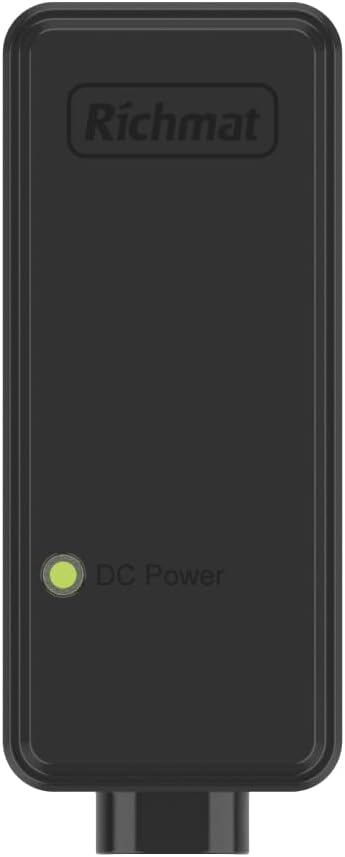
Figure 3.2: Adapter Front View with DC Power Indicator.
4. Operasyon Enstriksyon
Once the Richmat power supply adapter is correctly installed and connected, your adjustable bed should be ready for operation. The adapter functions as a continuous power source for your bed's motor and control system.
- Operasyon nòmal: The adapter provides stable power to your adjustable bed, allowing you to use its remote control or integrated controls to adjust the bed's position.
- Sik devwa: The adapter is designed with a duty cycle of "ON 2 min / OFF 18 min". This means the motor should not be operated continuously for more than 2 minutes, followed by a rest period of at least 18 minutes to prevent overheating and prolong the life of the motor and adapter.
- Endikatè pouvwa: The green "DC Power" light on the adapter indicates that it is receiving AC power and converting it to DC power for the bed. If this light is off, check the wall outlet and connections.
5. Antretyen ak Swen
Proper care will ensure the longevity and safe operation of your power supply adapter:
- Netwayaj: Disconnect the adapter from the power outlet before cleaning. Use a soft, dry cloth to wipe the exterior. Do not use liquid cleaners or sprays.
- Depo: If storing the adapter for an extended period, disconnect it from both the wall outlet and the bed. Store in a cool, dry place away from direct sunlight and extreme temperatures.
- Jesyon kab: Avoid kinking, twisting, or placing heavy objects on the power cord. This can damage the internal wires.
- Kondisyon anviwònman: Do not operate the adapter in excessively dusty, humid, or hot environments.
NAN. Depanaj
If you encounter issues with your power supply adapter, refer to the following common problems and solutions:
| Pwoblèm | Kòz posib | Solisyon |
|---|---|---|
| No power to adjustable bed / Adapter indicator light is off. |
|
|
| Bed operates intermittently or slowly. |
|
|
| Adapter feels excessively hot. |
|
|
Si pwoblèm nan pèsiste apre ou fin eseye solisyon sa yo, kontakte sèvis kliyan.
7. Espesifikasyon
| Karakteristik | Detay |
|---|---|
| Nimewo Modèl | PS1L-A29018-2 |
| Antre Voltage | AC 100-130V, 50 / 60Hz, 2.5A |
| Sòti Voltage / Kouran | DC 29V, 1.8A |
| Sortie pouvwa | 52.2W |
| Sik devwa | ON 2 min / OFF 18 min |
| Sètifikasyon | UL sètifye |
| Koulè | Nwa |
| Aparèy konpatib | Adjustable Bed (e.g., Leggett and Platt 50 Series) |
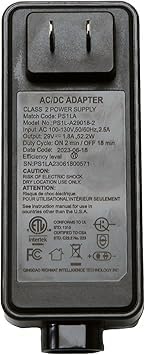
Figure 7.1: Adapter Back View with Specifications Label.
8. Garanti ak sipò
For warranty information or technical support regarding your Richmat PS1L-A29018-2 power supply adapter, please refer to the original purchase documentation or contact the seller directly. As this product is a replacement part, specific warranty terms may vary based on the retailer or manufacturer's policy.
For general inquiries or assistance, please reach out to the customer service provided by your point of purchase.
Ask a question about this manual
Ask about setup, troubleshooting, compatibility, parts, safety, or missing instructions. Manuals+ will review the question and use this page’s manual context to help answer it.