
Entwodiksyon
Thank you for choosing the Monster Clarity 101 AirLinks Wireless Earbuds. This manual provides essential information on how to set up, operate, and maintain your earbuds to ensure optimal performance and longevity. Please read this manual thoroughly before use.
Ki sa ki nan bwat la
- Monster Clarity 101 AirLinks Wireless Earbuds (Left and Right)
- Ka chaje
- USB-C Chaje Kab
- Plizyè gwosè bouchon zòrèy (S, M, L)
- Manyèl itilizatè

The package includes the wireless earbuds, a portable charging case, a USB-C cable for charging, various eartip sizes for a comfortable fit, and this user manual.
Pwodwi souview
The Monster Clarity 101 AirLinks are true wireless in-ear headphones designed for an active lifestyle. They feature powerful 6mm dynamic drivers for clear sound and deep bass, touch controls for easy management, and an IPX5 waterproof rating.

Each earbud is lightweight and ergonomically designed to provide a secure and comfortable fit, even during sports and exercise. The included charging case is compact and features a magnetic closure to keep your earbuds safe and charged.
Enstalasyon
1. Chaje ekoutè yo ak bwat la
Before first use, fully charge the earbuds and the charging case. Place the earbuds into the charging case. Connect the USB-C charging cable to the charging port on the case and the other end to a USB power source. The charging indicators on the case will show the charging status.

A quick 5-minute charge can provide up to 1.5 hours of playback. A full charge of the earbuds provides approximately 5 hours of play time, and the charging case extends this to a total of 25 hours.
2. Konekte ak aparèy ou an
- Asire ke ekoutè yo chaje.
- Louvri bwat chaje a. Ekoutè yo ap limen otomatikman epi antre nan mòd koneksyon.
- Sou aparèy ou an (telefòn entelijan, tablèt, elatriye), aktive Bluetooth.
- Chèche pou Bluetooth devices and select "Clarity 101" from the list.
- Yon fwa konekte, w ap tande yon son konfimasyon, epi ekoutè yo ap pare pou itilize.

The earbuds feature one-step pairing for quick and convenient connection to your Bluetooth-enabled devices.
Enstriksyon Operasyon
1. Mete ekoutè yo
Select the eartips that provide the most comfortable and secure fit for your ears. Gently insert the earbuds into your ear canal and rotate them slightly to ensure a snug fit. This helps optimize sound quality and noise isolation.

2. Touche Kontwòl
The earbuds are equipped with multi-function touch controls on the outer surface. These controls allow you to manage music playback, calls, and voice assistant activation.
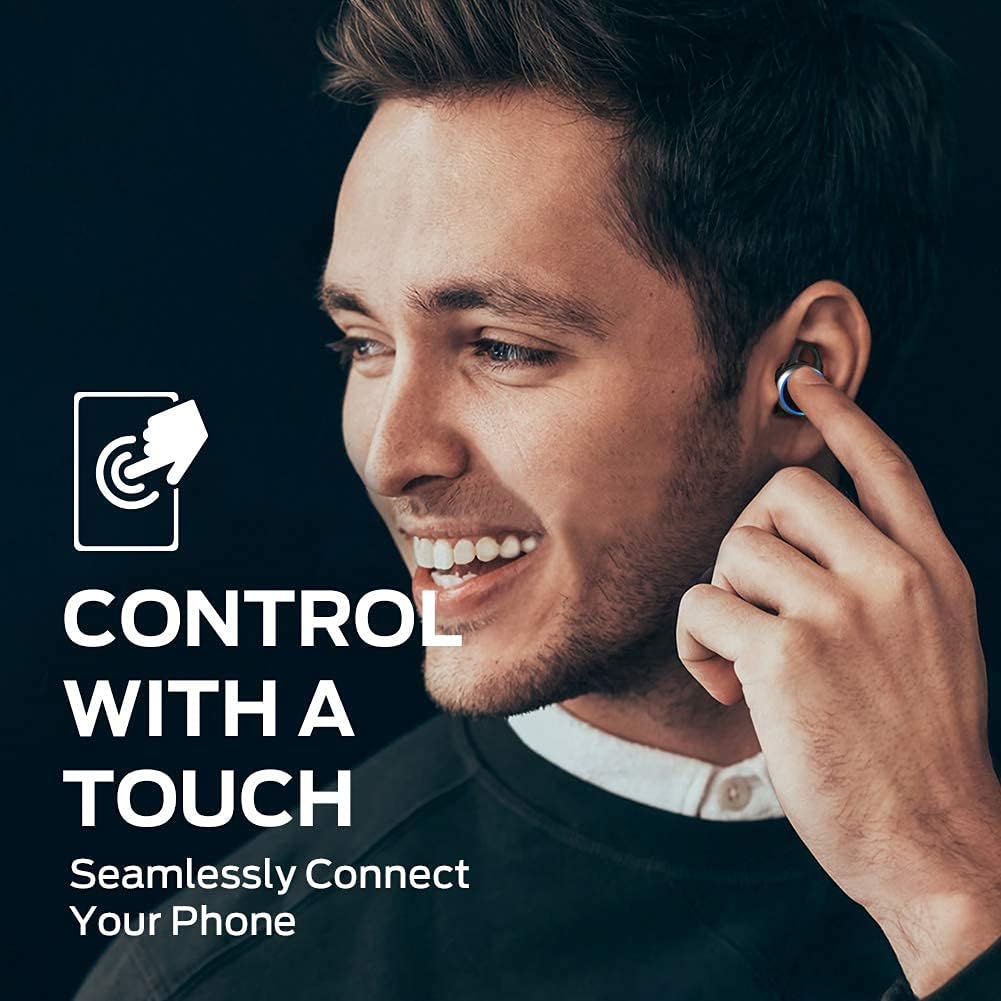
| Aksyon | Fonksyon |
|---|---|
| Yon sèl tape (agoch/adwat) | Jwe/Pòz Mizik, Reponn/Fen Apèl |
| Tape de fwa (adwat) | Next Track |
| Tape de fwa (agoch) | Previous Track |
| Twa Tape (Agoch/Dwat) | Aktive Asistan Vwa |
| Press and Hold (Left/Right) | Rejte apèl |
3. Fè ak resevwa apèl
The earbuds support hands-free stereo calls. You can use either earbud independently or both together for calls. The built-in microphone provides clear voice quality, even in moderately noisy environments.
- Reponn/Fen Apèl: Tape youn apre lòt sou nenpòt ekoutè.
- Rejte apèl: Peze epi kenbe youn nan ekoutè yo.
- Aktive Asistan Vwa: Tape twa fwa sou nenpòt ekoutè.
Antretyen
1. Netwayaj
Regularly clean your earbuds and charging case to maintain optimal performance and hygiene. Use a soft, dry, lint-free cloth to wipe the surfaces. For the eartips, remove them from the earbuds and clean with a mild soap solution if necessary, then rinse and dry thoroughly before reattaching. Do not use harsh chemicals or abrasive materials.
2. Depo
When not in use, always store the earbuds in their charging case. This protects them from dust, damage, and keeps them charged. Store the charging case in a cool, dry place away from direct sunlight and extreme temperatures.
Depanaj
| Pwoblèm | Solisyon posib |
|---|---|
| Ekoutè pa asosye | Ensure earbuds are charged. Turn off and on Bluetooth on your device. Forget "Clarity 101" from your device's Bluetooth list and re-pair. |
| Pa gen son nan yon sèl ekoutè | Place both earbuds back in the charging case, close the lid, then open again to reset. Check device's audio output settings. |
| Ba volim | Increase volume on both your device and the earbuds (if applicable via touch controls). Clean eartips and earbud mesh. |
| Kalite apèl pòv | Ensure microphone is not obstructed. Move closer to your connected device. Check network signal on your phone. |
| Ka chaje pa chaje | Ensure USB-C cable is properly connected and power source is active. Try a different cable or power adapter. |
Espesifikasyon
| Karakteristik | Detay |
|---|---|
| Mak | Mons |
| Nimewo Modèl | 101 |
| Plasman Zòrèy | Nan Zòrèy |
| Koneksyon Teknoloji | San fil (Bluetooth 5.0) |
| Gamme Bluetooth | Jiska 10 mèt (33 pye) |
| Kalite kontwòl | Kontwòl manyen |
| Gwosè Chofè Audio | 6 mm chofè dinamik |
| Gamme frekans | 20 Hz a 20,000 Hz |
| Enpedans | 140 Ohms |
| Dire batri (ekoutè) | Jiska 5 èdtan |
| Dire total batri a (ak bwat la) | Jiska 25 èdtan |
| Tan chaj batri | Apeprè 1.5 èdtan (pou ka a) |
| Nivo rezistans dlo | IPX5 (enpèmeyab) |
| Kontwòl bri | Anilasyon Bri Aktif (pou apèl) |
| Materyèl | Metal (Enclosure & Carrying Case) |
| Pwa atik | 0.14 Kilogram |
Garanti ak sipò
The Monster Clarity 101 AirLinks Wireless Earbuds come with a 1-year limited warranty from the date of purchase. This warranty covers manufacturing defects under normal use. It does not cover damage caused by misuse, accidents, unauthorized modifications, or normal wear and tear.
For warranty claims, technical support, or further assistance, please refer to the contact information provided on the official Monster website or your purchase documentation. Please have your proof of purchase and product model number (101) ready when contacting support.