
Entwodiksyon
Thank you for choosing the Ledwood ACCESS130 Portable HiFi Speaker. This manual provides essential information for the safe and efficient operation of your device. The ACCESS130 is a versatile portable speaker featuring dynamic RGB LED effects, Bluetooth 5.3 connectivity, USB input, and a karaoke function with an included wireless microphone. It is designed to deliver a powerful audio experience for various occasions.
Enfòmasyon sou Sekirite
- Li tout enstriksyon yo ak anpil atansyon anvan ou sèvi ak pwodwi a.
- Pa mete oratè a nan dlo oswa imidite twòp. Pwodui sa a pa enpèmeyab.
- Kenbe oratè a lwen sous chalè, limyè solèy dirèk, ak materyèl ki ka pran dife.
- Pa eseye demonte, repare, oswa modifye aparèy la. Konfye tout antretyen bay pèsonèl kalifye.
- Sèvi sèlman ak kab chaje USB-C ki vini ak li a.
- Evite koute nan nivo volim wo pou peryòd pwolonje pou anpeche domaj tande.
- Kenbe soti nan atenn timoun yo.
Kontni pake
Tanpri tcheke pake a pou atik sa yo:
- Oratè HiFi pòtab Ledwood ACCESS130
- USB-C Chaje Kab
- Mikwofòn san fil
- Pote senti
Pwodwi souview
Familiarize yourself with the components and controls of your Ledwood ACCESS130 speaker.
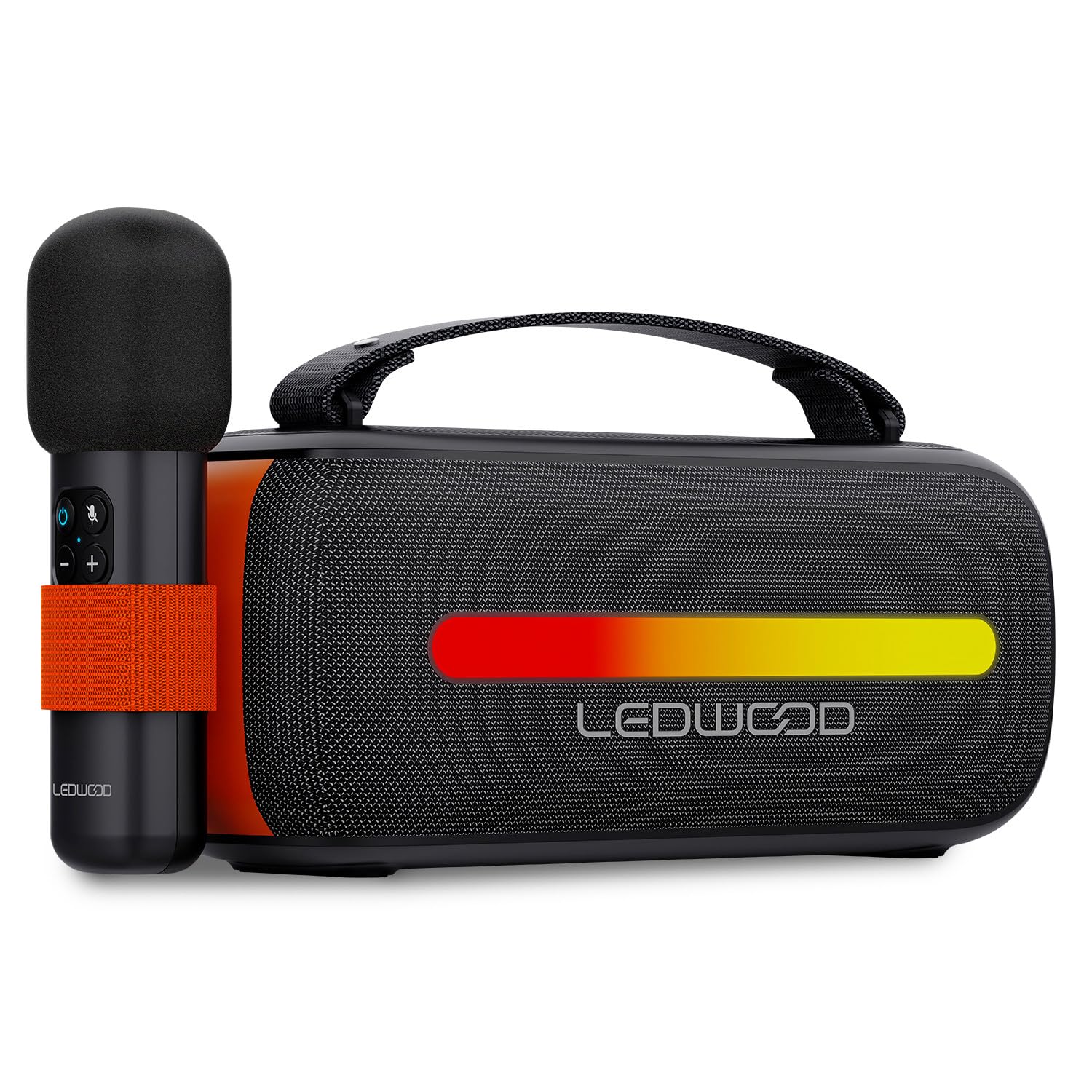
Image: The Ledwood ACCESS130 portable speaker shown with its wireless microphone attached to the side. The speaker features a black mesh grille and an illuminated LED strip on the front.
Kontwòl ak pò

Imaj: Yon imaj anwo-anba view of the Ledwood ACCESS130 speaker, highlighting the control panel with buttons for power, volume, mode, and LED effects. Icons for LED colors, microphone, karaoke function, USB-C, and wireless connection are also visible.
- Bouton pouvwa: Peze epi kenbe pou vire oratè a sou / koupe.
- Bouton mòd (M): Press to switch between Bluetooth, USB, and other input modes.
- Volim moute (+): Ogmante volim.
- Volim desann (-): Diminye volim.
- Bouton jwe/poz: Jwe oswa mete yon poz nan lekti odyo a.
- LED Effect Button: Cycle through different LED lighting modes or turn them off.
- USB-C pò: Pou chaje oratè a.
- USB-A pò: For USB audio playback.
Enstalasyon
1. Chaje Oratè a
- Konekte kab chaje USB-C ki vini ak li a nan pò USB-C oratè a.
- Konekte lòt bout kab la nan yon adaptè kouran USB konpatib (pa enkli) oubyen nan yon pò USB òdinatè.
- The LED indicator will show charging status. A full charge takes approximately [Charging Time - not specified in input, omit if not available].
2. Powering On / Off
- Pou limen oratè a, peze epi kenbe bouton Power la jiskaske limen l.
- Pou etenn oratè a, peze epi kenbe bouton Power la ankò jiskaske li fèmen.
3. Pè Bluetooth
- Ensure the speaker is powered on and in Bluetooth mode (indicated by a flashing Bluetooth LED). If not, press the 'M' (Mode) button to switch to Bluetooth mode.
- Sou telefòn entelijan ou, tablèt ou, oswa òdinatè w la, aktive Bluetooth epi chèche aparèy ki disponib yo.
- Select "Ledwood ACCESS130" from the list of devices.
- Once paired, the Bluetooth LED will stop flashing and remain solid, indicating a successful connection.
4. Konekte Mikwofòn san fil la
- Ensure the wireless microphone is charged and powered on.
- The microphone should automatically connect to the speaker when both are powered on and within range.
- Test the microphone by speaking into it to confirm audio output from the speaker.
Opere
1. Lekti Bluetooth
- Apre koneksyon Bluetooth la reyisi, ouvri aplikasyon mizik ou sou aparèy ki konekte a.
- Start playing audio. The sound will be transmitted wirelessly to the ACCESS130 speaker.
- Sèvi ak bouton volim ki sou oratè a oswa sou aparèy ki konekte a pou ajiste nivo odyo a.
- Press the Play/Pause button on the speaker to control playback.
2. Lektur USB
- Mete yon kondwi flash USB ki gen odyo files (e.g., MP3) into the speaker's USB-A port.
- Press the 'M' (Mode) button to switch to USB mode.
- The speaker will automatically begin playing audio from the USB drive.
- Use the speaker's controls to adjust volume and navigate tracks.
3. Fonksyon Karaoke
- Ensure the wireless microphone is connected to the speaker as described in the Setup section.
- Play your desired instrumental track via Bluetooth or USB.
- Speak or sing into the microphone. Your voice will be amplified through the speaker, mixing with the music.
4. Efè Limyè LED
- Press the LED Effect button to cycle through various dynamic RGB lighting modes.
- Continue pressing the button to select your preferred lighting effect or to turn the LEDs off.
Antretyen
- Netwayaj: Sèvi ak yon twal mou epi sèk pou netwaye sifas oratè a. Pa sèvi ak pwodui netwayaj abrazif oswa solvan.
- Depo: Sere oratè a nan yon kote ki fre epi sèk, lwen limyè solèy dirèk ak tanperati ekstrèm lè w pa itilize li pou yon bon bout tan.
- Swen batri: To prolong battery life, fully charge the speaker before first use and recharge it at least once every three months if not used regularly. Avoid completely draining the battery.
Depanaj
| Pwoblèm | Kòz posib | Solisyon |
|---|---|---|
| Oratè pa limen. | Batri ki ba. | Chaje oratè a lè l sèvi avèk kab USB-C yo bay la. |
| Pa gen koneksyon Bluetooth. | Speaker not in pairing mode; device out of range; previously connected device. | Ensure speaker is in Bluetooth pairing mode. Move device closer. Disconnect from other devices. |
| Pa gen son nan mikwofòn. | Microphone not powered on; microphone not paired. | Ensure microphone is charged and powered on. Check if it automatically connects. |
| Lektur USB a pa fonksyone. | Mòd ki pa kòrèk; pa sipòte file format; corrupted USB drive. | Press 'M' button to select USB mode. Ensure files are MP3. Try a different USB drive. |
| Limyè LED yo pa mache. | LED effects turned off. | Press the LED Effect button to cycle through modes. |
Espesifikasyon
| Non modèl: | AKSÈ130 |
| Mak: | Ledwood |
| Kalite oratè: | Portable oratè |
| Maksimòm pouvwa Sòti Oratè: | 130 Watts (12W RMS) |
| Audio Sòti Mode: | Stereo |
| Teknoloji kominikasyon san fil: | Bluetooth 5.3 |
| Bluetooth Max pouvwa: | -6 a 4dBm |
| Siyal-a-bri Bri: | ≥80dB |
| Sous pouvwa: | Batri Powered |
| Batri: | 3.7V - 3600mAh |
| Total Playtime (50% volume): | 6 èdtan 30 minit |
| Metòd kontwòl: | Application, Touch |
| Koneksyon: | Bluetooth 5.3, USB-A |
| Dimensions (H x D x L): | 12.04 cm x 9.9 cm x 26.1 cm |
| Pwa: | 1 Kg |
| Enpèmeyab: | Non |
| Eleman ki enkli: | USB-C charging cable, Wireless microphone, Carrying strap |
Garanti ak sipò
For warranty information or technical support, please refer to the documentation provided at the time of purchase or contact your retailer. You may also visit the official Ledwood websit pou plis asistans.