
Entwodiksyon
This manual provides detailed instructions for the SGIN Android Tablet SGIN-T12. It covers setup, operation, maintenance, and troubleshooting to ensure optimal use of your device. The SGIN-T12 features a 10.51-inch Full HD IPS display, an Octa-Core processor, 6GB RAM, 128GB internal storage, and runs on Android 13. It supports 5G WiFi, Bluetooth 5.0, and GPS functionality.
1. Enstalasyon
1.1 Kontni pake a
Verifye ke tout atik yo prezan nan pakè a:
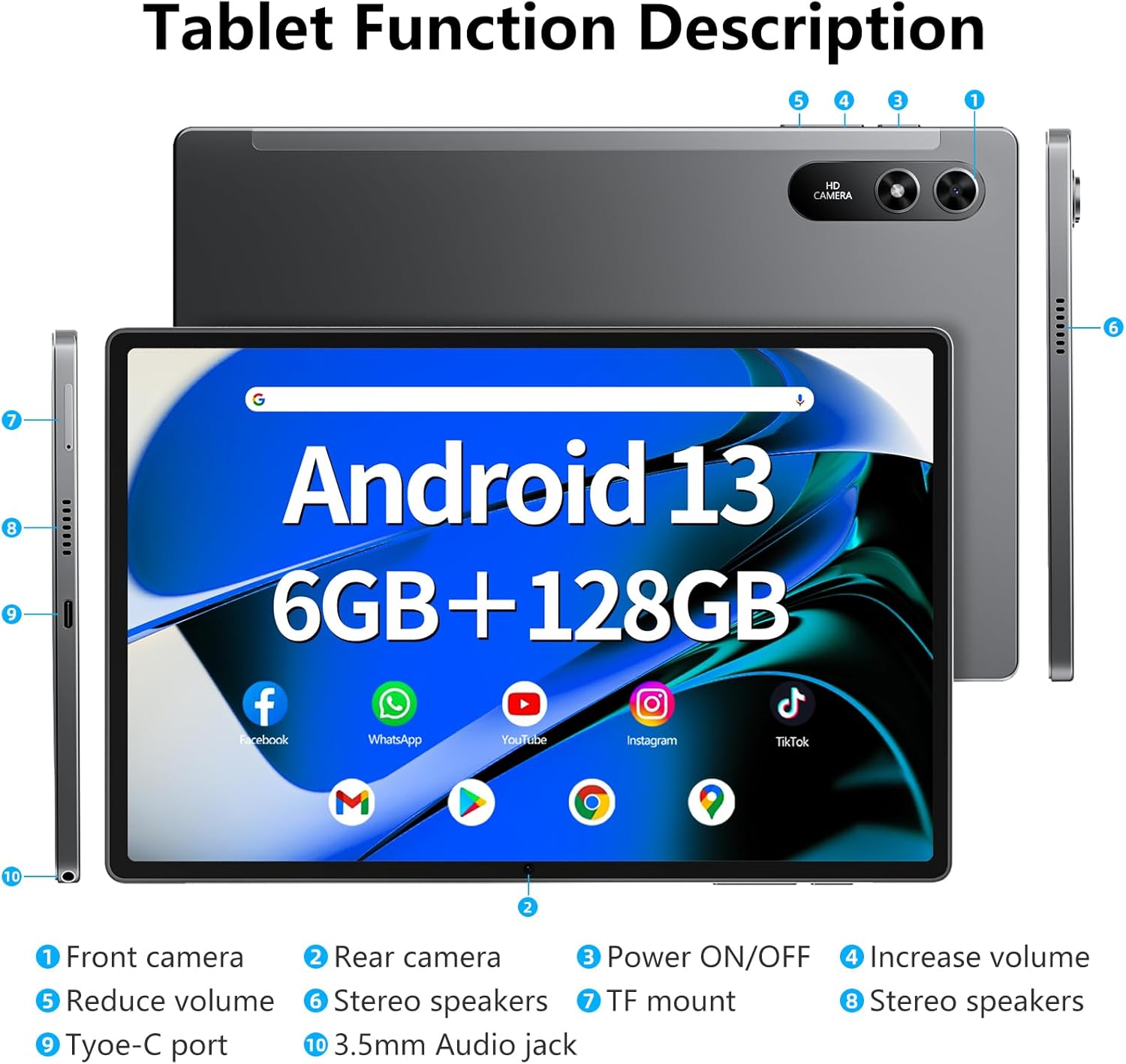
Image: The SGIN-T12 tablet, power adapter, USB-C charging cable, SIM ejector tool, and user manual.
- SGIN Android Tablet SGIN-T12
- Adaptè pouvwa
- USB-C Chaje Kab
- Zouti èkstrè SIM
- Manyèl itilizatè
1.2 Layout Aparèy
Familiarize yourself with the physical components and ports of your tablet.

Image: Labeled diagram of the SGIN-T12 tablet indicating the location of the front camera, rear camera, power ON/OFF button, volume increase/decrease buttons, stereo speakers, TF card slot, Type-C charging port, and 3.5mm audio jack.
- Kamera devan
- Kamera dèyè
- Pouvwa ON/OFF bouton
- Ogmante bouton volim
- Diminye bouton volim
- Oratè Stereo
- TF mount (MicroSD card slot)
- Oratè Stereo
- Kalite-C pò
- 3.5mm Audio Jack
1.3 Premye chaj
Before first use, fully charge the tablet. Connect the USB-C charging cable to the tablet's Type-C port and the power adapter to a wall outlet. The charging indicator will show the charging status.
1.4 Power On/Off
- Pou limen: Press and hold the Power ON/OFF button until the SGIN logo appears.
- Pou etenn: Press and hold the Power ON/OFF button until the power options appear on the screen. Select "Power off" and confirm.
- Pou rekòmanse: From the power options, select "Restart."
1.5 Asistan Enstalasyon Inisyal
Lè w limen tablèt la pou premye fwa, li pral gide w nan pwosesis konfigirasyon inisyal la:
- Chwazi lang ou pi pito.
- Konekte nan yon rezo Wi-Fi.
- Review epi aksepte tèm ak kondisyon yo.
- Sign in with your Google account or create a new one. This is necessary for accessing the Google Play Store and other Google services.
- Konfigire blokaj ekran an (kòd PIN, modèl, oswa modpas).
- Configure other settings as prompted.
2. Operasyon Enstriksyon
2.1 Navigasyon debaz
- Tape: Touche ekran an yon fwa pou chwazi yon atik oswa louvri yon aplikasyon.
- Tape epi kenbe: Touch and hold an item to access contextual menus or move icons.
- Glise: Trennen dwèt ou sou ekran an pou defile paj yo oswa lis yo.
- Zongle: Sèvi ak de dwèt pou agrandi oswa diminye imaj yo epi web paj.
2.2 Koneksyon Wi-Fi
Pou konekte ak yon rezo san fil:
- Ale nan Anviwònman > Rezo ak entènèt > Wi-Fi.
- Aktive Wi-Fi a On.
- Chwazi rezo ou vle a nan lis la.
- Antre modpas la si yo mande w epi tape Konekte.
2.3 Bluetooth Pairing
Pou konekte ak yon aparèy Bluetooth (pa egzanp, kas ekoutè, klavye):
- Ale nan Anviwònman > Aparèy ki konekte > Bluetooth.
- Aktive Bluetooth On.
- Asire w aparèy Bluetooth ou a nan mòd koneksyon.
- Chwazi aparèy la nan lis "Aparèy disponib" yo epi swiv nenpòt enstriksyon ki parèt sou ekran an pou konplete koneksyon an.
2.4 Operasyon Kamera
The tablet features a 5MP front camera and a 13MP rear camera.

Image: The SGIN-T12 tablet showcasing its front camera for video calls and rear camera for capturing images.
- Louvri a Kamera aplikasyon.
- Tap the camera switch icon to alternate between the front and rear cameras.
- Tape bouton deklanchè a pou pran yon foto oswa pou kòmanse/sispann anrejistreman videyo.
- Access various camera modes and settings within the app.
2.5 Jesyon Depo
The tablet comes with 128GB of internal storage and supports expansion up to 256GB via a TF (MicroSD) card.

Image: Visual representation of the tablet's memory specifications, highlighting 6GB RAM, 128GB ROM, and support for up to 512GB external storage expansion.
- Mete yon kat TF: Use the provided SIM ejector tool to open the TF card slot. Insert the MicroSD card with the gold contacts facing down, then close the tray.
- Jesyon Depo: Ale nan Anviwònman > Depo pou view itilizasyon depo ak jesyon files.
2.6 Anviwònman odyo
The tablet features dual stereo speakers and a 3.5mm audio jack.

Image: The SGIN-T12 tablet illustrating its four-speaker stereo system for an immersive audio experience.
- Kontwòl Volim: Use the physical volume buttons on the side of the tablet or adjust volume in Anviwònman > Son & Vibration.
- Kas ekoutè Jack: Konekte kas ekoutè 3.5mm estanda pou koute mizik an prive.
2.7 Fonksyonalite GPS
Tablèt la gen ladan GPS pou navigasyon ak sèvis ki baze sou lokalizasyon.
- Asire w Kote services are enabled in Anviwònman > Kote.
- Use pre-installed mapping applications or download others from the Google Play Store for navigation.
3. Antretyen
3.1 Swen Batri

Image: The SGIN-T12 tablet highlighting its 6200mAh battery, designed for extended use.
- Evite dechaje batri a nèt souvan.
- Pa ekspoze tablèt la nan tanperati ekstrèm.
- Sèvi sèlman ak plato ki vini ak plato a oswa yon plato konpatib ki sètifye.
- Si w pa pral itilize tablèt la pou yon peryòd tan pwolonje, chaje l a apeprè 50% anvan ou sere l.
3.2 Netwaye Aparèy la
- Sèvi ak yon twal mou ki pa gen pousyè pou netwaye ekran an ak kò a.
- Pou tach ki difisil pou retire, yon ti kras dampRense twal la avèk dlo oswa yon pwodui netwayaj ekran ki fèt pou aparèy elektwonik.
- Evite itilize pwodui chimik ki agresif, materyèl abrazif, oswa imidite twòp.
3.3 Mizajou lojisyèl
Tcheke epi enstale mizajou lojisyèl regilyèman pou asire pèfòmans ak sekirite optimal.
- Ale nan Anviwònman > Sistèm > Aktyalizasyon sistèm lan.
- Swiv enstriksyon ki sou ekran an pou tcheke epi enstale nenpòt mizajou ki disponib.
NAN. Depanaj
| Pwoblèm | Solisyon |
|---|---|
| Tablèt la pa limen. | Ensure the battery is charged. Connect the tablet to the charger and wait a few minutes before attempting to power on again. |
| Ekran an pa reponn. | Perform a forced restart by pressing and holding the Power ON/OFF button for approximately 10-15 seconds until the device restarts. |
| Pwoblèm koneksyon Wi-Fi. | Restart your Wi-Fi router. On the tablet, toggle Wi-Fi off and then on again. Forget the network and reconnect. |
| Applications are crashing or freezing. | Close and reopen the application. Clear the app's cache in Anviwònman > Aplikasyon yo > [Non Aplikasyon an] > Depo ak kachSi pwoblèm nan pèsiste, dezenstale epi enstale aplikasyon an ankò. |
| Pèfòmans ralanti. | Fèmen aplikasyon ki pa itilize yo. Vide kach la ak aplikasyon tanporè yo files. Consider performing a factory reset if performance issues are severe and persistent (back up data first). |
| "Reboot errors" or "Failed to load" messages. | Attempt multiple restarts. If the issue persists, a factory reset may be required. Warning: A factory reset will erase all data on the device. Back up important files anvan kontinye. If the problem continues after a factory reset, contact customer support. |
5. Espesifikasyon
| Karakteristik | Detay |
|---|---|
| Modèl | SGIN-T12 |
| Sistèm operasyon | Android 13 |
| Gwosè ekran | 10.51 pous |
| Rezolisyon ekran | 1920 x 1200 Pixels (FHD IPS) |
| Processeur | Octa-Core (2 GHz ARM_Cortex_A5) |
| RAM | 6 GB DDR4 SDRAM |
| Depo Entèn | 128 GB |
| Depo dilatabl | Supports up to 256GB TF card (MicroSD) |
| Kamera devan | 5 MP |
| Kamera dèyè | 13 MP |
| Kapasite batri | 6200 mAh Lityòm Ion |
| Mwayèn lavi batri | Jiska 6 èdtan |
| Koneksyon san fil | 5G Wi-Fi (802.11bgn), Bluetooth 5.0 |
| Navigasyon | GPS |
| Pò | Type-C, 3.5mm Audio Jack, TF Card Slot |
| Dimansyon (LxWxH) | 10.51 x 6.36 x 0.3 pous |
| Pwa atik | 2.2 liv |
6. Garanti ak sipò
6.1 Pwodwi Garanti
The SGIN Android Tablet SGIN-T12 comes with a 1-ane garanti limite apati dat acha a. Garanti sa a kouvri domaj fabrikasyon ak atizan konn fè nan itilizasyon nòmal. Li pa kouvri domaj ki koze pa move itilizasyon, aksidan, modifikasyon san otorizasyon, oswa dezas natirèl.
Tanpri kenbe prèv ou achte pou reklamasyon garanti.
6.2 Sipò pou Kliyan
For technical assistance, troubleshooting not covered in this manual, or warranty inquiries, please contact SGIN customer support. Refer to the contact information provided on the SGIN official websit la oswa dokiman acha ou a.
Ou ka vizite tou SGIN Store on Amazon pou plis enfòmasyon ak resous pwodwi yo.