
Entwodiksyon
This manual provides comprehensive instructions for the Soundking SPD 100 Electronic Percussion Octapad. It covers product features, setup, operation, maintenance, troubleshooting, and technical specifications to ensure optimal use of the device. Please read this manual thoroughly before operating the unit.
Pwodwi souview ak Karakteristik
The Soundking SPD 100 is an electronic percussion pad designed for drummers and musicians. It offers a wide array of sounds and functionalities in a compact format.

Imaj: Angle view of the Soundking SPD 100 Electronic Percussion Octapad, showing its eight pads and control panel.
Karakteristik kle:
- 408 Son: Access a wide range of drum and percussion instrument sounds, including General MIDI (GM) sounds, suitable for various musical styles.
- 30 Preset Kits + 20 User Kits: Store and customize your preferred drum configurations with easy access to both user-defined and factory preset kits.
- Efè reverb: Utilize 6 reverb presets to adjust the sound's ambiance, suitable for different acoustic environments.
- Sekansè: Record and edit rhythms with a single-track sequencer, capable of storing up to 1000 notes, ideal for creating custom patterns.
- Adjustable Metronome: Practice timing and improve rhythm with a metronome featuring tempo adjustments from 30 to 250 BPM.
- Teaching Modes: Enhance learning with 10 snare, rhythm, and drum exercises designed for practice.
- Antre ak Sòti MIDI: Integrate with other MIDI devices for expanded sound options and control capabilities.
- Ekspozisyon itilizatè-zanmitay: A large 320 x 240 TFT screen provides clear and intuitive access to settings and functions.
Enstriksyon Enstalasyon
Follow these steps to set up your Soundking SPD 100 Electronic Percussion Octapad:
- Debake: Carefully remove all components from the packaging. Verify that all items listed in the product contents are present.
- Plasman: Place the SPD 100 on a stable, flat surface or mount it securely on a compatible stand. Ensure adequate space for playing and accessing controls.
- Koneksyon pouvwa: Connect the included power adapter to the DC IN jack on the unit and then to a suitable power outlet.
- Sòti odyo: Connect the AUDIO OUT jacks to an amplifier, mixer, or headphones using appropriate cables.
- Koneksyon pedal: If using external pedals (e.g., kick drum, hi-hat), connect them to the designated PEDAL input jacks.
- Koneksyon MIDI (Si ou vle): If integrating with other MIDI devices, connect MIDI IN/OUT ports as required.
- Pouvwa sou: Press the POWER button to turn on the unit. The display should illuminate.

Image: The Soundking SPD 100 Octapad mounted on a stand, accompanied by its carrying bag and two foot pedals, illustrating a typical setup.
Enstriksyon Operasyon
1. Power On/Off
- Pou vire sou, peze la POUVWA bouton.
- Pou etenn, peze epi kenbe bouton an POUVWA bouton jiskaske inite a fèmen.
2. Sound Selection and Kit Management
- Selecting Kits: Sèvi ak la KIT buttons or navigation controls to browse through the 30 preset kits and 20 user kits.
- Atribisyon Son: In Kit Edit mode, select a pad and use the sound selection controls to assign a desired instrument sound from the 408 available sounds.
- Saving User Kits: After customizing a kit, use the SAVE function to store it in one of the 20 user kit slots.
3. Reverb Effects
- Aksede a EFÈ meni sou ekran an.
- Select from the 6 available reverb presets to add spatial effects to your sound. Adjust parameters as needed.
4. Sequencer
- Antre SEQUENCER mòd.
- Sèvi ak la DOSYE button to start recording your performance.
- Sèvi ak la JWE button to listen to your recorded sequence.
- Edit recorded notes and patterns as desired within the 1000-note capacity.
5. Metwonòm
- Aktive la METRONÒM fonksyon.
- Adjust the tempo using the dedicated controls or navigation buttons, ranging from 30 to 250 BPM.
6. Teaching Modes
- Chwazi MÒD ANSÈYMAN soti nan meni prensipal la.
- Choose from 10 exercises focusing on snare, rhythm, and general drumming techniques to improve your skills.
7. Koneksyon MIDI
- Connect the SPD 100 to external MIDI devices (e.g., computers, sound modules) using standard MIDI cables.
- Configure MIDI settings (channels, clock sync) in the system menu for proper communication.

Imaj: Devan view of the Soundking SPD 100 Electronic Percussion Octapad, highlighting the eight playing pads and the control panel with its display and buttons.
Antretyen
- Netwayaj: Use a soft, dry cloth to wipe the surface of the unit. For stubborn dirt, a slightly damp Ou ka itilize yon twal, epi sèvi ak yon twal sèk apre sa. Evite pwodui netwayaj abrazif oswa solvan.
- Depo: When not in use, store the SPD 100 in a cool, dry place away from direct sunlight and extreme temperatures. If transporting, use a protective case.
- Pouvwa: Dekonekte adaptè kouran an lè aparèy la pa nan itilizasyon pou yon bon bout tan.
Depanaj
| Pwoblèm | Kòz posib | Solisyon |
|---|---|---|
| Pa gen pwodiksyon son. |
|
|
| Pads are unresponsive or trigger inconsistently. |
|
|
| MIDI communication issues. |
|
|
Espesifikasyon
| Non modèl | SPD 100 |
| Manifakti | SOUND KING |
| Dimansyon pwodwi (L x W x H) | 67 x 32 x 7 cm (26.4 x 12.6 x 2.8 pous) |
| Pwa pwodwi | 4 kg (8.8 liv) |
| Koulè | Nwa |
| Kantite Son | 408 |
| Twous Predefini | 30 |
| Twous itilizatè | 20 |
| Efè reverb | 6 Prereglaj |
| Sequencer Capacity | 1000 notes (single track) |
| Metwonòm Tempo Range | 30 - 250 BPM |
| Mòd ansèyman | 10 exercises |
| Ekspozisyon | 320 x 240 TFT |
| Koneksyon | MIDI In/Out, Audio Out, Pedal Input |
Garanti ak sipò
Pou enfòmasyon sou garanti a ak sipò teknik, tanpri gade dokiman ki vini ak acha ou a oswa kontakte machann/fabrikan an dirèkteman. Kenbe prèv acha ou a pou reklamasyon garanti.
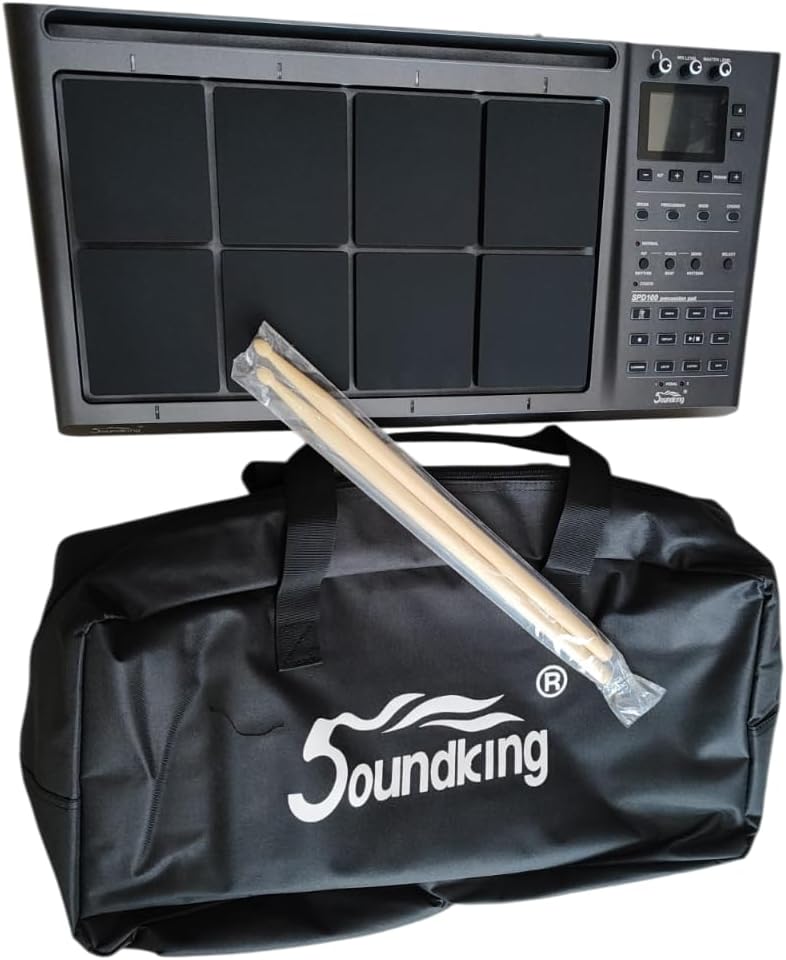
Image: The Soundking SPD 100 Octapad shown with its branded carrying bag and a pair of drumsticks, representing the complete package.