
SVITOO SVITOO Tab 10 GMS Certified 1027C
SVITOO Kids Tablet 10 Inch User Manual
Model: SVITOO Tab 10 GMS Certified 1027C
Entwodiksyon
This manual provides essential instructions for setting up, operating, and maintaining your SVITOO Kids Tablet 10 Inch. Designed for young users, this Android 15 tablet features parental controls, a durable shockproof case, and a vibrant 10-inch HD IPS display. Please read this guide thoroughly to ensure proper use and to maximize your tablet's functionality.
Ki sa ki nan bwat la
- SVITOO Kids Tablet 10 Inch
- Protective Cover (Pre-installed)
- USB-C Chaje Kab
- Manyèl itilizatè
- Bwat kado
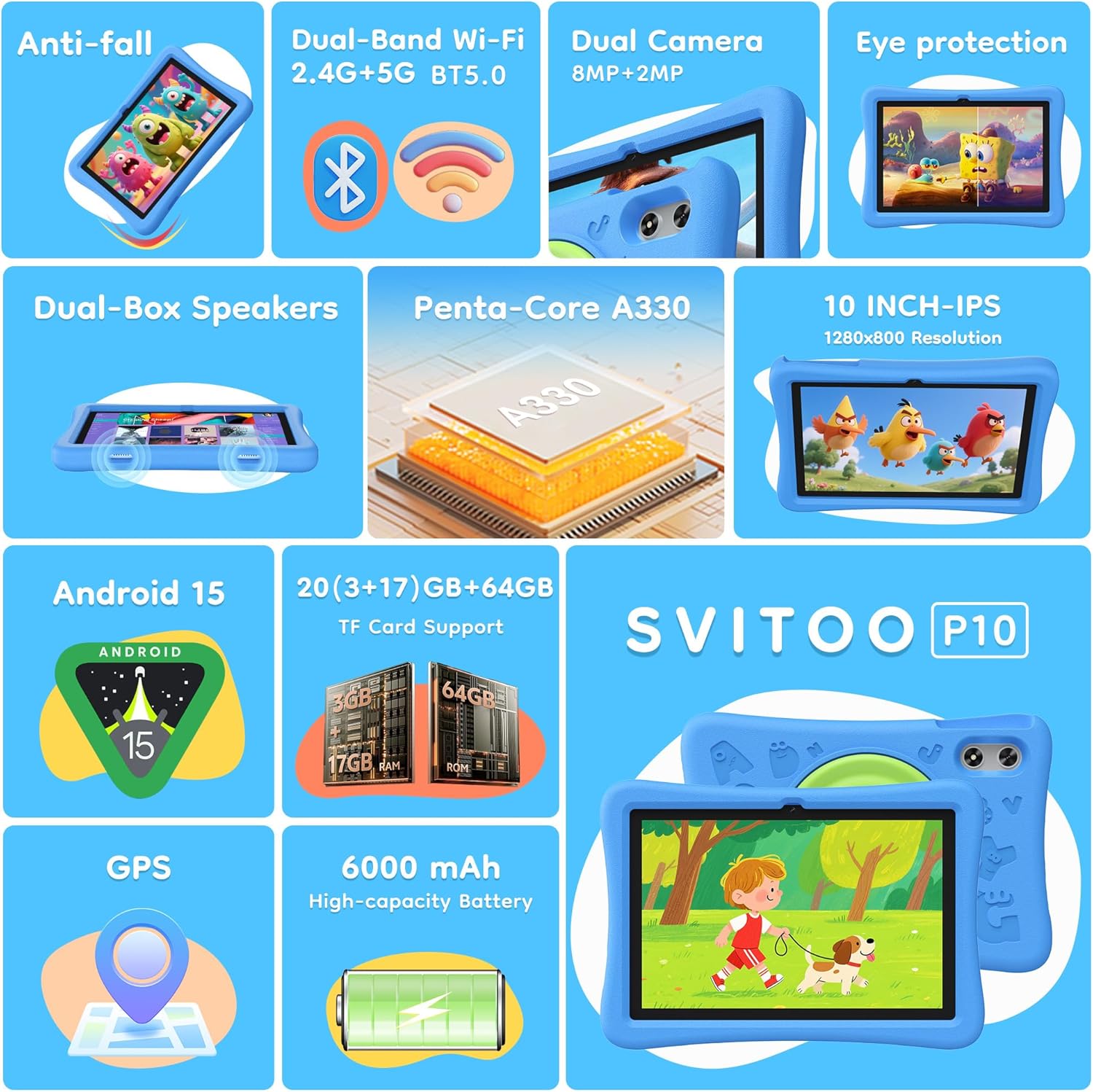
Image: The SVITOO Kids Tablet 10 Inch, shown in its blue protective case, highlighting its robust design suitable for children.
Pwodwi souview
Karakteristik kle
- Sistèm operasyon: Android 15 with GMS Certification for full Google Play access.
- Ekspozisyon: 10-inch HD IPS (1280 x 800 pixels) touchscreen with eye protection mode.
- Processeur: Unisoc T7200 8-core CPU for smooth performance.
- Memwa ak Depo: 20GB RAM (3GB fizik + 17GB vityèl) ak 64GB depo entèn, ou ka ogmante li jiska 1TB avèk yon kat microSD (vann separeman).
- Kamera: 8MP Rear Camera and 2MP Front Camera.
- Koneksyon: Dual-Band Wi-Fi (2.4/5 GHz) and Bluetooth 5.0.
- Batri: Batri 6000mAh gwo kapasite pou itilizasyon pwolonje.
- Odyo: Dual-box speakers and a 3.5mm headphone jack.
- Dirab: Kid-friendly EVA shockproof case with a 360° rotating handle and 180° rotating stand.
- Kontwòl paran yo: Advanced settings for screen time limits, content filtering, and app management.
Konpozan tablèt
Familyarize w ak konpozan fizik tablèt ou a:

Imaj: Yon imaj detaye view of the tablet's side and rear, indicating the USB Type-C port, headphone jack, power ON/OFF button, volume controls, speakers, rear camera, and front camera.
- USB Kalite-C Port: Pou chaje ak transfè done.
- Jack kas ekoutè (3.5mm): Pou konekte kas ekoutè ak fil.
- Pouvwa ON / OFF bouton: Pou limen/etenn tablèt la oubyen mete l nan dòmi.
- Bouton Volim: Pou ajiste volim odyo a.
- Oratè: Dual-box speakers for audio output.
- Kamera devan: Pou apèl videyo ak selfie.
- Kamera dèyè: Pou pran foto ak videyo.
- MicroSD Kat plas: Located under a protective flap, for storage expansion.

Image: The tablet's protective case featuring a versatile 360-degree rotating handle that also functions as a 180-degree rotating stand, allowing for various viewang ing.
Gid Enstalasyon
- Chaje tablèt la: Before first use, fully charge the tablet using the provided USB-C cable and a compatible power adapter.
- Pouvwa sou: Press and hold the Power ON/OFF button until the screen lights up.
- Premye konfigirasyon: Swiv enstriksyon yo sou ekran an pou chwazi lang ou, konekte ak yon rezo Wi-Fi, epi konfigire kont Google ou.
- Google Kids Space / Parental Controls: During setup, you will have the option to configure Google Kids Space or other parental control settings. It is highly recommended to set these up immediately to ensure a safe environment for your child.
- Enstale Aplikasyon: Once setup is complete, you can download age-appropriate apps and games from the Google Play Store.
Enstriksyon Operasyon
Navigasyon debaz
- Ekran Kay: Glise agoch oswa adwat pou jwenn aksè nan diferan paj aplikasyon yo.
- Tiwa aplikasyon: Glise moute anba nan fon an nan ekran an view tout aplikasyon enstale.
- Notifikasyon ak Paramèt Rapid: Swipe down from the top of the screen to access notifications and quick settings like Wi-Fi, Bluetooth, and screen brightness.
- Retounen, Akèy, Aplikasyon resan yo: Use the navigation buttons at the bottom of the screen to go back, return to the home screen, or view aplikasyon ki fèk louvri yo.
Chaje tablèt la
Connect the USB-C charging cable to the tablet's USB-C port and the other end to a power adapter. The battery icon on the screen will indicate charging status. A full charge provides approximately 12 hours of mixed use.

Image: The tablet connected to a charger, displaying a battery icon with 99% charge, illustrating the charging process and battery life features like Night Mode and Energy Saving.
Mode Pwoteksyon Je
To reduce eye strain, especially during prolonged use, activate the Eye Protection Mode (often called Night Mode or Reading Mode) from the quick settings panel or display settings. This mode adjusts screen colors to warmer tones.
Kontwòl Paran yo
The SVITOO Kids Tablet features robust parental controls to help manage your child's digital experience. These controls are integrated with Android 15 and Google Family Link.

Image: A family using the tablet, with an overlay showing various parental control options such as setting screen time limits, blocking harmful apps/websites, approving app downloads, and tracking child's location.
Konfigirasyon Kontwòl Paran yo:
- Anviwònman aksè: Ale nan Anviwònman > Byennèt dijital ak kontwòl paran yo or search for "Family Link" in your app drawer.
- Set Screen Time Limits: Define daily limits for tablet usage to encourage balanced screen time.
- Filtrage kontni: Bloke aksè a bagay ki pa apwopriye websit ak aplikasyon yo.
- App Approvals: Require parental approval for new app downloads or in-app purchases.
- Suivi Kote: Monitor your child's device location (if enabled and configured).
For detailed instructions on Google Family Link, please refer to Google's official support documentation.
Antretyen
- Netwayaj: Sèvi ak yon twal mou ki pa gen pousyè pou netwaye ekran an ak kò tablèt la. Evite pwodui netwayaj abrazif oswa solvan.
- Swen batri: To prolong battery life, avoid fully discharging the tablet frequently. Charge it regularly and avoid exposing it to extreme temperatures.
- Mizajou lojisyèl: Keep the tablet's operating system and apps updated to ensure optimal performance and security.
- Depo: Store the tablet in a cool, dry place away from direct sunlight when not in use.
- Ka pwoteksyon: The included EVA shockproof case provides protection against drops and bumps. Ensure it is properly fitted at all times.
Depanaj
| Pwoblèm | Solisyon |
|---|---|
| Tablèt la pa limen. | Ensure the tablet is fully charged. Connect it to a charger for at least 30 minutes, then try powering it on again. |
| Ekran an pa reponn. | Perform a force restart by holding the Power ON/OFF button for 10-15 seconds. If the issue persists, contact support. |
| Pwoblèm koneksyon Wi-Fi. | Check if other devices can connect to the Wi-Fi network. Restart your router and the tablet. Forget the network and reconnect. |
| Apps are crashing or slow. | Close background apps. Clear app cache (Settings > Apps > [App Name] > Storage > Clear Cache). Ensure sufficient storage space is available. Restart the tablet. |
| Batri vide byen vit. | Reduce screen brightness. Close unused apps. Disable Wi-Fi/Bluetooth when not in use. Check battery usage in settings to identify power-hungry apps. |
Espesifikasyon
| Karakteristik | Detay |
|---|---|
| Non modèl | SVITOO Tab 10 GMS Certified 1027C |
| Sistèm operasyon | Android 15 |
| Gwosè ekran | 10 pous |
| Rezolisyon ekran | 1280 x 800 piksèl (HD IPS) |
| Processeur | 1.8 GHz (Unisoc T7200 8-core CPU) |
| RAM | 20 GB (3GB fizik + 17GB vityèl) |
| Depo Entèn | 64 GB |
| Depo dilatabl | Up to 1TB via MicroSD (sold separately) |
| Koprosesè grafik | Mali-G57 processor Imagination Tech |
| Kalite san fil | 802.11a/b/g/n/ac (Dual-Band 2.4/5 GHz) |
| Bluetooth | Bluetooth 5.0 |
| Kapasite batri | 6000mAh |
| Mwayèn lavi batri | 12 èdtan |
| Kamera devan | 2 megapiksèl |
| Kamera dèyè | 8 megapiksèl |
| Pwa atik | 2.44 liv |
| Dimansyon pwodwi | 9.7 x 6.4 x 0.4 pous |
Garanti ak sipò
Your SVITOO Kids Tablet comes with a 1-Year Manufacturer Protection. This warranty covers manufacturing defects under normal use. It does not cover damage caused by misuse, accidents, natural disasters, or unauthorized modifications.
For technical support, warranty claims, or any questions regarding your product, please contact SVITOO customer service through your Amazon order page. Look for the "Contact Us" option next to your order details.
Tanpri konsève prèv acha ou a pou rezon garanti.
Ask a question about this manual
Ask about setup, troubleshooting, compatibility, parts, safety, or missing instructions. Manuals+ will review the question and use this page’s manual context to help answer it.