
Entwodiksyon
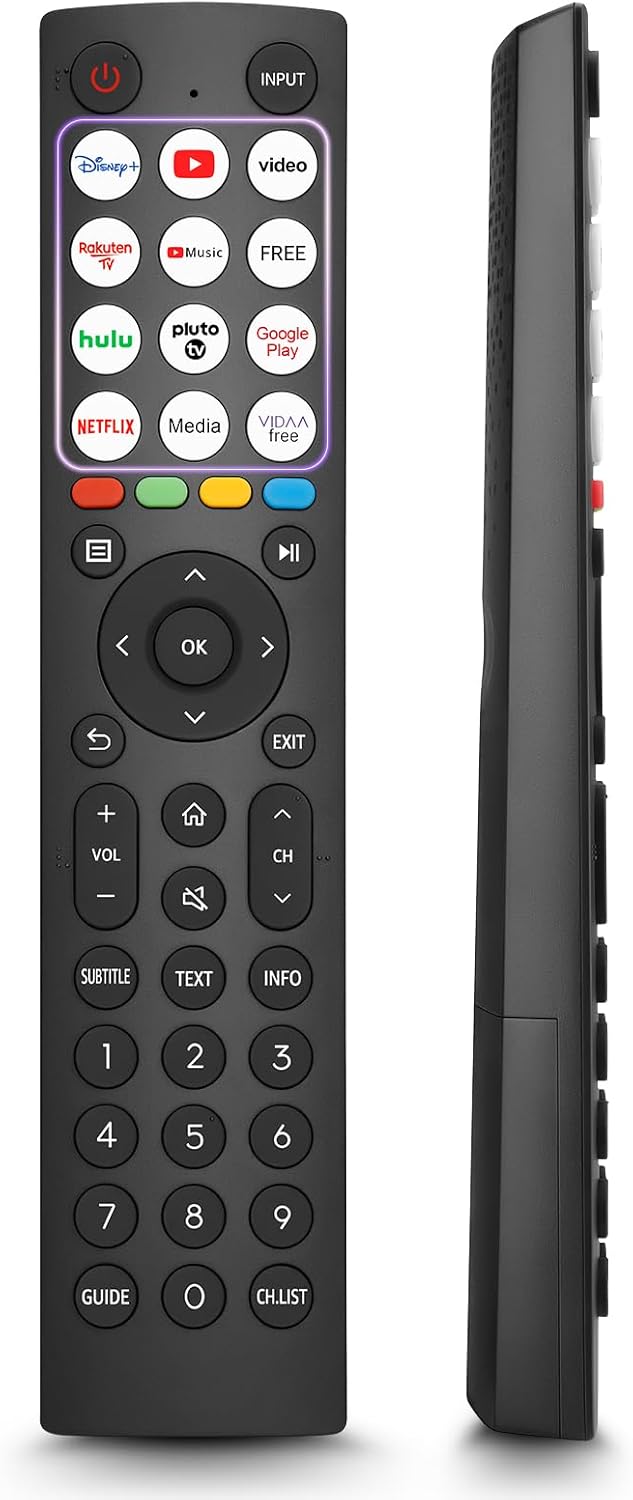
This manual provides comprehensive instructions for the OMAIC EN2Q36H replacement remote control, designed for Hisense Smart TVs. It covers essential information regarding setup, operation, and maintenance to ensure optimal performance and user experience. This remote offers a direct replacement solution without the need for complex programming.
Enstalasyon
The OMAIC EN2Q36H remote control is designed for immediate use with compatible Hisense Smart TVs. No programming or pairing is required.
Enstalasyon batri
- Jwenn lòj batri a sou do a nan kontwòl remote la.
- Glise kouvèti batri a anba oswa nan direksyon flèch la endike a pou ouvri li.
- Mete de pil alkalin AAA (pa enkli), asire w ke tèminal pozitif (+) ak negatif (-) yo byen aliyen ak mak ki anndan konpatiman an.
- Remèt kouvèti batri a lè w glise l tounen nan plas li jiskaske li fè yon klik byen fèm.
Once batteries are installed, the remote is ready to operate your Hisense Smart TV.

Enstriksyon Operasyon
This remote control utilizes infrared (IR) technology for communication with your Hisense Smart TV. Ensure a clear line of sight between the remote and the TV's IR receiver for optimal performance.
Karakteristik kle
- 12 Shortcut Buttons: Quickly access popular streaming services and applications with dedicated buttons.
- Strong IR Signal: Provides a longer transmission distance and quick response without noticeable delay.
- Konstriksyon dirab: Made from high-quality ABS and silicone materials for extended lifespan.

Fonksyon bouton
Familiarize yourself with the functions of each button on your OMAIC EN2Q36H remote control:
| Bouton | Fonksyon |
|---|---|
| POUVWA | Switches the TV on or into standby mode. |
| Antre | Chwazi sous antre yo (HDMI, AV, elatriye). |
| APP Buttons | Quick access buttons for specific applications (e.g., Disney+, Netflix, YouTube). |
| MENI | Displays the Quick Setup menu. |
| MEDIA Kontwòl | Buttons for Play, Pause, Stop, Fast Forward, Rewind. |
| Navigasyon (Anwo/Anba/Agoch/Dwat) | Navigates on-screen menus and adjusts system settings. |
| OK | Confirms selection in on-screen menus. |
| TOUNEN | Retounen nan meni anvan an. |
| Sòti | Sòti meni aktyèl la. |
| VOL +/- | Ajiste nivo volim. |
| LAKAY | Enters the Home screen. |
| BÈN | Silence oswa retabli son televizyon an. |
| CH ^/v | Switches channels. |
| subtitles | Activates or deactivates subtitle mode. |
| TÈKS | Turns teletext function on and off. |
| ENFO | Montre enfòmasyon sou pwogram aktyèl la. |
| NUMBER Buttons (0-9) | Direct channel selection or number input. |
| GID | Displays the Electronic Programme Guide (DTV input). |
| CH.LIS | Displays the Channel List on the screen. |

Compatible Hisense TV Models
The OMAIC EN2Q36H replacement remote control is compatible with the following Hisense VIDAA 4K HDTV Smart TV series:
- 32A4K, 40A4K, 43A4K
- 32A5KQ, 40A5KQ
- 43A6K, 50A6K, 55A6K, 58A6K, 65A6K, 70A6K, 75A6K, 85A6K
- 55U6KQ, 65U6KQ
- 43A7KQ, 50A7KQ, 55A7KQ, 65A7KQ, 75A7KQ
- 43E7KQ, 50E7KQ, 55E7KQ, 65E7KQ, 75E7KQ
Antretyen
Pou asire bon jan fonksyonman ak lonjevite kontwòl remote ou a, swiv enstriksyon antretyen sa yo:
- Netwayaj: Use a soft, dry cloth to clean the remote. Avoid using liquid cleaners or abrasive materials, as they may damage the surface or internal components.
- Ranplasman batri: Replace batteries when the remote's response becomes sluggish or stops working. Always replace both batteries at the same time with new ones of the same type (AAA alkaline).
- Depo: Sere telekòmand lan nan yon kote ki fre epi sèk, lwen limyè solèy dirèk, tanperati ekstrèm ak imidite ki wo.
- Evite gout: Pwoteje telekòmand lan kont enpak fizik, paske si li tonbe, li ka domaje sikui entèn yo.
Depanaj
Si ou rankontre pwoblèm ak kontwòl remote ou a, gade etap depanaj sa yo:
| Pwoblèm | Kòz posib | Solisyon |
|---|---|---|
| Remote pa reponn | Pil ki mouri oswa ki mal mete. | Ranplase pil yo ak nouvo pil alkalin AAA, asire polarite ki kòrèk la. |
| Remote pa reponn | Obstriksyon ant telekòmand lan ak televizyon an. | Ensure a clear line of sight to the TV's IR receiver. Remove any objects blocking the path. |
| Remote pa reponn | Telekòmand lan twò lwen televizyon an. | Move closer to the TV. The remote has an extended range, but extreme distances may affect performance. |
| Bouton yo kolan oswa yo pa reponn | Salte oswa debri anba bouton yo. | Gently clean around the buttons with a soft, dry cloth. Avoid liquids. |
| Fonksyon espesifik ki pa fonksyone | TV model incompatibility (rare). | Verify your Hisense TV model is listed in the 'Compatible Hisense TV Models' section. |
Espesifikasyon
| Karakteristik | Detay |
|---|---|
| Non modèl | EN2Q36H |
| Mak | OMAIC |
| Aparèy konpatib | Hisense Smart TVs |
| Koneksyon Teknoloji | Enfrawouj (IR) |
| Kantite bouton | 48 |
| Kalite kontwòl | Kontwòl bouton |
| Karakteristik espesyal | Universal, Comfortable |
| Koulè | Nwa |
| Deskripsyon batri | AAA (Alkaline) |
| Supported Devices (Max) | 1 |
| Dimansyon pwodwi (apeprè) | 34.7 x 24.7 x 2.2 cm |
| Pwa pwodwi (apeprè) | 80 gram |

Garanti ak sipò
OMAIC is committed to the quality and compatibility of its replacement remote controls. We provide professional after-sales support to ensure customer satisfaction.
If you have any questions or concerns regarding your OMAIC EN2Q36H remote control or your order, please contact us directly. Our support team aims to respond to inquiries within 12 working hours.