
1. Entwodiksyon
The RODEDIO V300/V519 OBD2 Scanner is a versatile and user-friendly diagnostic tool designed to help you monitor your vehicle's health. This device allows you to read and clear engine fault codes, view live sensor data, check I/M readiness status, and perform battery voltage tests. It is compatible with most vehicles manufactured after 1996 that support OBD-II/EOBD protocols. Its intuitive interface and robust design make it suitable for both automotive enthusiasts and professional mechanics.
This manual provides detailed instructions on how to set up, operate, and maintain your OBD2 scanner, along with troubleshooting tips and technical specifications.
2. Pwodwi souview
2.1 Kontni pake a
- RODEDIO V300/V519 OBD2 Scanner (fuselage)
- Kab OBD-II entegre
2.2 Aparèy la ak Kontwòl yo
The V300/V519 scanner features a clear LCD display and dedicated buttons for easy navigation and operation.

Figi 2.1: Devan view of the RODEDIO V300/V519 OBD2 Scanner, showing the LCD screen, DTC, OK, EXIT buttons, and navigation arrows.
- Ekspozisyon LCD: Shows diagnostic data, menus, and results.
- Bouton DTC: Directly accesses Diagnostic Trouble Code lookup.
- OK bouton: Konfime seleksyon yo oubyen antre nan sou-meni yo.
- SOTI bouton: Returns to the previous menu or exits a function.
- Bouton flèch monte/desann: Navige nan opsyon meni yo.
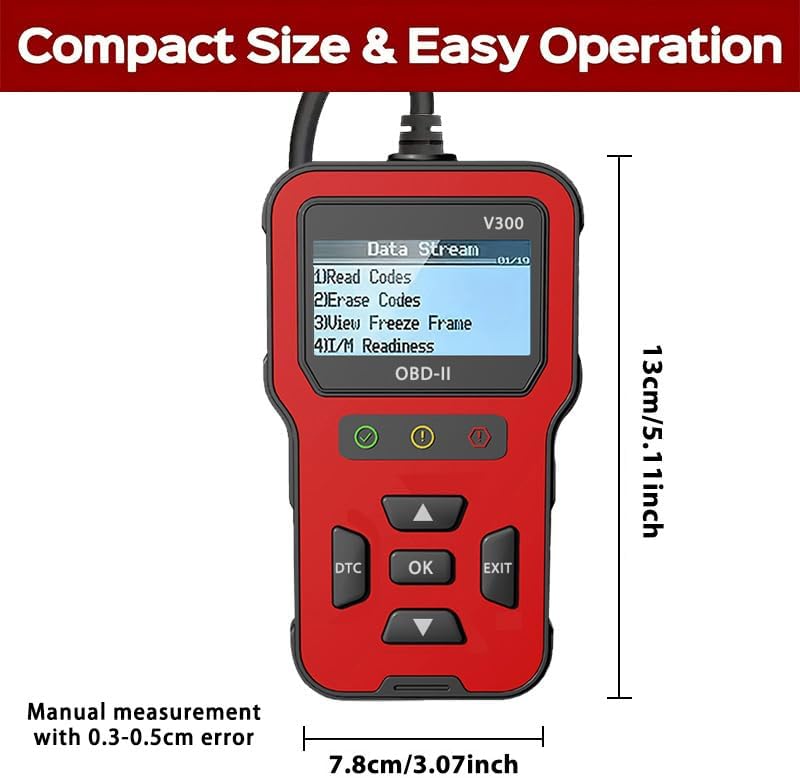
Figure 2.2: Dimensions of the RODEDIO V300/V519 OBD2 Scanner, approximately 13cm (5.11 inches) in length and 7.8cm (3.07 inches) in width.
3. Enstalasyon
3.1 Koneksyon Inisyal
The RODEDIO V300/V519 OBD2 Scanner is designed for plug-and-play operation. No batteries or external power sources are required as it draws power directly from your vehicle's OBD-II port.
- Locate the 16-pin Data Link Connector (DLC) in your vehicle. This port is typically located under the dashboard on the driver's side.
- Asire w ke ignisyon machin nan nan pozisyon OFF pozisyon.
- Firmly plug the scanner's OBD-II cable into the vehicle's DLC.
- Vire ignisyon machin nan sou pozisyon ON position (engine off). The scanner will automatically power on and begin communicating with the vehicle's onboard computer.

Figure 3.1: The OBD2 scanner being held in a user's hand, demonstrating its compact size and ease of use within a vehicle's interior.
4. Operasyon
4.1 Navigasyon debaz
Once powered on, the scanner will display the main menu. Use the Up epi Desann arrow buttons to scroll through menu options. Press the OK button to select an option or enter a sub-menu. Press the Sòti bouton pou retounen nan ekran oswa meni anvan an.
Figure 4.1: The scanner's main menu displaying options such as "Read Codes", "Erase Codes", "View Freeze Frame", and "I/M Readiness".
4.2 Lekti Kòd Pwoblèm Dyagnostik (DTC)
This function allows you to retrieve stored Diagnostic Trouble Codes (DTCs) from the vehicle's computer, which indicate specific issues.
- Nan meni prensipal la, chwazi "Li Kòd yo" ak peze OK.
- The scanner will display any stored DTCs. If multiple codes are present, use the arrow buttons to scroll through them.
- Each code will typically be accompanied by a brief description.
4.3 ErasinKòd Pwoblèm Dyagnostik (DTC)
Clearing DTCs will turn off the Check Engine Light (MIL) and erase all diagnostic data from the vehicle's memory. Nòt: Only clear codes after addressing the underlying issue, otherwise, the codes will reappear.
- Nan meni prensipal la, chwazi "Efase Kòd yo" ak peze OK.
- Konfime seleksyon w lè w mande w.
- The scanner will indicate if the codes have been successfully erased. The Check Engine Light should turn off.

Figure 4.2: Illustration of the scanner's ability to identify engine problems and clear fault codes, thereby turning off the check engine light.
4.4 Viewing Freeze Frame Data
Freeze Frame Data is a snapshot of the vehicle's operating conditions at the moment a fault code was set. This data can help in diagnosing intermittent problems.
- Nan meni prensipal la, chwazi "View Freeze Frame" ak peze OK.
- The scanner will display various parameters recorded when the DTC occurred.
4.5 Eta Preparasyon I/M
I/M Readiness (Inspection/Maintenance Readiness) indicates whether the various emissions-related systems on the vehicle are operating correctly and have completed their self-tests. This is useful for emissions testing.
- Nan meni prensipal la, chwazi "I/M Readiness" ak peze OK.
- The scanner will display the status of various monitors (e.g., O2 Sensor, EVAP System). A "Ready" status indicates the monitor has completed its test.
4.6 Difizyon Done An Dirèk
The Live Data Stream function displays real-time sensor data from the vehicle's engine control unit (ECU). This can include engine RPM, vehicle speed, coolant temperature, oxygen sensor readings, and more.
- Nan meni prensipal la, chwazi "Kouran Done" or "Done an dirèk" ak peze OK.
- The scanner will display a list of available data parameters. Use the arrow buttons to scroll and view diferan valè.
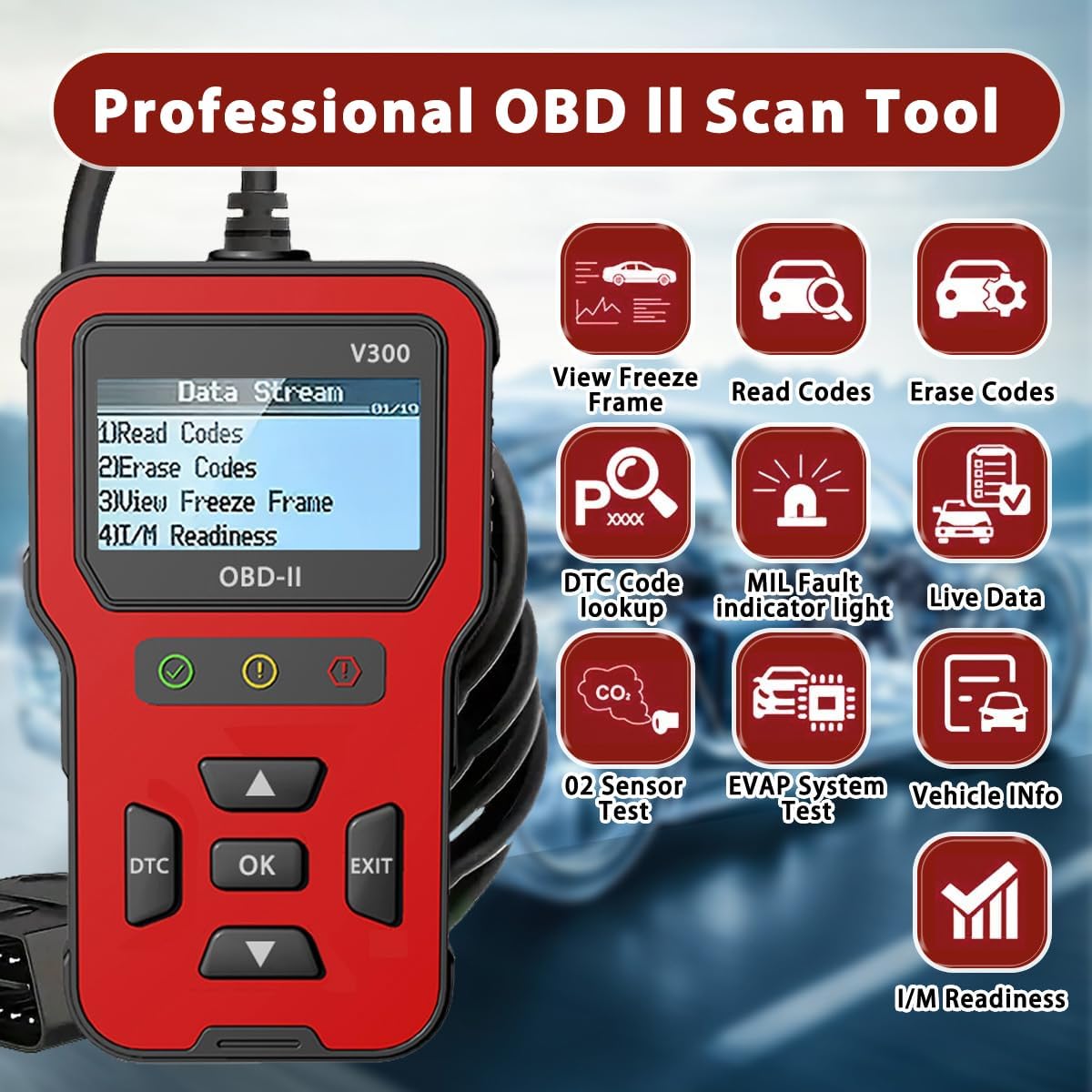
Figi 4.3: Yon anlèview of the professional OBD II scan tool's capabilities, including View Freeze Frame, Read Codes, Erase Codes, DTC Code Lookup, MIL Fault Indicator Light, Live Data, O2 Sensor Test, EVAP System Test, Vehicle Info, and I/M Readiness.
4.7 Batri Voltage Tès
This function allows you to check the vehicle's battery voltage, providing a quick assessment of its health.
- From the main menu, select the option related to "Battery Voltage Test" ak peze OK.
- Eskanè a ap montre volim batri aktyèl la.tage.
4.8 DTC Passage
If you have a specific DTC code, you can use the DTC Lookup function to get a detailed description of the code.
- Peze dedye a DTC bouton oswa chwazi "DTC Lookup" soti nan meni an.
- Enter the DTC code using the arrow buttons to navigate characters and OK pou chwazi.
- The scanner will display the definition of the code.
5. Konpatibilite
5.1 Supported Vehicles
The RODEDIO V300/V519 OBD2 Scanner is compatible with most vehicles that support the OBD-II/EOBD protocols. This generally includes:
- Veyikil Etazini yo: All vehicles manufactured after 1996.
- EU Vehicles: All vehicles manufactured after 2002.
- Asian Vehicles: All vehicles manufactured after 2008.
It supports all full OBDII modes.

Figure 5.1: Compatibility details for the scanner, indicating support for most vehicles after 1996 and listing various supported OBD protocols for diesel vehicles.
5.2 Important Limitations
Tanpri sonje limit sa yo:
- Pwodwi sa a does not support ABS, SRS, or TPMS detection. It is primarily for engine-related diagnostics.
- For diesel vehicles, please ensure your vehicle supports one of the following protocols, otherwise, this product may not be compatible:
- SAE J1850 PWM (41.6KBaud)
- SAE J1850 VPW (10.4KBaud)
- ISO9141-2 (5 baud inisyalizasyon, 10.4KBaud)
- ISO14230-4 KWP (5 baud init, 10.4 KBaud)
- ISO14230-4 KWP (fast init, 10.4 KBaud)
- ISO15765-4 CAN (11bit ID, 500 KBaud)
- ISO15765-4 CAN (29bit ID, 500 KBaud)
- ISO15765-4 CAN (11bit ID, 250 KBaud)
- ISO15765-4 CAN (29bit ID, 250 KBaud)
6. Espesifikasyon teknik
| Karakteristik | Spesifikasyon |
|---|---|
| Mak | RODEDIO |
| Modèl | V519 (also referred to as V300) |
| Dimansyon pwodwi | 5.1"L x 1.5"W x 7.8"H (apeprè 13cm x 3.8cm x 19.8cm) |
| Pwa atik | 8 ons (apeprè 227 gram) |
| Rezolisyon ekspozisyon | 128 x 64 LCD |
| Operating System (for PC connection, if applicable) | Windows XP (Note: Device is plug-and-play, no PC software typically required for basic operation) |
| Kalite anfòm otomobil | Universal Fit (OBD2/EOBD compliant vehicles) |
| Peyi orijin | Lachin |
NAN. Depanaj
If you encounter issues while using your RODEDIO OBD2 Scanner, please refer to the following common problems and solutions:
- Eskanè a pa limen:
- Ensure the scanner's cable is firmly connected to the vehicle's 16-pin DLC.
- Verify the vehicle's ignition is in the ON position (engine off).
- Check the vehicle's fuse for the OBD-II port (consult your vehicle's owner's manual for fuse box location and diagram).
- "Link Error" or "Communication Error" message:
- Confirm the vehicle is OBD-II compliant (most vehicles after 1996 in the US, 2002 in EU, 2008 in Asia).
- Ensure the ignition is ON and the engine is off.
- Try connecting the scanner to a different OBD-II compliant vehicle to rule out a scanner issue.
- Check for any aftermarket devices connected to the OBD-II port that might interfere with communication.
- Cannot clear codes:
- Ensure the ignition is ON and the engine is off.
- Codes cannot be cleared if the underlying fault is still present. Diagnose and repair the issue first, then attempt to clear codes.
- Lekti ki pa egzak:
- Asire w ke batri machin nan chajetage ki estab.
- Verify the scanner's connection is secure.
- If possible, compare readings with another known good scanner.
8. Antretyen
To ensure the longevity and optimal performance of your RODEDIO OBD2 Scanner, follow these maintenance guidelines:
- Kenbe aparèy la pwòp lè w siye l avèk yon twal mou epi sèk. Evite itilize pwodui netwayaj abrazif oswa solvan.
- Sere eskanè a nan yon kote ki fre epi sèk, lwen limyè solèy dirèk ak tanperati ekstrèm.
- Pa ekspoze aparèy la nan dlo oswa imidite twòp.
- Avoid dropping the scanner or subjecting it to strong impacts.
- Do not attempt to disassemble or repair the unit yourself, as this will void any potential warranty.
9. Garanti ak sipò
For warranty information or technical support, please contact RODEDIO customer service through the retailer where you purchased the product or refer to the contact information provided with your purchase. Please have your product model number (V300/V519) and purchase details ready when contacting support.