
Entwodiksyon
Mèsi paske w te chwazi Black laview W50PRO Smartwatch. This manual provides essential information for setting up, operating, and maintaining your device. Please read it carefully to ensure optimal performance and a safe user experience. Keep this manual for future reference.
Kontni pake
Verifye ke tout atik yo prezan nan pakè ou a:
- Nwaview W50PRO Smartwatch
- Silicone senti
- Replacement Nylon Braided Strap
- Mayetik kab chaje
- Manyèl Itilizatè (dokiman sa a)

Image: Package contents and product dimensions.
Pwodwi souview
Nwa aview W50PRO Smartwatch features a 1.45-inch HD touchscreen display, function buttons, a powerful flashlight, and a comfortable silicone strap. Its robust design is suitable for various activities.

Imaj: Nwaview W50PRO Smartwatch with its key features labeled.
Enstalasyon
1. Chaje Aparèy la
Before first use, fully charge your smartwatch. Connect the magnetic charging cable to the charging points on the back of the watch and plug the USB end into a power adapter (not included) or a computer's USB port. The watch will display a charging indicator.
- Yon chaj konplè pran apeprè 3 èdtan anjeneral.
- The 960mAh battery provides up to 30 days of typical use and 100 days of standby time.

Image: Battery capacity and charging information.
2. Enstalasyon aplikasyon an
Telechaje epi enstale "Da Fit" application on your smartphone. You can find it in the App Store (iOS) or Google Play Store (Android).
3. Device Pairing and Bluetooth Calls
To connect your smartwatch and enable Bluetooth calling:
- Download the Da Fit app from your phone's app store.
- Pèmèt Bluetooth sou smartphone ou.
- Open the Da Fit app and add your device.
- Confirm the pairing request on your phone and watch.
- Grant necessary notification permissions within the Da Fit app for calls and messages.
- Yon fwa li konekte, ou ka fè epi resevwa apèl dirèkteman nan mont ou a.

Image: Connection and calling setup guide.
Enstriksyon Operasyon
1. Navigasyon debaz
- Ekran tactile: Glise agoch/adwat, monte/anba pou navige nan meni yo epi jwenn aksè a fonksyon yo. Tape pou chwazi.
- Bouton Fonksyon: Use the physical buttons on the side of the watch for quick access to specific functions or to return to the home screen.
2. Flashlight and Compass
The W50PRO includes a built-in flashlight and compass for outdoor activities.
- Flach: Activate the flashlight feature from the watch's menu. It offers fixed and intermittent modes for various situations.
- konpa: Access the compass feature from the watch's menu for accurate directional guidance.
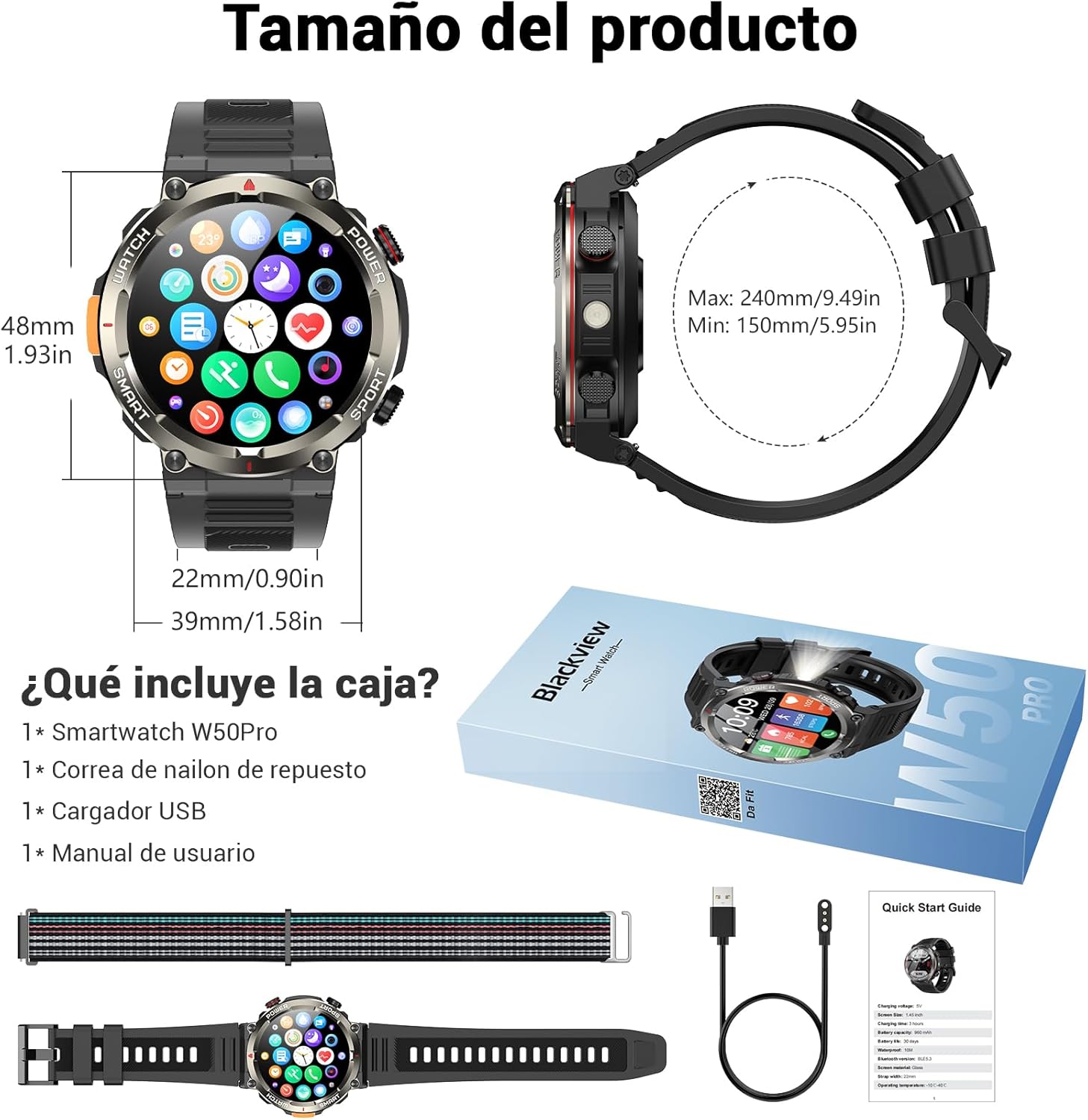
Image: Compass feature for outdoor navigation.

Image: Powerful LED flashlight in action.
3. Apèl ak Notifikasyon Bluetooth
Once paired with your smartphone, the W50PRO allows you to manage calls and notifications directly from your wrist.
- Fè/Resevwa Apèl: Use the integrated speaker and microphone to make or answer calls.
- Notifikasyon: Receive real-time alerts for text messages, emails, and social media apps.
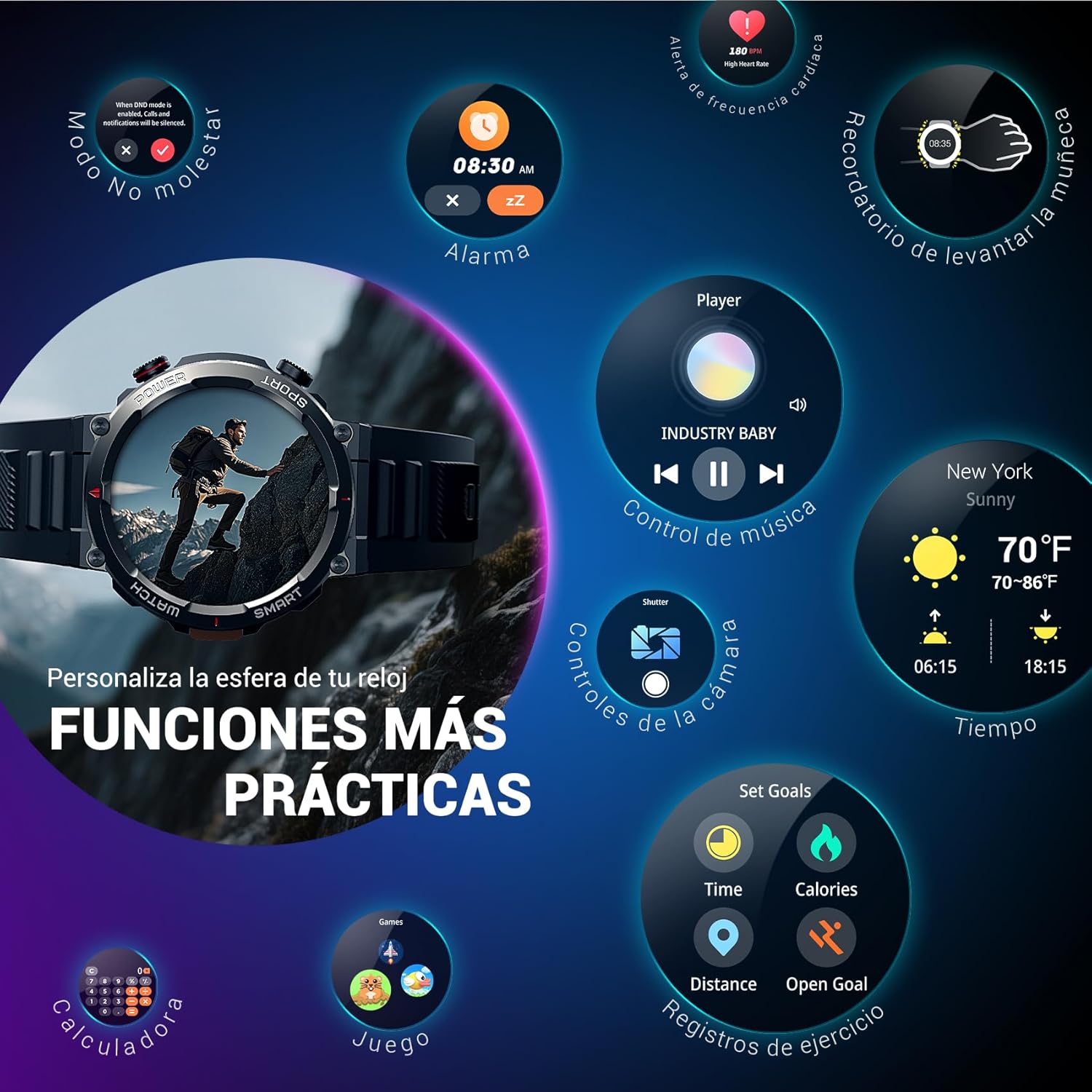
Image: Bluetooth calling and notification features.
4. Siveyans Sante
The smartwatch is equipped with high-precision sensors to monitor various health indicators:
- Batman kè: Real-time heart rate monitoring.
- Oksijèn nan san (SpO2): Kontwole nivo oksijèn nan san ou.
- Monitè dòmi: Tracks sleep quality and patterns.
- Nivo Estrès: Bay enfòmasyon sou nivo estrès ou.
All health data synchronizes with the Da Fit app for detailed analysis and trend tracking.

Image: Real-time health monitoring features.
5. Mòd Espò
The W50PRO offers over 100 integrated sports modes, including running, cycling, climbing, rope skipping, football, and basketball. It accurately records exercise time, distance, steps, calorie consumption, and heart rate changes, providing clear and intuitive performance data. Detailed data can be viewed nan app Da Fit.

Imaj: Plis paseview of 100+ sports modes.
6. Pèsonalize Kadran Mont yo
The Da Fit app provides a wide selection of watch faces to suit various styles. You can also upload personal photos as wallpaper and adjust text color and widget layout to create a unique watch interface.

Image: Customizable watch faces.
7. Lòt Fonksyon Pratik
Nwa aview W50PRO includes additional features for daily convenience:
- Pwedi tan
- Kontwòl Mizik
- Kamera Remote Control
- Alam
- Rapèl sedantèr
- Bwè Dlo Rapèl
- Kronomètr
- Revèy Countdown
- Jwenn Telefòn
- Kalkilatè
- Jwèt
- Ajisteman klète

Image: Multiple smart functions available on the smartwatch.
Antretyen
1. Netwayaj
Netwaye mont entelijan ou ak braslè ou regilyèman pou anpeche iritasyon po epi pou kenbe aparèy la an bon eta. Sèvi ak yon twal mou.amp twal pou siye ekran an ak casing. For the strap, follow the manufacturer's cleaning recommendations based on the material (silicone or nylon).
2. Rezistans dlo
Nwa aview W50PRO Smartwatch features an IP68 water resistance rating. This means it is protected against dust ingress and can withstand immersion in water up to 1.5 meters for up to 30 minutes. It is suitable for daily use, such as hand washing or light rain. Avoid using it in hot water, saunas, or during diving, as steam and high pressure can compromise the seals.

Image: Durability features including IP68 water resistance.
3. Swen batri
Pou pwolonje lavi batri:
- Evite tanperati ekstrèm.
- Pa kite batri a dechaje nèt souvan.
- Chaje aparèy la avèk kab chaje mayetik ki vini ak li a.
Depanaj
Si ou rankontre pwoblèm ak Black ou aview W50PRO Smartwatch, try the following:
- Aparèy pa limen: Asire w ke mont lan chaje nèt.
- Pa ka konekte ak telefòn nan: Check if Bluetooth is enabled on both devices. Restart both the watch and phone. Ensure the Da Fit app has necessary permissions.
- Done sou sante ki pa egzak: Asire w ke mont lan byen sere sou ponyèt ou. Netwaye detèktè yo regilyèman.
- Notifikasyon ki pa resevwa: Verify that notification permissions are granted in the Da Fit app and your phone's settings. Ensure the app is running in the background.
- Kout lavi batri: Reduce screen brightness, disable unnecessary features, and limit frequent heart rate monitoring.
For persistent issues, refer to the Da Fit app's help section or contact customer support.
Espesifikasyon
| Karakteristik | Spesifikasyon |
|---|---|
| Mak | Nwaview |
| Modèl | W50PRO |
| Gwosè ekspozisyon | 1.45 pous |
| Kalite ekspozisyon | LCD |
| Rezolisyon | 360 x 360 piksèl |
| Kapasite batri | 960 mAh |
| Tipik lavi batri | Jiska 30 jou |
| Tan sibstiti | Jiska 100 jou |
| Tan pou chaje | Apeprè. 3 èdtan |
| Koneksyon | Bluetooth |
| Antre Entèfas Imèn | Buttons, Microphone |
| Rezistans dlo | IP68 |
| Modèl Telefòn konpatib | iOS ak andwad |
| Dimansyon pwodwi | 8.8 x 2.2 x 18.1 cm |
| Pwa pwodwi | 136 g |
Garanti ak sipò
Pou enfòmasyon sou garanti a ak sipò teknik, tanpri al gade dokiman ki vini ak acha ou a oswa vizite sit ofisyèl Black la.view websit la. Kenbe prèv acha ou pou reklamasyon garanti.