
1. Entwodiksyon
This manual provides essential information for the safe and effective operation of your Thermal Master Handheld Thermal Camera THOR 002. Please read this manual thoroughly before using the device and retain it for future reference. This thermal imager is designed for professionals in electrical, HVAC, mechanical, and building inspections, offering advanced thermal imaging capabilities for detailed diagnostics.
2. Enfòmasyon sou Sekirite
Always operate the device in accordance with the instructions provided. Do not attempt to disassemble or modify the camera, as this may void the warranty and cause damage. Avoid direct exposure of the lens to strong light sources. Ensure the device is charged using the provided cable and a compatible power source. Keep the device away from extreme temperatures and corrosive environments. The laser positioning feature should be used with caution; avoid direct eye exposure.
3. Pake kontni
Lè w ap debale l, tanpri verifye si tout atik ki nan lis anba a yo la epi yo an bon kondisyon.
- Thor002 Thermal Camera ×1
- Explosion-Proof Case ×1
- 100cm USB Data Cable ×1
- 32GB Memory Card (pre-installed)

Figure 3.1: Contents of the Thermal Master THOR 002 package, showing the thermal camera, explosion-proof case, and USB data cable.
4. Pwodwi souview
The Thermal Master THOR 002 is a robust handheld thermal camera designed for professional use. It features an ergonomic body with an alloy base for durability.

Figi 4.1: Devan ak bò view of the THOR 002, highlighting the 3.5" IPS screen, laser targeting, LED light, thermal camera, visible light camera, flash shield, noise-reducing mic, and alloy base.
Karakteristik kle:
- Ekspozisyon: 3.5'' 640×480 IPS screen with 60Hz refresh rate.
- Thermal Resolution: 512×384 X³ IR Resolution (upgraded from 256×192).
- Kamera vizyèl: 2MP visible light camera.
- Ranje Tanperati: -4 ° F a 1022 ° F (-20 ° C a 550 ° C).
- Presizyon: ±3.6°F (±2°C) or ±2% of the reading.
- Sansiblite: Ultra-fine 40mK.
- Lantiy: 4.3mm lens, 4X digital zoom.
- Koneksyon: USB for PC, WiFi for smartphones/tablets.
- Depo: 8GB RAM, 32GB internal storage.
- Batri: 5000mAh lithium battery, up to 10.5 hours runtime, 18W fast charging.
- Dirab: IP54 protection, 2-meter drop resistance.
5. Enstalasyon
5.1 Premye chaj
Before first use, fully charge the thermal camera. Connect the provided USB data cable to the camera's USB-C port and plug the other end into a compatible 18W fast charger or a PC USB port. The battery indicator on the screen will show charging status.

Figure 5.1: The THOR 002 features a 5000mAh battery for up to 10.5 hours runtime and supports 18W fast charging.
5.2 Power On/Off
- Pouvwa sou: Press and hold the power button (usually located below the screen) for a few seconds until the Thermal Master logo appears.
- Pouvwa Off: Press and hold the power button until the shutdown prompt appears, then confirm.
6. Operasyon Enstriksyon
6.1 Navigasyon debaz
Use the directional buttons and the central selection button to navigate through the camera's menu and settings on the 3.5" IPS screen.
6.2 Mòd Mezi
The camera offers precise temperature measurement with multiple spot analysis options.
- Standard Points: Measure center, hottest, and coldest spots automatically.
- Custom Points: Define up to three additional measurement spots for specific areas of interest.

Figure 6.1: The camera display showing options for minimum, maximum, center, and three custom temperature points.
6.3 Mòd Imaging
Switch between different imaging modes to best suit your inspection needs.
- Infrared (IR): Montre sèlman imaj tèmik la.
- Limyè vizib: Displays only the visual image from the 2MP camera.
- Mòd Fizyon: Melanje imaj tèmik ak vizyèl yo pou amelyore detay.
- Foto nan Foto (PIP): Sipèpoze yon imaj tèmik ki pi piti sou imaj limyè vizib la.
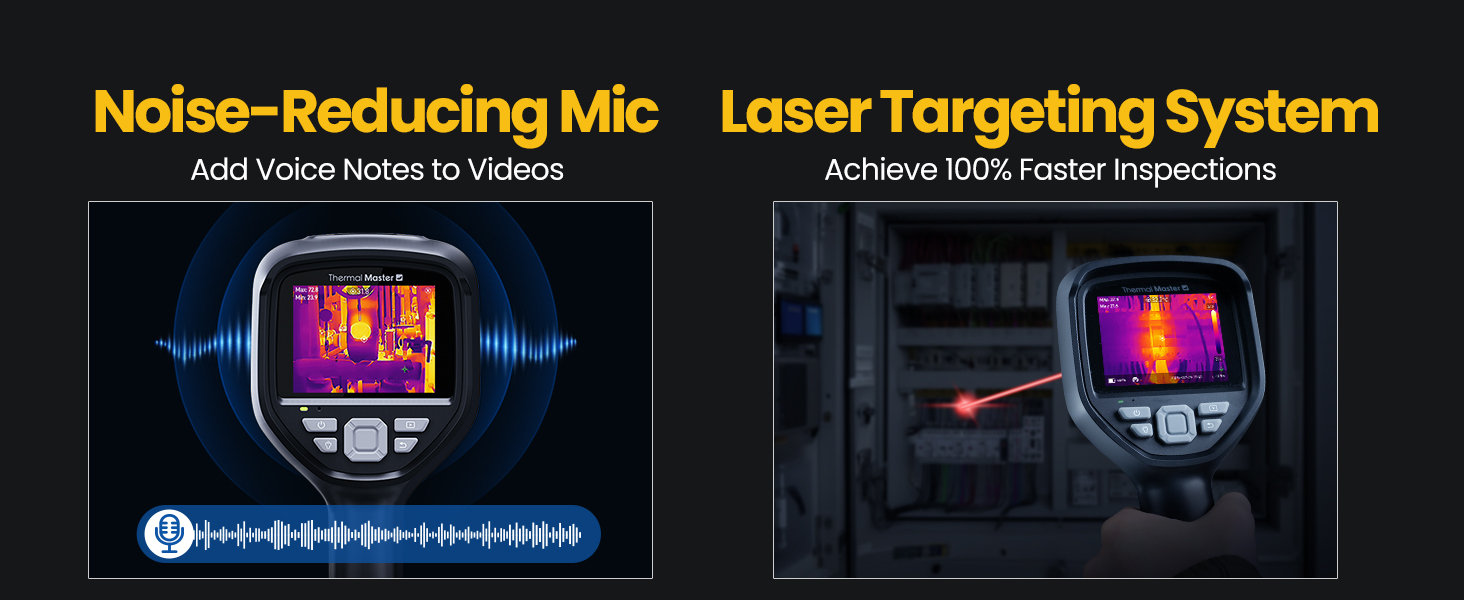
Figure 6.2: Comparison of Fusion Imaging and Picture-in-Picture modes for combining thermal and visual data.
6.4 Koneksyon
The THOR 002 supports both wired and wireless connectivity for data transfer and real-time analysis.
- Koneksyon USB: Connect to a PC via the USB cable for real-time thermal analysis and data transfer.
- Koneksyon WiFi: Pair with smartphones and iPads using the 'Thermal Smart' app for flexible operation and remote viewing.

Figure 6.3: The camera connected wirelessly to a smartphone and wired to a laptop for thermal reporting.
6.5 Anrejistreman
Capture and store inspection data directly on the device.
- Capture foto: Press the trigger button once to take a photo.
- Anrejistreman videyo: Press and hold the trigger button to start recording video. Press again to stop.
- Nòt Vwa: Add voice annotations to videos for detailed on-site documentation.
- QR Code Management: Use QR codes for simplified file management and reporting.

Figure 6.4: The camera features a noise-reducing microphone for voice notes and a laser targeting system for precise aiming.
6.6 Zoom & Focus
Ajiste a view for detailed inspections.
- Zoom dijital: Utilize the 4X digital zoom (1x, 2x, and 4x magnification) for closer inspection of targets.
- Lantiy: The 4.3mm lens extends the detection range by 34.4%.
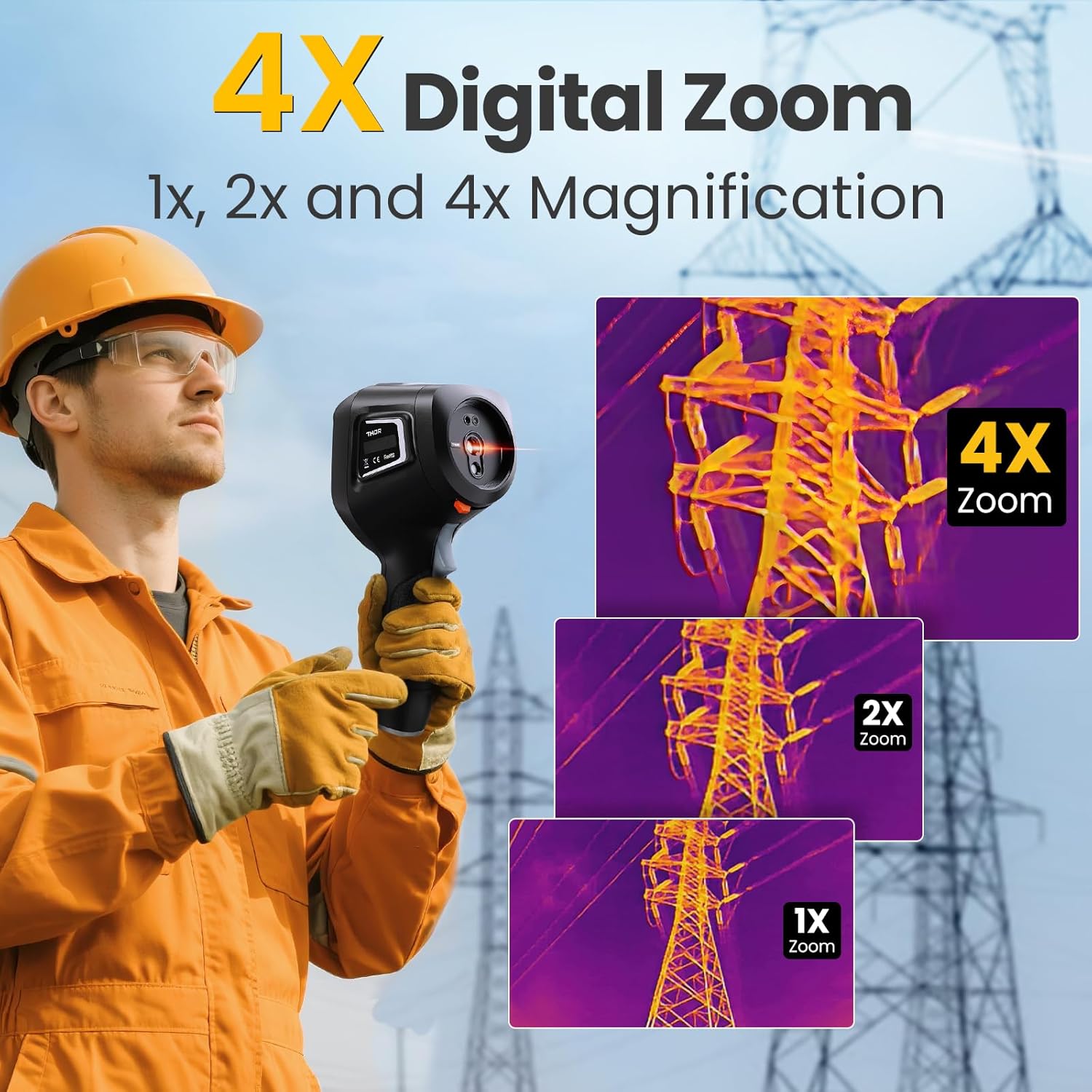
Figure 6.5: The camera's 4X digital zoom function, illustrating 1x, 2x, and 4x magnification levels.
6.7 Ajisteman Emisivite
For accurate temperature readings, adjust the emissivity setting based on the surface material being inspected.

Figure 6.6: Emissivity settings menu, allowing adjustment for various materials like polished aluminum, light aluminum oxide, brass mirror, and brass oxide.
7. Antretyen
To ensure the longevity and optimal performance of your Thermal Master THOR 002, follow these maintenance guidelines:
- Netwayaj: Use a soft, dry cloth to clean the camera body. For the lens, use a lens cleaning cloth and solution.
- Depo: Store the camera in its explosion-proof case when not in use to protect it from dust, moisture, and impact.
- Swen batri: Avoid fully discharging the battery frequently. Charge the battery regularly, even if the camera is not in active use, to maintain battery health.
- Mizajou lojisyèl: Periodically check the Thermal Master official website for any available firmware or software updates for your device.
NAN. Depanaj
If you encounter any issues with your Thermal Master THOR 002, refer to the common problems and solutions below. If the problem persists, contact customer support.
| Pwoblèm | Kòz posib | Solisyon |
|---|---|---|
| Kamera a pa limen | Low oswa batri apovri | Chaje batri a konplètman. |
| Imaj la twoub oswa pa klè | Lens is dirty; Incorrect focus/zoom settings | Clean the lens. Adjust digital zoom. |
| Lekti tanperati ki pa kòrèk | Incorrect emissivity setting; Distance to target too far | Adjust emissivity for the material. Ensure appropriate distance. |
| Cannot connect via WiFi | Incorrect WiFi password; Device not in hotspot mode | Verify password and network name. Ensure WLAN hotspot is enabled on camera. |
| PC software not working | Software not installed correctly; Compatibility issues | Download the latest software from the official website. Ensure PC meets system requirements. |
9. Espesifikasyon
Detailed technical specifications for the Thermal Master THOR 002.
| Karakteristik | Spesifikasyon |
|---|---|
| Dimansyon pwodwi | 10.24 x 4.33 x 4.13 pous; 4.59 liv |
| Nimewo Modèl Atik | Thor 002 |
| Batri | 1 batri ityòm ion obligatwa (enkli) |
| Manifakti | Mèt tèmik |
| Rezolisyon tèmik | 512×384 X³IR |
| Kamera vizyèl | 2MP |
| Ekspozisyon ekran | 3.5" 640×480 IPS |
| Rafrechisman pousantaj | 60Hz |
| Sansiblite tèmik (NETD) | 40mK |
| Ranje Tanperati | -4 ° F a 1022 ° F (-20 ° C a 550 ° C) |
| Presizyon Tanperati | ±3.6°F (±2°C) or ±2% of the reading |
| Zoom dijital | 4X |
| Depo | 8GB RAM, 32GB depo entèn |
| Kapasite batri | 5000mAh |
| Batri ègzekutabl | Jiska 10.5 èdtan |
| Chaje | 18W vit chaje |
| Pwoteksyon Rating | IP54 |
| Drop Rezistans | Jiska 2 mèt |
10. Garanti ak sipò
Thermal Master is committed to providing high-quality products and customer satisfaction.
- Garanti: The Thermal Master THOR 002 comes with a 2-Year Warranty. Replacements are provided only under warranty conditions.
- Sipò teknik: Lifetime technical support is available. For assistance, please contact Thermal Master customer service.
Figure 10.1: The camera display showing options for minimum, maximum, center, and three custom temperature points.