
1. Entwodiksyon
This manual provides comprehensive instructions for the WiMiUS K13 4K Google TV Projector. Designed for a superior visual experience, this projector integrates advanced features for both entertainment and professional use. Key functionalities include native 1080p resolution with 4K support, 1500 ANSI lumens brightness, automatic focus and keystone correction, and an integrated Google TV system for seamless access to a wide range of applications.
Please read this manual thoroughly before operating the device to ensure proper usage and to maximize its performance and longevity.
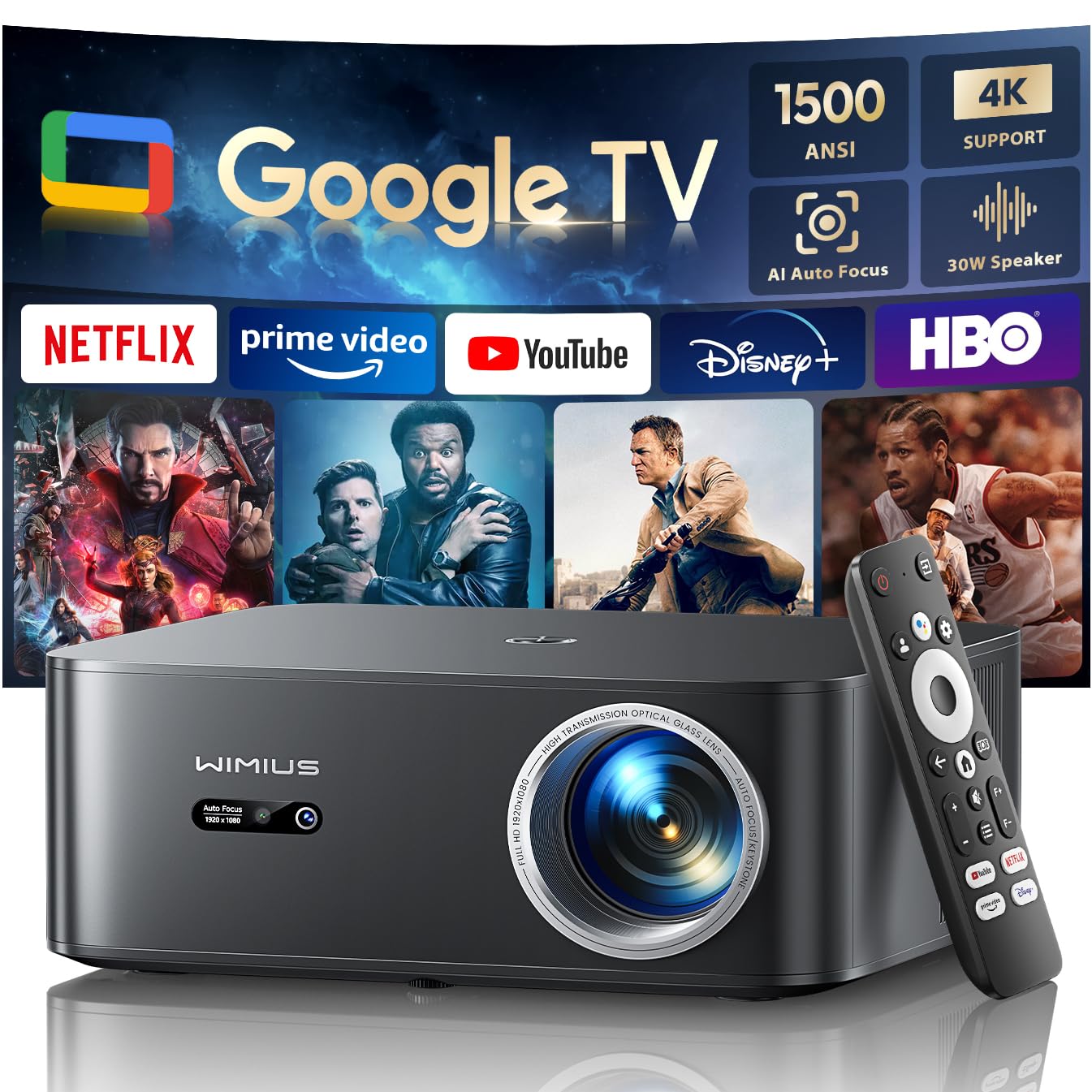
Figure 1: WiMiUS K13 4K Google TV Projector
2. Gid Enstalasyon
2.1 Debalaj ak Kontni Pakè a
Retire tout konpozan yo nan anbalaj la avèk prekosyon. Verifye ke tout atik yo prezan:
- WiMiUS K13 Projector
- Kontwòl remote (pil AAA pa enkli)
- Pouvwa kab
- HDMI kab
- Manyèl itilizatè
2.2 Plasman
Position the projector on a stable, flat surface. For optimal image quality, ensure the projector lens is perpendicular to the projection surface. Recommended projection distance is 2.5 to 3 meters for a large screen size.
- Montaj sou tab la: Place the projector on a table or stand.
- Montaj plafon/mi: The projector features M5 screw holes for compatible ceiling or wall mounts. Ensure the mount is securely installed and can support the projector's weight.
- Montaj tripod: The K13 projector does not have dedicated tripod mounting holes. Use a tripod equipped with a tray to support the projector.
2.3 Koneksyon pouvwa
Connect the power cable to the projector's power input port, then plug the other end into a power outlet. The power indicator light will illuminate.
2.4 Premye Limen ak Konfigirasyon Debaz
Press the power button on the projector or remote control to turn on the device. Upon first use, follow the on-screen prompts to:
- Chwazi lang ou pi pito.
- Connect to a Wi-Fi network (2.4G or 5G) for internet access.
- Log in with your Google account to access Google TV features and applications.
2.5 Automatic Focus and Keystone Correction
The WiMiUS K13 projector is equipped with automatic focus and keystone correction. After powering on or moving the projector, it will automatically adjust the image to achieve a clear, rectangular display. Manual adjustments are also available in the settings menu if needed.
3. Operasyon Enstriksyon
3.1 Remote Control and Google Voice Assistant
Use the provided remote control to navigate the Google TV interface. The remote includes dedicated buttons for popular streaming services like Netflix, Prime Video, YouTube, and Disney+. Utilize the integrated Google Voice Assistant by pressing the microphone button on the remote and speaking commands to search for content, adjust volume, or launch applications.
3.2 Google TV and Application Usage
The projector runs on an officially certified Android 11.0 Google TV system, providing access to over 10,000 applications from the Google Play Store. Navigate through the home screen to find installed apps or download new ones. Ensure a stable internet connection for optimal streaming performance.
3.3 Miroir ekran
Pwojektè a sipòte repwodiksyon ekran san fil soti nan plizyè aparèy:
- AirPlay (iOS devices): Connect your iOS device and the projector to the same Wi-Fi network. Select the AirPlay option on your iOS device and choose the projector from the list of available devices.
- Miracast (Android/Windows devices): Enable Miracast or Screen Mirroring on your Android or Windows device. Select the projector from the detected devices.
3.4 Konekte Aparèy Ekstèn yo
The WiMiUS K13 offers multiple connectivity options:
- Pò HDMI: Connect gaming consoles, laptops, Blu-ray players, or other HDMI-enabled devices. Select the corresponding HDMI input from the projector's source menu.
- Pò USB: Insert USB drives to play media files (videos, photos, documents like PPT, Excel, Word).
- Sòti odyo 3.5mm: Connect external headphones or speakers via the audio jack.
3.5 Sòti odyo
The projector features integrated 20W speakers for clear audio. For enhanced sound, you can connect external audio systems:
- Bluetooth 5.2: Konekte ak oratè Bluetooth oswa kas ekoutè pou odyo san fil.
- HDMI ARC: Connect to a soundbar or AV receiver that supports HDMI ARC for simplified audio setup and control.
3.6 Fonksyon Zoom
Adjust the screen size from 50% to 100% using the digital zoom function in the settings menu. This allows you to resize the image without physically moving the projector.

Figure 2: Outdoor movie experience with the WiMiUS K13 Projector

Figure 3: Outdoor sports viewing with the WiMiUS K13 Projector
4. Antretyen
4.1 Netwayaj Lantiy
Gently clean the projector lens with a soft, lint-free cloth or a lens cleaning brush. Avoid using abrasive materials or harsh chemicals, which can damage the lens coating.
4.2 Ventilation Care
Ensure the projector's ventilation openings are clear and unobstructed to prevent overheating. Regularly check for dust accumulation and clean as necessary using a soft brush or compressed air.
4.3 Depo
Lè w pa itilize pwojektè a pou yon bon bout tan, sere l nan yon kote ki fre, sèk, epi san pousyè. Sèvi ak anbalaj orijinal la oswa yon kouvèti pwoteksyon pou anpeche domaj.
NAN. Depanaj
If you encounter issues with your WiMiUS K13 projector, refer to the following common problems and solutions:
| Pwoblèm | Kòz posib | Solisyon |
|---|---|---|
| Pa gen imaj ki parèt | Power cable disconnected, incorrect input source, device not powered on. | Check power connection, ensure projector is on, select correct HDMI/USB input. |
| Imaj la twoub | Out of focus, lens dirty, projector moved. | Allow auto-focus to adjust, clean the lens, manually adjust focus if needed. |
| Imaj la defòme (fòm trapèz) | Pwojektè a pa pèpandikilè ak ekran an. | Allow auto-keystone correction to adjust, manually adjust keystone in settings. |
| Pa gen son | Volume too low, incorrect audio output selected, external device audio issue. | Increase volume, check audio output settings (internal, Bluetooth, HDMI ARC), verify external device audio. |
| Pa ka konekte ak Wi-Fi/Bluetooth | Modpas ki pa kòrèk, deyò limit, pwoblèm rezo. | Verify password, move closer to router/device, restart projector and router/device. |
| Remote kontwòl pa reponn | Low batteries, obstruction, remote not paired. | Ranplase pil yo, retire obstak yo, repare telekòmand lan si sa nesesè. |
6. Espesifikasyon
Detailed technical specifications for the WiMiUS K13 Projector:
| Karakteristik | Detay |
|---|---|
| Mak | WiMiUS |
| Nimewo Modèl Atik | K13 |
| Koulè | Nwa |
| Kalite pwodwi | Pwojektè pòtab |
| Rezolisyon ekspozisyon | 1920 x 1080 (Native Full HD) |
| Rezolisyon ekspozisyon maksimòm | 4096 x 2160 Piksèl (Sipò 4K) |
| Kalite ekspozisyon | LCD |
| Klète | 1500 ANSI lumèn |
| Koneksyon Teknoloji | HDMI, USB, 3.5mm Audio, Wi-Fi (6), Bluetooth (5.2) |
| Karakteristik espesyal | Digital Keystone Correction, Built-in Speaker, Auto Focus, Built-in Wi-Fi, Google TV |
| Aparèy konpatib | Tablet, Laptop, Game Console, Speaker, Smartphone, Television |
| Itilizasyon pwodwi rekòmande | Sinema Lakay, Jwèt Videyo, Pwofesyonèl, Edikasyon |
| Dimansyon pwodwi | 28L x 24.2W x 10.8H santimèt |
| Faktè fòm | Pòtab |
| Kalite aliye | Table Mount (M5 screw holes for ceiling/wall mount) |
7. Garanti ak sipò
WiMiUS is committed to providing excellent customer service and support for your K13 projector:
- Sèvis Kliyan: 24/7 support is available for any inquiries or assistance you may need.
- Règleman ranbousman: Enjoy a 1-year refund policy from the date of purchase.
- Repair Coverage: The projector is covered by a 3-year repair warranty.
- Sipò teknik: Yo bay sipò teknik pou tout lavi pou pwodwi ou a.
For any questions or support requests regarding your WiMiUS K13 projector, please contact our customer service team via email. We are dedicated to providing a prompt and satisfactory solution.


