
1. Entwodiksyon
This manual provides essential instructions for the safe and efficient operation of your VOLTCRAFT DOV1004 Digital Oscilloscope. The DOV1004 is a compact, high-performance digital storage oscilloscope featuring a 12-bit analog-to-digital converter (ADC), a 7-inch touchscreen with gesture control, and multiple connectivity options including USB, LAN, and HDMI. It is designed for precise measurement and analysis of electronic signals in various applications. Please read this manual thoroughly before using the device and keep it for future reference.
2. Enfòmasyon sou Sekirite
Always observe the following safety precautions to prevent injury and damage to the device.
- Pwovizyon pou pouvwa: Use only the provided USB Type-C power adapter. Ensure the voltage matches the device's requirements (12 Volts).
- Anviwònman: Operate the oscilloscope in a dry, well-ventilated area, away from direct sunlight, extreme temperatures, and high humidity. Avoid dusty or corrosive environments.
- Sondaj: Always use properly rated probes for the voltage and frequency being measured. Ensure probes are correctly connected before taking measurements.
- Atè: Ensure the oscilloscope is properly grounded to prevent electric shock.
- Antretyen: Pa eseye ouvri oswa repare aparèy la tèt ou. Konfye tout antretyen bay pèsonèl kalifye.
- Netwayaj: Dekonekte kouran an anvan ou netwaye. Sèvi ak yon twal mou epi sèk. Pa sèvi ak pwodui netwayaj likid oswa ayewosòl.
3. Pake kontni
Verify that all items listed below are present in your package. If any items are missing or damaged, contact your supplier.
- VOLTCRAFT DOV1004 Digital Oscilloscope (1 unit)
- USB tip-C pouvwa adaptè
- USB kab
- Probe Tips (4 units)
- Sample Voltage Sets (2 units)
- Software CD with English User Manual
- Manyèl Itilizatè Brèf
4. Pwodwi souview
The VOLTCRAFT DOV1004 features a user-friendly interface and robust design for accurate signal analysis.
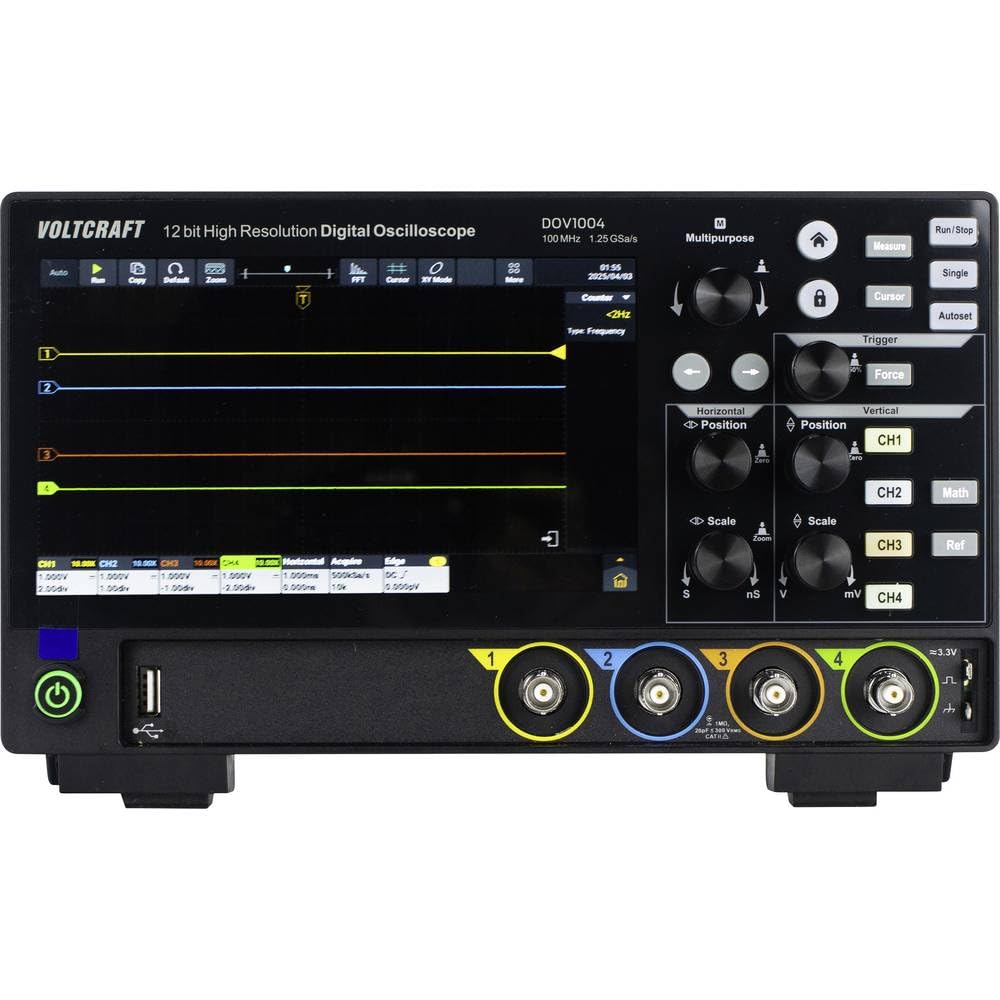
Figi 4.1: Devan View of DOV1004 Oscilloscope
This image displays the front panel of the VOLTCRAFT DOV1004 Digital Oscilloscope. Key features visible include the large 7-inch touchscreen display, various control knobs for horizontal and vertical adjustments, trigger settings, and the four analog input channels (CH1 to CH4) at the bottom right. A USB port is also visible on the front.
4.1 Front Panel Controls and Connectors
- Ekran taktil 7 pous: High-resolution (1024 x 600 pixels) interface for waveform visualization and menu navigation. Supports touch and gesture control.
- Kontwòl orizontal: Knobs for adjusting horizontal position and scale (time/div).
- Kontwòl vètikal: Knobs for adjusting vertical position and scale (volts/div) for each channel.
- Kontwòl deklanchè: Buttons and knobs for setting trigger type, level, and mode.
- Channel Inputs (CH1-CH4): BNC connectors for connecting oscilloscope probes.
- Pò USB: For data transfer and connecting peripherals.
- Bouton pouvwa: Pou vire aparèy la sou / sou.

Figi 4.2: Side View of DOV1004 Oscilloscope
Imaj sa a montre bò pwofesyonèl la.file of the VOLTCRAFT DOV1004 Digital Oscilloscope. Visible features include ventilation grilles for heat dissipation and potential side-mounted connectivity ports (though not clearly visible in this specific angle, typical for such devices).
4.2 Panèl dèyè ak koneksyon
The rear panel typically houses additional connectivity options for advanced functionality.
- USB Type-C Power Input: Pou konekte adaptè pouvwa a.
- Pò LAN: For network connectivity and remote control.
- Sòti HDMI: Pou konekte yon ekran ekstèn.
- USB Host/Device Ports: Additional USB ports for connecting to a PC or external storage.
5. Enstalasyon
Follow these steps to set up your VOLTCRAFT DOV1004 oscilloscope for the first time.
- Debake: Retire osiloskop la ak tout akseswa yo nan anbalaj la avèk prekosyon. Kenbe anbalaj la pou transpò oswa depo pita.
- Koneksyon pouvwa: Connect the USB Type-C power adapter to the power input port on the rear of the oscilloscope and then plug the adapter into a suitable power outlet.
- Pouvwa sou: Press the power button on the front panel to turn on the oscilloscope. The display should illuminate.
- Koneksyon sonde: Connect the oscilloscope probes to the desired input channels (CH1-CH4) using the BNC connectors. Ensure a secure connection.
- Konpansasyon Sond: Before taking measurements, it is recommended to compensate your probes. Connect the probe to the probe compensation output (usually a dedicated terminal on the front panel, often labeled "Probe Comp" or similar, or use a known square wave source). Adjust the probe's compensation trimmer until a flat-top square wave is displayed on the screen.
- Premye Anviwònman: The oscilloscope may perform an automatic self-calibration upon first power-on. You can adjust basic settings like language, date, and time through the system menu on the touchscreen.
6. Operasyon
This section covers the basic operation and key features of the VOLTCRAFT DOV1004 oscilloscope.
6.1 Mezi Debaz
- Konekte Siyal: Connect the compensated probe to the circuit point you wish to measure.
- Auto-Set: Peze a Oto button (if available) to automatically adjust horizontal and vertical settings for a stable waveform display.
- Ajisteman manyèl:
- Sèvi ak la Vertical Scale (V/div) bouton pou ajiste a amplatitid nan fòm ond lan.
- Sèvi ak la Pozisyon vètikal knobs to move the waveform up or down.
- Sèvi ak la Horizontal Scale (s/div) knob to adjust the time base.
- Sèvi ak la Pozisyon orizontal knob to move the waveform left or right.
- Trigger Setup:
- Select the trigger source (e.g., CH1, CH2).
- Choose the trigger type (e.g., Edge, Pulse, Video).
- Adjust the trigger level to stabilize the waveform.
6.2 Karakteristik avanse
- Touchscreen and Gesture Control: Utilize the 7-inch touchscreen for intuitive navigation. Pinch-to-zoom and swipe gestures can be used for waveform manipulation, eliminating tedious menu navigation.
- High-Resolution ADC: The 12-bit ADC provides enhanced vertical resolution for more precise measurements.
- Segondè Samppousantaj ling: With a maximum sampling rate of 1.25 GSa/s (single channel), the oscilloscope can capture fast-changing signals accurately.
- Deep Memory: A record length of 50 Mpts allows for capturing long signal durations at high sample pousantaj.
- To kaptire fòm vag: Real-time waveform capture of 50,000 wfms/s and segment capture of 700,000 wfms/s enable the observation of infrequent events.
- Multiple Trigger Types: Supports a wide range of trigger types including Edge, Video, Pulse, Slope, Runt, Window, Timeout, Nth, Logic, RS232/UART, I2C, SPI, CAN, and LIN for isolating specific events.
- Koneksyon: USB, LAN, and HDMI interfaces allow for data transfer, remote control, and external display connection. Real-time signal display on a computer is possible.
7. Antretyen
Proper maintenance ensures the longevity and optimal performance of your oscilloscope.
- Netwayaj: Regularly clean the exterior of the oscilloscope with a soft, dry, lint-free cloth. For stubborn dirt, slightly dampen twal la ak dlo. Do not use abrasive cleaners, solvents, or alcohol. Asire w ke aparèy la etenn epi deploge anvan w netwaye.
- Swen ekran: The touchscreen is a sensitive component. Clean it gently with a microfiber cloth. Avoid pressing too hard or using sharp objects.
- Depo: When not in use for extended periods, store the oscilloscope in a cool, dry place, away from direct sunlight and extreme temperatures. Use the original packaging if available.
- Swen Sonde: Inspect probes regularly for damage to cables or connectors. Replace damaged probes immediately.
- Vantilasyon: Asire w griy vantilasyon yo pa gen pousyè ak obstak pou anpeche yo chofe twòp.
NAN. Depanaj
Seksyon sa a bay solisyon pou pwoblèm komen ou ka rankontre.
| Pwoblèm | Kòz posib | Solisyon |
|---|---|---|
| Pa gen pouvwa | Adaptè kouran an pa konekte oswa li gen pwoblèm. Priz kouran an pa fonksyone. | Ensure the power adapter is securely connected to the oscilloscope and a working power outlet. Test the outlet with another device. |
| No Waveform Displayed | Probe not connected. Signal too small or too large. Incorrect trigger settings. Channel turned off. | Check probe connections. Adjust Vertical Scale (V/div) and Horizontal Scale (s/div). Press the Oto button. Verify trigger source and level. Ensure the channel is enabled. |
| Unstable Waveform | Incorrect trigger level or mode. No trigger source selected. | Adjust the trigger level. Select an appropriate trigger source and type (e.g., Edge trigger for repetitive signals). |
| Distorted Waveform | Probe compensation incorrect. Probe faulty. Signal exceeding input limits. | Perform probe compensation. Try a different probe. Ensure the input signal voltage does not exceed the oscilloscope's maximum input rating. |
| Ekran taktil la pa reponn | Temporary software glitch. Screen dirty. | Restart the oscilloscope. Clean the screen with a soft, dry cloth. If the issue persists, contact support. |
9. Espesifikasyon
Detailed technical specifications for the VOLTCRAFT DOV1004 Digital Oscilloscope.
| Karakteristik | Spesifikasyon |
|---|---|
| Nimewo Modèl | DOV1004 (VC-16753920) |
| Mak | VOLTCRAFT |
| Bandwidth | 100 MHz |
| Chèn Analòg | 4 |
| Max. Real-time Sample Rate | 1.25 GSa/s (single channel), 625 MSa/s (two channels or all channels) |
| Longè dosye | 50 Mpts |
| Rezolisyon vètikal | 12-bit ADC |
| To kaptire fòm vag | 50,000 wfms/s (real-time), 700,000 wfms/s (segment) |
| Orizontal Bale Range | 1 ns/div to 1000 s/div (1-2-5 steps) |
| Vètikal sansiblite | 500 µV/div to 10 V/div |
| Ekspozisyon | 7-inch Touchscreen, 1024 x 600 pixels, gesture control |
| Kalite deklanche | Edge, Video, Pulse, Slope, Runt, Window, Timeout, Nth, Logic, RS232/UART, I2C, SPI, CAN, LIN |
| Entèfas | USB, LAN, HDMI |
| Pwovizyon pou pouvwa | 12 Volts (via USB Type-C adapter) |
| Dimansyon (L x W x H) | 16 x 26 x 7.8 cm |
10. Sipò ak Garanti
For technical assistance, troubleshooting beyond this manual, or warranty inquiries, please refer to the following resources:
- Included Software CD: Contains a comprehensive English user manual and additional software.
- Manifakti Websit: Vizite sit ofisyèl VOLTCRAFT la websit la pou dènye dokiman yo, mizajou lojisyèl yo, ak enfòmasyon pou kontakte sipò a.
- Sèvis Kliyan: Contact your point of purchase or VOLTCRAFT customer service for direct support.
Warranty information is typically provided with the product documentation or available on the manufacturer's websit la. Tanpri konsève prèv acha ou a pou reklamasyon garanti.