
JETBeam E26
JETBeam E26 EDC Flashlight User Manual
Modèl: E26
1. Pwodwi souview
The JETBeam E26 is a high-performance, compact Everyday Carry (EDC) flashlight featuring a dual light source with a powerful white LED and a precise green beam. Designed for versatility and durability, it is suitable for various applications from daily tasks to outdoor adventures.
- Doub sous limyè: Combines a 3000-lumen white light with a <5mW green beam, which can be used simultaneously or independently.
- Compact EDC Design: Slim profile (0.62” thin, 4 oz with battery) with a sturdy two-way clip for easy pocket, hat, or backpack carry.
- Mòd miltip: Features 5 brightness levels for white light (Ultra Low, Low, Medium, High, Highest) plus a strobe mode.
- Batri rechargeable: Equipped with a built-in 1700mAh Li-ion battery, offering up to 39 hours of runtime.
- Konstriksyon dirab: IPX8 waterproof rating (submersible up to 2 meters) and 1.5-meter drop resistance, made from anodized aviation aluminum.
- Fonksyon memwa: Remembers the last used brightness level for convenience.
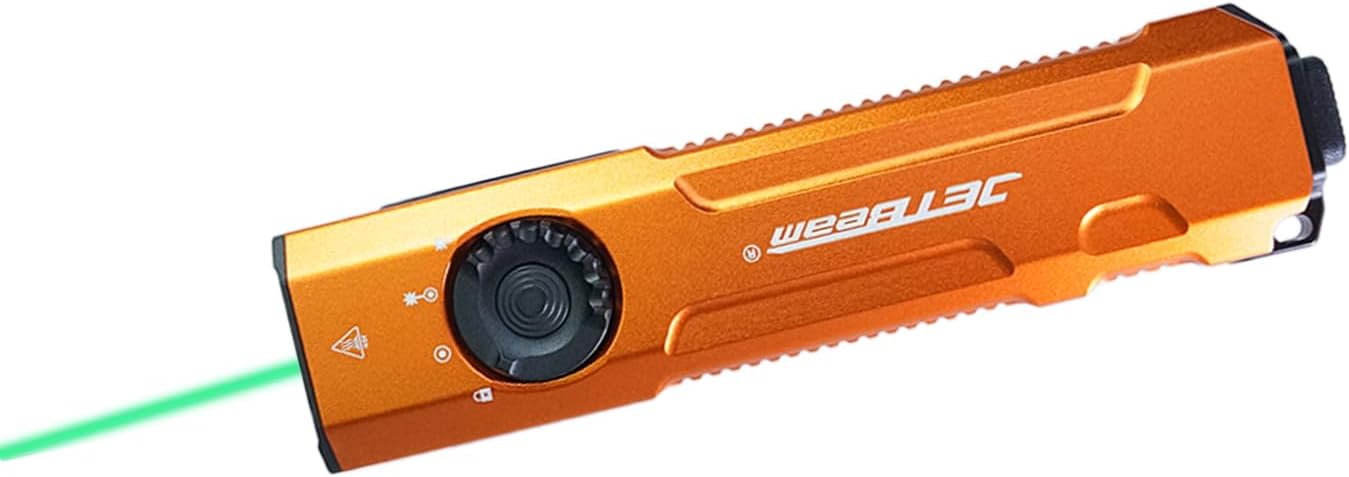
Image: The JETBeam E26 EDC Flashlight in orange, showcasing its slim design and the green beam in action.
2. Ki sa ki nan bwat la
Upon opening your JETBeam E26 package, you should find the following items:
- E26 Flashlight (Battery Included) x 1
- Manyèl itilizatè x 1
- USB chaje kab x 1
- Lanyard x 1
3. Espesifikasyon
| Karakteristik | Deskripsyon |
|---|---|
| Modèl | E26 |
| Sous limyè | LED (White Light & Green Beam) |
| Blan klète | 3000 Lumen (Max) |
| Green Beam Output | <5mW (520nm) |
| Distans gwo bout bwa | 885 pye (apeprè 270 mèt) |
| Batri | Batri ityòm ion 1700mAh entegre |
| Max Runtime | 39 èdtan |
| Rezistans dlo | IPX8 (Underwater 2 meters) |
| Rezistans enpak | 1.5 mèt |
| Materyèl | Anodized Aviation Aluminum |
| Dimansyon (D x W x H) | 0.6" x 1.25" x 5" |
| Pwa | 4 ons (ak pil) |
| Tanperati Koulè | 18300 Kelvin |
4. Enstalasyon
4.1 Chaje batri a
The JETBeam E26 comes with a built-in rechargeable battery. Before first use, or when the power indicator shows low battery, charge the device using the provided USB charging cable.
- Locate the USB-C charging port on the side of the flashlight.
- Connect the USB charging cable to the flashlight and to a compatible USB power source (e.g., computer, wall adapter).
- The power indicator light will show charging status.

Image: Close-up of the JETBeam E26 showing the USB-C charging port and the power indicator light. The indicator shows battery levels: 35%-100% (green), 15%-35% (orange), Less than 15% (red, requires charging).
The power indicator will automatically work when the flashlight turns on and will shut down after 5 minutes.
4.2 Initial Use - Moonlight Mode Access
To access the ultra-low moonlight mode from the off state:
- Press and hold the side switch for several seconds.
- Release the switch to turn on the moonlight mode.
- If you continue to press and hold, the brightness will adjust normally through the other modes.
5. Operasyon Enstriksyon
5.1 Power On/Off and Mode Switching (Side Switch)
The E26 features a side switch for primary control of the white light and green beam modes.
- Limen/Etenyen: Single press the side switch to turn the flashlight on or off.
- Ajisteman klète: When the white light is on, single press the side switch to cycle through the 5 lighting modes: Ultra Low (20 lm), Low (300 lm), Medium (700 lm), High (1300 lm), Highest (3000 lm).
- Fonksyon memwa: The flashlight will remember the last used brightness level when turned off and on again.

Image: Diagram illustrating the side switch and the 5 lighting modes (Ultra Low, Low, Medium, High, Highest) with their respective lumen outputs.
5.2 Tactical Tail Button Operation
The tactical tail button provides quick access to high output and strobe modes.
- Mòd limyè segondè: A heavy press of the tactical tail button will instantly activate the high light mode (3000 lumens). Release to turn off.
- Strobe mòd: Slightly press the tactical tail button twice to activate the strobe mode.

Image: Visual guide demonstrating the tactical tail button for instant high light output and strobe mode activation.
5.3 Green Beam and Dual Light Source Operation
The E26 features a dedicated green beam and the ability to combine it with white light.
- Green Beam Only: From the off state, press and hold the side switch to activate the green beam.
- White Light + Green Beam: When the white light is on, activate the green beam by pressing and holding the side switch. Both lights can be on simultaneously. You can adjust the brightness of the white light while both are active.

Image: Illustration showing the different light combinations: white light only (3000lm), white light + green beam (3000lm + ≤5mW), and green beam only (≤5mW).

Image: Demonstrates the accurate green beam (520nm, <5mW) for presentations or pet interaction.
5.4 Fonksyon bloke
The E26 features a locking mechanism to prevent accidental activation.
- Pou fèmen: From the off state, press and hold the side switch until the light flashes twice, indicating it is locked. All functions will be ineffective.
- Pou déblotché: When the flashlight is locked, press and hold the side switch until the light flashes once, indicating it is unlocked. The flashlight will restore ultra-low brightness.
6. Antretyen
Proper maintenance ensures the longevity and optimal performance of your JETBeam E26 flashlight.
- Netwayaj: Netwaye kò flach la avèk yon twal mou,amp cloth. For the lens, use a lens cleaning cloth. Avoid harsh chemicals or abrasives.
- Rezistans dlo: The E26 is IPX8 waterproof. Ensure the USB-C port cover is securely closed before exposing it to water.
- Swen batri: Recharge the battery regularly, especially if not used for extended periods, to maintain battery health. Avoid fully depleting the battery.
- Depo: Sere flach la nan yon kote ki fre, sèk lwen limyè solèy la dirèk ak tanperati ekstrèm.

Image: The JETBeam E26 demonstrating its IPX8 waterproof capability (submerged in water) and 1.5-meter drop resistance (impact on ground), highlighting its robust and durable design.
NAN. Depanaj
If you encounter issues with your JETBeam E26 flashlight, refer to the following common problems and solutions:
| Pwoblèm | Kòz posib / Solisyon |
|---|---|
| Flach pa limen. |
|
| Limyè ki soti a fèb oswa li ap tranble. |
|
| Green beam not working. |
|
| Flashlight gets warm during use. | This is normal, especially on higher brightness settings, due to the high lumen output. The E26 has a built-in temperature control module (ATR) to prevent overheating. |
8. Demonstrasyon pwodwi
Watch the official product video for a visual guide on the JETBeam E26's features and operation.
Video: Official demonstration of the JETBeam E26 flashlight, showcasing its UV light (though not listed in product features), green beam, mode switching, tactical tail switch, waterproof capabilities, and impact resistance. This video is provided by Huida Lighting, the seller.
9. Garanti ak sipò
For warranty information, technical support, or any inquiries regarding your JETBeam E26 flashlight, please contact the manufacturer or the seller directly.
Vandè: Huida Lighting
Tanpri konsève resi acha ou a pou reklamasyon garanti.
Ask a question about this manual
Ask about setup, troubleshooting, compatibility, parts, safety, or missing instructions. Manuals+ will review the question and use this page’s manual context to help answer it.