
Warmco W1
Warmco Portable Waist Fan - Model W1
Manyèl Enstriksyon
1. Entwodiksyon ak souview
The Warmco Portable Waist Fan (Model W1) is designed to provide powerful and continuous cooling in various outdoor environments. Equipped with a high-speed brushless motor and a large capacity battery, it offers extended operation and multi-functional capabilities, including an emergency LED light and a power bank feature. Please note that due to its high-speed motor, the fan generates noticeable operational noise and is primarily recommended for outdoor use where noise is less of a concern.
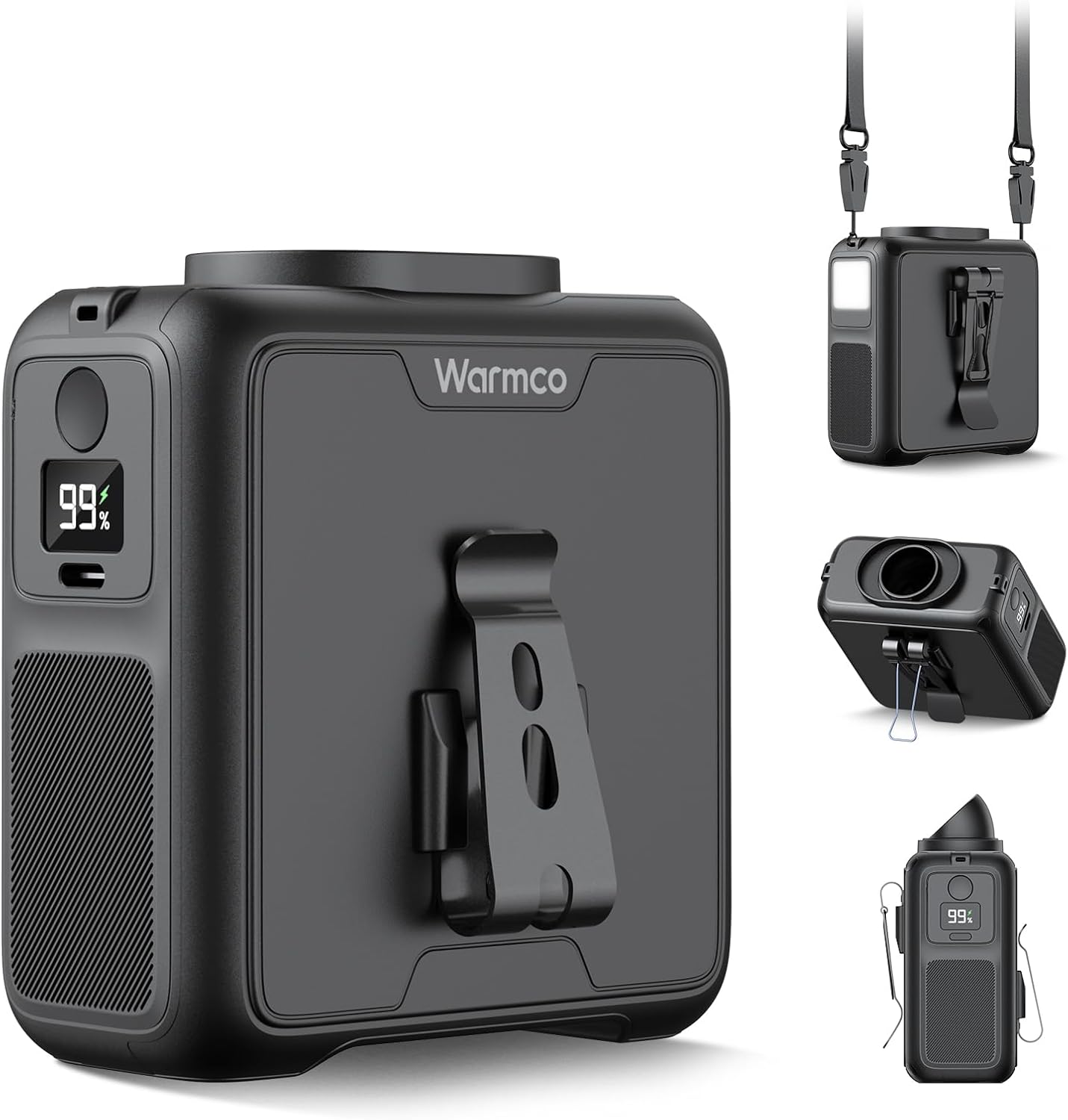
Figi 1: Plis paseview of the Warmco Portable Waist Fan and its accessories.
2. Pwodwi Features
- TurboBoost Powerful Airflow: Features an advanced straight-through structure and a high-performance 16000RPM brushless motor, delivering powerful airflow up to 9m/s. This provides rapid and continuous cooling, ideal for extreme heat conditions.
- Batri ki dire lontan rechargeable: Equipped with a 10000mAh battery capacity, the Warmco waist fan operates for up to 24 hours on low speed and 8 hours on high speed. A real-time LED power display shows the current battery status. The USB-C port also allows for emergency phone charging.

Figure 2: Illustration of the 10000mAh battery capacity and working times.
- Konsepsyon miltifonksyonèl 5 an 1: This portable waist fan serves multiple purposes beyond cooling. It functions as an emergency LED light and a power bank, making it suitable for outdoor survival, hiking, night walks, camping, or demanding work environments.

Figure 3: The fan's power bank and night light functionalities.
- Durable and Outdoor-Ready: Constructed from premium ABS material and featuring an upgraded manganese steel clip, the fan is designed for durability, slip-resistance, and a stronger grip. It can be securely attached to belts, making it perfect for high-altitude work, construction sites, and workshops.
- Rechargeable & Portable Design: The fan fully charges in 5-6 hours and supports use while charging. Its compact and lightweight design makes it easy to carry for camping, travel, fishing, hiking, and cycling.
3. Pake kontni
Lè w ap ouvri pake a, tanpri asire w ke tout bagay sa yo ladan l:
- 1 x Warmco Portable Waist Fan (Model W1)
- 1 x manyèl itilizatè
- 1 x USB-C kab
- 1 x kou lanyard
- 1 x Airflow Directional Attachment (Cap)
4. Enstalasyon ak Kòmanse
4.1 Premye chaj
Before first use, fully charge the fan. Connect the provided USB-C cable to the fan's charging port and plug the other end into a compatible USB power adapter (not included). The LED display will show the charging progress. A full charge typically takes 5-6 hours.
4.2 Tache Pwodwi pou Telefòn
- Lanyard pou kou: Thread the lanyard through the designated holes on the top of the fan. Ensure it is securely fastened before wearing around your neck.
- Airflow Directional Attachment: This cap can be placed over the fan's air outlet to direct airflow more precisely.
5. Operasyon Enstriksyon
5.1 Powering On/Off and Adjusting Fan Speed
- To power on the fan, press the power button once. The fan will start at Speed 1.
- To cycle through the 4 available speeds, press the power button repeatedly. The LED display will indicate the current speed level (1-4).
- To power off the fan, continue pressing the power button until the fan turns off, or long-press the power button for approximately 3 seconds.

Figure 4: Fan speed indicators and powerful airflow.
5.2 Sèvi ak limyè ki ap dirije a
To activate the emergency LED light, long-press the dedicated light button (usually located near the power button) for approximately 3 seconds. Repeat the long-press to turn off the light.
5.3 Itilizasyon kòm yon Bank Pouvwa
The Warmco fan can serve as an emergency power bank. Connect your device's charging cable to the USB-C port on the fan. The fan's battery will then provide power to your device. Note that charging your device will consume the fan's battery life.
5.4 Wearing Modes
- Klip pou ren: Use the integrated manganese steel clip to securely attach the fan to your belt or waistband. The fan can be oriented to blow air upwards into your shirt or downwards, depending on your preference.

Figure 5: Different wearing modes for optimal cooling.
- Lanyard pou kou: Attach the provided lanyard and wear the fan around your neck for hands-free cooling.
- Sipò pou biwo: The fan features a built-in stand arm, allowing it to be placed on a flat surface for desktop use.

Figure 6: Innovative design features for versatile use.
6. Antretyen
6.1 Netwayaj
- Ensure the fan is turned off before cleaning.
- Siye deyò vantilatè a ak yon twal mou epi sèk.
- For dust accumulation on the fan blades or air vents, use a soft brush or compressed air to gently remove debris. Do not use water or harsh chemicals.
6.2 Depo
Store the fan in a cool, dry place away from direct sunlight and extreme temperatures when not in use for extended periods. It is recommended to charge the battery to about 50% before long-term storage to preserve battery health.
NAN. Depanaj
- Vantilatè a pa limen:
- Check the battery level on the LED display. If low, recharge the fan.
- Ensure the power button is pressed correctly (a single press for on, long press for off).
- Flux lè fèb:
- Check the current speed setting on the LED display and increase if necessary.
- Ensure the air intake and outlet are not obstructed by clothing or debris.
- Fanatik fè bwi:
- The Warmco fan is equipped with a high-speed motor designed for powerful airflow, which naturally generates noticeable operational noise (50-60dB). This is normal for its design and intended outdoor use. It may be perceived as loud in quiet indoor settings.
- Pwoblèm chaj:
- Ensure the USB-C cable is securely connected to both the fan and the power source.
- Try a different USB power adapter or charging port.
8. Espesifikasyon
| Mak | Warmco |
| Non modèl | W1 |
| Koulè | Nwa |
| Sous pouvwa | Batri Powered |
| Kapasite batri | 10000mAh |
| Vitès maksimòm | 16000 RPM |
| Max Vantilasyon | 9m/s |
| Kantite Nivo Pouvwa | 4 |
| Metòd kontwòl | Manyen |
| Kalite Connector | USB Kalite C |
| Pwa atik | 2.43 ons |
| Manifakti | Dongguan Chenxun Elektwonik co, Ltd. |
9. Garanti ak sipò
Warmco offers a Pwomès Ranplasman 3 Ane for this product, ensuring peace of mind regarding its quality and performance. For any questions, technical support, or warranty claims, please contact Warmco customer service through the retailer's platform or the official Warmco websit la. Tanpri konsève prèv acha ou a pou validasyon garanti a.

Figure 7: Warmco's 3-Year Replacement Promise.
Ask a question about this manual
Ask about setup, troubleshooting, compatibility, parts, safety, or missing instructions. Manuals+ will review the question and use this page’s manual context to help answer it.