
Element Element 2023
Element 43" Frameless 4K UHD HDR XUMO TV User Manual
Model: Element 2023
1. Entwodiksyon
This manual provides essential information for setting up, operating, and maintaining your Element 43-inch Frameless 4K UHD HDR XUMO TV. Please read it thoroughly before using your television to ensure proper functionality and safety.
The Element XUMO TV offers a breathtaking viewing experience with its 4K Ultra HD resolution, delivering clear and detailed images. Enhanced color and contrast are provided by Dolby Vision and HDR technology, ensuring an immersive experience even in dark scenes. Dolby Audio contributes to superior sound quality for movies and games. A 120Hz effective refresh rate ensures smooth motion during fast-paced content.

Imaj 1.1: Devan view of the Element 43" XUMO TV.
2. Ki sa ki nan bwat la
Tanpri verifye sa ki nan pake a pou asire w ke tout atik yo la:
- 1 Element Xumo TV 43"
- 1 Xumo TV remote control (batteries included)
- 1 Gid Quick Start
- 1 TV stand + hardware
3. Enstalasyon
3.1 Debake
- Carefully remove the TV from its packaging. It is recommended to have two people for this step due to the size and weight of the television.
- Mete ekran televizyon an anba sou yon sifas ki plat e mou pou evite li reyur.
- Retire tout fim pwoteksyon ak materyèl anbalaj yo.
3.2 Tache kanpe la
Pou tache kanpe televizyon an:
- Idantifye pye kanpe gòch ak dwat la.
- Aliyen chak pye sipò a ak twou vis ki koresponn yo anba televizyon an.
- Secure the stand legs using the provided hardware (screws). Do not overtighten.
- Leve televizyon an ak anpil atansyon pou l kanpe dwat sou yon sifas ki estab e plat.
3.3 Konekte periferik
Connect your external devices (e.g., cable box, gaming console, Blu-ray player) to the appropriate ports on the back of the TV. Refer to the Quick Start Guide for port locations.
3.4 Premye pouvwa sou
- Branche kòd kouran an nan televizyon an epi answit nan yon priz miray.
- Peze bouton Power ki sou kontwòl remote la oubyen sou televizyon an menm.
- Swiv enstriksyon ki sou ekran an pou w konplete konfigirasyon inisyal la, ki gen ladan koneksyon rezo a ak eskanè chanèl yo.
4. Operasyon Enstriksyon
4.1 Fonksyon kontwòl Remote
The included XUMO TV remote control allows you to navigate the TV's features. It includes an advanced voice remote function for easy content search.
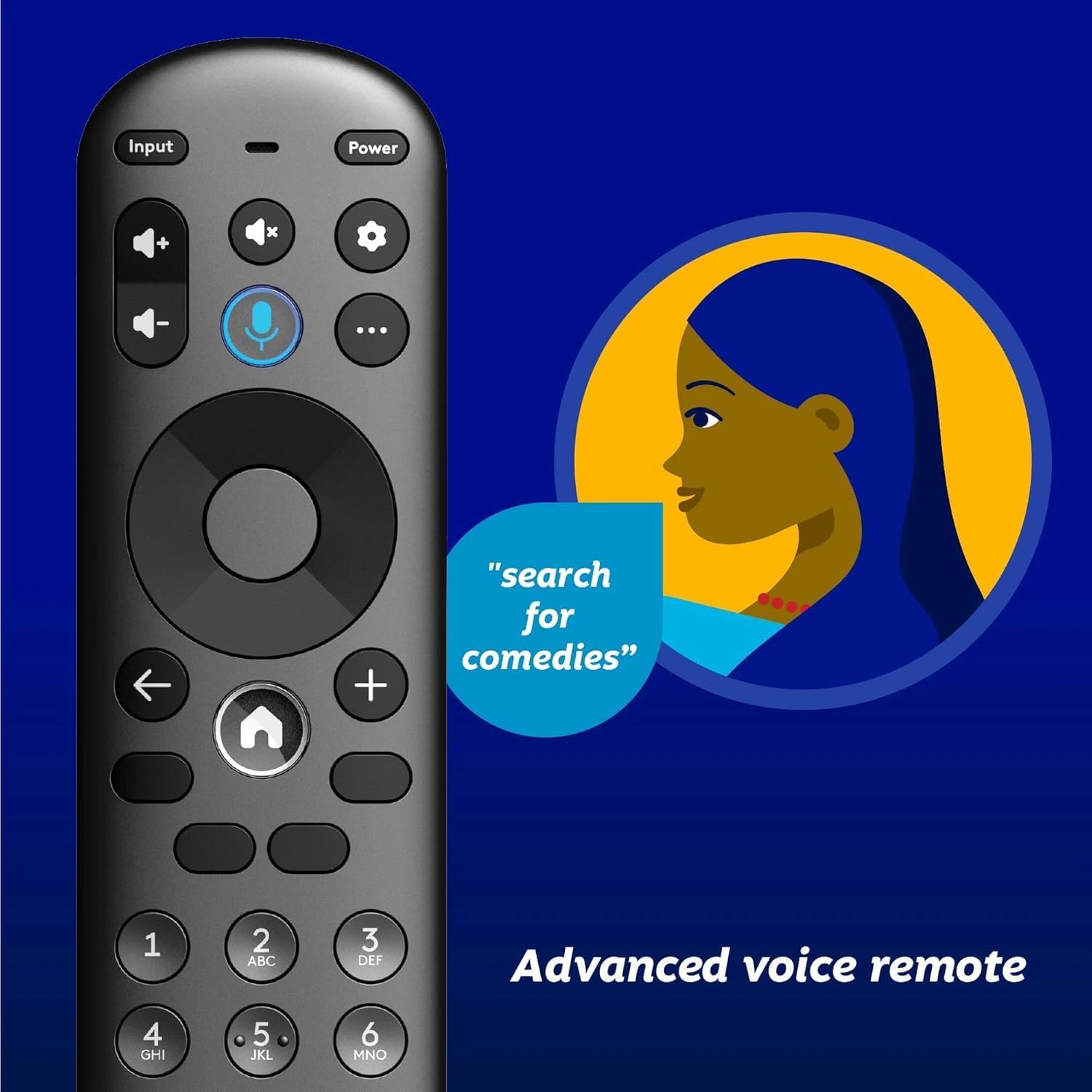
Image 4.1: Element XUMO TV advanced voice remote control.
- Pouvwa: Limen oswa etenn televizyon an.
- Antre: Chwazi sous antre a (HDMI, AV, elatriye).
- Bouton vwa: Activates voice commands for searching content or controlling the TV.
- Navigasyon Pad: Itilize pou deplase nan meni yo epi chwazi opsyon.
- Bouton Kay: Returns to the XUMO TV home screen.
- Volim +/-: Ajiste nivo volim.
- Chèn +/-: Chanje chanèl televizyon yo.
4.2 Smart TV Features (XUMO)
Your Element TV features a built-in XUMO TV experience, providing access to over 250 pre-loaded apps and streaming services.

Image 4.2: XUMO TV smart interface with streaming applications.
- Aplikasyon difizyon: Access thousands of movies, TV shows, and music from platforms like Netflix, YouTube, Disney+, Prime Video, Peacock, and more.
- Chanèl an dirèk: Explore over 750 free live channels, including news, sports, and kids' programming, from Xumo Play, Tubi, Pluto TV, and others.
- Personalized Content: The XUMO interface is designed to help you stream easily, bringing together content in one simple view.
4.3 Koneksyon
- Wi-Fi: Konekte ak rezo san fil lakay ou pou jwenn aksè entènèt ak difizyon.
- Bluetooth: Easily pair your TV with compatible Bluetooth devices such as speakers, headphones, or game controllers.
- Apple AirPlay & Home: Mirror your smartphone, iPad, or Mac screen to the TV, stream media, and control your TV directly from Apple devices.
5. Antretyen
5.1 Netwaye ekran an
- Etenn televizyon an epi deploge li nan priz kouran an.
- Gently wipe the screen with a soft, dry, lint-free cloth.
- Pou mak ki difisil pou retire, pase yon ti krasampRense twal la avèk dlo oswa yon pwodui netwayaj ekran espesyalize (pa flite dirèkteman sou ekran an).
- Avoid using harsh chemicals, abrasives, or alcohol-based cleaners.
5.2 Swen Jeneral
- Kenbe televizyon an lwen limyè solèy dirèk, sous chalè, ak twòp pousyè.
- Asire bon vantilasyon alantou televizyon an pou anpeche surchof.
- Pa mete objè lou sou televizyon an.
NAN. Depanaj
Si w rankontre pwoblèm ak televizyon w lan, gade pwoblèm ak solisyon komen sa yo:
- Pa gen pouvwa:
- Asire w ke kòd kouran an byen branche nan televizyon an ak nan yon priz elektrik ki fonksyone.
- Tcheke si priz la ap fonksyone lè w branche yon lòt aparèy ladan l.
- Eseye peze bouton pouvwa a sou televizyon an menm, pa sèlman sou telekòmand lan.
- No Picture, But Has Sound:
- Verifye ke sous antre ki kòrèk la chwazi (pa egzanp, HDMI 1, AV).
- Tcheke tout koneksyon kab ant televizyon an ak aparèy ekstèn yo.
- Rekòmanse televizyon an ak tout aparèy ki konekte yo.
- No Sound, But Has Picture:
- Tcheke nivo volim nan epi asire w ke televizyon an pa sou silans.
- Si w ap itilize oratè ekstèn, asire w ke yo byen konekte epi yo limen.
- Tcheke paramèt pwodiksyon odyo yo nan meni televizyon an.
- Kontwòl Remote pa travay:
- Ranplase pil yo nan kontwòl remote la.
- Asire w pa gen okenn obstak ant telekòmand lan ak detèktè IR televizyon an.
- Rekonekte telekòmand lan si se yon telekòmand Bluetooth (gade Gid Demaraj Rapid la pou enstriksyon sou koneksyon an).
- Pwoblèm Koneksyon Rezo:
- Rekòmanse routeur Wi-Fi ou a ak modèm ou a.
- Check the Wi-Fi settings on the TV to ensure it's connected to the correct network.
- If possible, try connecting the TV to the internet via an Ethernet cable.
7. Espesifikasyon
Key technical specifications for the Element 43" Frameless 4K UHD HDR XUMO TV:
| Karakteristik | Deskripsyon |
|---|---|
| Non mak | Eleman |
| Non modèl | Eleman 2023 |
| Gwosè ekran | 43 pous (110 cm) |
| Teknoloji ekspozisyon | dirije |
| Rezolisyon | 4K Ultra HD |
| Karakteristik espesyal | 4K High Definition, HDR (High Dynamic Range), Vibrant Colors, 60 Hz, Dolby Vision, HDR10+ |
| Efektif pousantaj rafrechi | 120Hz |
| Teknoloji Audio | Dolby Audio |
| Sèvis Entènèt Sipòte | Netflix, Prime Video, Max, Disney Plus, YouTube TV, Paramount+, Apple TV+, Crunchyroll, Xumo Play, Tubi, Pluto TV |
| Koneksyon Teknoloji | Wired, Wireless (Wi-Fi, Bluetooth, Apple AirPlay) |
| Aspè rapò | 16:9 |
| Pwa atik | 22 liv |
| Dimansyon pwodwi | 3.3 x 37 x 225 pous |
7.1 Karakteristik Kalite Imaj

Image 7.1: Dolby Vision technology enhances highlights and darks for superior contrast.

Image 7.2: 120Hz Effective Refresh Rate for smooth motion.

Image 7.3: 4K resolution delivers vivid colors and remarkable detail.
8. Garanti ak sipò
This product is an Amazon Renewed item. Amazon Renewed products are backed by the Amazon Renewed Guarantee. This means your purchase is eligible for a replacement or refund within 90 days of receipt if it does not work as expected.
For specific warranty details or support inquiries, please refer to the documentation provided with your Amazon Renewed purchase or visit the Amazon Renewed support page.
Ask a question about this manual
Ask about setup, troubleshooting, compatibility, parts, safety, or missing instructions. Manuals+ will review the question and use this page’s manual context to help answer it.