
SEMIER SM-136
SEMIER SM-136 Cassette Player & Digital Converter User Manual
Modèl: SM-136
Entwodiksyon
Mèsi pou acha aasing the SEMIER SM-136 Cassette Player & Digital Converter. This versatile device allows you to play and record audio cassettes, play music from an SD card, and convert your cherished cassette tapes into digital MP3 files, either directly to an SD card or to your computer using the included software. Please read this manual carefully to ensure proper operation and to maximize your enjoyment of this product.
Ki sa ki nan bwat la
- Cassette Recorder Converter x 1
- Kat SD 16GB x 1
- USB Reader x 1
- Software CD-ROM x 1
- Manyèl itilizatè x 1
- Type-C Charging and Data Cable x 1

Image: All items included in the product package.
Enstalasyon
Alimente Aparèy la
The SEMIER SM-136 can be powered by two methods:
- USB-C kab: Connect the included USB-C cable to the device's USB-C port and the other end to a USB power adapter (not included) or a computer's USB port.
- Batri AA: Open the battery compartment on the back of the device and insert four (4) AA batteries (not included), ensuring correct polarity.
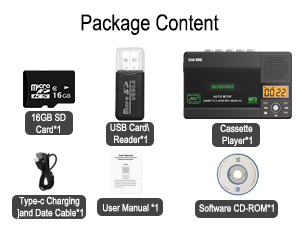
Image: Illustration of inserting AA batteries into the device.
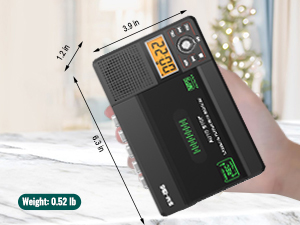
Image: Connecting the USB-C power cable to the device.
Inserting a Cassette Tape
Gently open the cassette compartment door. Insert your cassette tape with the open edge facing upwards and the tape side facing the device. Close the door firmly until it clicks.

Image: Proper insertion of a cassette tape into the player.
Mete yon kat SD
Locate the SD card slot on the side of the device. Insert the included 16GB SD card (or another compatible SD card, up to 32GB) into the slot until it clicks into place. Ensure the card is inserted in the correct orientation.

Image: Proper insertion of an SD card into the device's dedicated slot.
Enstriksyon Operasyon
Jwe kasèt
- Ensure a cassette tape is inserted.
- Slide the "TAPE/OFF/Micro SD" switch to the "TAPE" position.
- Peze a JWE bouton (►) pou kòmanse lecture.
- Ajiste volim nan lè l sèvi avèk la VOL bouton.
- Pou sispann lèktur, peze la SISPANN bouton (■).
- Sèvi ak la FWD (►►) ak REW (◄◄) buttons for fast-forward and rewind.
Playing Music from SD Card
- Ensure an SD card with MP3 files mete.
- Slide the "TAPE/OFF/Micro SD" switch to the "Micro SD" position. The LCD display will show "SD" and the current track time.
- Peze a JWE/POZ bouton (►⏺) pou kòmanse oswa pou mete lekti a sou poz.
- Sèvi ak la PREV (◄◄) ak PWOCHÈ (►►) bouton yo pou navige ant tras yo.
- Peze a REP button to repeat the current track or all tracks.
- Peze a DEL button to delete the current track.
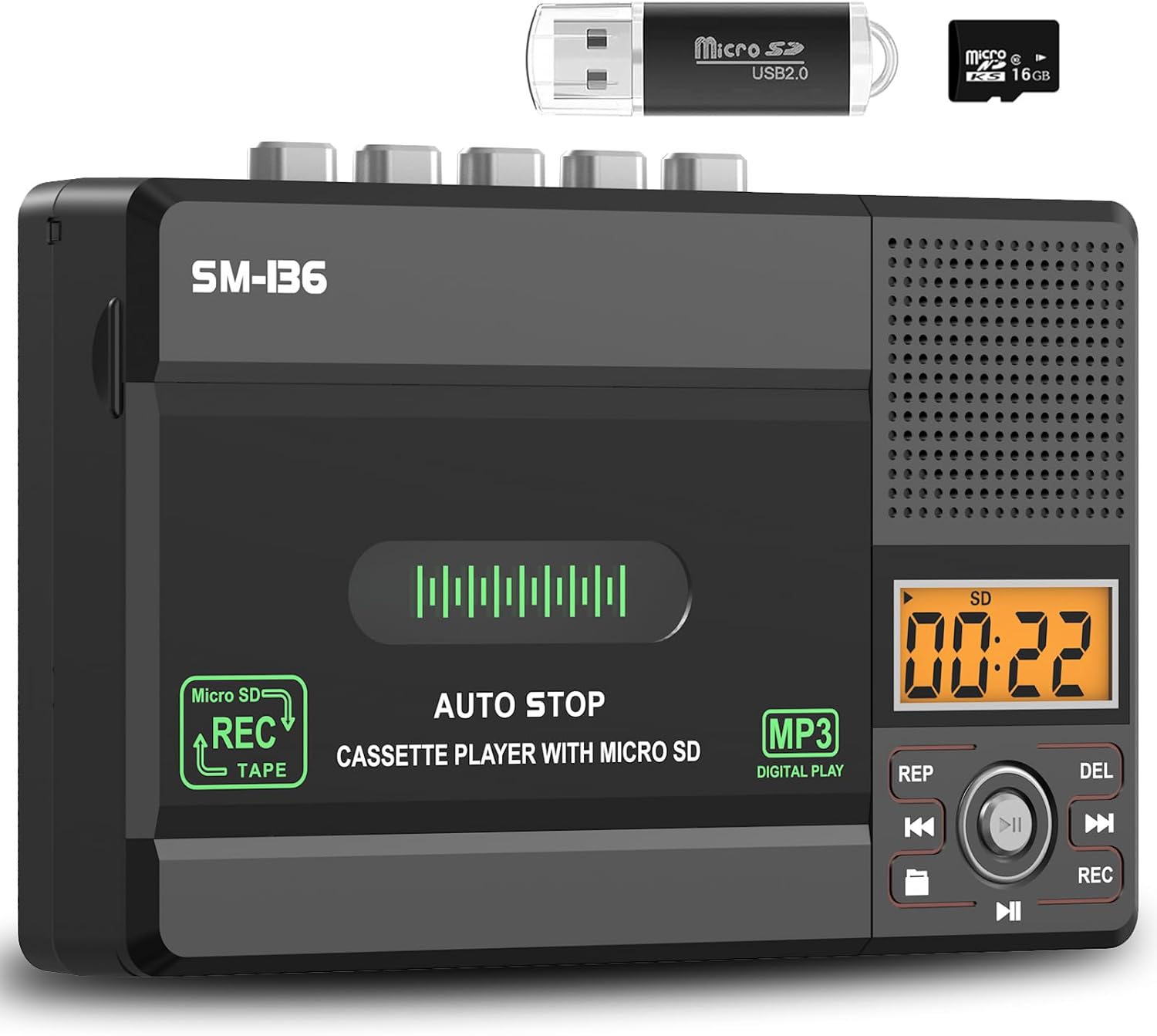
Imaj: Plis paseview of the device's control panel and LCD screen.
Recording to Cassette Tape (from built-in microphone)
- Insert a blank or recordable cassette tape.
- Slide the "TAPE/OFF/Micro SD" switch to the "TAPE" position.
- Peze a REC button (red button) to begin recording from the built-in microphone.
- Pou sispann anrejistreman, peze la SISPANN bouton (■).

Image: Demonstrates recording audio to a cassette tape using the built-in microphone.
Converting Cassette to MP3 (to SD Card)
This method allows direct conversion without a computer.
- Mete kasèt ou vle konvèti a.
- Insert the 16GB SD card (or another compatible SD card) into the SD card slot.
- Slide the "TAPE/OFF/Micro SD" switch to the "TAPE" position.
- Peze a JWE bouton (►) on the cassette player.
- While the tape is playing, press and hold the REC button (red button) on the digital control panel until the LCD display shows "REC". This will start recording the cassette audio directly to the SD card as an MP3 file.
- Pou sispann anrejistreman, peze la REC bouton ankò, oswa peze la SISPANN bouton (■) on the cassette player.
- The converted MP3 files will be saved on the SD card. You can then play them back on the device by switching to "Micro SD" mode or transfer them to a computer using the included USB reader.

Image: Visual steps for direct cassette to SD card MP3 conversion.
Converting Cassette to MP3 (to Computer via Audacity)
This method requires a computer and the included Audacity software.
- Install Audacity: Insert the included Software CD-ROM into your computer's CD drive and follow the installation instructions for Audacity. Alternatively, you can download the latest version of Audacity from its official websit.
- Konekte aparèy: Connect the SEMIER SM-136 to your computer using the included USB-C data cable.
- Prepare Audacity: Open Audacity. Ensure the correct input device (usually "USB Audio CODEC" or similar) is selected in Audacity's audio settings.
- Kòmanse anrejistreman: Insert the cassette tape you wish to convert into the player. Press the JWE bouton (►) on the cassette player. Then, click the Dosye button in Audacity to begin capturing the audio.
- Monitor and Stop: Monitor the audio levels in Audacity. Once the tape has finished playing, click the Sispann button in Audacity and the SISPANN bouton (■) on the cassette player.
- Export MP3: In Audacity, you can edit the recorded audio (e.g., trim silence, remove noise). Once satisfied, go to File > Export > Export as MP3 to save your digital audio file.

Image: Illustrates connecting the device to a computer and using Audacity for digital conversion.
Antretyen
- Netwayaj: Sèvi ak yon twal mou epi sèk pou netwaye deyò aparèy la. Pa sèvi ak pwodui netwayaj likid oswa materyèl abrazif.
- Netwayaj tèt kasèt: Periodically clean the tape heads and pinch rollers with a cotton swab lightly dampenfuze ak alkòl izopropilik pou asire yon bon jan kalite son optimal epi pou anpeche domaj nan kasèt la.
- Depo: Sere aparèy la nan yon kote ki fre epi sèk, lwen limyè solèy dirèk ak tanperati ekstrèm.
- Retire batri: If the device will not be used for an extended period, remove the AA batteries to prevent leakage.
Depanaj
| Pwoblèm | Kòz posib | Solisyon |
|---|---|---|
| Aparèy pa limen. | No power source; batteries dead or incorrectly inserted; USB-C cable not connected properly. | Check battery polarity and charge; ensure USB-C cable is securely connected to a working power source. |
| No sound during cassette playback. | Volume too low; "TAPE/OFF/Micro SD" switch in wrong position; tape head dirty. | Increase volume; ensure switch is on "TAPE"; clean tape head. |
| Move kalite son pandan lekti/anrejistreman. | Dirty tape heads; worn-out tape; low battery power. | Clean tape heads; try a different tape; replace batteries or use USB-C power. |
| SD card not recognized or "No SD" message. | SD card incorrectly inserted; unsupported SD card format/size; faulty SD card. | Reinsert SD card; ensure it's formatted to FAT32 and is 32GB or less; try a different SD card. |
| Cannot record to SD card. | SD card full; SD card write-protected; incorrect recording procedure. | Efase files from SD card; check SD card's physical write-protect switch; follow "Converting Cassette to MP3 (to SD Card)" steps carefully. |
| Audacity not detecting device for conversion. | USB-C cable issue; incorrect audio input selected in Audacity; driver issue. | Try a different USB port/cable; ensure "USB Audio CODEC" is selected in Audacity; restart computer and device. |
Espesifikasyon
- Modèl: SM-136
- Fonksyon: Cassette Player, Cassette Recorder (via Mic), SD Card MP3 Player, Cassette to MP3 Converter (to SD Card / PC)
- Sous pouvwa: DC 5V (USB-C) or 4 x AA Batteries
- Sòti Oratè: 2W
- Kas ekoutè Jack: 3.5mm Stereo
- Sipò pou kat SD: Jiska 32GB, fòma FAT32
- Dimansyon: 6.3 x 3.9 x 1.2 pous (16 x 9.9 x 3 cm)
- Pwa: 0.52 liv (0.24 kg)

Image: Detailed dimensions and weight of the product.
Garanti ak sipò
SEMIER products are designed for reliability and performance. This product comes with a standard manufacturer's warranty. For detailed warranty information, technical support, or customer service inquiries, please refer to the contact information provided on the product packaging or visit the official SEMIER website. Our dedicated customer support team is available to assist you with any questions or concerns.
Ou ka vizite tou SEMIER Store on Amazon pou plis enfòmasyon ak resous sipò.
Ask a question about this manual
Ask about setup, troubleshooting, compatibility, parts, safety, or missing instructions. Manuals+ will review the question and use this page’s manual context to help answer it.