
Entwodiksyon
Welcome to your Synido Live Dock A20 Portable Audio Interface user manual. This guide provides essential information for setting up, operating, and maintaining your device. The Live Dock A20 is designed to offer high-fidelity audio recording and streaming capabilities for musicians, DJs, and content creators using various devices like smartphones, tablets, and computers.
Karakteristik kle
- Anrejistreman odyo pòtab: Offers ultra-clear loopback and monitor functions, ideal for music enthusiasts.
- Unique Instrument Gain Control: Adapts output levels for different instruments to ensure optimal recording quality.
- Odyo ki gen anpil fidelite: Features studio-grade 24-bit/96kHz resolution for capturing every detail.
- Advanced Sound Processing: Dual-core chip and sound processing system minimize delays and noise.
- Konsepsyon sofistike: Integrated design with built-in wire storage, pocket-sized, compact, and portable.
- Wireless Accompaniment: One-touch wireless switch to connect a second mobile phone for backing tracks.
- Koneksyon USB-C: Direct connection to cell phones, tablets, and computers.
- Sipò chaje: Functions as a docking station to charge your phone during mobile live broadcasts.
- Wider Instrument Compatibility: Adaptive gain control optimizes sound for electric guitars, MIDI keyboards, digital pianos, electric bass, and electric drum sets.
- Direct Audio Embedding: Records audio directly into video files, eliminating the need for post-production synchronization.
Kontni pake
- Synido Live Dock A20 Audio Interface
- Kab Odyo (3.5mm pou rive 3.5mm)
- Adaptè 1/4"
- Gid Koneksyon Rapid
Aparèy souview
Familiarize yourself with the ports and controls of your Live Dock A20.

Image Description: A diagram of the Synido Live Dock A20 highlighting its various ports and controls. These include a Type-C Charging Port, 1/8" Headphone Output, 1/4" Instrument Input, 1/8" Mic Input, Bluetooth button, Loopback button, Mono/Stereo switch, Mic Gain Adjustment, Monitor Volume Control Dial, Instrument Gain Adjustment, and 5V 2A Power Supply port.
Gid Enstalasyon
Connecting to a Smartphone/Tablet
- Connect the built-in USB-C cable from the Live Dock A20 to your smartphone or tablet's USB-C port.
- Plug your instrument into the 1/4" Instrument Input.
- Connect your microphone to the 1/8" Mic Input (if applicable).
- Plug in headphones to the 1/8" Headphone Output for monitoring.
- Ensure your device supports USB-C audio input.
Connecting to a Computer/Laptop
- Connect the built-in USB-C cable from the Live Dock A20 to your computer or laptop's USB-C port.
- The device should be recognized automatically as an audio interface (plug-and-play).
- Plug your instrument into the 1/4" Instrument Input.
- Connect your microphone to the 1/8" Mic Input (if applicable).
- Plug in headphones to the 1/8" Headphone Output for monitoring.
Alimente Aparèy la
The Live Dock A20 is bus-powered via the USB-C connection. For extended use or to charge your connected mobile device, use the dedicated 5V 2A Power Supply port with a charging cable.

Image Description: The Synido Live Dock A20 connected to a smartphone via its built-in USB-C cable, with an additional charging cable plugged into the 5V 2A Power Supply port, indicating simultaneous use and charging.
Enstriksyon Operasyon
Ajiste nivo pwogrè yo
Use the dedicated gain controls on the side of the device to adjust input levels for your microphone and instrument. This helps prevent distortion and signal overload, ensuring optimal audio quality.

Image Description: A close-up of the Synido Live Dock A20 showing the microphone gain and instrument gain adjustment sliders on the side of the device.
Siveyans Audio
Connect headphones to the 1/8" Headphone Output. Use the Monitor Volume Control Dial to adjust your monitoring level.
Fonksyon Boukbak
Press the "LOOPBACK" button to activate the loopback function. This allows you to record or stream your instrument and microphone audio along with any audio playing on your connected device (e.g., backing tracks, system sounds).
Mono / Stereo switch
Use the "M/S" switch to select between Mono (M) and Stereo (S) input modes.
- Mono (Red Light): Select this mode when connecting a single mono audio source. If a stereo source is connected in mono mode, you may only hear sound in one ear during monitoring and recording.
- Stereo (Green Light): Select this mode when connecting a stereo audio source. If a mono source is connected in stereo mode, sounds in the left and right channels may cancel each other out.

Image Description: A diagram illustrating the Mono/Stereo switch on the Synido Live Dock A20, showing the red light for Mono input and green light for Stereo input, with explanations for each mode.
Wireless Accompaniment (Bluetooth)
Activate the "BT" (Bluetooth) button to enable wireless accompaniment. This feature allows you to connect a second mobile phone via Bluetooth to play backing tracks or other audio, which can then be mixed with your live performance for streaming or recording.

Image Description: The Synido Live Dock A20 connected to one smartphone for live streaming/recording, and wirelessly connected via Bluetooth to a second smartphone providing accompaniment music.
Galeri medya
Imaj pwodwi
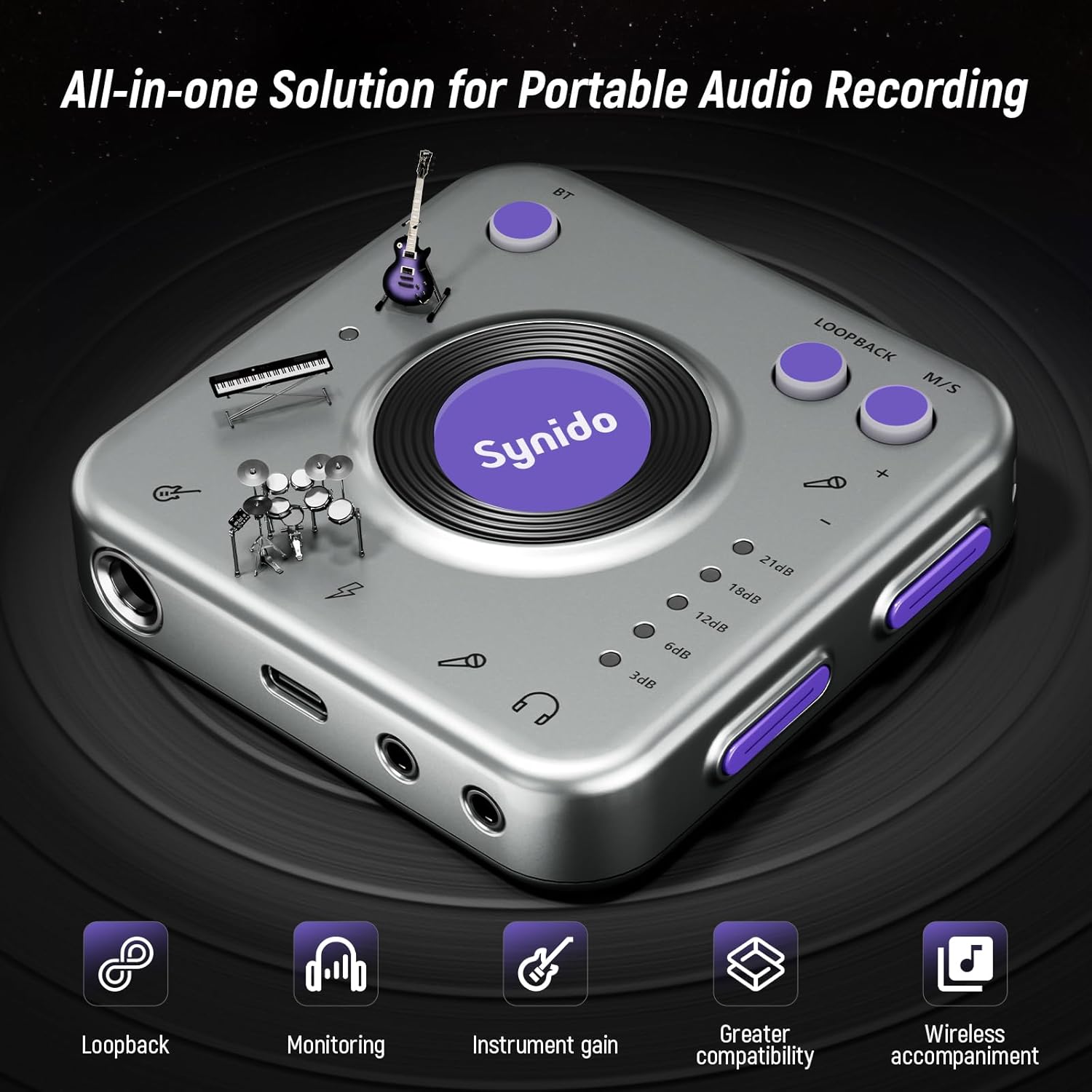
Image Description: The Synido Live Dock A20, a compact silver square device with purple accents, showcasing its various inputs and controls. Text overlay highlights features like Loopback, Monitoring, Instrument Gain, Greater Compatibility, and Wireless Accompaniment.

Image Description: A close-up of the Synido Live Dock A20 emphasizing its Hi-Fi 3D Audio capabilities, with text indicating 24-Bit Sampling Depth and 96 kHz Sampling Rate, and a graph comparing 44.1kHz to 96kHz audio quality.

Image Description: The Synido Live Dock A20 with its built-in USB-C cable extended, demonstrating its ultra-portable design and reinforced slot for cable storage. Text highlights "Plug and play, streaming even while charging."

Image Description: A collage of images showing various instruments (Electric Guitars, Electronic Wind Instruments, Digital Pianos, Midi Keyboards, Electric Bass, Electric Drums, Guitars) that are compatible with the Live Dock A20's adaptive gain control.
Videyo pwodwi ofisyèl yo
Video Description: An official Synido video demonstrating the Live Dock A20 audio interface for recording music with instrument gain control. It highlights its portability and use for live streaming.
Video Description: An official Synido video showcasing the portable recording capabilities of the Live Dock A20 audio interface.
Video Description: An official Synido video demonstrating how to record DJ set audio directly into a camera using the Live Dock A20, eliminating the need for post-production syncing.
Depanaj
No Sound Output/Input
- Tcheke tout koneksyon kab pou asire ke yo an sekirite.
- Verify that the correct input and output devices are selected in your recording software or device settings.
- Adjust the gain controls for your instrument and microphone to appropriate levels.
- Ensure the monitor volume is turned up.
Audio defòme
- Reduce the input gain for the instrument or microphone.
- Check the audio levels in your recording software to ensure they are not clipping.
Pwoblèm konpatibilite
- Ensure your smartphone or action camera supports USB-C audio input.
- For iOS devices, ensure you are using a compatible adapter if needed.
Espesifikasyon
| Karakteristik | Detay |
|---|---|
| Mak | Synido |
| Nimewo Modèl | Dock Live A20 |
| Koneksyon Teknoloji | USB |
| Kantite Chanèl | 2 |
| Maksimòm S.ample Rate | 96 KHz |
| Ti jan Pwofondè | 24-bit |
| Pwofi Enstriman | 0-21dB |
| Akeri Mikwofòn | 32dB |
| Ranje dinamik | > 90dB |
| Aparèy konpatib | Guitar, Headphone, Personal Computer, Smartphone, Tablet |
| Sistèm operasyon | Android, iOS |
| Pwa atik | 0.01 Kilogram |
Garanti ak sipò
The Synido Live Dock A20 comes with service support. For any inquiries or assistance, please refer to the official Synido websit la oubyen kontakte sèvis kliyan atravè platfòm acha ou a.
Ou ka vizite tou Synido Store on Amazon for more information and to ask questions directly to the seller.