
1. Enstriksyon Sekirite Enpòtan
Tanpri li tout enstriksyon yo ak anpil atansyon anvan ou itilize tapi kous sa a. Kenbe manyèl sa a pou referans pita.
- Toujou mete tapi kous la sou yon sifas plat epi ki stab.
- Asire w ke gen ase espas toutotou tapi kous la (omwen 2 mèt dèyè ak 0.6 mèt sou chak bò).
- Kenbe timoun ak bèt kay lwen tapi a pandan operasyon an.
- Mete soulye ak rad espòtif ki apwopriye.
- Pa sèvi ak tapi kous la si fil la oswa ploge a domaje, oubyen si li pa ap fonksyone byen.
- Kapasite pwa maksimòm itilizatè a: 130 kg.
- Always use the safety key. Attach it to your clothing before starting your workout.
2. Pwodwi souview
The TOPUTURE 2-in-1 Treadmill is designed for both walking and light running, offering a versatile fitness solution for home or office use. It features a powerful yet quiet motor, manual incline adjustment, and smart app connectivity.

Image: Two individuals demonstrating the TOPUTURE 2-in-1 Treadmill in use, highlighting its dual functionality for walking while working and running.
3. Enstalasyon ak Asanble
This TOPUTURE 2-in-1 Treadmill features a space-saving design that requires minimal assembly. It is ready for use almost immediately out of the box.
3.1 Debake
- Retire tapi kous la nan anbalaj li avèk prekosyon.
- Check all components against the packing list to ensure everything is present.
3.2 Plasman
- Place the treadmill on a firm, level surface.
- Ensure the power cord is easily accessible and not obstructed.
3.3 Manual Incline Adjustment
The treadmill offers manual incline settings to increase workout intensity. The original incline is 2°, and can be adjusted to 4.7° (9% incline rate).
- Locate the incline adjustment bolts at the rear of the treadmill.
- Pull out the bolt and turn the slope block to the desired position.
- Insert the bolt into the upper hole to secure the incline.

Image: A visual guide illustrating the two-step process for manually adjusting the treadmill's incline.
4. Operasyon Enstriksyon
Your treadmill can be controlled via its LED display, remote control, or a smart application.
4.1 Power On/Off
- Konekte fil elektrik la nan yon priz apwopriye.
- Flip the main power switch located on the treadmill base to the 'ON' position.
- To turn off, flip the main power switch to 'OFF' and unplug the unit.
4.2 Using the LED Display and Remote Control
The multi-functional LED display shows real-time data including speed, distance, time, and calories burned. The remote control allows for easy adjustment of speed and modes.

Image: The treadmill's clear LED display provides real-time workout metrics, complemented by a convenient remote control for adjustments.
- Kòmanse/Stop: Press the 'Start' button on the display or remote to begin. Press 'Stop' to pause or end your workout.
- Ajisteman vitès: Use the '+' and '-' buttons on the remote or display to increase or decrease speed (1-10 km/h).
- Pwogram yo: Select from 12 preset programs for varied workout routines.
- Temporary Pause: Use the 'Pause' button to temporarily stop your workout without losing data.
4.3 Smart App Connectivity
Connect your treadmill to fitness apps like 'FITSHOW' via Bluetooth (Bluetooth name: TP3) for enhanced training courses and data tracking.
- Asire w ke Bluetooth aktive sou aparèy mobil ou.
- Open the 'FITSHOW' app (or compatible app) and search for 'TP3'.
- Pair your device with the treadmill.
- Follow the app's instructions to access various training courses and monitor your progress.

Image: The treadmill connects to fitness apps, allowing users to engage with virtual training courses and track their performance.
5. Antretyen
Antretyen regilye asire lonjevite ak pèfòmans optimal tapi kous ou a.
5.1 Netwayaj
- Unplug the treadmill before cleaning.
- Wipe down the display and exterior surfaces with a damp twal. Evite pwodui netwayaj abrazif.
- Regularly vacuum under the treadmill to prevent dust buildup.
5.2 Lubrifikasyon senti
The running belt requires periodic lubrication to reduce friction and extend its lifespan. Use silicone-based treadmill lubricant.
- Leve kwen senti kous la.
- Apply a small amount of lubricant to the center of the deck, underneath the belt.
- Fè tapi kous la mache ak yon vitès ba pandan kèk minit pou distribye lubrifian an respire.
- Refer to the lubricant manufacturer's instructions for frequency, typically every 3-6 months depending on usage.
5.3 Ajisteman senti
Si senti kous la deplase sou yon bò oswa glise, li ka bezwen ajisteman.
- Consult the detailed instructions in the full product manual for specific belt tension and alignment procedures.
NAN. Depanaj
If you encounter issues with your treadmill, refer to the following common problems and solutions.
| Pwoblèm | Kòz posib | Solisyon |
|---|---|---|
| Tapis roulan an pa limen. | Power cord not plugged in, main switch off, safety key not in place. | Check power connection, ensure main switch is ON, insert safety key. |
| Kouri senti glise. | Senti a twò lach, pa gen ase wilaj. | Adjust belt tension (refer to full manual), lubricate the belt. |
| Bri dwòl pandan operasyon an. | Loose parts, belt friction, motor issue. | Check for loose bolts, lubricate belt, contact customer support if motor noise persists. |
| Echèk koneksyon aplikasyon an. | Bluetooth off, app not updated, incorrect pairing. | Ensure Bluetooth is on, update app, re-pair with 'TP3'. |
If the problem persists after attempting these solutions, please contact TOPUTURE customer support.
7. Espesifikasyon
| Karakteristik | Spesifikasyon |
|---|---|
| Mak | TOPITURE |
| Pouvwa motè | 2.5 HP (Peak 3.0 HP) |
| Range vitès | 1 - 10 kilomèt pa èdtan |
| Incline | Manual (0%, 5%, 10% equivalent to 2° and 4.7°/9%) |
| Kouri andigman | 1000 x 400 mm (apeprè 39.4 x 15.7 pous) |
| Pwa maksimòm itilizatè | 130 kg (apeprè 286 lbs) |
| Nivo bri | < 45 dB |
| Dimansyon pwodwi | 120.8 x 52.6 x 12.5 cm (apeprè 47.6 x 20.7 x 4.9 pous) |
| Pwa pwodwi | 21.69 kg (apeprè 47.8 lbs) |
| Koneksyon | Bluetooth (TP3) for APP control |
| Pwogram yo | 12 pwogram prereglaj |
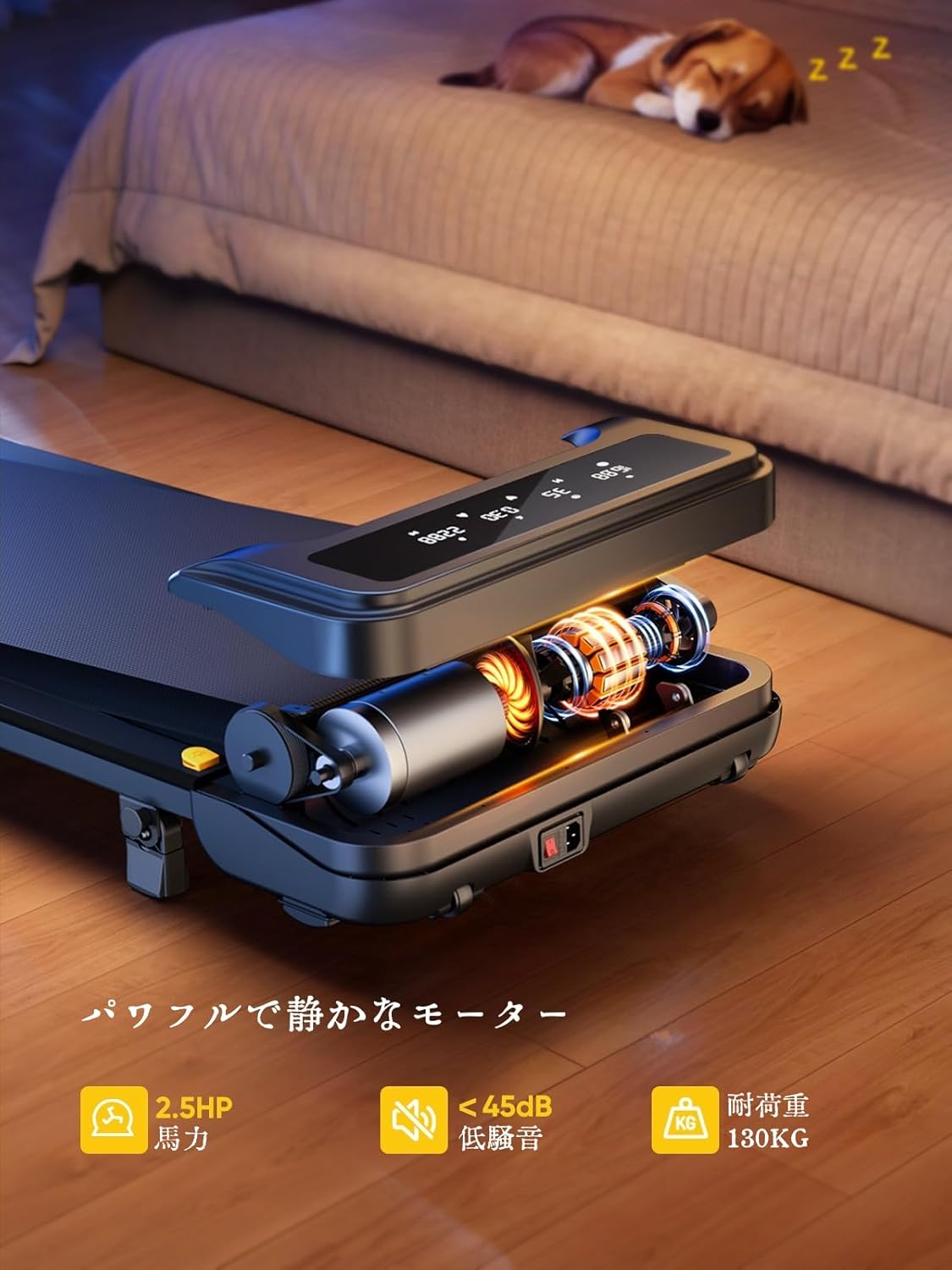
Image: The treadmill features a powerful 2.5 HP motor, operates quietly below 45dB, and supports users up to 130 kg.

Image: The compact design of the treadmill, highlighting its running surface dimensions for space efficiency.
8. Depo ak Portabilite
The TOPUTURE 2-in-1 Treadmill is designed for easy storage and portability, making it ideal for small spaces.
- The treadmill is lightweight (18.5 kg / 40.7 lbs) and features built-in wheels for effortless movement.
- It can be stored upright or flat under a bed or sofa when not in use, saving valuable space.
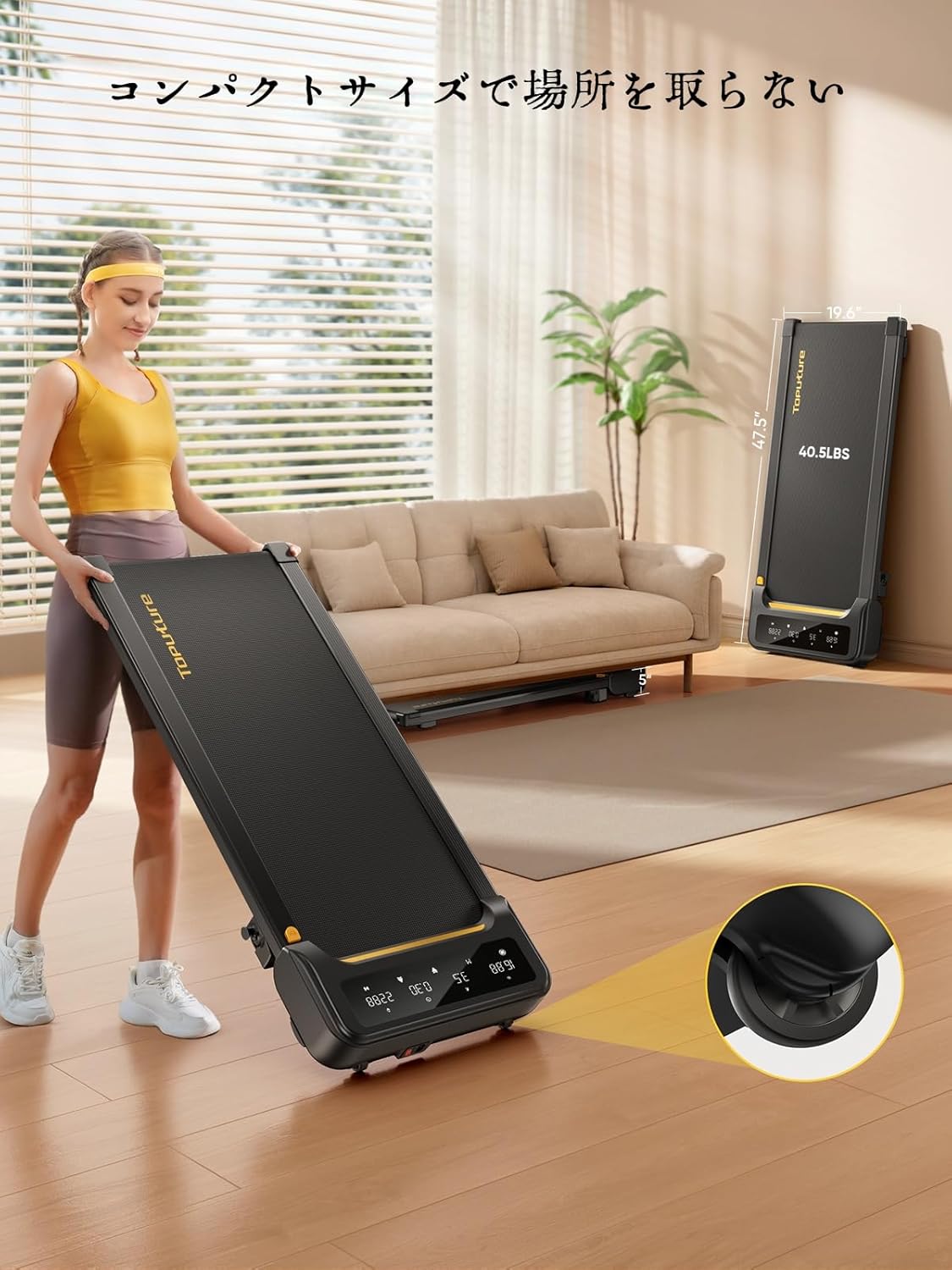
Image: A woman demonstrates the ease of moving the treadmill, highlighting its portability with integrated wheels.
9. Garanti ak sipò
TOPUTURE provides a warranty for this product. Please refer to your purchase documentation for specific warranty terms and conditions.
9.1 Sipò pou Kliyan
For any questions, technical assistance, or warranty claims, please contact TOPUTURE customer support through the retailer where you purchased the product or visit the official TOPUTURE websit.
- Sipò sou entènèt: Visit the TOPUTURE brand store on Amazon or the official websit pou kesyon yo poze souvan (FAQ) ak enfòmasyon pou kontakte yo.
- Sipò Imèl: Refer to your product packaging or warranty card for the customer service email address.