
Entwodiksyon
Thank you for choosing the Nacon PCCH-380 Ergonomic Gaming Chair. This manual provides essential information for the safe and effective use of your new chair. Please read these instructions carefully before assembly and use, and retain them for future reference.
Enfòmasyon sou Sekirite
AVÈTISMAN:
- Do not use the chair for extended periods without taking adequate breaks.
- Always use the height adjustment function safely and follow the manufacturer's instructions to prevent injuries.
- Asire ke tout eleman yo byen tache anvan ou itilize.
- Pa kanpe sou chèz la oubyen sèvi avè l kòm yon ti mach eskalye.
- Kenbe timoun ak bèt kay lwen chèz la pandan asanblaj la.
Pwodwi souview
The Nacon PCCH-380 is an ergonomic gaming chair designed for comfort and support during long sessions. It features 2D adjustable armrests, a lumbar cushion, and a reclinable backrest.
Karakteristik kle:
- Ergonomic design for M-L users.
- 2D adjustable armrests.
- Adjustable lumbar cushion.
- Reclinable backrest up to 135°.
- Textile fabric in dark grey.
- 5-star base with smooth-rolling wheels.
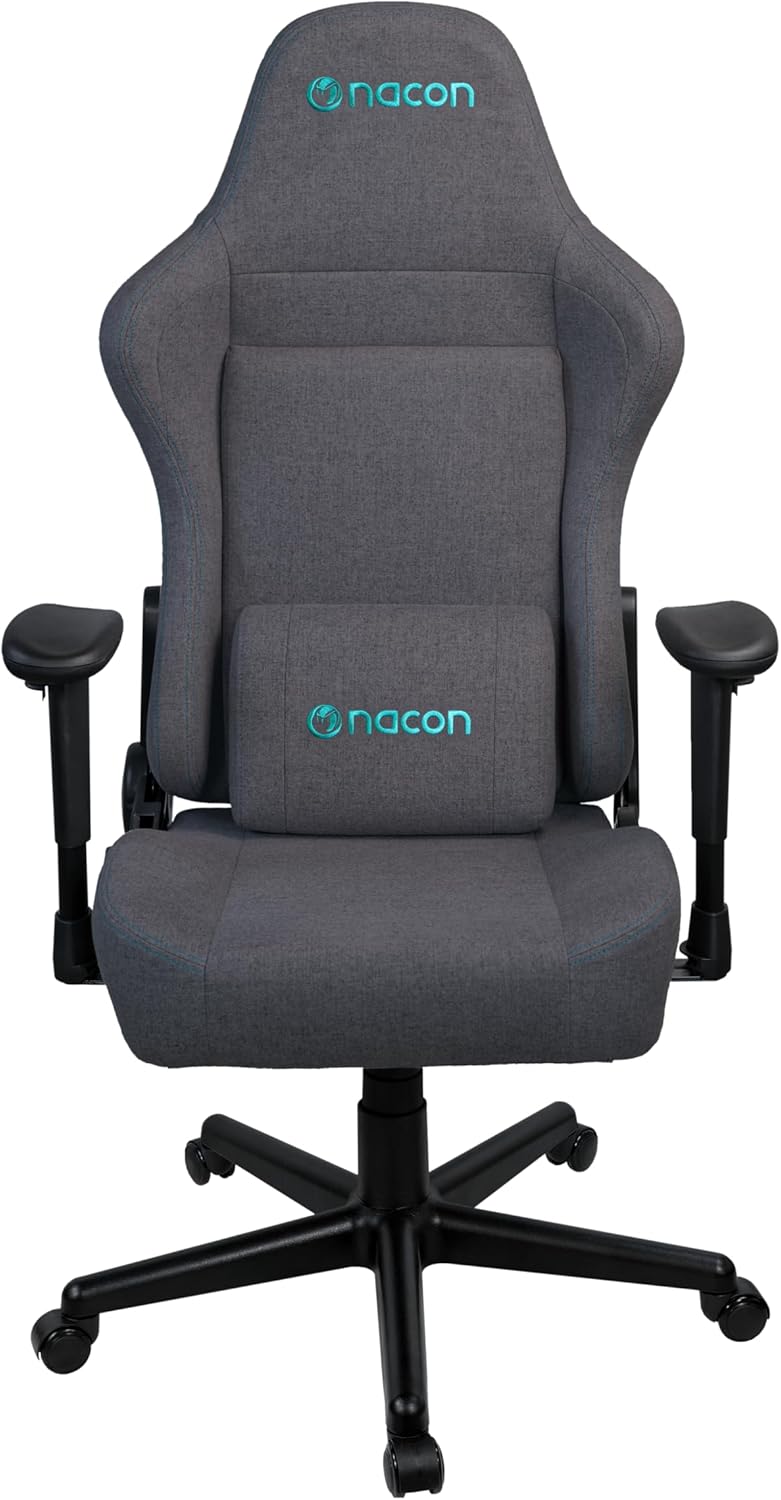
Figi 1: Devan view of the Nacon PCCH-380 Ergonomic Gaming Chair in dark grey.

Figi 2: Retounen view of the Nacon PCCH-380 Ergonomic Gaming Chair, highlighting the backrest design.
Enstriksyon Asanble
The Nacon PCCH-380 gaming chair requires assembly. Please follow the detailed instructions provided in the separate assembly guide included with your product packaging. Ensure all parts are present before beginning assembly.
Etap Asanble Jeneral la:
- Depake tout konpozan yo epi verifye yo avèk lis pyès yo.
- Attach the wheels to the 5-star base.
- Mete silenn asansè gaz la nan sant baz la.
- Attach the seat mechanism to the bottom of the seat.
- Secure the backrest to the seat assembly.
- Install the 2D armrests.
- Place the assembled chair onto the gas lift cylinder.
- Attach the lumbar cushion as desired.

Figure 3: Packaging box for the Nacon PCCH-380 Gaming Chair, indicating assembly is required.
Enstriksyon Operasyon
Your Nacon PCCH-380 gaming chair offers several adjustment options to customize your seating experience for maximum comfort and ergonomic support.
1. Ajisteman wotè:
To adjust the chair's height, locate the lever on the right side beneath the seat. While seated, pull the lever up to lower the chair. To raise the chair, stand up and pull the lever up. Release the lever at your desired height.
2. Backrest Recline:
The backrest can be reclined up to 135 degrees. Locate the recline lever on the left side of the chair. Pull the lever up and lean back to your desired angle. Release the lever to lock the backrest in position. To return to an upright position, pull the lever and lean forward slightly.

Figure 4: The Nacon PCCH-380 Gaming Chair shown in a reclined position, demonstrating its flexibility.
3. Armrest Adjustment (2D):
The 2D armrests can be adjusted in two dimensions: height and rotation. Use the buttons or levers on the armrests to adjust them to your preferred height and angle for optimal arm and wrist support.
4. Lumbar Cushion:
The included lumbar cushion provides additional support for your lower back. Position it along the backrest to align with the natural curve of your spine for enhanced comfort. The cushion can be removed if not desired.

Figi 5: Close-up view of the adjustable lumbar cushion on the Nacon PCCH-380 Gaming Chair.
5. Swivel Function:
The chair features a 360-degree swivel function, allowing for easy movement and access to different areas of your workspace without needing to reposition the entire chair.
Antretyen ak Swen
Proper maintenance will ensure the longevity and appearance of your Nacon PCCH-380 gaming chair.
Netwayaj:
- For general cleaning, wipe the textile fabric with a damp twal.
- For stubborn stains, use a mild fabric cleaner and follow the product's instructions. Test on an inconspicuous area first.
- Avoid using harsh chemicals or abrasive cleaners, as these can damage the fabric and components.
- Pase aspiratè sou chèz la regilyèman pou retire pousyè ak debri.

Figi 6: Detaye view of the dark grey textile fabric used on the Nacon PCCH-380 Gaming Chair.
Swen Jeneral:
- Tcheke tout vis ak boulon yo detanzantan pou asire yo byen sere. Sere boulon yo ankò si sa nesesè.
- Evite ekspoze chèz la anba limyè solèy dirèk pou yon bon bout tan pou anpeche li defòme.
- Do not place hot items directly on the chair's surface.
Depanaj
If you encounter any issues with your Nacon PCCH-380 gaming chair, refer to the following common problems and solutions:
1. Chair does not adjust height:
- Ensure the height adjustment lever is fully engaged.
- Check if the gas lift cylinder is properly installed and not damaged.
2. Backrest does not recline or lock:
- Verify that the recline lever is functioning correctly and not obstructed.
- Inspect the recline mechanism for any visible damage or loose connections.
3. Wheels are not rolling smoothly:
- Check for any debris (hair, dust, etc.) caught in the wheels and clean them.
- Ensure the wheels are securely attached to the base.
Si solisyon sa yo pa rezoud pwoblèm nan, tanpri kontakte sèvis kliyan.
Espesifikasyon
| Karakteristik | Detay |
|---|---|
| Nimewo Modèl | PCCH-380 |
| Mak | NACON |
| Koulè | Gri nwa |
| Materyèl | Textile Fabric |
| Dimansyon pwodwi (D x W x H) | 58 x 57 x 121-131 cm |
| Pwa | 18 kg |
| Pwa maksimòm itilizatè | 100 kg |
| Wotè Itilizatè Rekòmande | Jiska 170 cm |
| Akoudwar | 2D reglabl |
| Ang Enklinasyon | Jiska 135 ° |
| Sipò lonbèr | Adjustable Lumbar Cushion Included |
| Asanble obligatwa | Wi |
Garanti ak sipò
For warranty information and customer support, please refer to the documentation provided with your purchase or contact your retailer. You can also visit the official NACON websit pou plis asistans.
NACON is committed to providing high-quality products and support. If you have any questions or require service, please do not hesitate to reach out.