
BACKWIN 3,5mm Jack
User Manual: In-Ear Wired Earphones
Model: 3,5mm Jack | Brand: BACKWIN
1. Pwodwi souview
Thank you for choosing the BACKWIN In-Ear Wired Earphones. These earphones are designed to provide a high-quality audio experience with deep bass, comfort, and noise isolation. They feature a standard 3.5mm jack for broad compatibility and an integrated microphone for convenient communication.
Karakteristik kle:
- Son Premium: Dynamic subwoofer unit delivers immersive, high-quality audio.
- Comfort Fit: Includes three types of ear hooks and S/M/L ear pads for a secure and comfortable fit.
- Gwo konpatibilite: Standard 3.5mm audio jack connects seamlessly to various devices.
- Dirab: Features durable, fold-resistant wires and enhanced metallic design.
- Mikwofòn definisyon wo: Equipped with an HD microphone for clear voice and calls.
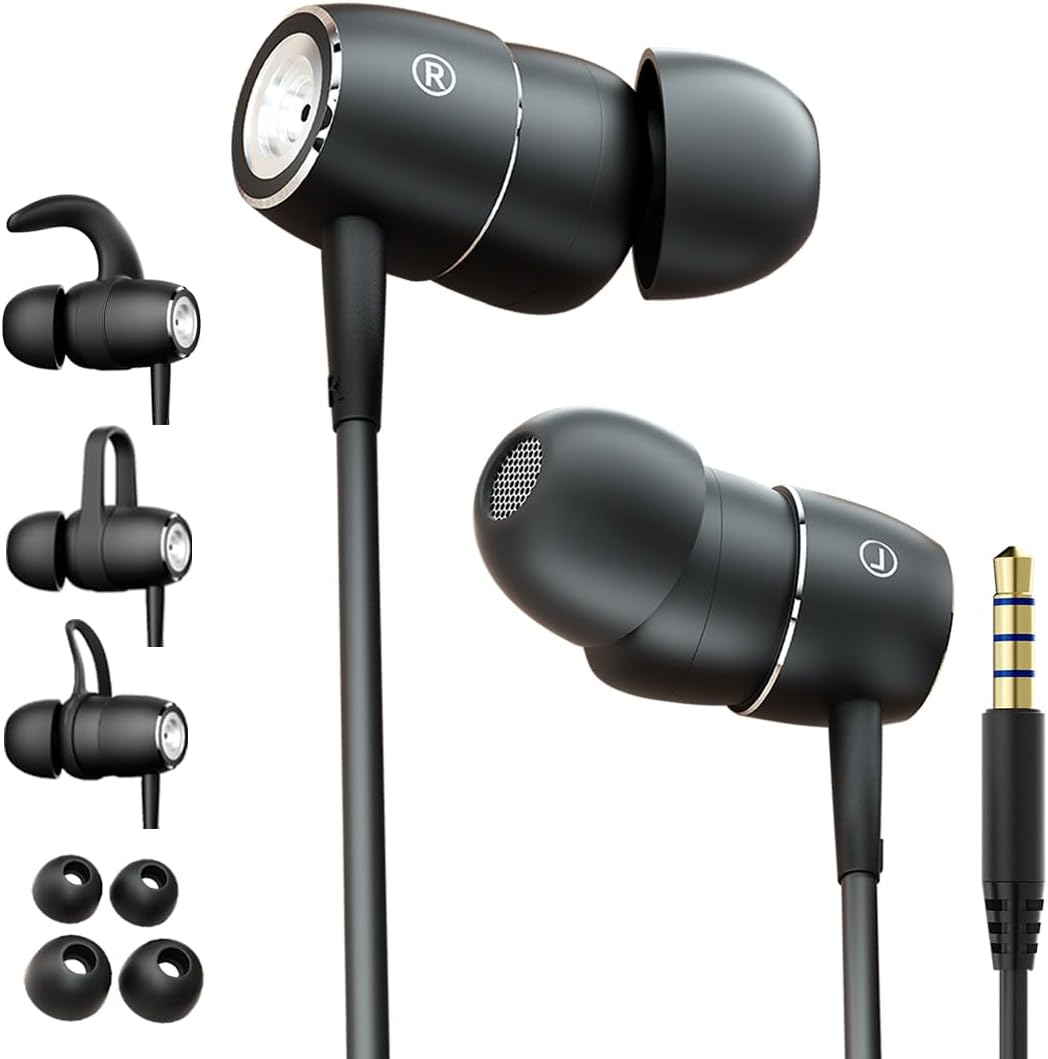
Figure 1: BACKWIN In-Ear Wired Earphones. This image displays the BACKWIN In-Ear Wired Earphones, highlighting their sleek black design, the 3.5mm audio jack, and the various ear hooks and ear tips provided for a customized fit.
2. Enstalasyon ak Enstalasyon
2.1 Choosing the Right Ear Tips and Ear Hooks
For optimal sound quality and comfort, select the ear tips and ear hooks that best fit your ears. Experiment with the different sizes (S/M/L ear pads) and styles of ear hooks provided.
- Konsèy zòrèy: Gently pull off the pre-installed ear tips. Select a size that creates a good seal in your ear canal without causing discomfort. Push the new ear tip firmly onto the earphone nozzle.
- Kwòk pou zòrèy: The ear hooks provide additional stability, especially during physical activity. Choose a hook style that comfortably secures the earphone in your outer ear. Attach the ear hook to the designated slot on the earphone body.

Figure 2: Earphones with interchangeable ear hooks and ear tips. A close-up view of the BACKWIN earphones alongside their interchangeable ear hooks and ear tips, demonstrating the customization options for comfort and secure fit.

Figure 3: Three types of ear hooks. This image provides a detailed look at the earphone unit and the three distinct styles of ear hooks, illustrating how they can be attached to secure the earphone in place.
2.2 Konekte ak aparèy ou an
The earphones feature a standard 3.5mm audio jack for universal compatibility.
- Locate the 3.5mm audio port on your smartphone, tablet, laptop, or other audio device.
- Insert the 3.5mm jack of the earphones firmly into the device's audio port until it clicks into place.
- Asire w koneksyon an byen fèm pou evite entèripsyon odyo a.

Figure 4: Earphones with 3.5mm jack and inline controls. The earphones are shown with their 3.5mm jack and the integrated inline remote control, which includes buttons for volume adjustment and playback.
2.3 Mete ekoutè yo
Proper placement ensures comfort and optimal sound isolation.
- Idantifye ekoutè gòch (G) ak dwa (D).
- Mete chak ekoutè dousman nan kanal zòrèy ki koresponn lan.
- Adjust the earphone and ear hook (if used) until it feels secure and comfortable. The ear tip should form a gentle seal in your ear canal.

Figure 5: Proper earphone placement. A young man wearing the BACKWIN In-Ear Wired Earphones, demonstrating their discreet and comfortable fit during use.

Figure 6: Secure fit with ear hooks. A young woman wearing the BACKWIN In-Ear Wired Earphones, illustrating how the ear hooks provide a secure and stable fit, ideal for active use.
3. Operasyon Enstriksyon
3.1 Lekti Odyo
Once connected, audio from your device will automatically play through the earphones. Adjust the volume using your device's controls or the inline remote control.
3.2 Inline Remote Control Functions
The earphones are equipped with an inline remote for convenient control of audio and calls.
- Jwe/Poz: Peze bouton santral la yon fwa pou jwe oswa pou mete odyo a sou poz.
- Pwochen Track: Peze bouton santral la de fwa rapidman pou sote nan pwochen track la.
- Track Previous: Press the center button three times quickly to go back to the previous track.
- Volim moute: Peze bouton '+' la pou ogmante volim nan.
- Volim desann: Peze bouton '-' la pou diminye volim nan.
3.3 Fè ak Resevwa Apèl
The integrated high-definition microphone allows for hands-free calls.
- Reponn/Fen Apèl: Peze bouton santral la yon fwa pou reponn yon apèl k ap antre oswa pou fini yon apèl k ap kontinye.
- Rejte apèl: Peze epi kenbe bouton santral la pandan apeprè 2 segonn pou rejte yon apèl k ap antre.
4. Antretyen ak Swen
Proper maintenance will extend the lifespan of your earphones and ensure optimal performance.
- Konsèy pou Netwaye Zòrèy: Retire bout zòrèy yo regilyèman epi netwaye yo ak yon twal mou.amp twal. Pou yon netwayaj pi pwofon, ou ka lave yo ak savon dou ak dlo, epi seche yo byen anvan ou mete yo ankò.
- Cleaning Earphones: Siye kò kas ekoutè yo ak kab la ak yon twal sèk epi mou. Evite itilize pwodui chimik ki agresif oswa materyèl abrazif.
- Depo: When not in use, store the earphones in a clean, dry place, preferably in a small pouch or case to prevent tangling and damage to the wires.
- Evite kondisyon ekstrèm: Pa ekspoze ekoutè yo nan tanperati ekstrèm, imidite, oswa limyè solèy dirèk.
- Manyen ak Swen: While the wires are designed to be fold-resistant, avoid excessive bending or pulling on the cable, especially near the connectors.
NAN. Depanaj
Si ou rankontre nenpòt pwoblèm ak kas ekoutè ou yo, tanpri al gade solisyon komen sa yo:
- Pa gen son:
- Asire w ke priz 3.5mm lan byen branche nan pò odyo aparèy ou an.
- Check the volume level on your device and using the inline remote.
- Test the earphones with another device to rule out a device-specific issue.
- Ensure the audio output is directed to the headphone jack on your device settings.
- Move Kalite Son (Distòsyon, Volim ki ba):
- Asire w ke bout zòrèy yo byen sele nan kanal zòrèy ou a. Eseye bout zòrèy diferan gwosè.
- Clean any debris from the earphone nozzles and ear tips.
- Tcheke si sous odyo a gen bon kalite.
- Mikwofòn pa travay:
- Ensure the 3.5mm jack is fully inserted. Some devices require a TRRS (4-pole) jack for microphone functionality, which these earphones provide.
- Tcheke paramèt antre odyo aparèy ou an pou asire w ke mikwofòn ekstèn lan chwazi.
- Teste mikwofòn nan avèk yon lòt aplikasyon oswa yon lòt aparèy.
- Kas ekoutè yo ap tonbe san rete:
- Experiment with different ear tip sizes and ear hook styles to find the most secure fit for your ears.
- Ensure the ear hooks are correctly attached and positioned.
6. Espesifikasyon
| Karakteristik | Spesifikasyon |
|---|---|
| Non modèl | B220 |
| Koneksyon Teknoloji | Branche |
| Jack kas ekoutè | 3.5mm Jack |
| Sansiblite | 106 dB |
| Repons Frekans | 2000 KHz |
| Enpedans | 16 Ohm |
| Kontwòl bri | Izolasyon son |
| Faktè fòm | Nan Zòrèy |
| Plasman Zòrèy | Nan Zòrèy |
| Koulè | Nwa |
| Materyèl | Metal |
| Manifakti | backwin |
| Aparèy konpatib | Laptops, Mobile phones |
| Kalite kontwòl | Kontwòl Volim |
| Konpozan ki enkli | Eartip |
7. Garanti ak sipò
For warranty information and customer support, please refer to the documentation included with your purchase or contact the manufacturer directly. You can typically find contact details on the product packaging or the manufacturer's official websit.
Manifakti: backwin
Ask a question about this manual
Ask about setup, troubleshooting, compatibility, parts, safety, or missing instructions. Manuals+ will review the question and use this page’s manual context to help answer it.