
Entwodiksyon
Thank you for choosing the Billboard Soul Advance True Wireless Stereo (TWS) Earbuds. These earbuds are designed to provide a superior audio experience with Active Noise Cancellation (ANC), Environmental Noise Cancellation (ENC), and a comfortable, splash-resistant design. This manual will guide you through the setup, operation, and maintenance of your new earbuds.
Enfòmasyon sou Sekirite
- Do not expose the earbuds or charging case to extreme temperatures or direct sunlight for extended periods.
- Evite jete oswa aplike twòp fòs sou aparèy la.
- Keep the earbuds and charging case away from water and liquids, except for light splashes as per IPX4 rating. Do not submerge.
- Pa eseye demonte oswa modifye pwodwi a. Sa ap anile garanti a.
- Sèvi sèlman ak kab chaje ki vini ak li a oswa yon kab ekivalan sètifye.
- Listening at high volumes for prolonged periods can cause hearing damage. Adjust volume to a safe level.
Kontni pake
- Billboard Soul Advance TWS Earbuds (Left and Right)
- Ka chaje
- USB Chaje Kab
- Manyèl itilizatè
Pwodwi souview
Familiarize yourself with the components of your Billboard Soul Advance TWS Earbuds and charging case.
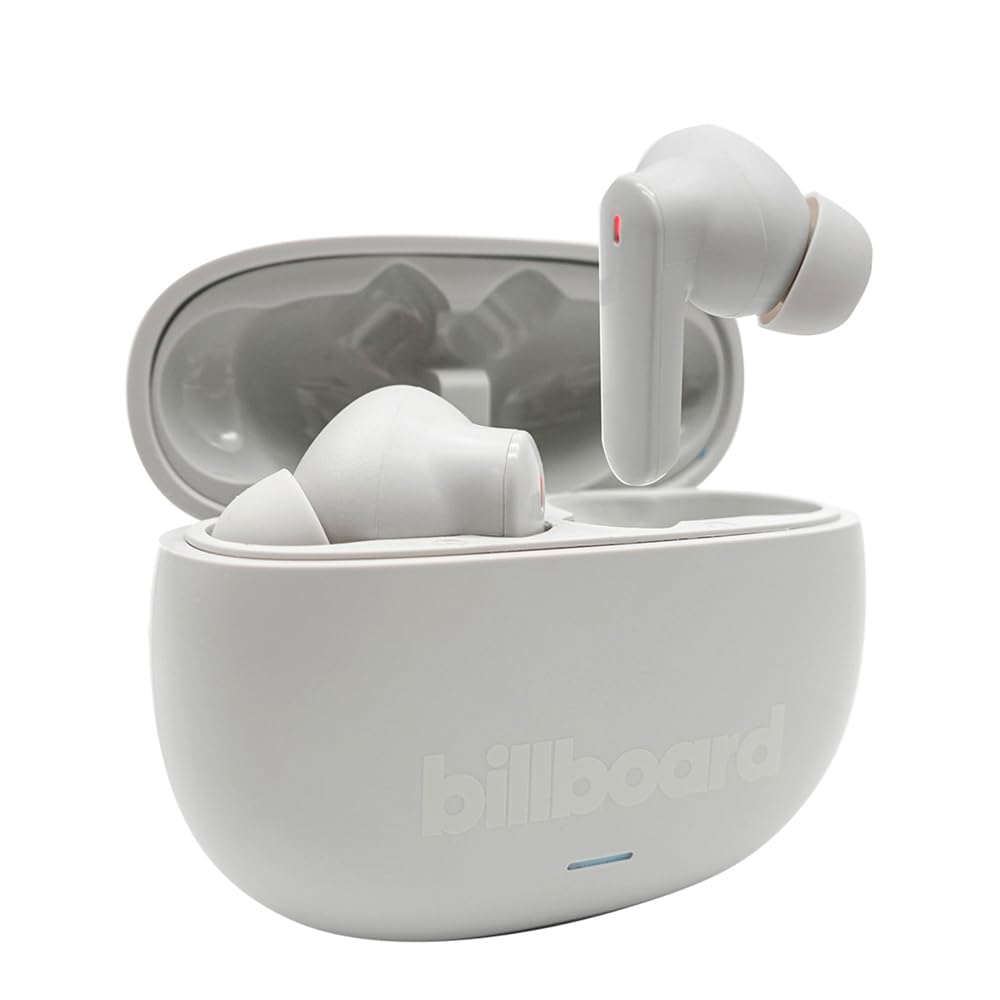
Image: The Billboard Soul Advance TWS Earbuds resting inside their open charging case. The earbuds are grey with red indicator lights visible, and the case is also grey with the 'billboard' logo embossed on the front.

Image: The Billboard Soul Advance TWS Earbuds charging case in a closed position. The case is grey with the 'billboard' logo embossed on the front and a small indicator light at the bottom.
Image: A person holding a single Billboard Soul Advance TWS earbud and the open charging case, demonstrating the compact size and design.
Enstalasyon
1. Chaje ekoutè yo ak bwat la
Anvan premye itilizasyon an, chaje ekoutè yo ak bwat chaje a nèt.
- Mete ekoutè yo nan bwat chaje a. Asire w ke yo byen chita nan plas respektif yo.
- Konekte kab chaje USB a nan pò chaje ki sou bwat la epi nan yon sous kouran USB (pa egzanp, òdinatè, adaptè miray).
- The indicator light on the case will show charging status. Once fully charged, the indicator will change or turn off. A full charge takes approximately 5 hours for the case and earbuds.
2. Pairing ak yon Aparèy
To connect your earbuds to a smartphone or other Bluetooth-enabled device:
- Louvri bwat chaje a. Ekoutè yo ap antre otomatikman nan mòd koneksyon, limyè ki ap flache sou ekoutè yo ap endike sa.
- Sou aparèy ou an, ale nan paramèt Bluetooth yo epi asire w ke Bluetooth la aktive.
- Chèche pou available devices and select "Billboard Soul Advance" from the list.
- Once connected, the earbud indicator lights will stop flashing.
- Ekoutè yo ap konekte otomatikman ak dènye aparèy ki te konekte a lè yo retire yo nan bwat la, si Bluetooth aktive sou aparèy la.
Opere
Kontwòl manyen
The earbuds feature touch-sensitive controls on their outer surface. Specific functions may vary slightly by device or app.
| Aksyon | Fonksyon |
|---|---|
| Yon sèl tape (agoch/adwat) | Jwe/Poz mizik, Reponn/Fen apèl |
| Tape de fwa (adwat) | Pwochen tras |
| Tape de fwa (agoch) | Track Previous |
| Twa Tape (Agoch/Dwat) | Aktive Asistan Vwa |
| Peze Long (Agoch/Dwat) | Aktive/Aktive Mòd ANC/Transparans |
| Apèl k ap rantre a, peze lontan | Rejte apèl |
Anilasyon Bri Aktif (ANC) ak Anilasyon Bri Anviwònman (ENC)
The Soul Advance earbuds feature both ANC and ENC for an optimized listening and calling experience.
- Anilasyon aktif bri (ANC): Reduces external ambient noise, allowing for a more immersive audio experience. Activate/deactivate by long-pressing an earbud.
- Anilasyon Bri Anviwònman (ENC): Utilizes 4 built-in microphones to filter out background noise during calls, ensuring clearer conversations for both you and the listener. This feature is active automatically during calls.

Image: A graphic illustrating the concept of Ultra ANC (Active Noise Cancellation), showing sound waves being blocked by headphones, emphasizing a quiet listening experience.
Antretyen
Netwayaj
- Siye ekoutè yo ak bwat chaje a dousman avèk yon twal mou, sèk, epi ki pa gen pousyè.
- Pa sèvi ak pwodui netwayaj abrazif, alkòl, oswa solvan chimik.
- Asire w ke kontak chaje yo sou tou de ekoutè yo ak sou bwat la pwòp epi sèk pou yon chajman optimal.
Depo
Lè w pa ap itilize ekoutè yo, sere yo nan bwat chaje yo pou pwoteje yo epi kenbe yo chaje.
Depanaj
| Pwoblèm | Solisyon |
|---|---|
| Ekoutè pa asosye | Asire w ke ekoutè yo chaje. Etenn epi aktive Bluetooth aparèy ou an. Bliye aparèy la nan paramèt Bluetooth yo epi re-konekte yo. |
| Se yon sèl ekoutè k ap travay | Place both earbuds back in the case, close it, then open again. Ensure both are charged. |
| Pa gen son | Check device volume. Ensure earbuds are connected. Try playing different audio. |
| Pwoblèm chaje | Ensure charging cable is securely connected. Clean charging contacts. Try a different USB port or cable. |
Espesifikasyon
- Non modèl: Soul Advance
- Koneksyon Teknoloji: San fil
- Eleman ki enkli: Chaje estasyon
- Itilizasyon espesifik: Outdoor activities, Sports
- Tan pou chaje: Apeprè 5 èdtan
- Aparèy konpatib: Telefòn, Tablèt
- Nivo rezistans dlo: IPX4 (Rezistan a ekla)
- Mwayèn lavi batri: 27 èdtan (ak bwat chaje)
- Plasman Zòrèy: Nan-zòrèy
- Faktè fòm: Nan-zòrèy
- Kontwòl bri: Anile aktif bri

Image: A graphic highlighting long battery life, showing headphones with '40H' and earbuds with '42H*' (battery + case), indicating extended usage times.
Videyo pwodwi ofisyèl yo
Video: Product demonstration video (0:49 duration).
Video: Product feature overview (0:44 duration).
Video: Additional product details (0:44 duration).
Video: Short product highlight (0:24 duration).
Video: Product feature showcase (0:24 duration).
Video: Detailed product review/demonstration (1:57 duration).
Video: Quick product overview (0:34 duration).
Video: Comprehensive product guide (2:00 duration).
Garanti ak sipò
Your Billboard Soul Advance TWS Earbuds come with a standard manufacturer's warranty. For detailed warranty information, please refer to the warranty card included in your package or visit the official Billboard website. For technical support or customer service, please contact the retailer or manufacturer directly.
For returns, a 30-day free return policy is available from the purchase date.